

AIニュース
Claude Code 2.1.140: subagent goal handling fix and what changed
11 分
Weekly digest: Claude Code releases, Codex changes, Gemini CLI updates, and MCP ecosystem moves for the week ending 2026-05-12.

中澤 圭志
@keishi_nakazawaSales Claw maintainer
Key Facts
Coverage week
2026-05-06 to 2026-05-12
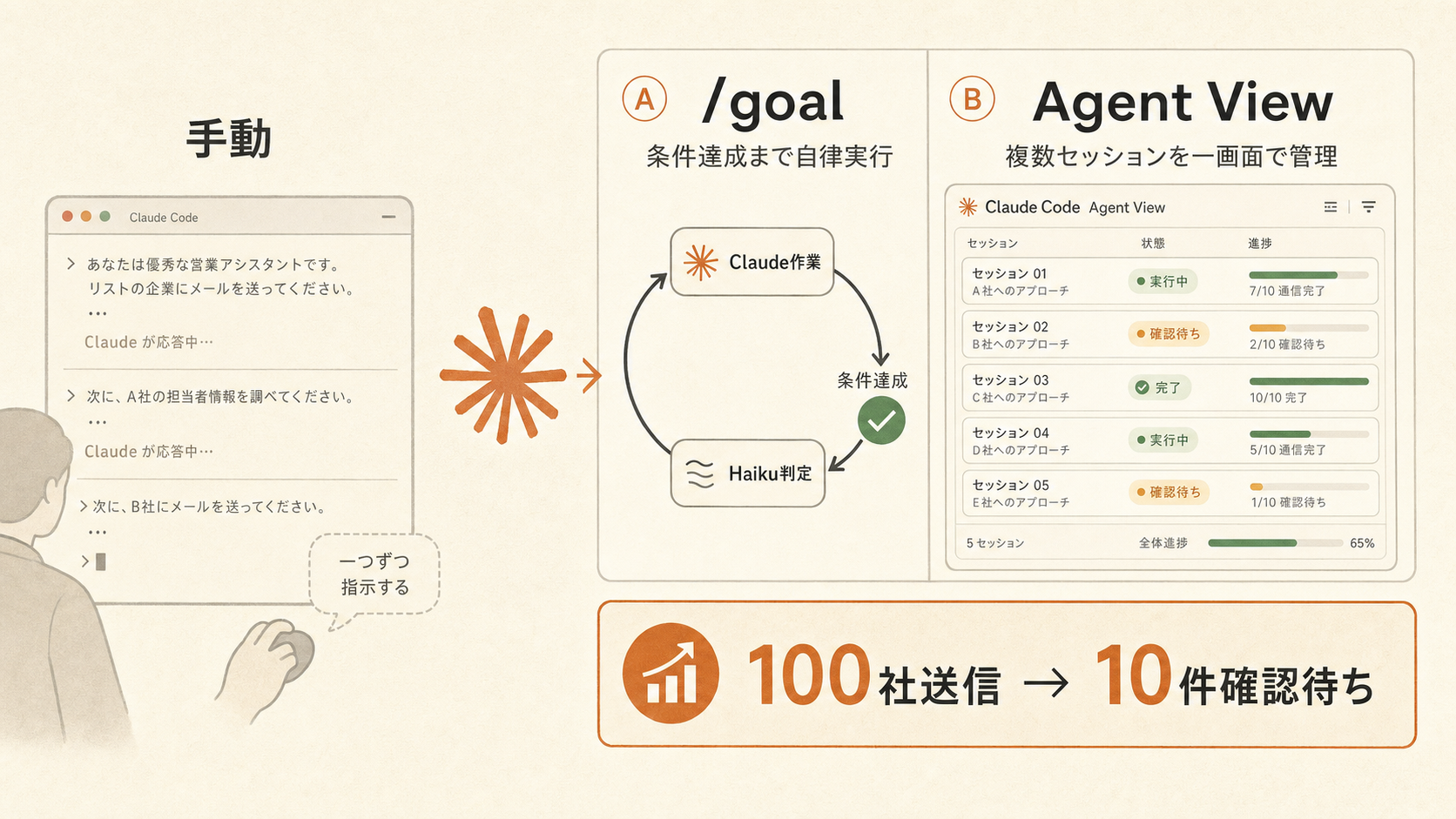
"AI sales automation still needs you to give instructions every turn." That was the limit of AI sales automation as of 2026-05-11. On 2026-05-12, two features removed that wall.
Anthropic released Claude Code v2.1.139, which contains 50 CLI changes. Two of them are pivotal:
/goal slash command — "continue execution across turns until a condition is met," natively in the CLIclaude agents) — monitor and control multiple parallel sessions from one screenPrimary sources: Anthropic official documentation, GitHub Releases, official Claude X. OpenAI official information is referenced for adjacent industry context.
Traditional Claude Code is conversational. The user instructs, Claude responds. For complex tasks, the user has to approve and add instructions every turn.
The /goal command flips this assumption.Set the condition once, and Claude Code keeps calling tools and reasoning autonomously until the condition is judged "done."
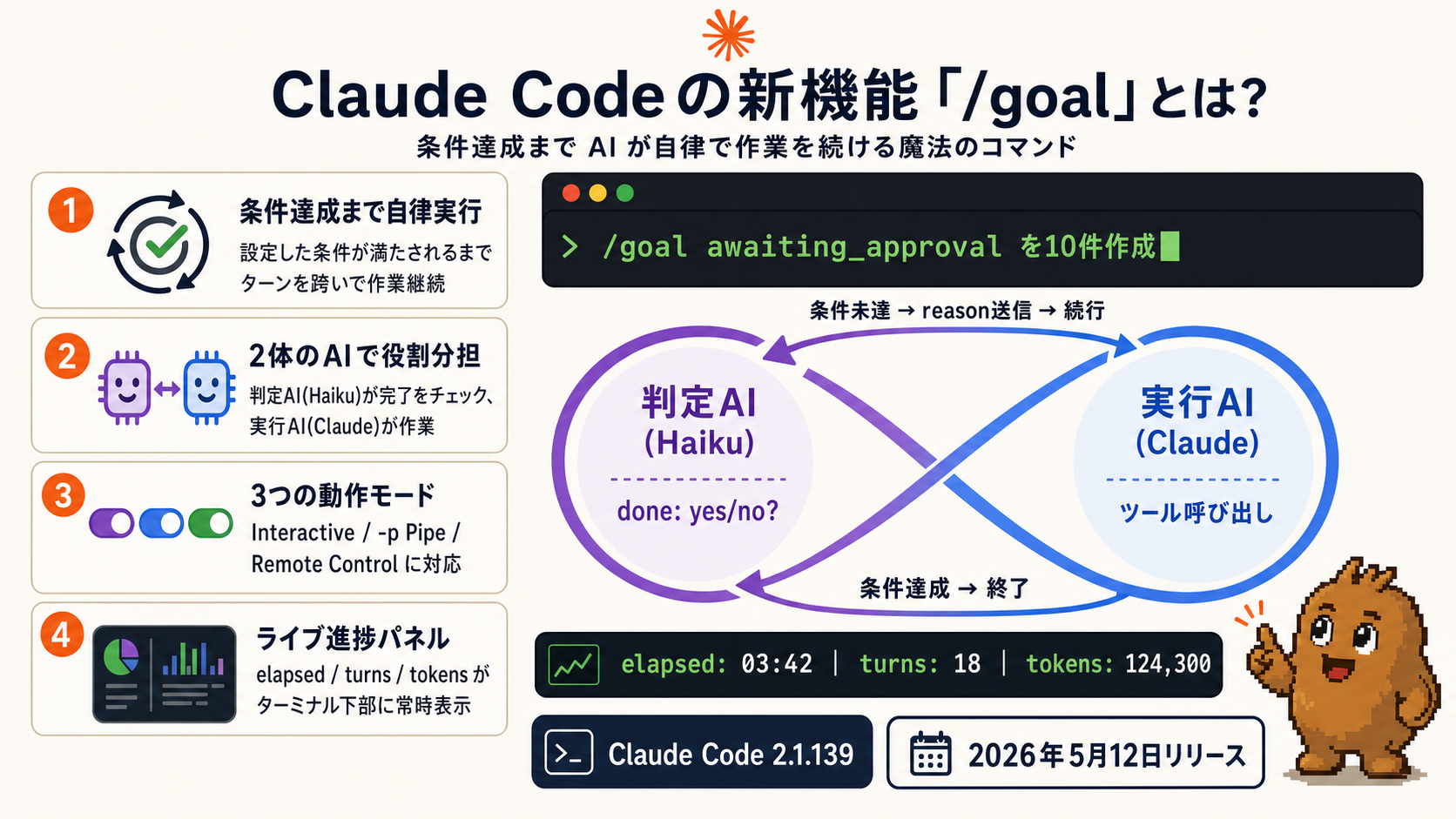
The implementation is elegant:
{ done: true|false, reason: string }.done: false, the reason becomes next-turn guidance for the main Claude Code, and the Worker continues.The community has called this pattern the "Ralph Loop."Karpathy implemented it for autoresearch; Anand Chowdhary's continuous-claude shipped a version. This is the first time Anthropic itself baked it into the CLI.
/goal in chat-p Pipe mode — one-shot with claude -p "/goal ..."Launch Sales Claw, then enter:
# Inside Claude Code's interactive mode
/goal Process the target list from the top until 10 companies are awaiting approval

# Or one-shot via -p (pipe)
claude -p "/goal Process until awaiting_approval reaches 10 companies. Skip do-not-contact; register CAPTCHA into awaiting_approval"
That's all. Claude Code loops form-fill → screenshot → log → next company on its own until 10 awaiting_approval entries accumulate.
Feed this /goal to research and qualify a list of SaaS companies in Tokyo:
/goal List 50 SaaS companies in Tokyo with 50–500 employees.
For each company, fetch the contact-form URL, judge CAPTCHA presence,
check for "no sales" notices and assess contact viability, save to results.csv
Claude Code completes the 50-company research, classification, and CSV writeout in a single /goalrun. The live panel shows "N remaining" and "currently company X."
--max-turnsawaiting_approval and log to the audit trailRunning multiple Claude Code sessions in parallel previously meant juggling many terminal tabs. Tracking "which tab does what" in your head was exhausting.
Agent View fixes that. Run claude agents and your terminal becomes a dashboard listing all running Claude Code sessions by status (running / waiting on user / completed).
/bg in an existing session to stash it into Agent Viewclaude --bg "Process companies 50–100 in the prospect list" spawns without using the foreground
Sales Claw has internally implemented parallel batches ("up to 3 awaiting approval"), and Agent View enables "monitor Sales Claw batches from outside":
# Split a 90-company target list into 3 parallel jobs
claude --bg "Sales Claw: process companies 1-30"
claude --bg "Sales Claw: process companies 31-60"
claude --bg "Sales Claw: process companies 61-90"

# Monitor all jobs from one screen
claude agents
90 companies in parallel with one screen for monitoring — operational burden is roughly 1/10 of "three terminals lined up visually managed." For implementation details, see Sales Claw Workflow overview. A follow-up article covers Claude Code 2.1.140's subagent_type / /goal fixes.
# Upgrade Claude Code to 2.1.139 or newer
npm install -g @anthropic-ai/claude-code@latest

# Check version
claude --version

# Clone & start Sales Claw
git clone https://github.com/joseikininsight-hue/sales-claw-ts
cd sales-claw && npm install && npm startIn the Sales Claw dashboard, click [Start Claude], then type into the PTY:
/goal Create 10 awaiting_approval entries. Process from the top of the target list.
Hand CAPTCHA to a human. Up to 60 minutes elapsed.
Monitor in real time via the "AI cost estimate" chip in the lower left of the dashboard.
# Split 300 companies into 3 jobs
claude --bg "Sales Claw process #1-100. /goal create 30 awaiting_approval"
claude --bg "Sales Claw process #101-200. /goal create 30 awaiting_approval"
claude --bg "Sales Claw process #201-300. /goal create 30 awaiting_approval"

# Monitor from one screen
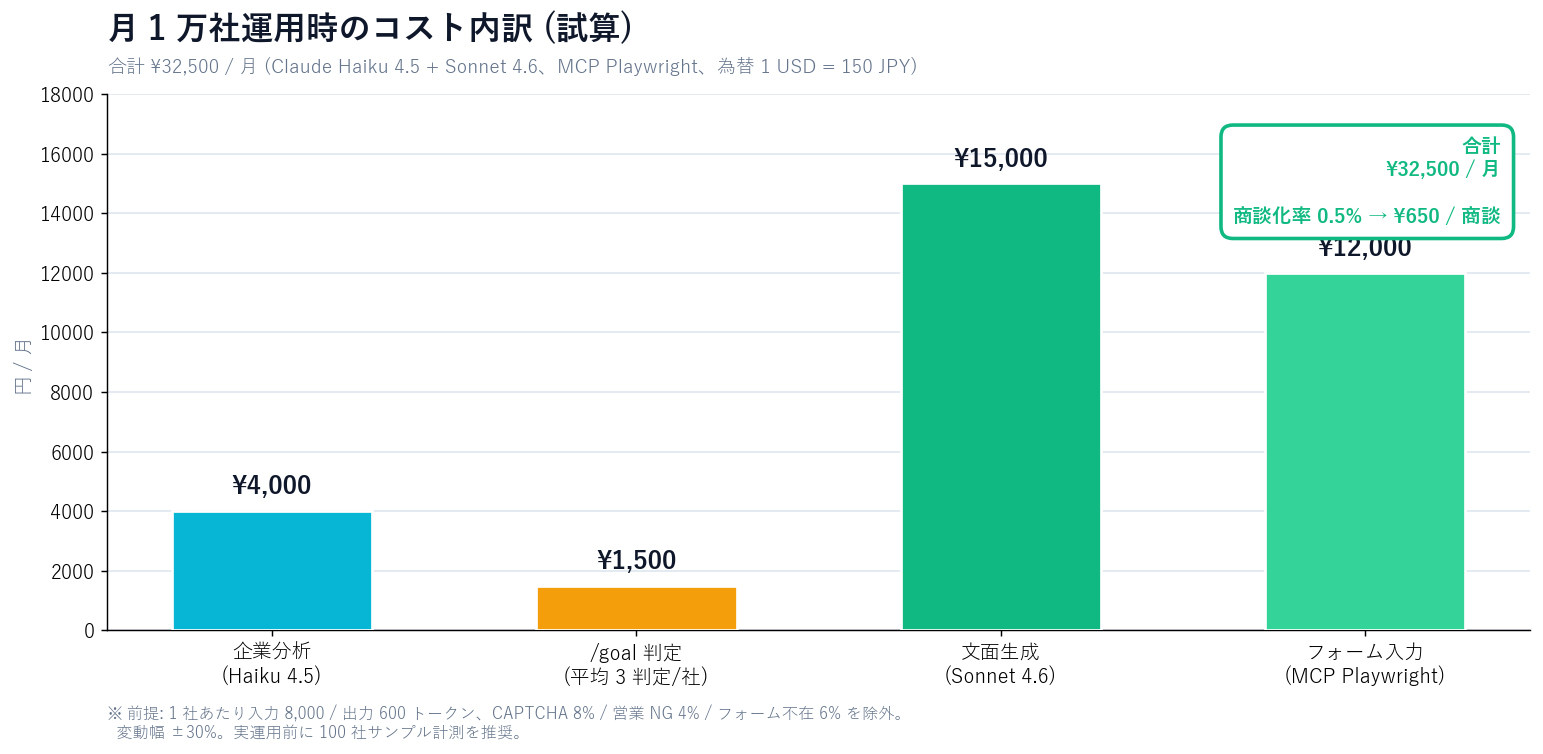
claude agents/goal)| Item | Rate | 10,000 companies | Notes |
|---|---|---|---|
| Company analysis | ¥0.4 / company | ¥4,000 | Haiku 4.5 |
| /goal judging | ¥0.15 / judgment | ¥1,500 | avg 3 judgments / company |
| Copy generation | ¥1.5 / company | ¥15,000 | Sonnet 4.6 |
| Form fill | ¥1.2 / company | ¥12,000 | MCP Playwright |
| Total | — | ¥32,500 | monthly run |
| 項目 | Sales Claw + Claude Code | Sales-outsourcing SaaS (average) |
|---|---|---|
| 10,000-company monthly cost | ¥32,500 | ¥300,000–¥2,000,000 |
| Cost per meeting at 0.5% conversion | ¥650 / meeting | ¥6,000–¥40,000 |
| Autonomous loop | ✓ via /goal | — (human operator required) |
| Parallel session monitoring | ✓ Agent View | ✓ Slack alerts, etc. |
| Data location | Local / customer-managed | Vendor side |
| Copy template-iness | Low (AI generated) | Medium to high |
/goal is powerful, but for sales automation you must build legal / compliance / runaway risks into the design. Sales Claw defends against these by default.
preferences.complianceFooter: trueawaiting_approval on detect, hand off to a humanaction-log.json; auditableBefore using /goal for AI sales
By May 2026, AI sales automation has moved through four clear phases:
With Claude Code 2.1.139, the "policy-controlled autonomous operation" philosophy Sales Claw has championed catches up to industry standard. Not unbounded auto-sending, but AI that continues while automated checks run pre-send and audit logs capture everything — that's the shape AI sales should take as of May 2026.
Next action: upgrade Claude Code → install Sales Claw → validate on 100 sample companies → run the first /goal loop. Start at Quick start and AI CLI setup. Sales Claw itself is free at the download page.