AIニュース
Claude Code 2.1.142: --agents flag, Fast Mode, and Opus 4.7 — what changed and why it matters
13 分
A dual release: Gemini CLI v0.42 (stable) and v0.43 (preview). Major MCP and tool changes — we summarize what to adopt now vs. pin until stable.

中澤 圭志
@keishi_nakazawaSales Claw maintainer
Key Facts
Releases
v0.42 stable + v0.43 preview (2026-05-13)
"Gemini CLI dropped Stable and Preview the same day. What's the difference? Which one is safe for production?" On 2026-05-12, Google's Gemini CLI released v0.42.0 (Stable) and v0.43.0-preview.0 (Preview) simultaneously. This article unpacks both channels and their impact on AI sales automation, using official GitHub Releases as primary source.
Stable is a production-bound cumulative-improvement release (Voice Mode upgrades, Model Routing improvements, Sandbox Security hardening). Preview is a structural update with Subagent Protocol and Surgical Editsas flagship additions. For products like Sales Claw that use Gemini CLI as a backend, the two-track release gives operators a clear answer to "when do I ship what to production."
Primary sources: gemini-cli GitHub Releases (v0.42.0 / v0.43.0-preview.0), Gemini CLI site, Gemini API Release Notes. Also read the Claude Code 2.1.140 article for comparison.
Gemini CLI ships on Stable / Preview / Nightly channels. Stable = production. Preview = next-gen features for validation. Nightly = post-merge builds for contributors.
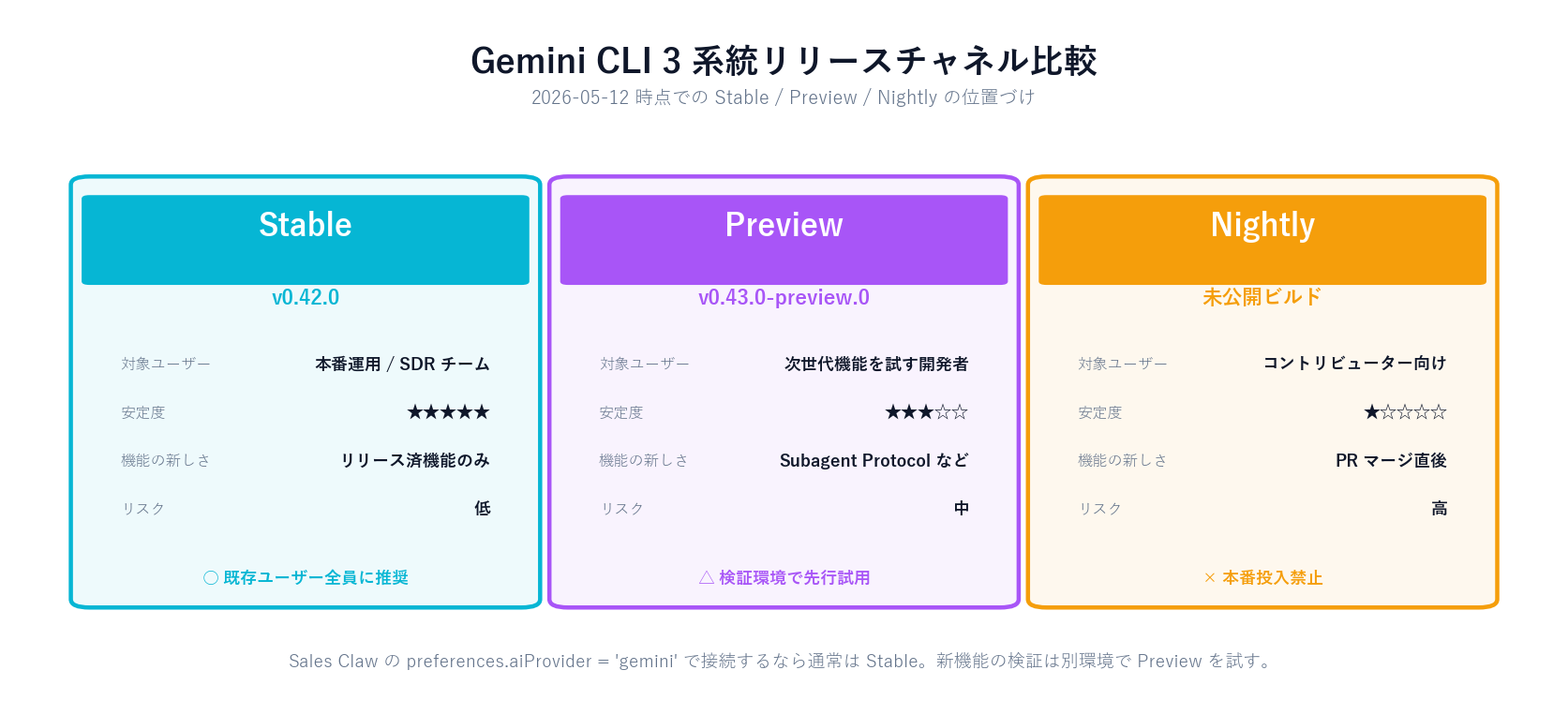
With Stable and Preview shipping the same day, operators can now "receive the features they were just testing in Preview as Stable." That said, Subagent Protocol and Surgical Edits are Preview-only — not yet in Stable.
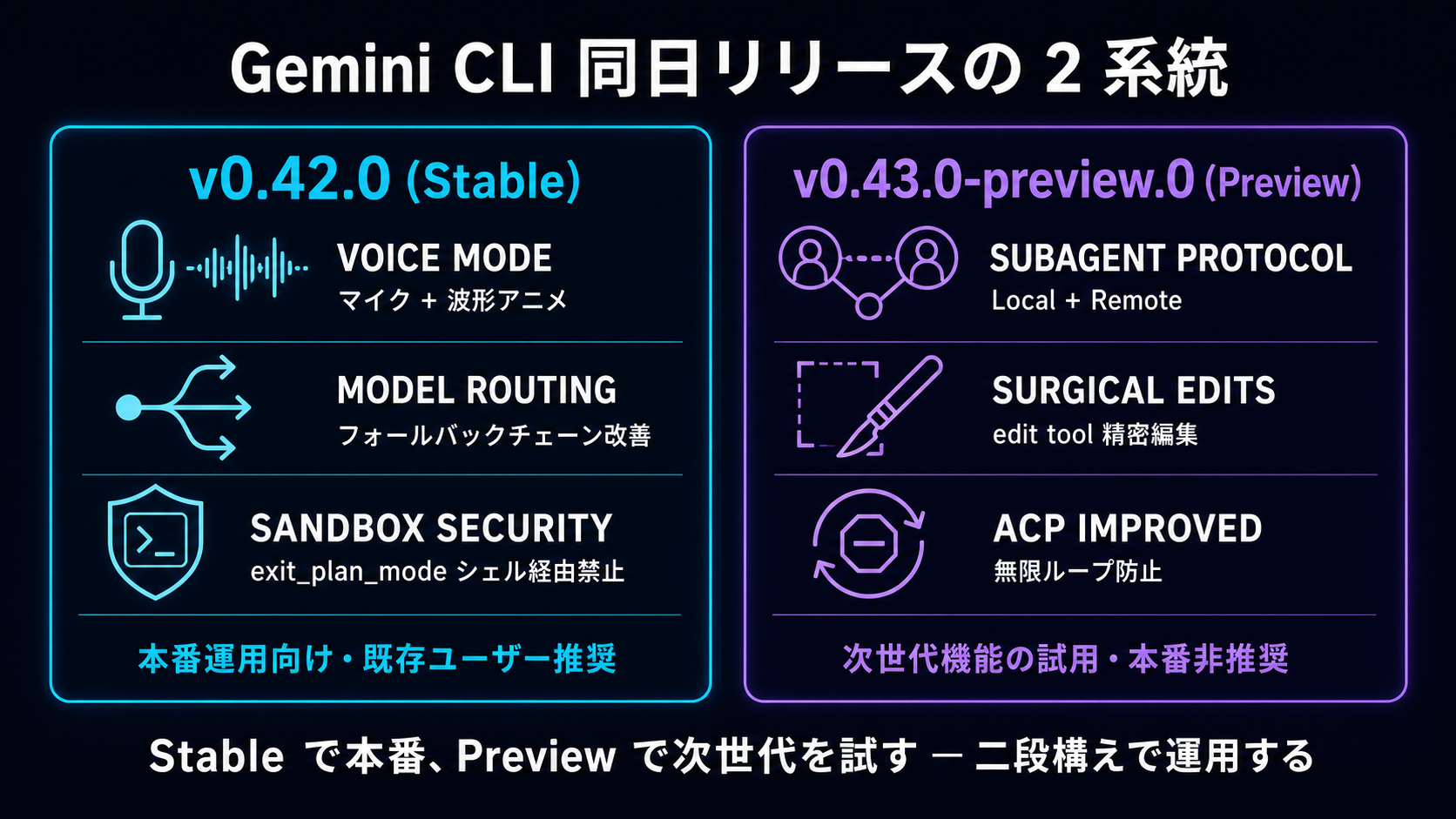
v0.42.0 makes Voice Mode UI and backend integration noticeably better. From the release notes:
For sales automation, Voice Mode helps with secondary scenarios (final copy review, on-the-go target-list review). But contact-form copy and other accuracy-critical text should stay text-input (transcription error risk).
Model Routing now distinguishes between auto and explicit fallback chains. Default API timeout is shortened to 60 seconds, with retries enabled for undici timeouts.
ERR_STREAM_PREMATURE_CLOSEInvalidStream events handled without throwing (robustness)For Sales Claw running Gemini CLI through a managed PTYfor long batches, these fixes compound. The "1–2 in 100 submissions experiencing mid-stream cuts" observed before is expected to drop.
exit_plan_modeBlocking shell-invoked exit_plan_modeaddresses a real risk in enterprise: shell-driven command injection rewriting the agent's mode. Quiet but important.
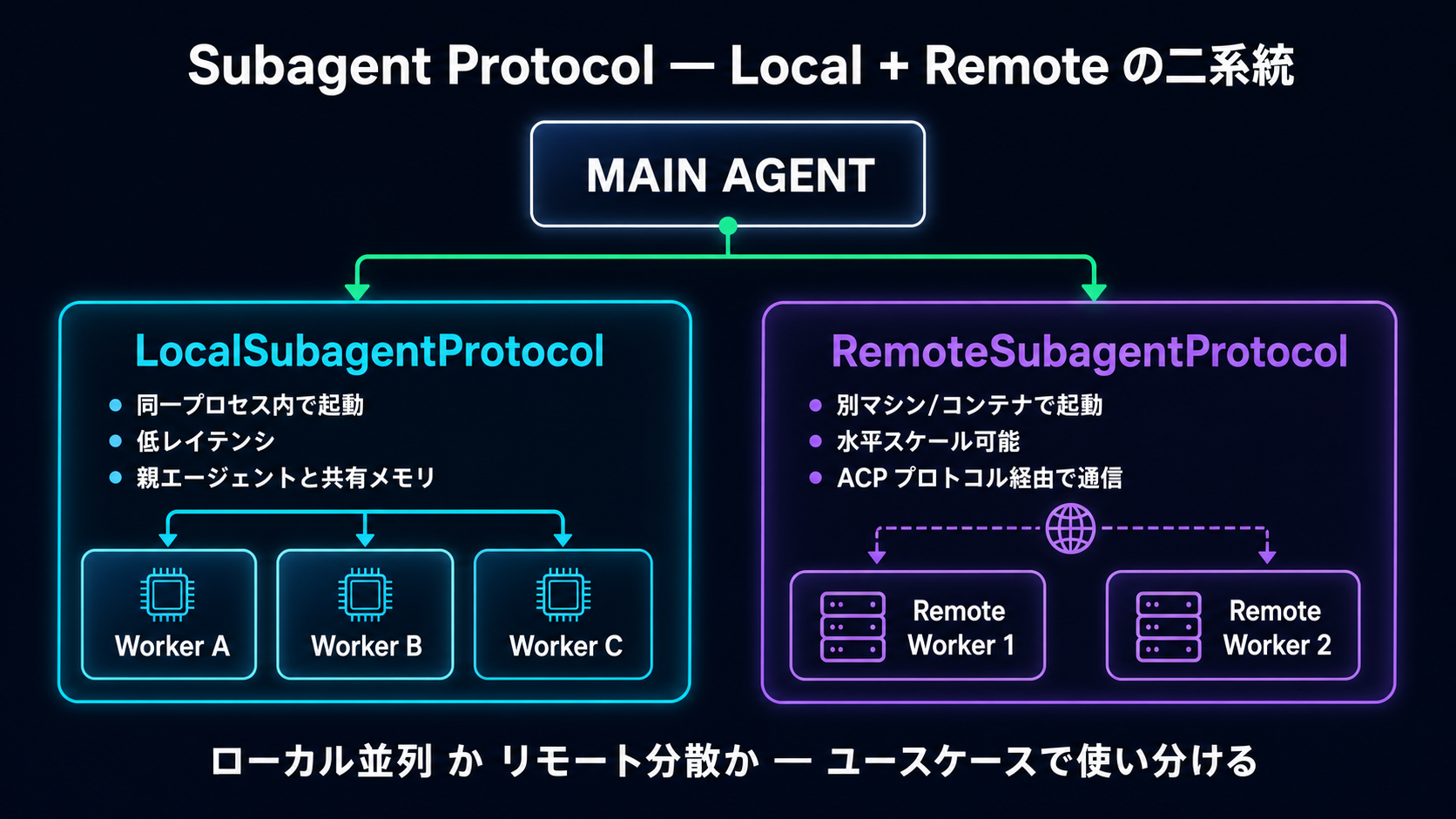
LocalSubagentProtocol lets the Gemini CLI Main Agent spawn multiple Workers within the same process. No IPC overhead; context shared via shared memory.
Sales Claw Phase A spawns 3–5 lightweight haiku-class subagents in parallel per target. See Workflow overview. With LocalSubagentProtocol standardizing this interface for the Gemini backend, custom parallel-management code shrinks.
RemoteSubagentProtocol spawns workers on different machines / containers, communicating over ACP (Agent Coding Protocol). Scales beyond a single machine's CPU / memory.
Suitable for "analyze 10,000 companies in 4 hours." Sales Claw currently only supports Local. Adopting the Remote protocol later removes single-machine resource limits (a future consideration).
v0.43.0-preview.0 fixes the ACP-mode infinite-thinking loop. Specifically, disabling nextSpeakerCheckbreaks the loop where subagents keep deciding "is it my turn next?"
Also: streaming-ID collisions on parallel tool calls and a context-manager chat-corruption bug are fixed. Robustness improvements that matter when processing 100+ companies at once.
A quiet but important Preview feature: Surgical Edits. A system-prompt / eval-set update that steers the model toward "edit just the right lines, don't rewrite the whole file."
| 項目 | Before (≤ v0.42.0) | After (v0.43.0-preview.0) |
|---|---|---|
| File edit tendency | Broad rewrites (whole files) | Local edits (only affected lines) |
| Regression risk | Unrelated areas may change | Predictable change scope |
| Code-review load | Large diffs, easy to miss | Small diffs, easy to review |
| Shell command eval | No eval set | Shell Command Safety evals added |
For AI sales automation, you rarely use Gemini CLI for direct coding. But if Gemini modifies Sales Claw itself or workflow scripts, Surgical Edits matters. "Tune the prompt for one target list" stays contained to the relevant one prompt-function block instead of a full-file rewrite.
Sales Claw is OSS that lowers misfire and policy-violation risk through policy control, pre-send checks, do-not-contact detection, CAPTCHA-on-detect stop, rate limits, audit logging, and automatic stop conditions. The AI CLI backend is selected in data/settings.json's preferences.aiProvider — one of claude / codex / gemini.
# 1. Install Gemini CLI v0.42.0
npm install -g @google/gemini-cli@latest

# 2. Confirm version
gemini --version
# → 0.42.0 (or newer Stable)

# 3. Update Sales Claw preferences
#    data/settings.json::preferences.aiProvider = "gemini"

# 4. Restart Sales Claw dashboard
#    Click [Start Gemini] to relaunch the managed PTY
Setup details: AI CLI setup guide. Gemini auth is OAuth-based; headless Linux hangs are fixed in v0.42.0 (safe in remote-dev environments).
Sales Claw Phase A runs parallel site analysis per target with a lightweight model. The Gemini backend currently parallelizes via the standard Agent tool. Once LocalSubagentProtocol lands in Stable, robustness improves.
| 項目 | Gemini CLI (v0.42.0 / v0.43.0-preview.0) | Claude Code (2.1.140) / Codex CLI (0.130) |
|---|---|---|
| Same-day release | 2026-05-12 (Stable + Preview) | Claude 5/12 (2.1.140) / Codex 5/8 (0.130) |
| Autonomous loop | ACP mode (improved in Preview) | Claude: /goal + Agent View |
| Subagents | Local + Remote Subagent Protocol (Preview) | Claude: flexible subagent_type matching (2.1.140) |
| Headless operation | Possible (CLI mode with Voice off) | Codex: remote-control command is strong |
| Lowest cost | Flash-Lite is cheapest | Claude Haiku also cost-efficient |
| Japanese naturalness | Pro/Flash usable | Claude leads slightly |
| Voice input | Native Voice Mode | Not standard |
From Sales Claw's perspective:
codex remote-controlEven with newer Gemini CLI versions, running AI sales automation unattended for long periods still requires multiple guards. Sales Claw defaults meet these, but running Preview in production departs from policy.
preferences.complianceFooter: trueawaiting_approval, log on detectGemini CLI's same-day release of v0.42.0 + v0.43.0-preview.0 is a milestone declaration: Google is shipping "production and next-gen on separate channels."The practical setup: keep production on Stable, validate Preview's Subagent Protocol on a separate environment.
Checks when using Gemini CLI with Sales Claw
Next action: npm install -g @google/gemini-cli@latest to pick up v0.42.0, set Sales Claw preferences.aiProvider to gemini, and validate Phase A on a 5-company sample. Details in AI CLI setup and Workflow overview. Sales Claw itself is free at the download page.