AIニュース
Claude Code 2.1.142: --agents flag, Fast Mode, and Opus 4.7 — what changed and why it matters
13 分
Claude Code 2.1.141 adds rewind (revert a session to a prior checkpoint) and workload IDs (group related work). We cover the model and how to adopt them in real projects.

中澤 圭志
@keishi_nakazawaSales Claw maintainer
Key Facts
Release
2.1.141 (2026-05-14)
Highlights
rewind + workload IDs
"2.1.141 dropped the day after 2.1.140. What is Rewind's 'Summarize up to here'? When does Workload ID matter?" This article walks through the seven primary changes in Claude Code 2.1.141 (released 2026-05-13, 23:19 UTC), using the official GitHub Releases as primary source.
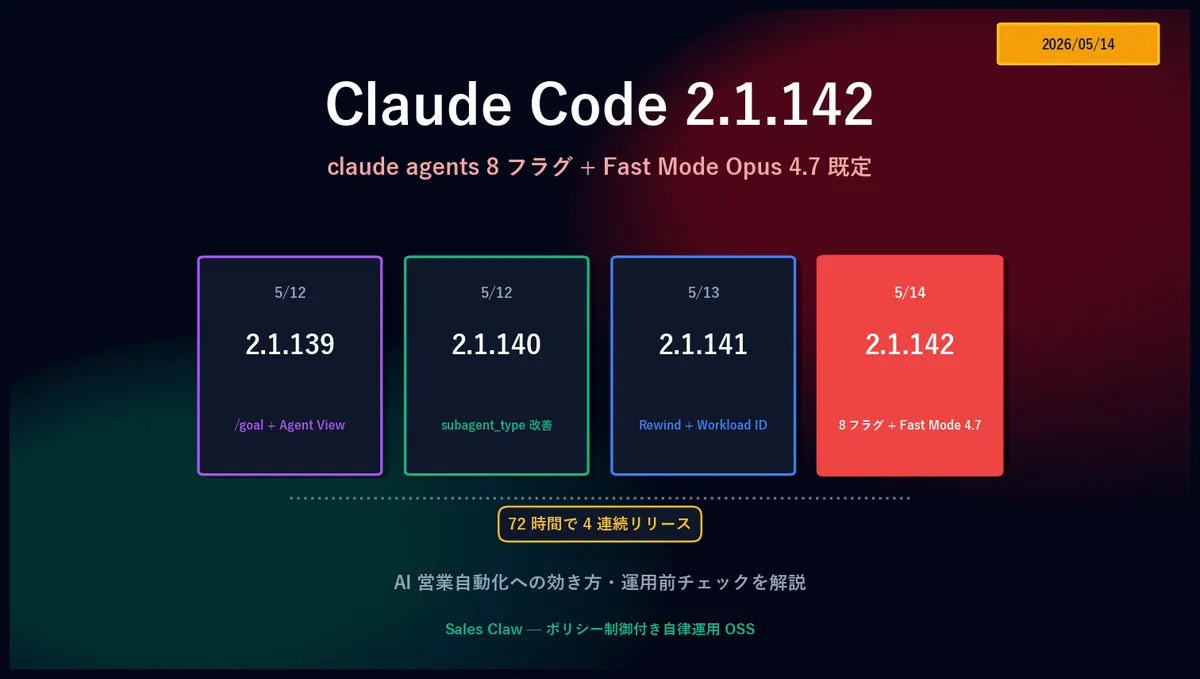
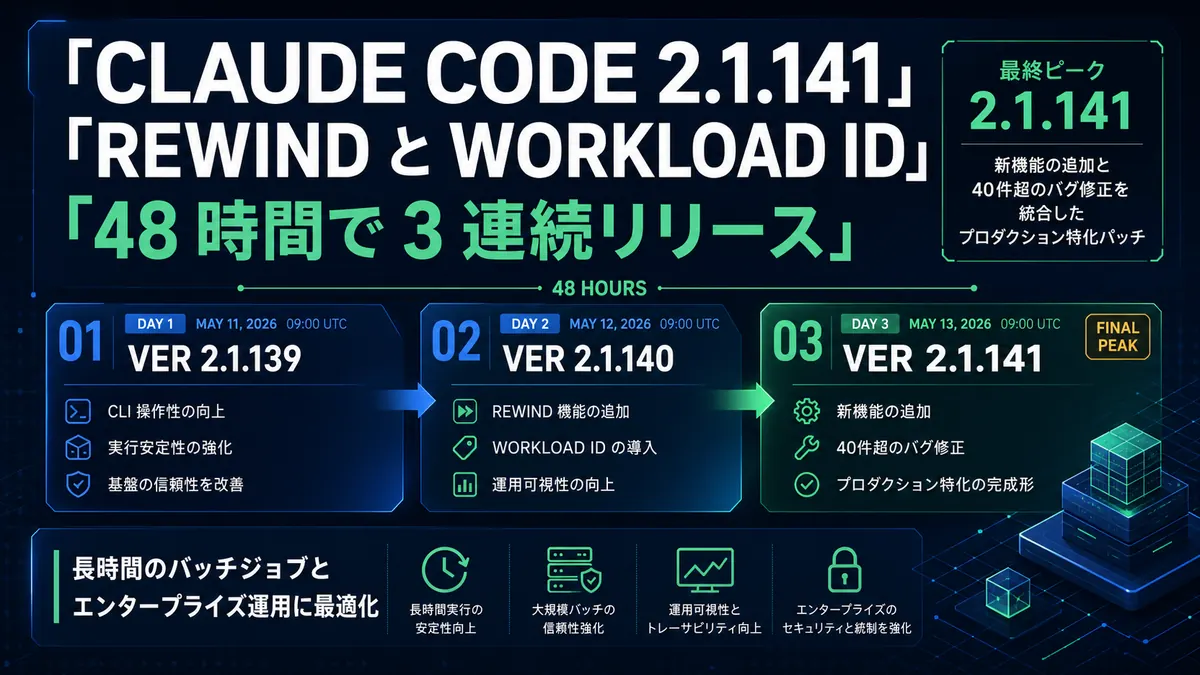
Claude Code released 2.1.139 (/goal + Agent View) on 2026-05-12, then 2.1.140 (subagent_type improvements) the same day, then 2.1.141 the next night — three releases in 48 hours. 2.1.141 is a mid-size release combining new features and fixes. For long-running AI sales automation, two stand out: Rewind "Summarize up to here" and ANTHROPIC_WORKSPACE_ID.
The seven primary changes:
terminalSequence field in Hook JSON Output — emit desktop notifications, window titles, and bells even without a controlling terminalANTHROPIC_WORKSPACE_ID env var — scope the Workload Identity Federation token to a specific WorkspaceCLAUDE_CODE_PLUGIN_PREFER_HTTPS — clone GitHub plugins over HTTPS for environments without an SSH keyclaude agents --cwd <path> — scope the session list to a specific directory/feedback — bundle the last 24 hours / 7 days of sessionsPrimary sources: Claude Code official Changelog, GitHub Releases (v2.1.141), Claude Code Docs. For the prior 2.1.140 subagent_type / /goal hang-fix, see the 2.1.140 article; for the original 2.1.139 features, see the /goal + Agent View deep dive.
2.1.141 shipped ~24 hours after 2.1.140. 2.1.139 added /goal + Agent View; 2.1.140 relaxed subagent_type matching; 2.1.141 brings "patches for the pain that shows up after long use."
Two improvement groups stand out for AI sales automation (multi-hour or multi-day autonomous loops via /goal):
ANTHROPIC_WORKSPACE_ID, CLAUDE_CODE_PLUGIN_PREFER_HTTPS, Remote Control 401 fix, Haiku model-ID fallback on Bedrock/Vertex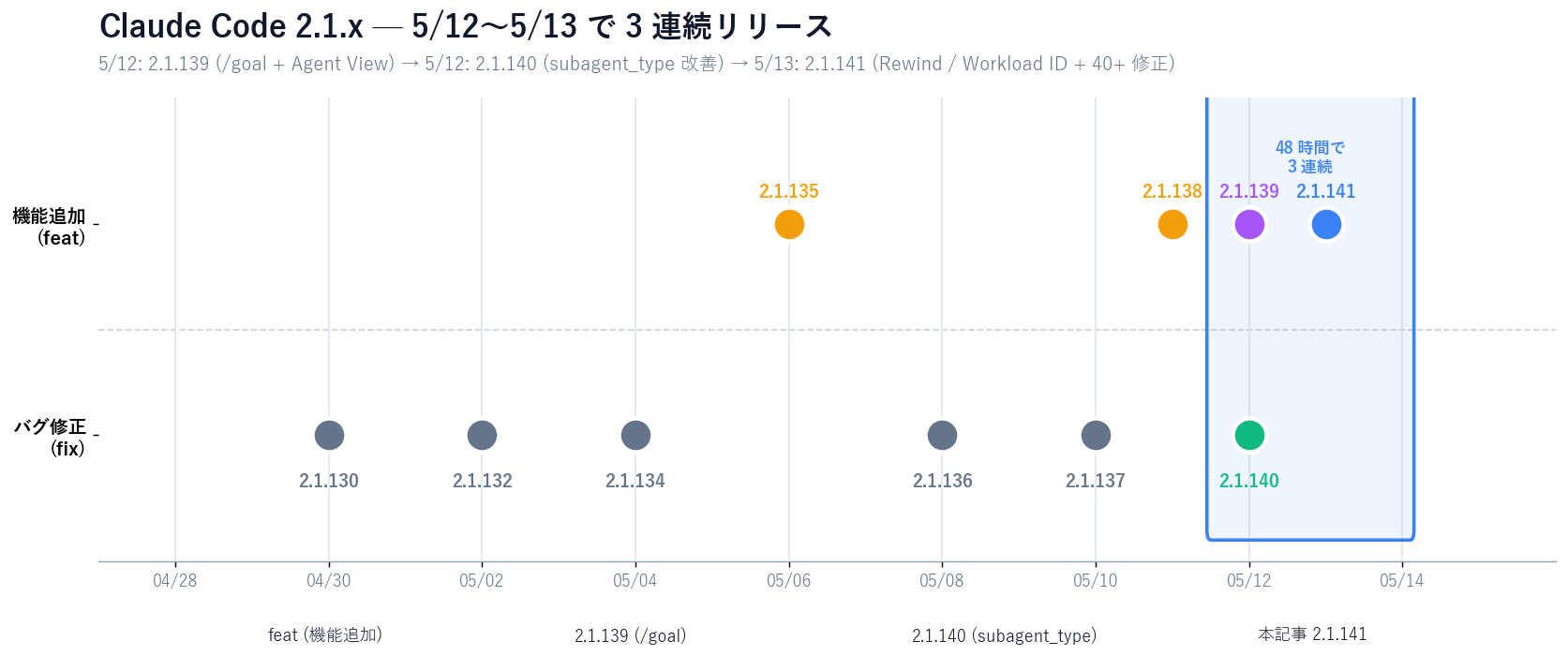
Excerpts from GitHub Releases v2.1.141, with focus on changes that affect AI sales automation directly.
The Rewind menu gains "Summarize up to here." Compresses (summarizes) conversation up to the point you choose, while keeping newer turns intact.
Previously, rewinding discardedeverything after the chosen point. For long-running batches where "the early context doesn't matter, but the last few turns do," the new option offers a finer-grained tool for context management.
terminalSequence in Hook JSON OutputHook JSON Output gets a terminalSequence field.
For execution modes that lack a controlling terminal (background services, headless CI, daemonized Sales Claw), hooks can now emit OS-level notifications — desktop toasts, window title changes, bells. Long-running batches can actively notify users on completion / error / intervention requests through a standard interface.
ANTHROPIC_WORKSPACE_IDFor Workload Identity Federation users, a new env var.
When your Workload Identity Federation rule covers multiple Workspaces, ANTHROPIC_WORKSPACE_ID lets you state explicitly which Workspace the minted token is scoped to. Essential for enterprise teams that run a single federation rule across dev / staging / prod Workspaces.
CLAUDE_CODE_PLUGIN_PREFER_HTTPSControls how GitHub plugins are cloned.
Previously Claude Code cloned GitHub plugins over SSH. Environments without SSH keys (Docker containers, ephemeral CI runners, Electron-bundled Sales Claw) failed at clone. HTTPS makes plugin features work without managing SSH keys.
claude agents --cwd and /feedbackclaude agents --cwd <path> — scope the session list to a directory. For teams running parallel pipelines across multiple Sales Claw projects on one machine, this keeps the Agent View clean./feedback — option to bundle the last 24 hours / 7 days of sessions into the feedback bundle. Useful for reporting bugs that span multiple sessions.permissions.ask rule triggered this dialog" (previously the trigger was opaque)./bg or ←← now retain the current permission mode instead of reverting to the default.The latter is especially important when running Sales Claw long-running batches with --bg. Previously, going to background occasionally downgraded permissions unintentionally and the loop got stuck in repeated awaiting_approval.
claude agents showing "Working" when a background shell remained← — now auto-retired after 5 minutesIndividually quiet; cumulatively they drive down error / freeze rate after long unattended runs.
In Sales Claw Phase A / Phase B, one session may run site analysis → copy generation → pre-send checks across dozens of accounts back-to-back. Worker (main Claude) history accumulates HTML scrapes and analysis notes for each account. Past around 50 accounts, latency for new accounts becomes visible, and autocompact thresholds trigger a mechanical conversation-wide compression.
Autocompact is convenient but lacks control over what to keep and what to drop:
2.1.141's Rewind "Summarize up to here" provides explicit, selective compression: summarize up to the chosen point, keep everything after it intact. Different from autocompact. Use cases:
/goal: deliberately compress to recover late-loop response speed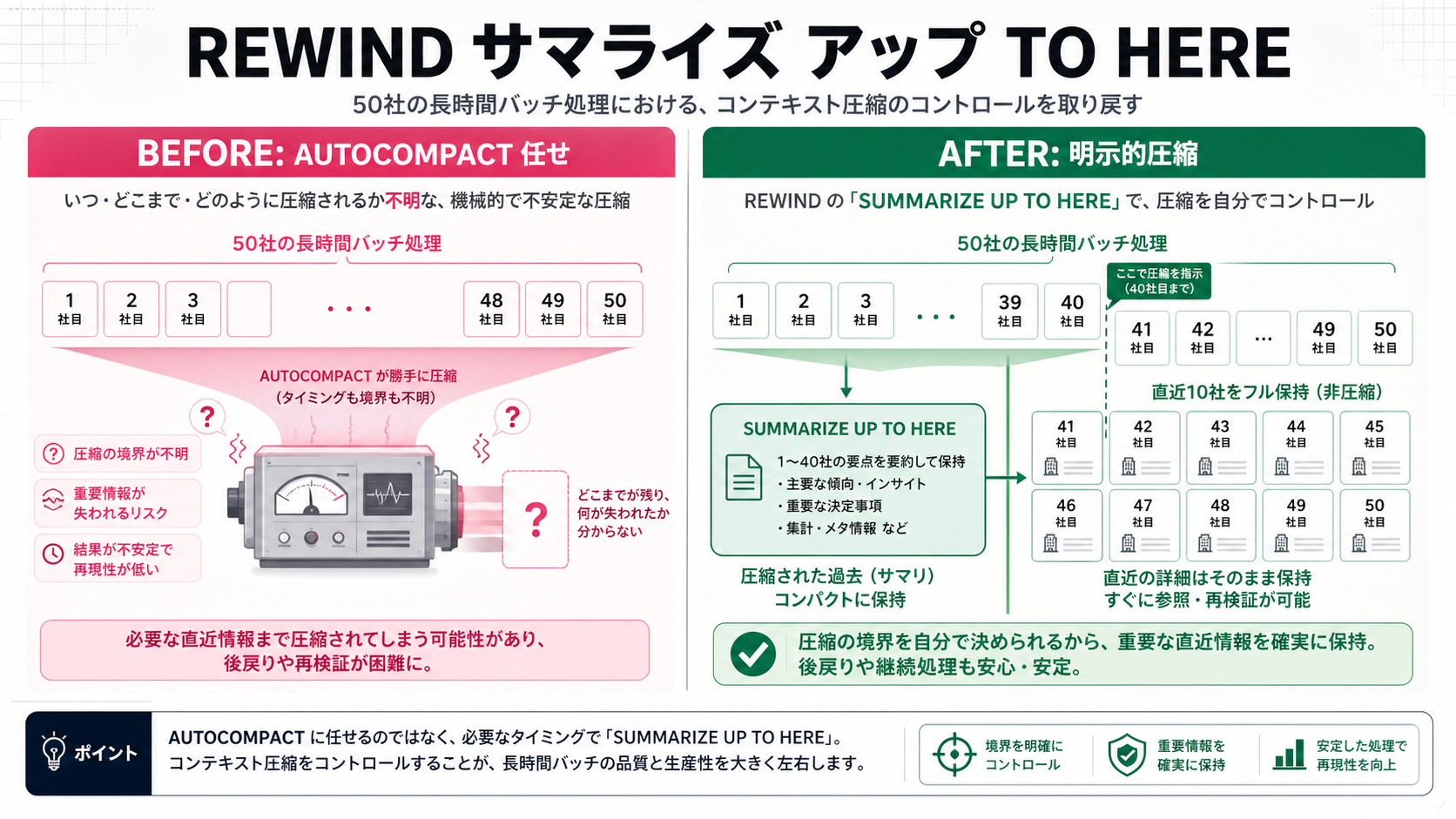
| 項目 | autocompact (previous) | Summarize up to here (2.1.141) |
|---|---|---|
| Trigger | Auto at threshold (unpredictable) | User-specified |
| Scope | Whole conversation, mechanical | Up to chosen point; later turns preserved |
| Recent-turn protection | Not guaranteed | Uncompressed |
| For Sales Claw | Behavior shifts late in long batches | Operator controls compression strategy |
ANTHROPIC_WORKSPACE_IDWorkload Identity Federation (WIF) lets you mint Anthropic API tokens via AWS / GCP / Azure IAM roles — no static ANTHROPIC_API_KEY in YAML or a secrets manager. Enterprises prefer this.
However, organizations whose federation rules span multiple Workspaces (dev, staging, prod) hit ambiguity: which Workspace does the minted token target?
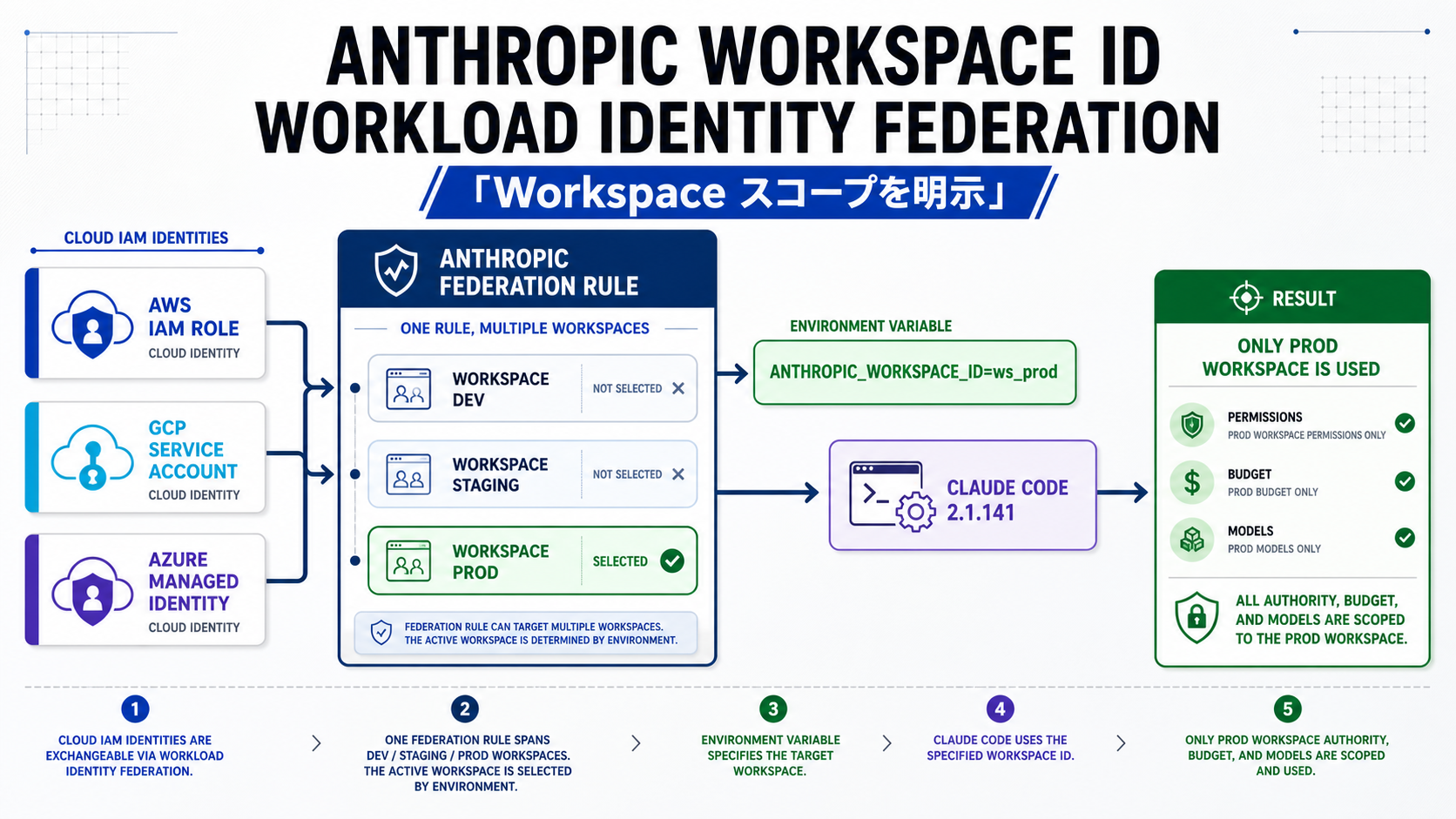
2.1.141's ANTHROPIC_WORKSPACE_ID resolves this. Set ANTHROPIC_WORKSPACE_ID=ws_xxxin the launch environment to scope Sales Claw to your production Workspace and reliably isolate it from other Workspaces' permissions, budgets, and model configuration.
Official Claude Code plugins (skills / mcp) come from GitHub repos. Default clone is SSH (git@github.com:...), which fails in these environments:
With CLAUDE_CODE_PLUGIN_PREFER_HTTPS=1, Claude Code clones over HTTPS. Combine with GITHUB_TOKEN / GH_TOKEN for token auth, and it works reliably in headless environments.
terminalSequence hooks + claude agents --cwd — operational gainsSales Claw runs Claude Code inside a managed PTY in a desktop app, which means the Claude Code side sees no controlling terminal. Previously, firing desktop notifications from Hooks (Windows toast, macOS Notification Center, Linux libnotify) was awkward — Sales Claw had to spin up a separate process to relay them.
2.1.141's terminalSequence field in Hook JSON Output writes escape-sequence-equivalent notification metadata; Claude Code fires notifications without a controlling terminal. OS-level "wake the operator up" events (completion / error / intervention) are now standardized for Hook authors.
Note: the Hooks page in the official docs (touched on in the previous day's article) didn't yet have a dedicated terminalSequence section at the time of writing (2026-05-14). The release notes are the primary source.
claude agents --cwd in automationclaude agents --cwd <path> scopes the Agent View to a directory. Teams running parallel projects on one machine (B2B SaaS / manufacturing / IT services) avoid cross-project mixing — the Agent View shows only the project you intended.
# Open project A's Agent View
claude agents --cwd /work/sales-claw/projects/btob-saas

# Open project B's Agent View
claude agents --cwd /work/sales-claw/projects/manufacturing
Also useful in automation scripts that want to roll up only sessions in a specific directory.
Sales Claw is OSS designed to lower misfire and policy-violation risk through policy control, pre-send checks, do-not-contact detection, CAPTCHA-on-detect stop, rate limits, audit logging, and automatic stop conditions. Since Claude Code is the CLI backend, Claude Code stability improvements flow directly into Sales Claw stability.
# 1. Upgrade Claude Code to 2.1.141
npm install -g @anthropic-ai/claude-code@latest

# 2. Confirm
claude --version
# → should show 2.1.141 or newer

# 3. Restart Sales Claw dashboard
#    Click [Start Claude] to relaunch the managed PTY
No Sales Claw code changes needed. See Sales Claw Quick start for setup details.
For enterprise WIF users, set these as well:
# Scope to the production Workspace
export ANTHROPIC_WORKSPACE_ID=ws_prod_xxxxxxxx

# In environments without SSH keys, clone plugins over HTTPS
export CLAUDE_CODE_PLUGIN_PREFER_HTTPS=1
export GITHUB_TOKEN=ghp_xxxxxxxxxxxxxxxxSales Claw Phase B (copy generation + pre-send checks + submit) increasingly runs as continuous /goal loops. See Workflow overview for context. 2.1.141 hits these points:
terminalSequence notifications — Sales Claw's managed PTY environment can now emit desktop notifications via Hooks. Long-batch completion / intervention requests become more visible--bg sessions no longer experience accidental permission downgrade2.1.141 stabilizes long-running batches, but running AI sales automation unattended for long periodsstill requires multiple guards. Don't claim "safe" — lower risk structurally.
preferences.complianceFooter: trueawaiting_approval and log on detectRewind "Summarize up to here" makes long-running batches more continuable, which structurally raises the "woke up to 1,000 sends overnight" risk. Termination-condition design responsibility increases.
terminalSequence notifications may not reach the user depending on OS / settings — add an out-of-band channel (email / Slack) for productionChecks when switching to Claude Code 2.1.141
In isolation, 2.1.141 looks like "one new Rewind menu item, two env vars, 40+ bug fixes." Lined up against 2.1.139 (/goal + Agent View), 2.1.140 (subagent_type improvements + /goal hang fix), and 2.1.141 (Rewind / Workload ID / 40+ fixes), you see Anthropic shipping "take autonomous-loop features to production-ready quality" as a deliberate cluster.
For AI sales automation that processes dozens to hundreds of accounts per session daily, you need the flashy feature + the next day's bug fix + the day-after's stabilization patch together before going to production.
Next action: npm install -g @anthropic-ai/claude-code@latest, optionally set ANTHROPIC_WORKSPACE_ID and CLAUDE_CODE_PLUGIN_PREFER_HTTPS, restart the Sales Claw dashboard. Run Rewind on a 50-company sample. See Quick start and Workflow overview for details. Sales Claw itself is free at the download page.