

AIニュース
Claude Code 2.1.142 + Codex remote-control: orchestrating multi-agent workflows with --agents
16 分
Claude Code 2.1.142 (2026-05-15) is a substantial release: --agents to orchestrate multiple agents, Fast Mode for snappier Opus output, and Opus 4.7 as the new default. We unpack the practical impact.

中澤 圭志
@keishi_nakazawaSales Claw maintainer
Key Facts
Release
2.1.142 (2026-05-15)
Defaults
Opus 4.7 / Fast Mode optional
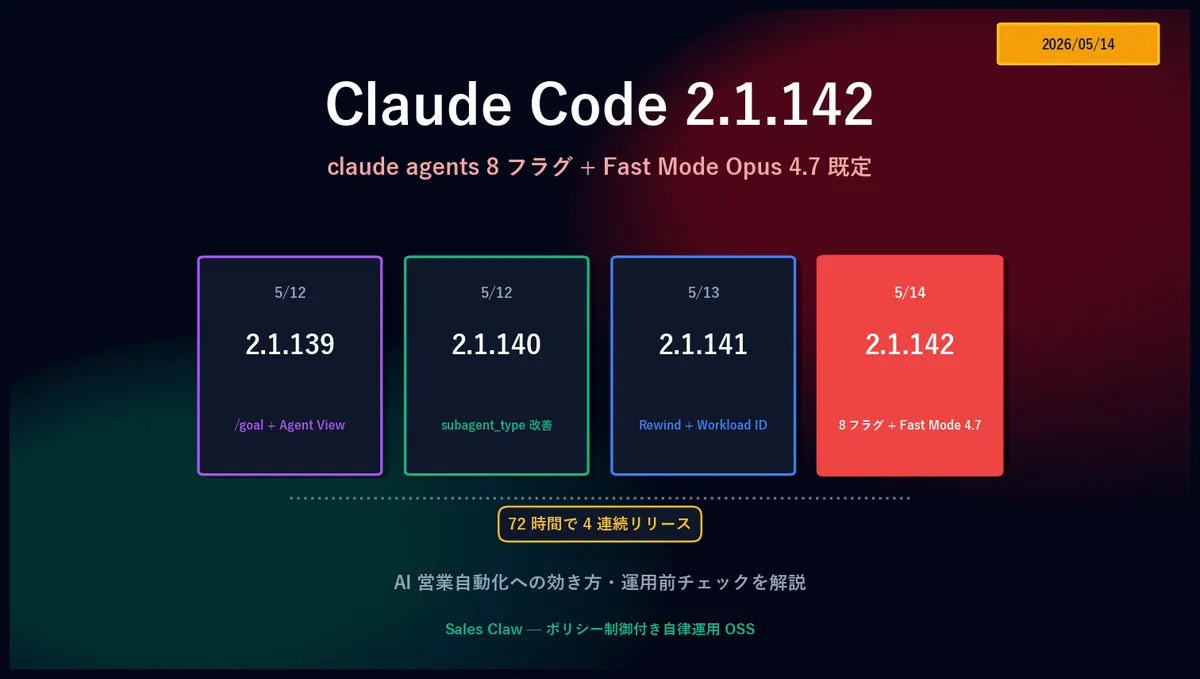
"2.1.142 dropped 24 hours after 2.1.141. What do the 8 new flags on claude agents actually do? And what does it mean that Fast Mode is now Opus 4.7 by default?" This article walks through the four primary change groups in Claude Code 2.1.142 (released 2026-05-14, 22:55 UTC) using the official GitHub Releases as primary source, with a focus on AI sales automation and what it means for Sales Claw.
On 2026-05-12, Anthropic shipped 2.1.139 (/goal + Agent View); later that day, 2.1.140 (subagent_type improvements); on the night of the 13th, 2.1.141 (Rewind + Workload ID); and on the night of the 14th, 2.1.142. That's four releases in 72 hours. 2.1.142 doesn't have a flashy headline feature, but it centers on two things that hit operations directly: eight new flags on claude agents for configuring dispatched background sessions, and the Fast Mode default model graduating to Opus 4.7.
At a glance, 2.1.142 has four primary change groups:
claude agents flags — --add-dir, --settings, --mcp-config, --plugin-dir, --permission-mode, --model, --effort, --dangerously-skip-permissions — all configurable per dispatched background sessionCLAUDE_CODE_OPUS_4_6_FAST_MODE_OVERRIDE=1SKILL.md is now surfaced as a Skill. The /plugin detail pane also shows LSP server infoMCP_TOOL_TIMEOUT coverage — git worktree detection, macOS sleep/wake recovery, post-upgrade crash-loop fix, the 60-second cap on remote HTTP/SSE MCP servers removed, and 15+ other fixesPrimary sources: Claude Code official Changelog, GitHub Releases (v2.1.142), Claude Code Docs. For background on 2.1.141's Rewind and ANTHROPIC_WORKSPACE_ID, see the 2.1.141 Rewind + Workload ID article; for 2.1.140's subagent_type matching, see the 2.1.140 subagent_type and /goal hang-fix article.
Claude Code 2.1.142 shipped about 24 hours after 2.1.141. The shape of the sequence is clear: 2.1.139 added /goal and Agent View; 2.1.140 loosened subagent_type matching; 2.1.141 tightened up Rewind "Summarize up to here" and Workload ID; and 2.1.142 brought together the flag set for "hand different configuration to each parallel background session."
2.1.142 itself is a mid-size release with both feature additions and fixes. The official GitHub Release notes list 15+ fixes. For AI sales automation use cases — multiple /goal sessions running in parallel, each with its own project / MCP / permissions — these two improvement groups stand out:
--add-dir, --settings, --mcp-config, --plugin-dir, --permission-mode, --model, --effort, --dangerously-skip-permissionsMCP_TOOL_TIMEOUT now applies to remote HTTP/SSE, git worktree detection, macOS sleep/wake recovery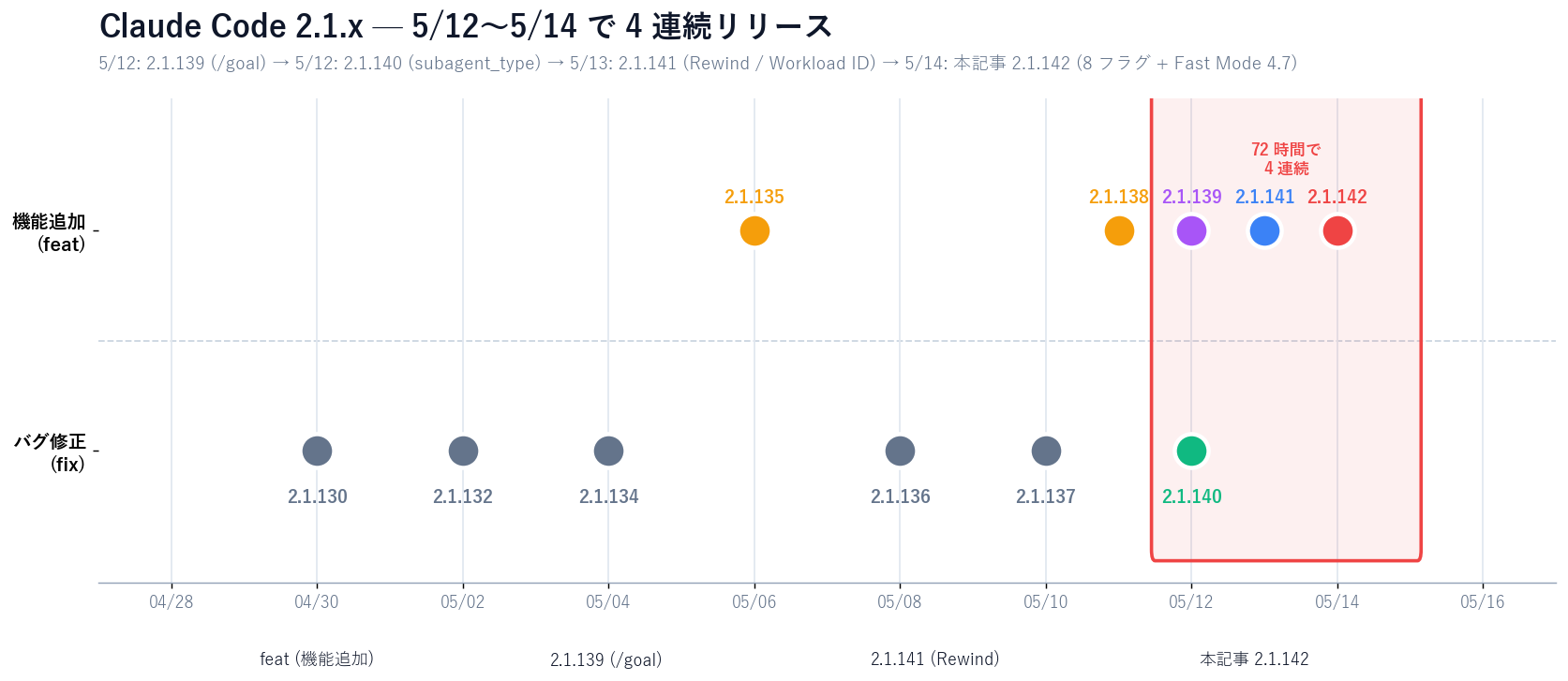
Excerpts and clarifications from the GitHub Releases v2.1.142 notes, with the four groups that hit AI sales automation directly.
claude agents flagsDispatched background sessions launched via claude agents now accept eight new flags at launch:
Until now, dispatched background sessions inherited the user's global settings as-is. When running multiple sessions on the same machine — one looking at a different directory, another with different MCP configuration — there was no clean way to isolate configuration per session.
The 8 new flags:
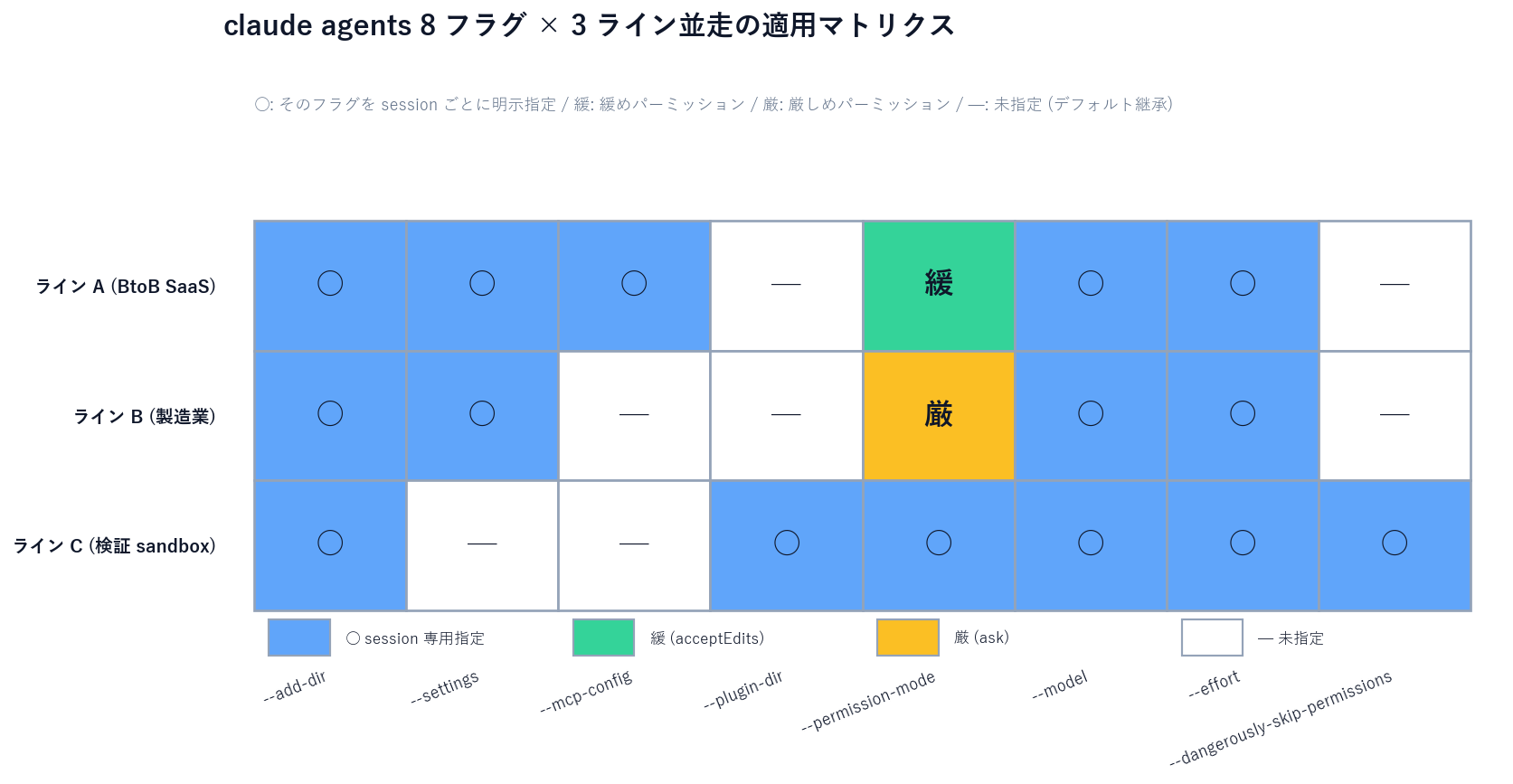
--add-dir <path> — additional working directories (repeatable)--settings <path> — settings file for this session only--mcp-config <path> — MCP config for this session only (isolated from global MCP)--plugin-dir <path> — plugin directory for this session only--permission-mode <mode> — permission mode for this session (default / ask / acceptEdits / bypassPermissions / plan)--model <model> — model for this session (haiku / sonnet / opus family)--effort <level> — reasoning effort for this session (high / medium / low)--dangerously-skip-permissions — fully bypass permissions for this session (sandbox / trusted host only)Each of these had previously been available to claude in foreground mode. 2.1.142 brings symmetric coverage to dispatched background sessions, so a background session is now a fully configurable independent process rather than just a lightweight worker.
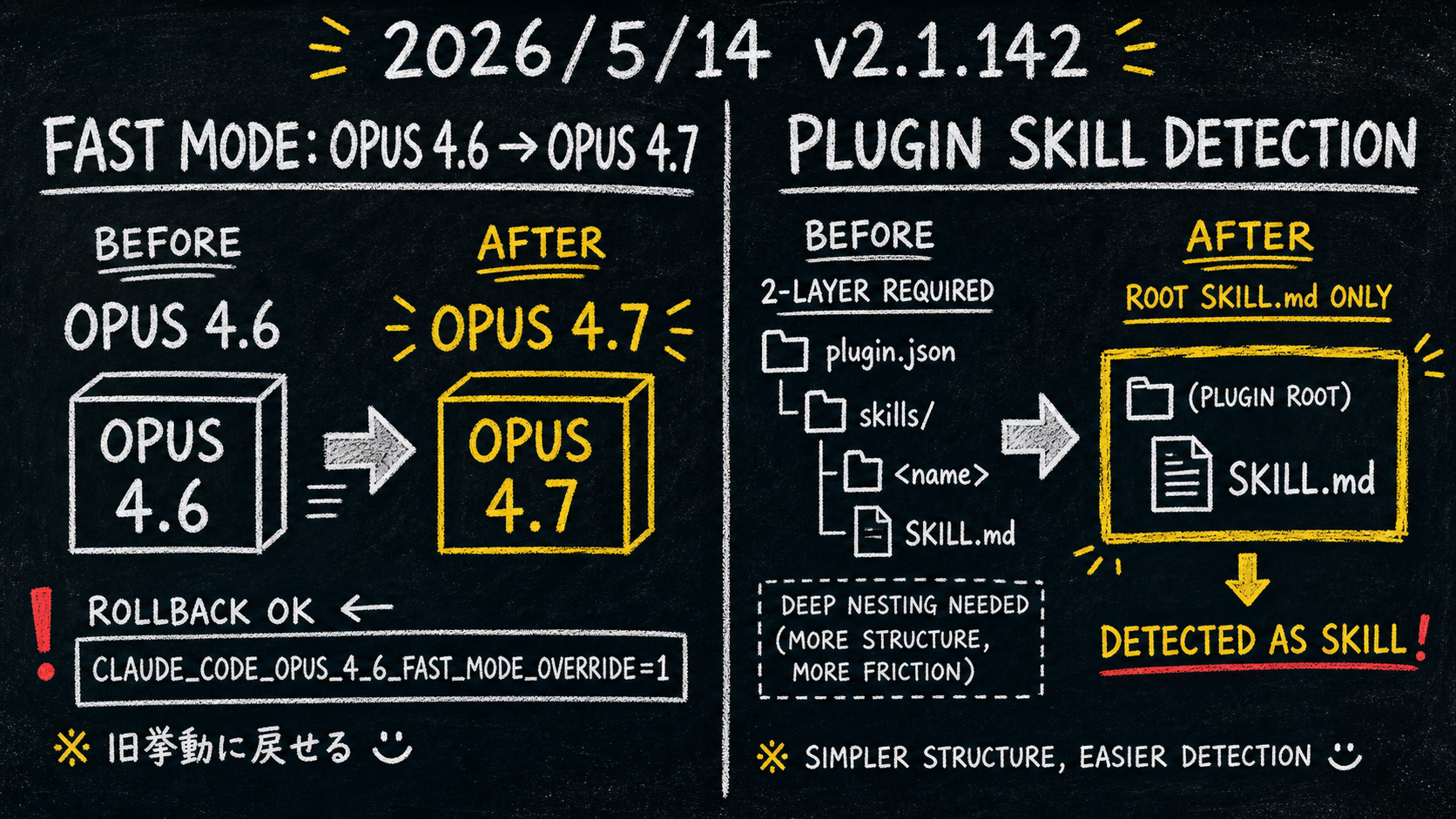
Fast Mode's default model is promoted from Opus 4.6 to Opus 4.7.
Fast Mode returns Claude Code responses with accelerated output — reducing wait time inside an agent loop. It previously ran on Opus 4.6; starting with 2.1.142, the default is Opus 4.7.
If you have automation scripts or CI that assumes Opus 4.6 behavior, set CLAUDE_CODE_OPUS_4_6_FAST_MODE_OVERRIDE=1 to roll back. For Sales Claw with Fast Mode in production, sample 100 records first to confirm Opus 4.7 default behavior.
Plugin detection rules became more flexible in 2.1.142.
Previously, distributing a Plugin required plugin.json + a skills/ subdirectory + individual SKILL.md files. From 2.1.142, a Plugin with just a root-level SKILL.md is auto-detected as a Skill — making it easy to ship "a minimal Plugin that contains a single Skill."
Additionally, /plugin detail panes and claude plugin details now show LSP server info. /web-setup also warns before overwriting an existing GitHub App connection.
MCP_TOOL_TIMEOUT coverageThe fix with the biggest operational quiet impact:
MCP_TOOL_TIMEOUT already let you extend MCP tool-call timeouts, but a 60-second cap remained on remote HTTP / SSE MCP servers. Long-running MCP calls (large-site scraping, multi-page analysis) would get cut off at 60 seconds and never complete.
2.1.142 removes that cap. MCP_TOOL_TIMEOUT now applies uniformly to remote HTTP / SSE as well. If your Sales Claw setup goes through a custom MCP server (for example a company-info scraper), long-running tools work as expected.
Operationally meaningful fixes. Highlights:
claude agents "press v to open in editor" using the daemon's default editor instead of the shell's $EDITOR/$VISUALclaude agents uses a Windows network drive as the working directory (Ctrl+C now works during startup)claude --bg --dangerously-skip-permissions not surviving retire / wakeskills: ["./"]Each fix is small individually; cumulatively they push toward "dispatched background sessions stay alive when you leave them running."
Sales Claw itself launches a single Claude Worker process for form submission. But many SDR teams want multiple pipelines on the same machine:
Previously, all three ran under the same ~/.claude/ global config. Switching meant either rewriting global config or swapping shell sessions. Even with --bg, dispatched background sessions inherited global permissions.ask and MCP config.
With 2.1.142, you can run all three on one machine, fully isolated:
# Pipeline A: B2B SaaS / sonnet / loose / CRM MCP
claude agents \
  --add-dir /work/sales-claw/lines/btob-saas \
  --settings /work/sales-claw/lines/btob-saas/.claude/settings.json \
  --mcp-config /work/sales-claw/lines/btob-saas/.claude/mcp.json \
  --permission-mode acceptEdits \
  --model sonnet \
  --effort high

# Pipeline B: Manufacturing / haiku / strict / no MCP
claude agents \
  --add-dir /work/sales-claw/lines/manufacturing \
  --settings /work/sales-claw/lines/manufacturing/.claude/settings.json \
  --permission-mode ask \
  --model haiku \
  --effort medium

# Pipeline C: Validation (sandbox only) / opus / fully bypassed
claude agents \
  --add-dir /work/sales-claw/lines/test-sandbox \
  --plugin-dir /work/sales-claw/lines/test-sandbox/.claude/plugins \
  --permission-mode bypassPermissions \
  --dangerously-skip-permissions \
  --model opus \
  --effort high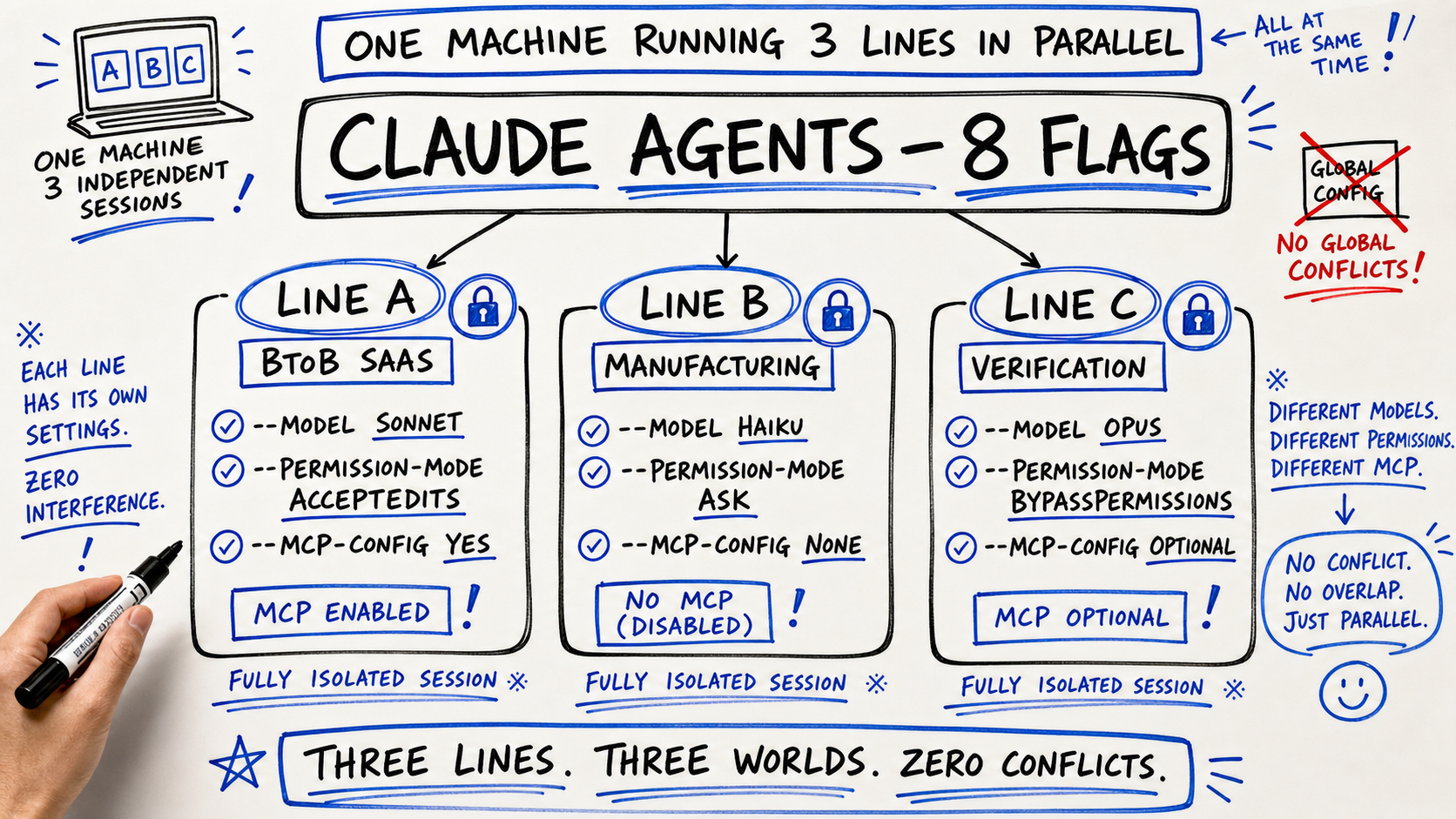
| 項目 | ≤ 2.1.141 (global config inheritance) | 2.1.142 (per-session via 8 flags) |
|---|---|---|
| Permission switching | Rewrite global config or env vars | Set --permission-mode per session |
| MCP config | ~/.claude/mcp.json shared across all sessions | Per-session --mcp-config |
| Model selection | Switch via /model command each time | Pin --model at session start |
| Reasoning effort | No runtime override | Per-session --effort high/medium/low |
| Plugin configuration | Global plugin shared across sessions | Per-session --plugin-dir |
| Parallel pipelines | Global config collisions | Fully isolated, no collision |
Fast Mode is Claude Code's high-speed response path — much shorter wait time than normal mode, noticeably snappier in the UI. Until 2.1.142 this ran on Opus 4.6; from now on it defaults to Opus 4.7.
Opus 4.7 rolled out in Q2 2026 as the latest-generation model. Per Anthropic, it improves coding, instruction following, and long-form response quality. Making it the Fast Mode default raises both quality andspeed for Sales Claw Phase B (form-copy generation + pre-send checks) — "return many responses in a short time" gets better on both axes.
That said, if your automation scripts depend on Opus 4.6's output shape (length, formatting, punctuation tics), the switch may shift outputs slightly. For production paths, sample 100 records on Opus 4.7 default before flipping.
# Opus 4.7 default (2.1.142 default)
claude --fast

# Roll back to Opus 4.6
export CLAUDE_CODE_OPUS_4_6_FAST_MODE_OVERRIDE=1
claude --fastSKILL.md detectionThe Plugin distribution structure also got more flexible — quietly important for OSS desktop tools like Sales Claw.
Previously, bundling a Plugin required at least plugin.json + skills/sales-claw-form-write/SKILL.md — a two-level structure minimum. From 2.1.142, just a root-level SKILL.md is detected as a Skill, so you can ship "a minimal Plugin with just one form-copy generation Skill" inside an Electron bundle or CI artifact.
Additionally, the /plugin detail pane now shows LSP server info, so Sales Claw can communicate "what LSP this Plugin provides" to users at install time — whether it embeds typescript-language-server, a custom form-html-language-server, etc.
MCP_TOOL_TIMEOUT coverage and cost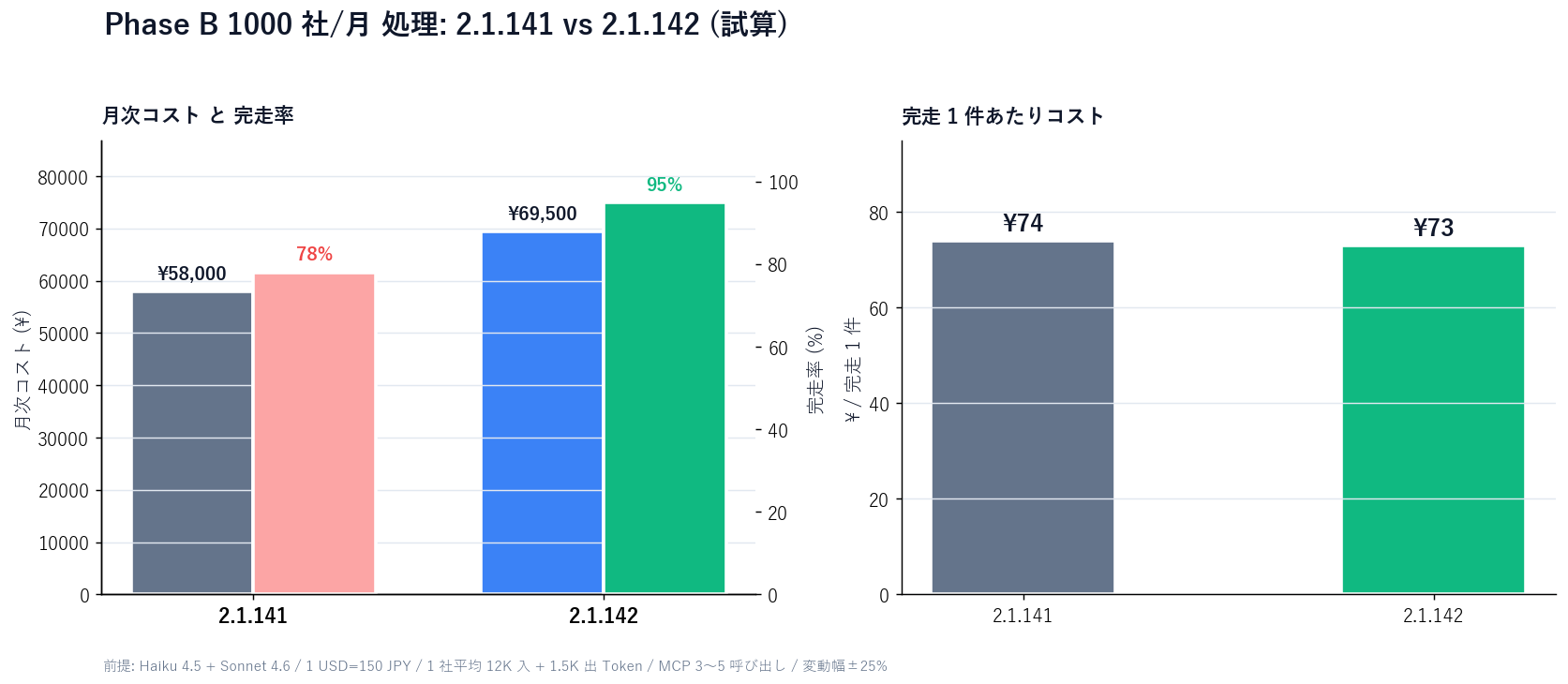
Key points. With the 60-second cap on MCP_TOOL_TIMEOUT gone:
Caveat: this estimate assumes long-running MCP calls don't run away. Without your own timeout on the MCP server side, extremely long calls (10+ minutes) can blow up token spend. Sales Claw 1.2.x recommends an explicit limit like MCP_TOOL_TIMEOUT=180 (3 minutes).
MCP_TOOL_TIMEOUT explicitly — cap removed ≠ unlimited. Set 180–300 seconds at launch.MCP_TOOL_TIMEOUT fails, the MCP server itself should cut.2.1.142 made parallel pipelines and long-running MCP calls both more practical. Running AI sales automation unattended for long periodsstill requires multiple guards. Don't claim "safe" — lower risk structurally.
Sales Claw is OSS that lowers misfire and policy-violation risk through policy control, pre-send checks, do-not-contact detection, CAPTCHA-on-detect stop, rate limits, audit logs, and automatic stop conditions. Claude Code is the CLI backend, so Claude Code stability improvements flow directly into Sales Claw stability.
preferences.complianceFooter: trueawaiting_approval and audit-log on detectBeing able to pass --dangerously-skip-permissions or --permission-mode bypassPermissions per session is freeing for designers. It is also dangerous if accidentally used on a production machine — gates removed, long batches run unsupervised.
# 1. Upgrade Claude Code to 2.1.142
npm install -g @anthropic-ai/claude-code@latest

# 2. Confirm version
claude --version
# → should show 2.1.142 or newer

# 3. Restart Sales Claw dashboard
#    Click [Start Claude] to relaunch the managed PTY
No code changes to Sales Claw itself (Electron + Node.js dashboard) required. See the Sales Claw Quick start for full setup.
For running Phase B across multiple industries in parallel, embed the 8 flags in a launch script. See Workflow overview for context.
# Sales Claw pipeline management script (example)
# Separates configuration via lines/btob-saas.json and lines/manufacturing.json

# Pipeline A
claude agents \
  --add-dir ~/work/sales-claw/lines/btob-saas \
  --settings ~/work/sales-claw/lines/btob-saas/.claude/settings.json \
  --mcp-config ~/work/sales-claw/lines/btob-saas/.claude/mcp.json \
  --permission-mode acceptEdits \
  --model sonnet \
  --effort high \
  --bg

# Pipeline B
claude agents \
  --add-dir ~/work/sales-claw/lines/manufacturing \
  --settings ~/work/sales-claw/lines/manufacturing/.claude/settings.json \
  --permission-mode ask \
  --model haiku \
  --effort medium \
  --bg

# Watch parallel status in Agent View
claude agents
On the Sales Claw side, add one mapping layer (pipeline definitions in lines/<name>.json) that produces the right claude agents launch commands. The user clicks "add pipeline" in the UI; the matching session starts. Free downloads: Download page.
Checks when switching to Claude Code 2.1.142
Read in isolation, Claude Code 2.1.142 looks like "8 new flags on claude agents, Fast Mode default to Opus 4.7, loosened Plugin detection, and a removed MCP timeout cap" — a mid-size release. Lined up against 2.1.139 (/goal + Agent View), 2.1.140 (subagent_type improvements + /goal hang fix), 2.1.141 (Rewind / Workload ID / 40+ fixes), and 2.1.142 (8 flags / Fast Mode 4.7 / 15+ fixes) — four consecutive 72-hour releases— you can see Anthropic shipping a deliberate cluster aimed at "getting autonomous loops and dispatched background sessions to production-ready quality."
For AI sales automation — multiple industry pipelines on one machine, long-running MCP calls in daily batches — you really need to take in the headline feature, the next day's consistency patch, the day-after's stabilization, and the day-after-that's ops flags before you can run it in production.
Next action: run npm install -g @anthropic-ai/claude-code@latest to pull 2.1.142. If you want parallel pipelines, embed the 8 flags into your launch script. If Fast Mode is in production, run the 100-company sample. The Quick start and Workflow overview cover the rest.