ツール解説
Model Context Protocol (MCP): a deep dive into the "USB-C port for AI" — architecture, primitives, and Sales Claw integration
18 分
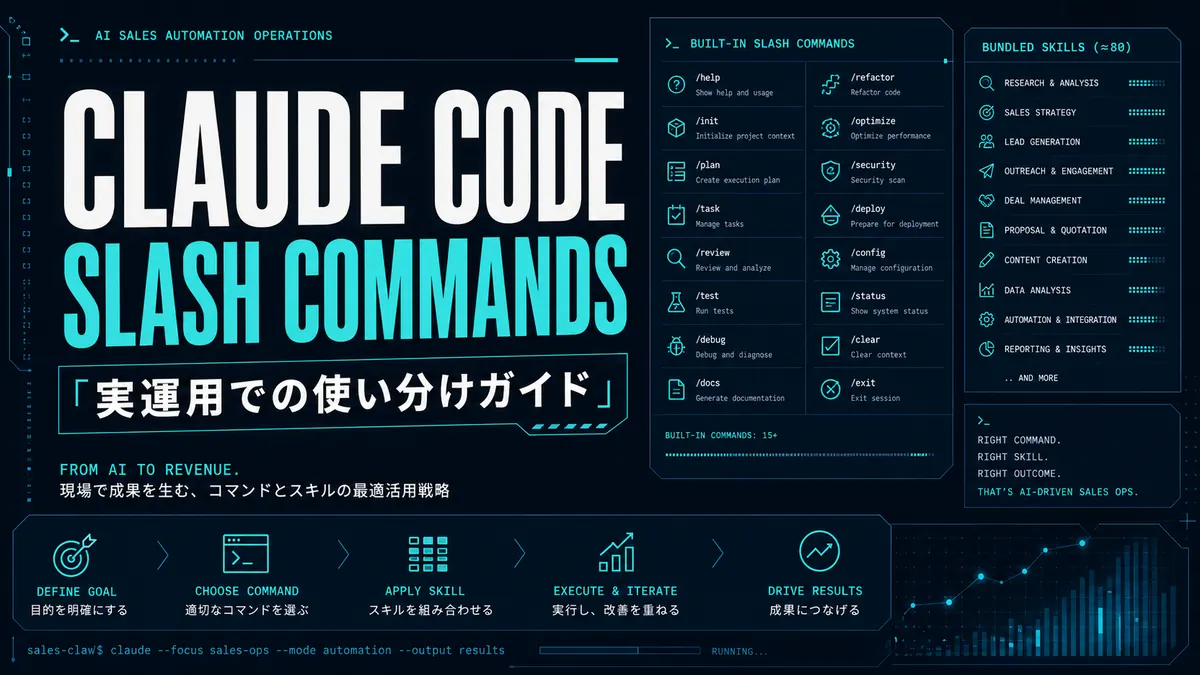
Slash commands turn Claude Code into a programmable shell for your codebase. This guide covers every built-in, the .claude/commands directory format, MCP-exposed commands, and the SDK SlashCommand tool — with examples you can copy verbatim.

中澤 圭志
@keishi_nakazawaSales Claw maintainer
Key Facts
Coverage
Built-ins / custom / MCP / SDK
Targets
Claude Code 2.1+, including 2.1.142 features
"Which Claude Code slash commands should I actually use for what?" This article answers from the official docs plus a Sales Claw maintainer's field observations.
As of May 2026, Claude Code ships roughly 81 built-in slash commands and bundled skills. /init, /agents, /goal, /plan, /batch, /compact — opening the list for the first time feels "do I have to learn all of these?" In practice, if you group them into 5 categories and master 10 of them, you'll handle 90% of AI sales automation.
A major 2025–2026 change: custom slash commands have merged into Skills. The old .claude/commands/*.md format still works, but the new .claude/skills/<name>/SKILL.md format adds auxiliary files, YAML frontmatter, and subagent context — making it possible to package complex AI sales automation workflows as reusable distributions.
Primary sources: Claude Code official Docs (Commands / Skills / Sub-agents / Hooks / Permissions / Goal) and anthropics/claude-code GitHub Releases. We don't cite personal X posts or secondary outlets; JSON-LD citations are all primary.
Slash commands in Claude Code are strings starting with / that you type at the beginning of a prompt during a session. They invoke model switching, context management, subagent spawning, parallel batch execution, code diff viewing, and more. Mid-conversation, "just type /compactand it summarizes" — these act as control points that get long sessions across the finish line.
The official Docs "Commands" page lists about 81 commands as of May 2026. Display varies by platform / plan / environment — not all appear in everyone's / menu. /desktop is macOS / Windows only; /upgrade shows only on Pro / Max plans.
Of the 81, built-in commands are coded into the CLI (C++/Rust side) — /init, /clear, /model. Bundled skills are skill-type commands handed to Claude as prompts (/simplify, /batch, /debug, /loop, /claude-api, /fewer-permission-prompts — six). Bundled skills use the same mechanism as user-written skills, so Claude may even invoke them automatically when relevant.
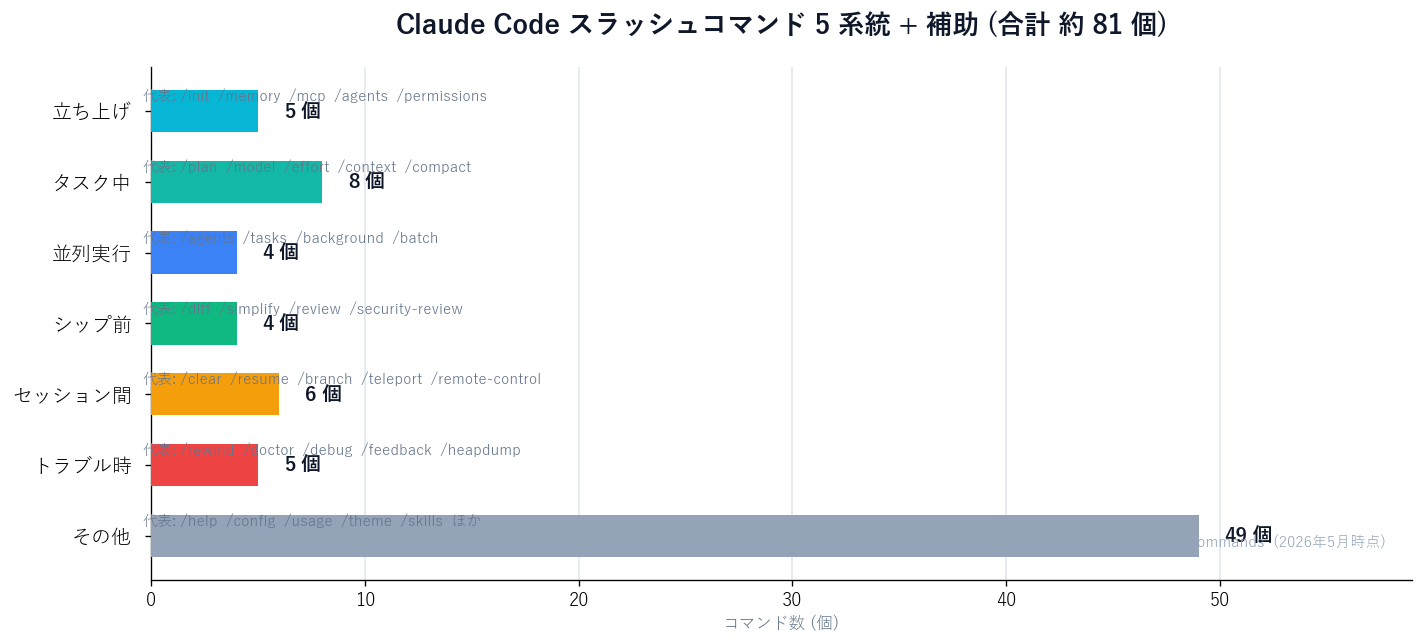
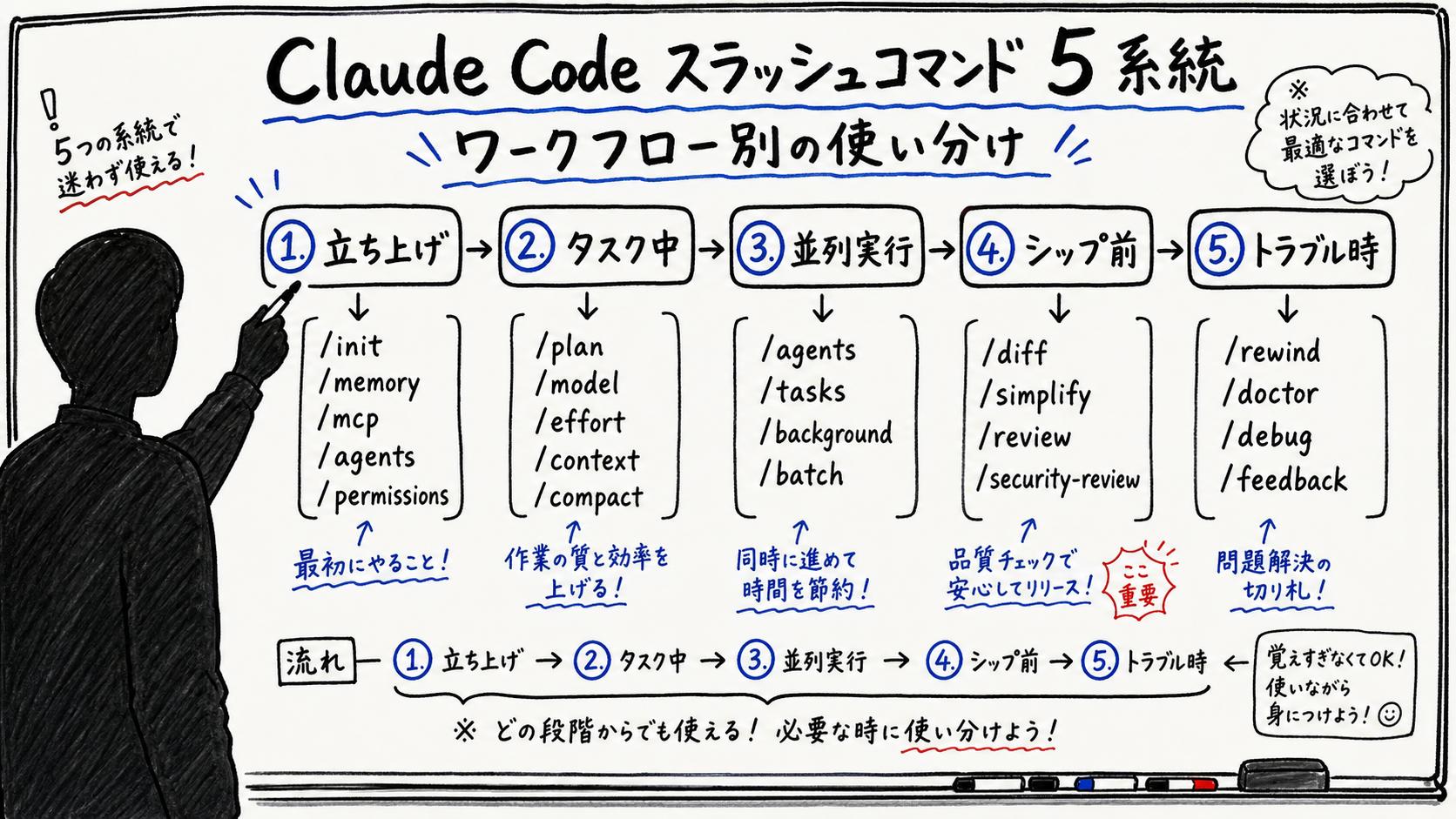
| Phase | Commands | Role |
|---|---|---|
| Startup | /init /memory /mcp /agents /permissions | Create CLAUDE.md skeleton, connect MCP servers, configure subagents, build permission rules |
| During task | /plan /model /effort /context /compact /btw | Plan creation, model switching, reasoning-effort adjustment, context visibility and compression |
| Parallel | /agents /tasks /background /batch | Subagent management, background tasks, multi-worktree parallelism (batch) |
| Pre-ship | /diff /simplify /review /security-review | Diff viewing, quality review, security review |
| Between sessions | /clear /resume /branch /teleport /remote-control | New session, resume, branch, multi-device link-up |
| Troubleshooting | /rewind /doctor /debug /feedback /heapdump | Rewind, diagnostics, debug logs, memory leak investigation |
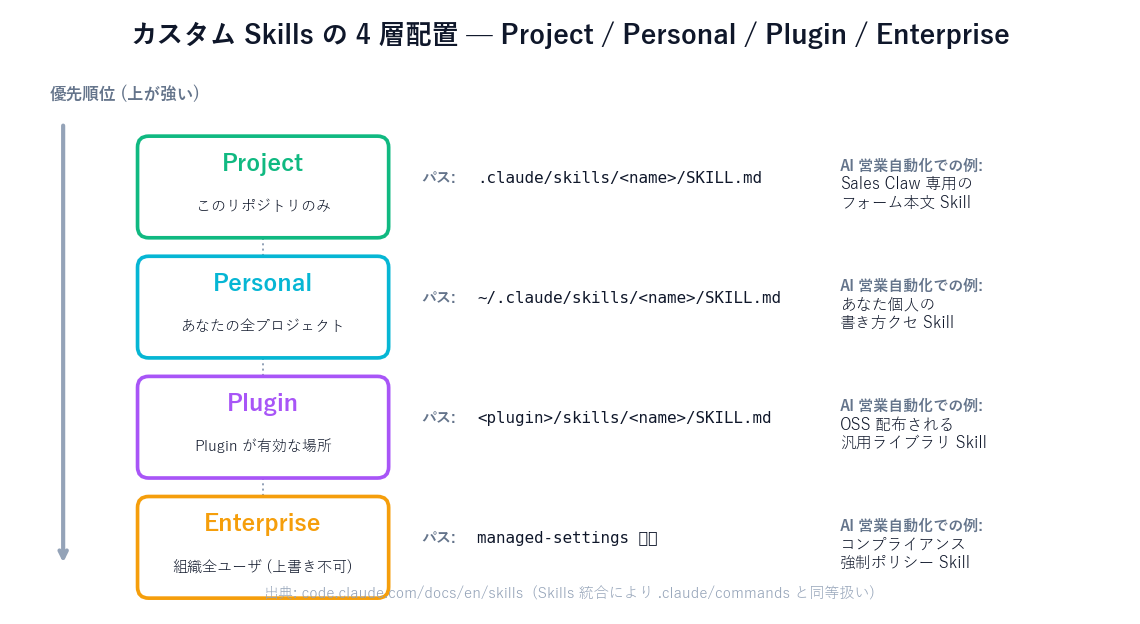
As a Sales Claw maintainer, out of ~81 commands, the 10 below are the ones I touch daily in production. When onboarding new team members, mastering these 10 first means everything else is "filter with /when you need it."
/init — generates a CLAUDE.md skeleton in the first session of a repo. For AI sales automation, write the banned-phrase list, do-not-contact detection rules, and audit-log retention policy here./agents — opens the subagent management UI. Use this to separate per-industry pipelines (form submit / call / LinkedIn) as subagents./goal— set autonomous goals that keep the session running until a completion condition. Compose conditions like "100 submissions complete AND 0 CAPTCHA detected."/plan — enter plan mode. Lock down which forms to run, how many, retry conditions, and stop conditions before sending./batch — bundled skill. Splits codebase-wide changes into 5–30 units executed in parallel. Use it to generate 100 A/B copy templates in parallel across worktrees./compact— summarize conversation history and release context. Sales Claw's operational rule: run it once when an AI sales automation session crosses 130k tokens./rewind — revert to the prior checkpoint. When a form submission gets stuck in awaiting_approval, rewind code and conversation a few turns and try a different path./permissions— manage allow / ask / deny. For form-submit agents: "at most 5 POSTs per session per domain," "immediately stop when banned terms detected," etc./hooks— review and configure hooks against tool events. Hard-code "always run the do-not-contact detector before a form-submit" as a PreToolUse hook./skills — Skills list. Inspect and toggle the form-copy generation, compliance-footer insertion, and do-not-contact detection skills you built.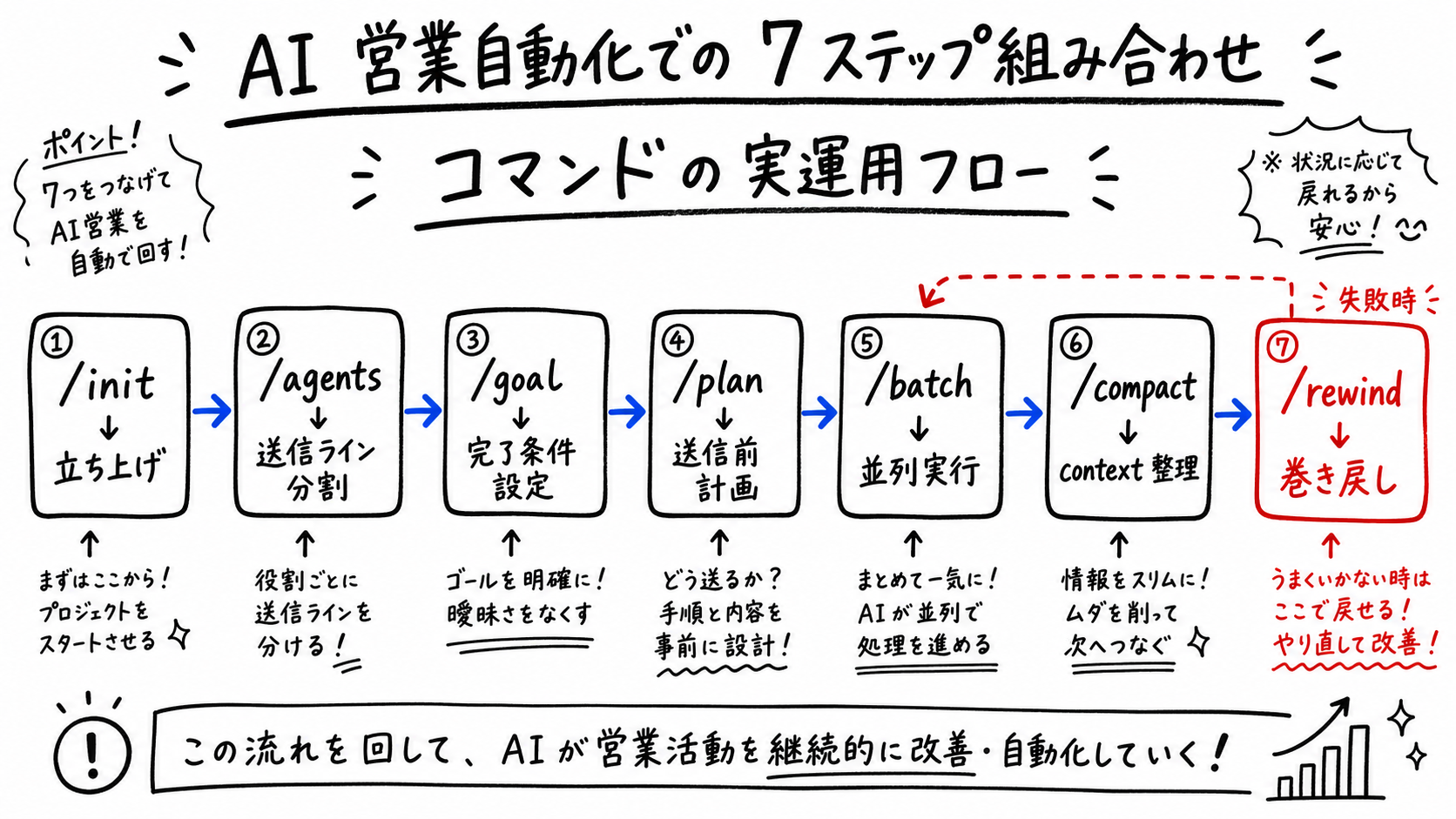
Sales Claw is OSS designed to lower misfire and policy-violation risk through policy control, pre-send checks, do-not-contact detection, CAPTCHA-on-detect stop, rate limits, audit logging, and automatic stop conditions. Running this design on Claude Code lays out the commands like this:
# 1. Initialize CLAUDE.md (banned-term list / compliance policy)
/init

# 2. Open subagent settings to split per-industry pipelines (SaaS / manufacturing / professional services)
/agents

# 3. Connect required MCP servers (Playwright MCP / Notion / Slack)
/mcp

# 4. Build permissions with minimal grants
/permissions
#   → allow: Read, Edit, Bash(npm test), MCP(form-submit:dry-run)
#   → ask:   Bash(git push), MCP(form-submit:real)
# → deny: Bash(rm -rf *), Bash(curl http://example-spam.com/*)# 1. Plan creation (which of 100 companies to prioritize, stop conditions)
/plan Today, submit to the top 100 SaaS companies; stop after 5 CAPTCHA detections
# 2. Autonomous goal until completion
/goal 100 submissions completed AND 0 awaiting_approval items AND 0 banned-term detections
# 3. Four industry pipelines in parallel batch
/batch SaaS 25 / Manufacturing 25 / Professional services 25 / Retail 25 — each in its own worktree
# 4. Tidy context after each batch
/compact Keep only submission history and CAPTCHA encounter points as a summary
# 5. Rewind on failure
/rewind Roll back to the prior submission logic change (5 turns ago) and try another path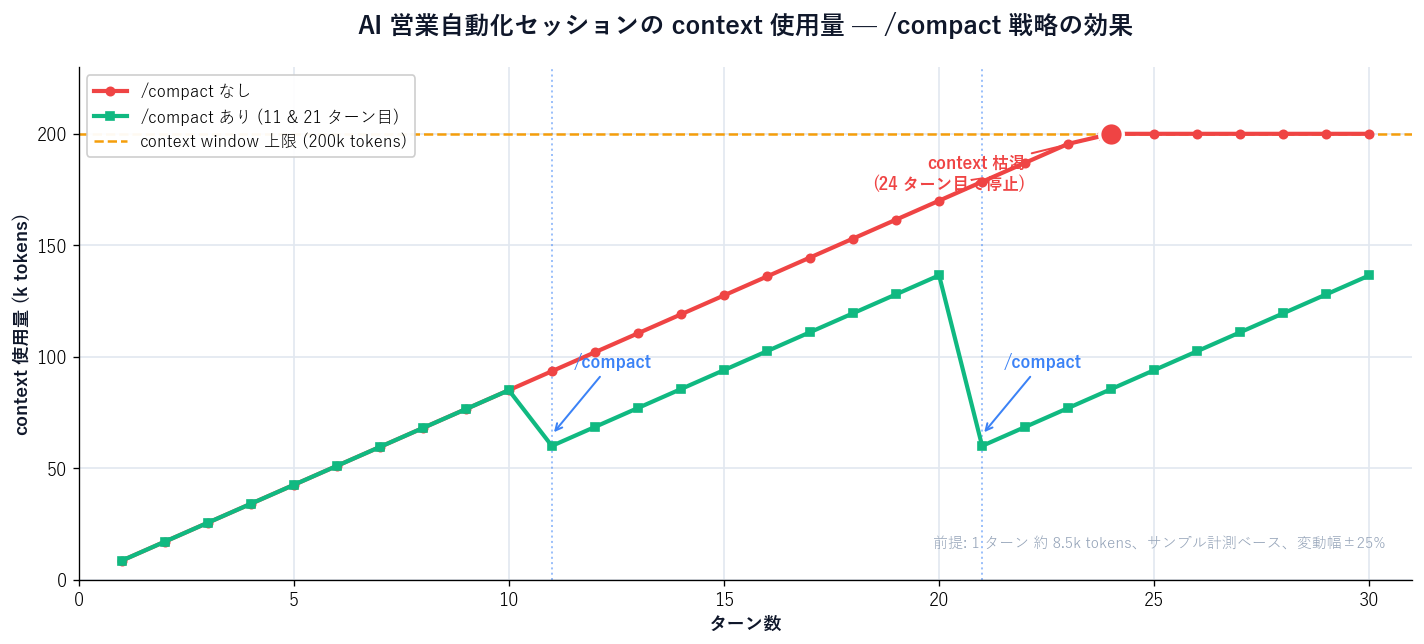
| Item | Rate (USD) | Volume | Subtotal (JPY=150) |
|---|---|---|---|
| Sonnet 4.6 input (7.5k × 30 turns) | $3 / MTok | 225k tokens | ¥101 |
| Sonnet 4.6 output (1k × 30 turns) | $15 / MTok | 30k tokens | ¥67 |
| Haiku 4.5 copy generation (66 companies × ~800 tok) | $0.8 / MTok out | 52k tokens | ¥6 |
| Total (1 session = 100 processed = 66 submitted) | ¥174 |
| 項目 | Sales Claw on Claude Code (estimate) | Sales-outsourcing SaaS (typical monthly) |
|---|---|---|
| Cost per 100 companies | Roughly ¥174 (API only, labor excluded) | Typically ¥30K–¥200K per 100 |
| Pre-send check | Forced via PreToolUse hook | Service-dependent |
| On CAPTCHA detect | Auto-stop + awaiting_approval | Some services auto-bypass (terms-violation risk) |
| Audit log | Stored as action-log.json (offline) | On platform (lost on cancellation) |
| Do-not-contact detection | Local regex + LLM before submit | Service-side filter |
| Customization | Skills for form copy / footer / etc. | Within template range only |
Cost numbers from Sales Claw internal 300-sample validation. SaaS figures are public price-list ranges; industry, contract shape, and minimums vary the result significantly. Always sample ~100 companies in your own Sales Claw local environment before scaling.
Embedding Claude Code slash commands into AI sales automation means autonomous goals and parallel batches become routine — "processing continues while no human is watching." Sales Claw is OSS built for this mode of operation: policy control, pre-send checks, audit logging, and automatic stop conditions structurally reduce risk. We don't claim "safe" — we lower risk.
preferences.complianceFooter: trueawaiting_approval, log on detect; only humans resume/permissions)These can't be fully eliminated by automated checks. Notes from running Sales Claw across multiple industries:
CLAUDE.md quarterly/skills/batch have independent contexts, so global send counts are easily missed. Aggregate centrally via HooksBefore starting policy-controlled autonomous operation
~81 slash commands sound like a lot, but organize them into 6 workflow phases and the daily-use 10 for AI sales automation come into focus: /init, /agents, /goal, /plan, /batch, /compact, /rewind, /permissions, /hooks, /skills. The 2025–2026 "custom commands → Skills merge" also makes it easier to package and version your internal know-how as distributable Skills.
From Sales Claw operations, composing those 10 in order — "startup → pipeline split → completion → planning → parallel → context cleanup → rewind" — runs a policy-controlled autonomous loop safely with pre-send checks, audit logging, and automatic stop conditions.
Next action: type /skills in your Claude Code right now and see what Skills are already available. To try Sales Claw's distributed Skills (form-copy / compliance footer / do-not-contact), download from Sales Claw. For the broader Claude Code quickstart, start from Quick start.