ツール解説
What are Claude Skills? Understanding Anthropic's New "Recipe-Book Files for AI" in 8 Minutes (Cookbook Analogy)
12 分
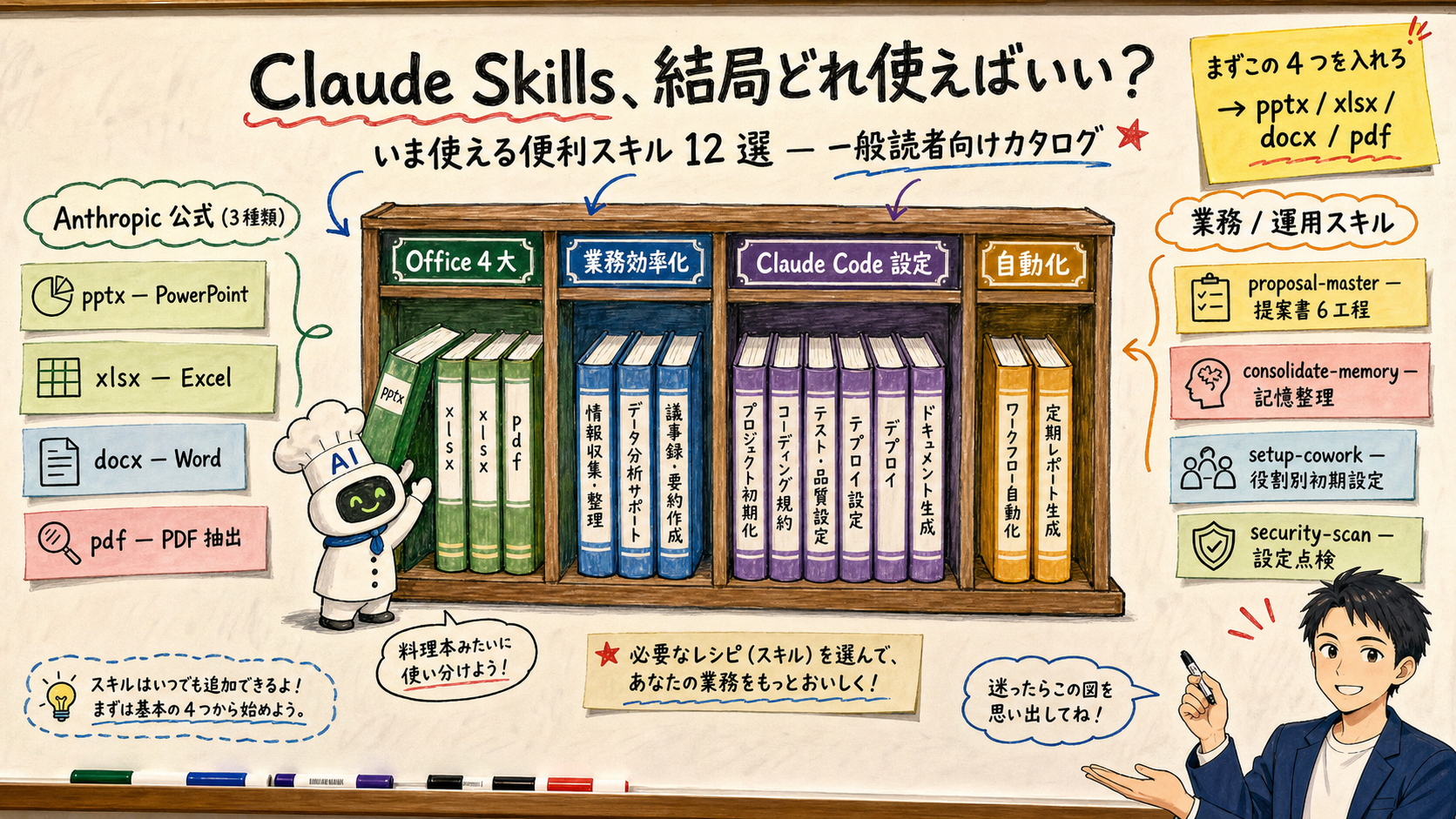
Concept of Claude Skills is clear after last week — but which ones do you actually install? This piece curates Anthropic's official Office four (pptx / xlsx / docx / pdf), three productivity Skills (proposal-master / consolidate-memory / setup-cowork), five Claude Code operations Skills, and two automation Skills (schedule / loop) — twelve in total. Includes a 3-day starter plan, risks around overload and untrusted scripts, and how Sales Claw's sales Skills fit alongside the official set.

中澤 圭志
@keishi_nakazawaSales Claw maintainer
Key Facts
First four to install
Anthropic's Office Skills: pptx / xlsx / docx / pdf
Next three productivity
proposal-master / consolidate-memory / setup-cowork
Five Claude Code ops
update-config / fewer-permission-prompts / keybindings-help / security-scan / simplify
Install commands
/plugin marketplace add anthropics/skills → /plugin install anthropic-skills
"OK, Skills are useful — but which ones do I actually install?" "The list has 100+ entries, I can't pick." "What's safe to try for free?"—— This article is the follow-up to our previous post, "What are Claude Skills? Explaining the 'recipe book for AI' metaphor". If the first article taught you the concept, this one answers the next question: "Which Skills should I actually install to make my work easier?"
Primary sources used here include Anthropic's Skills launch post (2025-10-16), the Anthropic Newsroom "Skills as an open standard" announcement (2025-12-18), Claude API Docs "Agent Skills Overview," the public GitHub repos anthropics/skills and anthropics/skill-creator, and Claude Code Skills docs. Each Skill's description and trigger keywords are quoted directly from its SKILL.md.
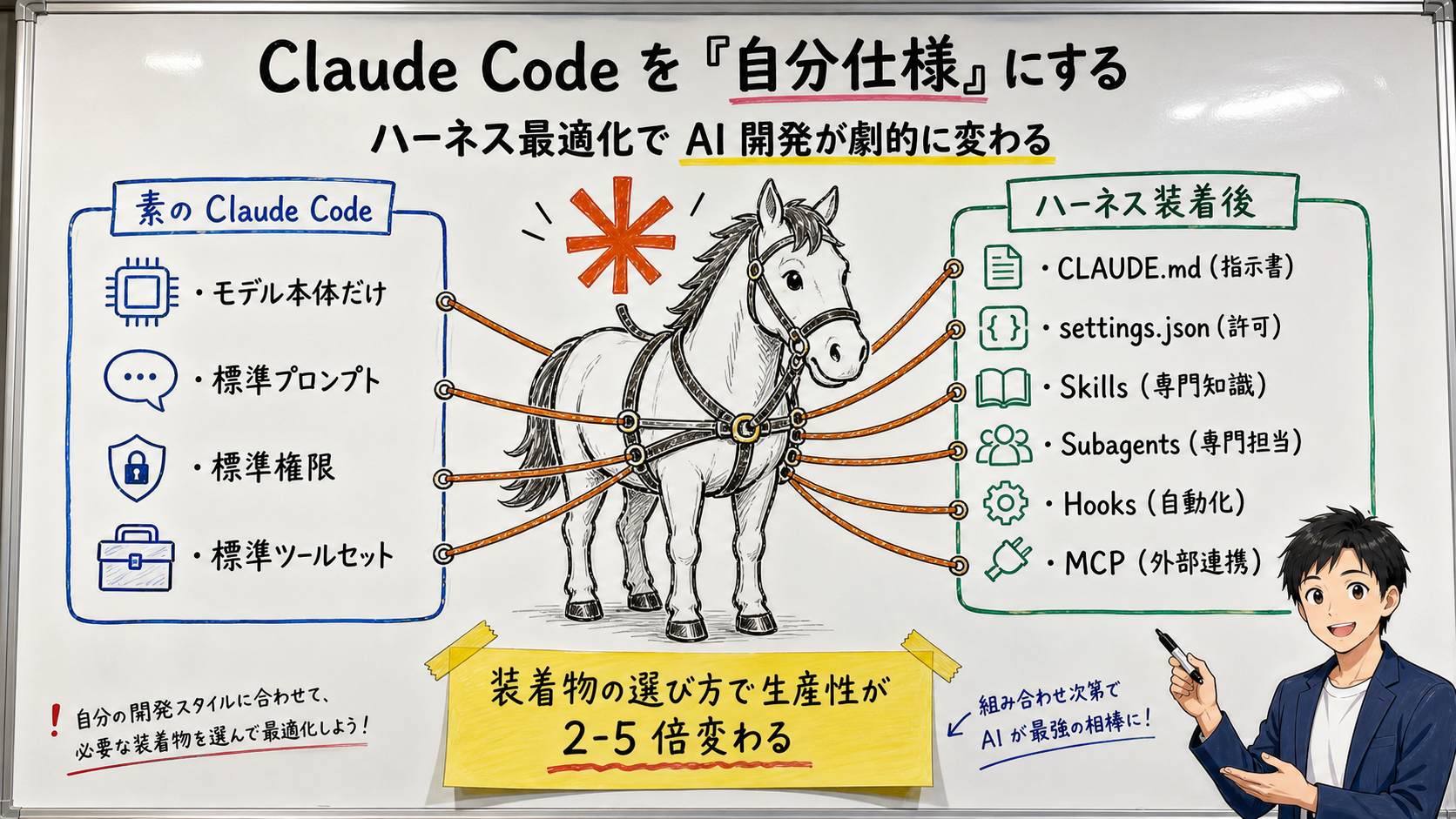
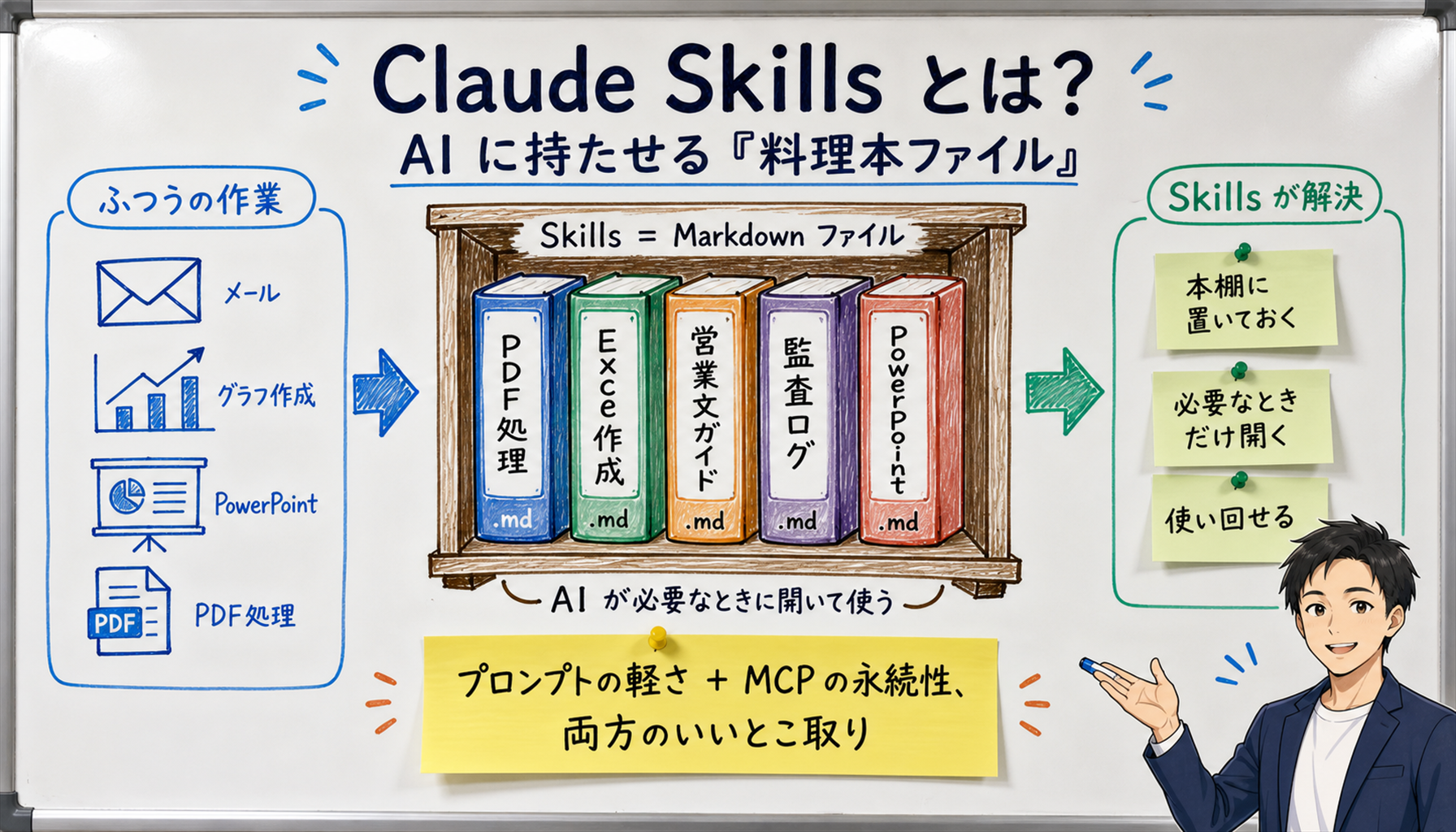
[Official] Anthropic's 2025-10-16 launch post defines Skills as "folders containing instructions, scripts, and resources" that Claude loads only when needed. They sit between prompts (one-shot) and MCP servers (heavy and always-on).
[Author's view] Plain analogy: imagine Claude as a chef. A prompt is shouting an order in the kitchen. MCP is installing a specialized appliance. Skills are lining cookbooks up on a shelf — when an order comes in, the chef walks to the shelf and grabs the right book. This article is a curated list of 12 cookbooks worth shelving today.
[Official] Inside the public anthropics/skills GitHub repo, thedocument-skillsdirectory holds the four official Office Skills: pptx, xlsx, docx, and pdf. They're auto-enabled on Claude.ai Pro / Max plans (Settings → Capabilities → Skills), and Claude Code users can install them via the official plugin.
[Author's view] We call this set the "Office four siblings." If your daily work touches Microsoft Office, Google Workspace, or PDFs, just dropping in these four Skills makes natural-language requests like "draft a deck," "add a column to this Excel," or "fill out this PDF" actually work. Think of it as buying the four classic recipe books — Japanese, Western, Chinese, and pastries — to cover most cuisines in one go.
[Official] In Claude.ai, the toggle lives under Settings → Capabilities → Skills(Pro plan and above). In Claude Code, you add the official marketplace with /plugin marketplace add anthropics/skills, then install all four with /plugin install anthropic-skills (official Claude Code Docs).
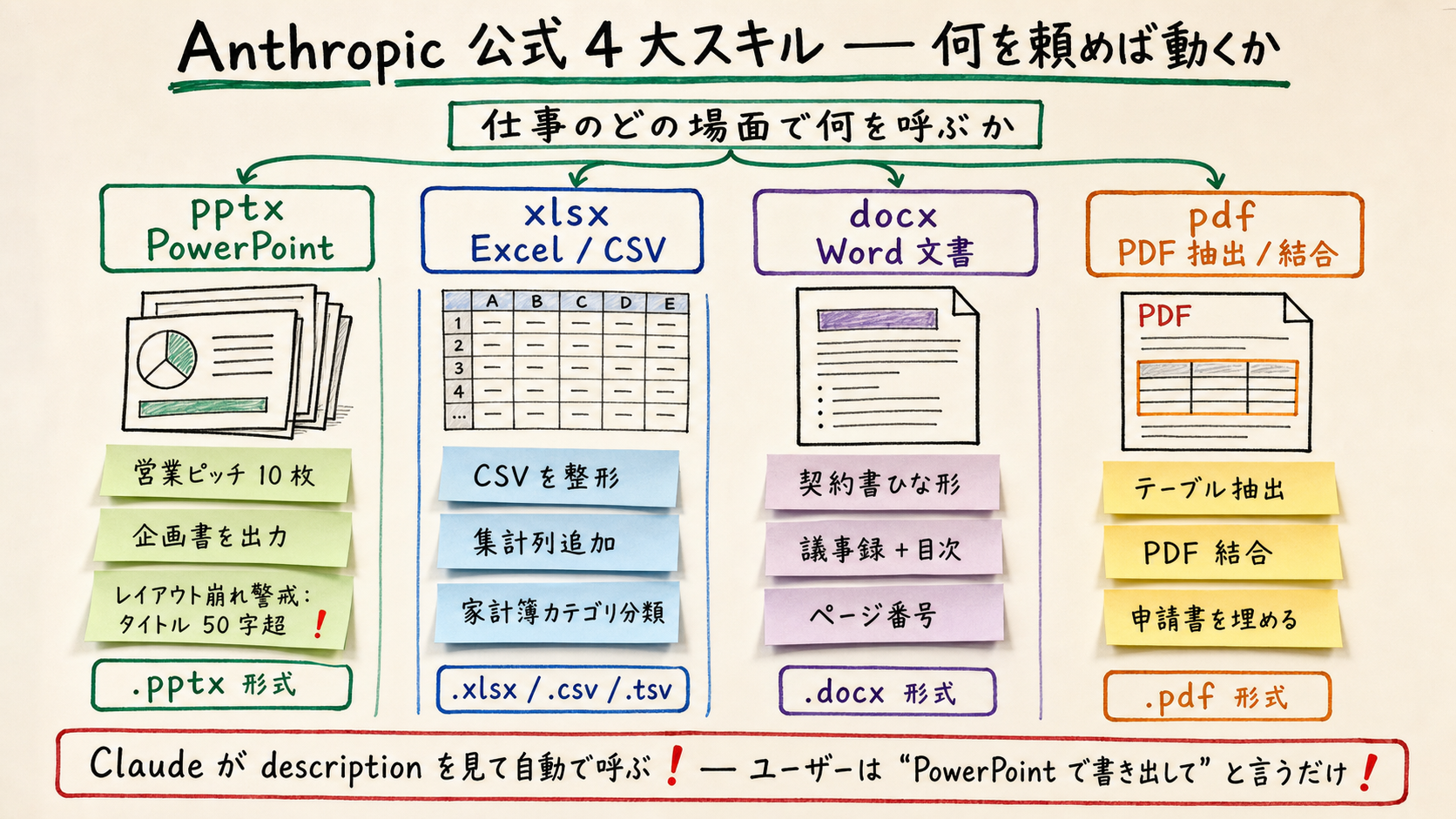
[Official] Below is the description field from each Skill's SKILL.md(quoted from the official repo), summarized as "what requests light it up."The description spells out trigger keywords, file extensions, and typical tasks; Claude uses this to decide whether to invoke the Skill.
| Skill | Formats | Example requests that trigger it |
|---|---|---|
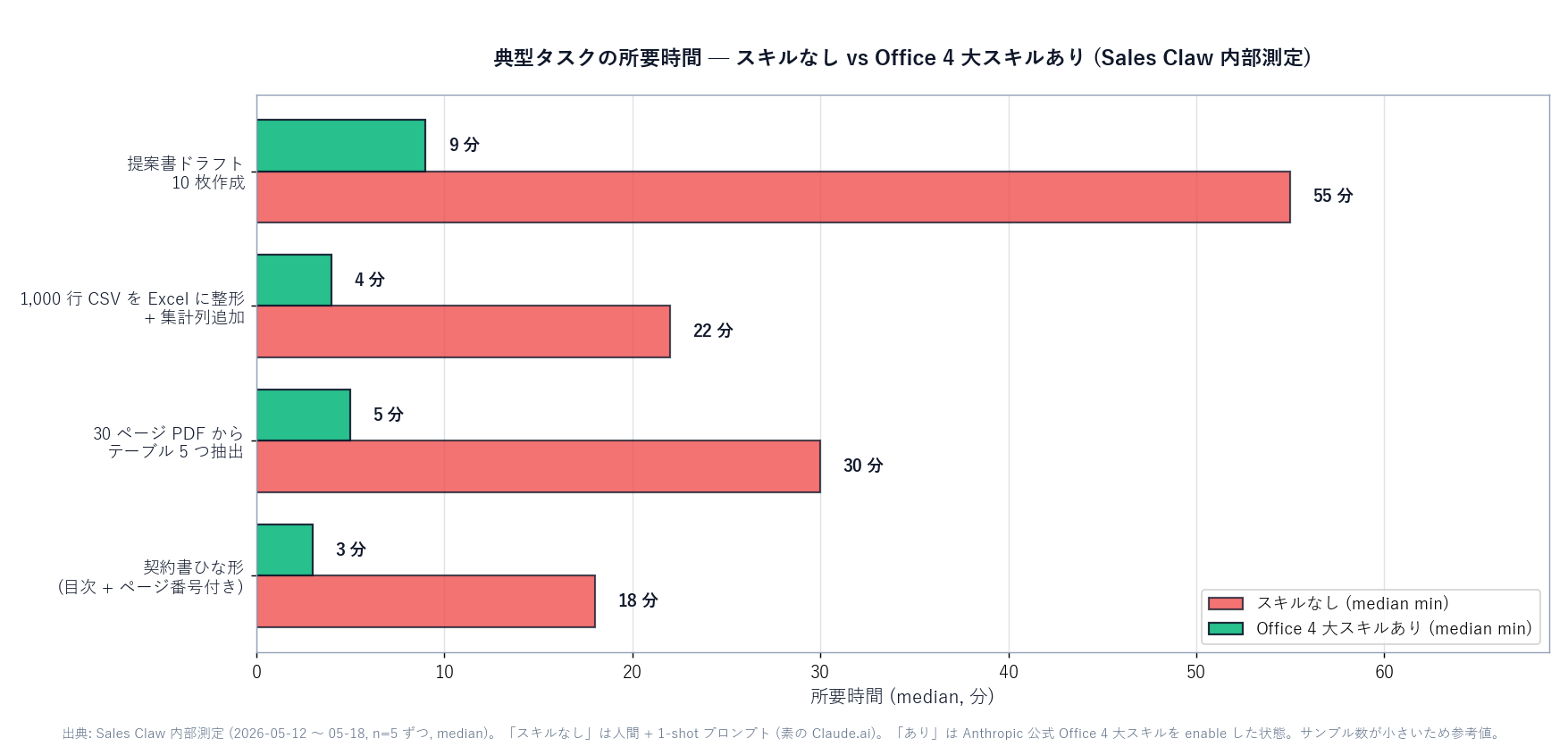
| pptx | .pptx (PowerPoint) | "Build a 10-slide sales pitch." "Export this plan as PowerPoint." |
| xlsx | .xlsx / .xlsm / .csv / .tsv | "Tidy this CSV into Excel with a summary column." "Add category tags to my budget sheet." |
| docx | .docx (Word) | "Draft a contract template in Word." "Add a TOC and page numbers to my meeting notes." |
| "Extract this PDF's tables." "Merge these PDFs." "Fill out this application PDF." |
Note the key phrase: "any time a .pptx file is involved."Users never have to say "use the pptx skill" — just asking for "export this as PowerPoint"is enough for Claude to invoke it automatically. That's Progressive Disclosure (covered last time) in action: the user doesn't need to know the Skill exists.
[Official] Beyond the Office four, the public anthropics/skills repo and marketplace host many productivity-oriented Skills. We highlight three that Sales Claw uses weekly and that we can confidently say "made a real difference".
[Official] proposal-master is described in its SKILL.md as "a master Skill that autonomously generates pro-grade proposal decks in one command,"and it orchestrates six other Skills under the hood: business-strategy, proposal-deck, write-quality, frontend-design, pptx, and design-auditor. Trigger phrases include "build a proposal," "proposal master," and "consulting deck."
[Author's view] In plain terms, this Skill replaces one junior consultant's worth of effort. Top-tier proposal decks (McKinsey, BCG quality) have four axes: template, skeleton, design, data — and proposal-master walks through them in order. At Sales Claw we let it produce the first internal draft, then humans tighten the finishing details by hand.
[Official] Anthropic's official anthropic-skills:consolidate-memory reads:"Reflective pass over your memory files — merge duplicates, fix stale facts, prune the index." When Claude Code's auto-memory file grows cluttered, this Skill consolidates duplicates and prunes outdated content.
[Author's view] After 1–2 months of Claude Code use, the memory/ folder turns messy. Running consolidate-memory once a month automatically catches things like "you wrote the same idea in three places"or "this fact is stale." In recipe-book terms, it's the bookshelf-tidying day where you say "these notes belong in a single newer book."
[Official] anthropic-skills:setup-cowork's description reads: "Guided Cowork setup — install role-matched plugins, connect your tools, try a skill." It asks what your role is and installs the right Skills, MCP servers, and starter config.
[Author's view] This is the "new hire setup"Skill: it asks "sales? engineering? product?" and provisions the right tools in 5–10 minutes. Anyone rolling out Claude inside an organization should run this for every new teammate on day one.

[Official] The five Skills below appear in Anthropic's marketplace as "ergonomics"helpers for Claude Code.
| Skill | What it does | When you reach for it |
|---|---|---|
| update-config | Safely edits settings.json (permissions, env vars, hooks) through a guided dialog | "Add npm to the allowlist." "Set DEBUG=true." |
| fewer-permission-prompts | Scans transcripts for "frequently approved safe commands" and auto-allowlists them | "I'm tired of approving the same commands." |
| keybindings-help | Walks you through customizing ~/.claude/keybindings.json | "Bind Ctrl+S to save." "Change the submit key." |
| security-scan | Scans the entire .claude/ directory with AgentShield (settings, hooks, MCP) | "Audit my Claude config." "Check that no hooks are off." |
| simplify | Reviews changed code for reuse, quality, and efficiency, then fixes any issues | "Simplify what I just wrote." "Deduplicate this." |
[Author's view] If you live in Claude Code every day, running fewer-permission-promptsfirst is the single biggest quality-of-life jump. By default, Claude Code asks for approval on every "npm install" or "git push" — moving safe commands into the allowlist removes a massive interruption. Recipe-book analog: "leave your daily condiments out on the counter instead of in the cupboard."
[Official] schedule is described as "Create, update, list, or run scheduled remote agents (routines) that execute on a cron schedule." loop is"Run a prompt or slash command on a recurring interval (e.g. /loop 5m /foo). Omit the interval to let the model self-pace."
[Author's view] These two cover repeating workflows like "refresh the sales list every Monday morning"or "poll the deploy every 5 minutes." At Sales Claw we use schedule for overnight competitor monitoring and morning inquiry summaries — that's the moment you notice you've created an AI coworker who keeps moving while you're asleep.
[Official] On Claude.ai, joining the Pro / Max / Team plan auto-enables the official Office Skills under Settings → Capabilities → Skills (Anthropic docs). On Claude Code, two commands — /plugin marketplace add anthropics/skills and /plugin install anthropic-skills — bring the same four onboard.
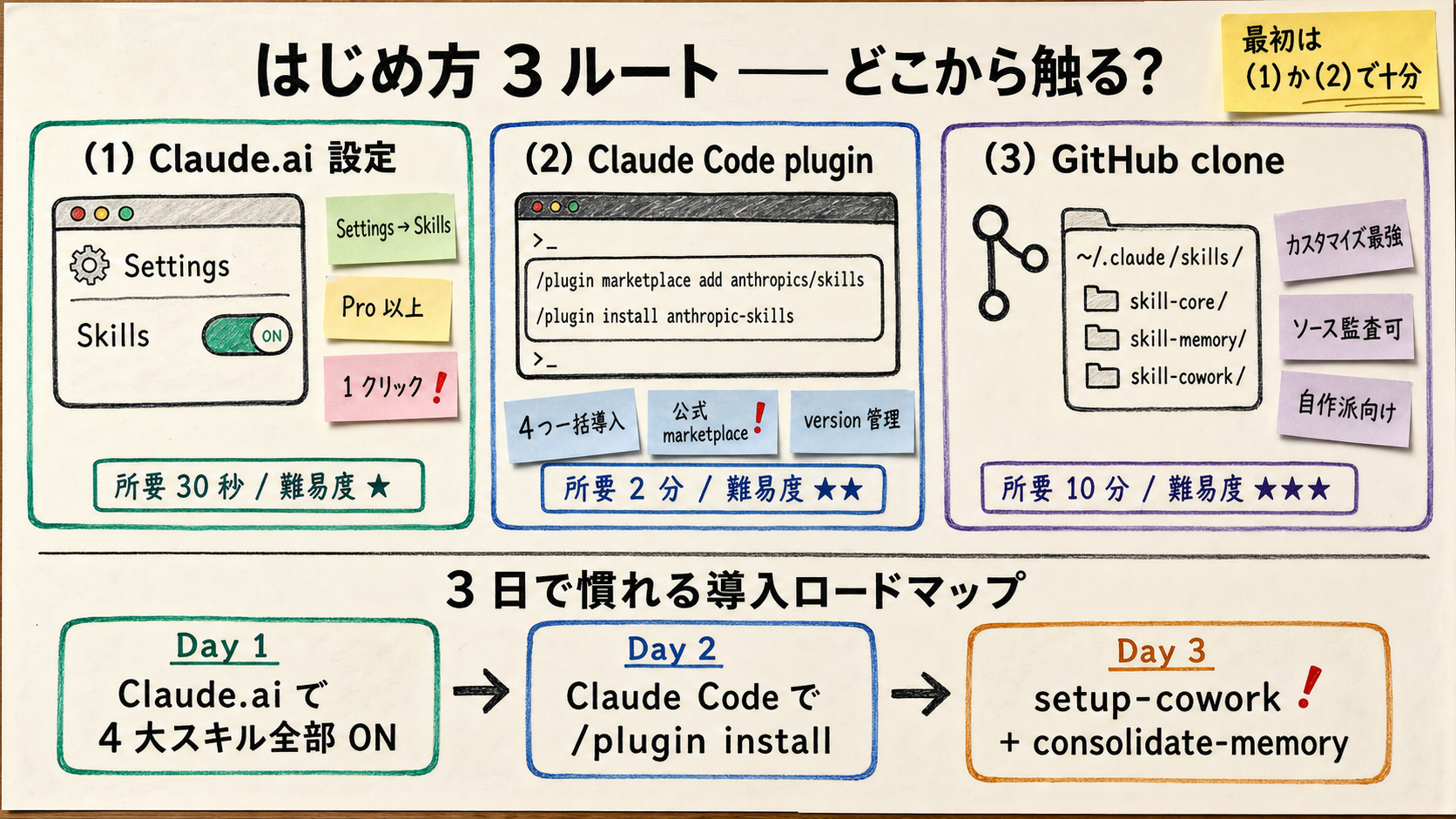
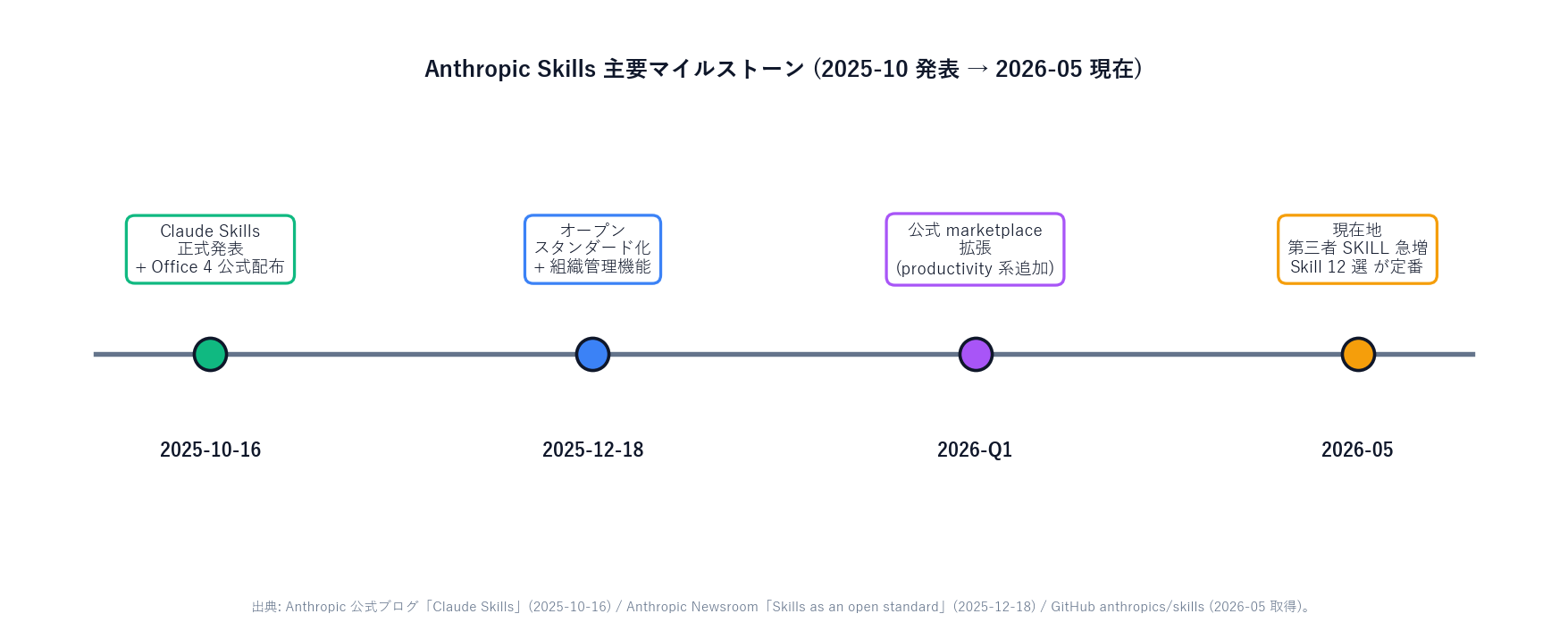
[Author's view] The trap to avoid: installing everything on day one. Stuffing 100 cookbooks on the shelf means Claude spends more time picking the right book (especially when descriptions overlap). The healthy sequence is Office four → productivity three → operational five, growing as needs appear.
[Official] Anthropic's Agent Skills Overview is explicit: "Skills are powerful — they run code on your machine." Scripts referenced from a SKILL.md(for example fill_form.py) actually execute locally. Don't install Skills from repos you don't trust.
| Risk | Example | Mitigation |
|---|---|---|
| Overload slowing decisions | 50 Skills installed and Claude hesitates picking one | Trim to ~10–15 frequently used Skills, prune monthly |
| Name / description collisions | Three pptx-style Skills and a different one fires each time | Keep one Skill per niche, write specific descriptions |
| Malicious scripts | A third-party Skill ships a credential-stealing script | Stick to Anthropic-official or trusted orgs, audit with security-scan |
| Stale memory | memory bloats with obsolete steps | Run consolidate-memory monthly |
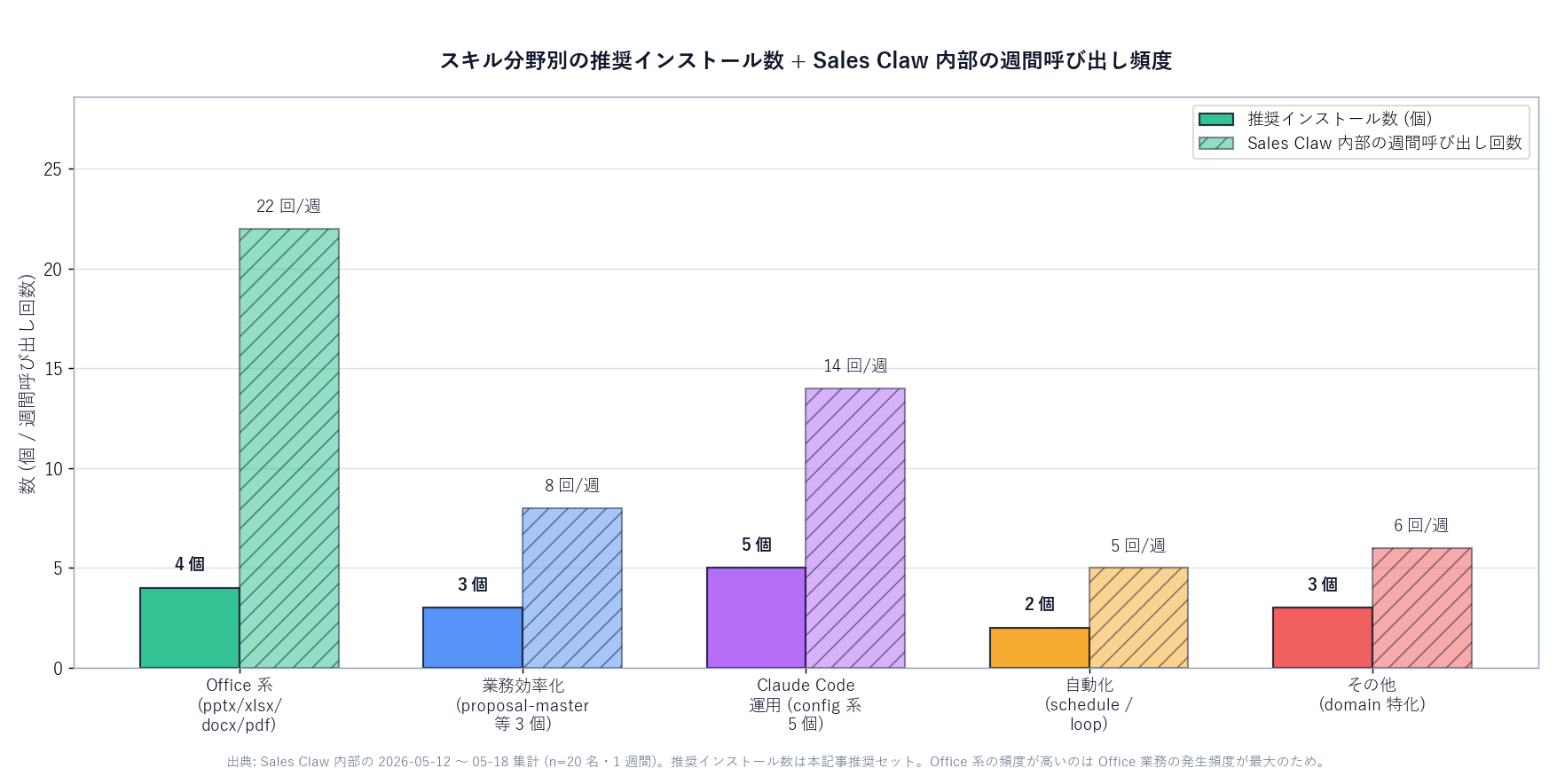
[Author's view] Same logic as physical bookshelves: 500 books makes finding the right one harder. 100 Skills means Claude scans 100 sets of metadata every request (and always-loaded tokens add up). Professional chefs keep only the cookbooks they actually use — the same discipline applies here.
[Author's view] Sales Claw bundles five internal Skills covering pre-send automated checks, sales- ban detection, CAPTCHA stop, send-rate throttling, and audit log retention. It also ships domain Skills like blog-write, note-publish, proposal-master, grant-rewrite, and keiba-race-analyst. Anthropic's official Office four supply the "office foundation,"Sales Claw's internal Skills supply the"sales-automation expertise".
Sales Claw doesn't depend on human approval; instead, it reduces misdelivery and compliance risk through pre-send automated checks, sales-NG detection, CAPTCHA stop, send-rate limits, and audit logging. Skills are the natural place to encode this kind of "policy-controlled procedure" — once written, Claude follows the same sales policy without humans rewriting prompts each session.
[Author's view] A typical Sales Claw workflow looks like this: a researcher writes a one-line request, Sales Claw's internal Skills assemble the prospect list, the official pptx Skill turns the results into a slide deck, the docx Skill drafts the cover letter, and the pdf Skill merges everything into a single send-ready file. The user never says "use pptx" or "use the audit-log Skill" — each SKILL.md exposes a tight description, and Claude routes the workflow on its own. The user's job shrinks to describing the outcome; the Skills handle plumbing.
Each of these is open-source and structured so that the SKILL.md alone explains bothwhat the Skill does and when Claude should reach for it. That discipline — packing intent into the description field — is the single biggest reason the "Claude decides on its own" pattern works in production. If your team is preparing to roll out Skills internally, treat SKILL.md design as a writing skill, not a programming one.
The FAQ also outputs structured data (JSON-LD) so search engines can surface answers.
Japanese-language original: Claude Skills、結局どれ使えばいい? いま使える "便利スキル 12 選" を一般読者向けに分野別に整理
本記事は X 公式アカウントと公式ドキュメントを一次情報として参照しています。
この記事の著者
中澤 圭志
Sales Claw maintainer
Designs and develops Sales Claw. Writes from the field on B2B sales automation and applied AI.