AIニュース
Claude Opus 4.8 Became an "Honest AI" — Benchmarks, New Features, and Cost, Explained for Non-Experts
15 分
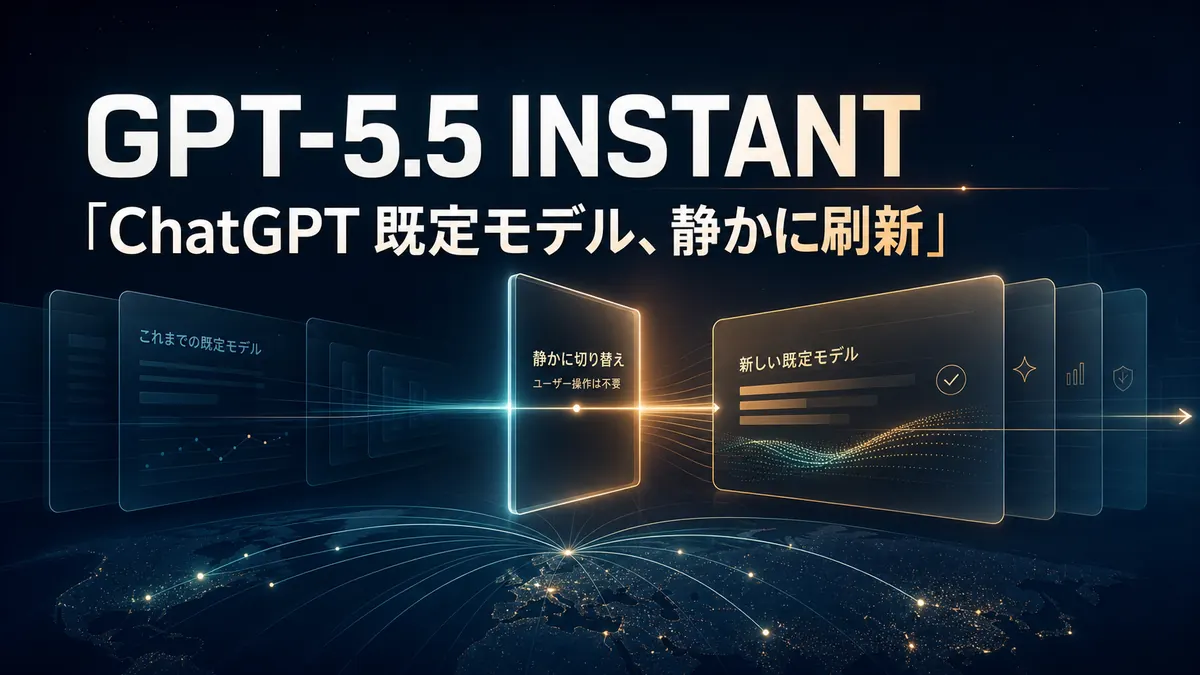
GPT-5.5 Instant is now the ChatGPT default. We walk through the capability delta from GPT-5, the latency profile, and what to change in your prompts and tool calls.

中澤 圭志
@keishi_nakazawaSales Claw maintainer
Key Facts
Release
2026-05-13
Default model
GPT-5.5 Instant
"ChatGPT's responses feel shorter and more grounded lately. Am I imagining it? Or did the model change?" You're not imagining it. On 2026-05-05, OpenAI quietly swapped ChatGPT's default to GPT-5.5 Instant. This article walks through what changed and how it lands on workplace writing like sales-form copy generation, using primary sources.
There was no big launch event. Unlike a Claude Code 2.1.140-style patch or Gemini CLI's same-day dual release, ChatGPT users worldwide were silently migrated to the new model — an industry-scale event by stealth.
Primary sources: OpenAI's GPT-5.5 Instant launch post, System Card, API docs, ChatGPT Release Notes, and OpenAI API Changelog. Secondary outlets (TechCrunch / Bloomberg / Fortune) are referenced only in body text — not in JSON-LD citations.
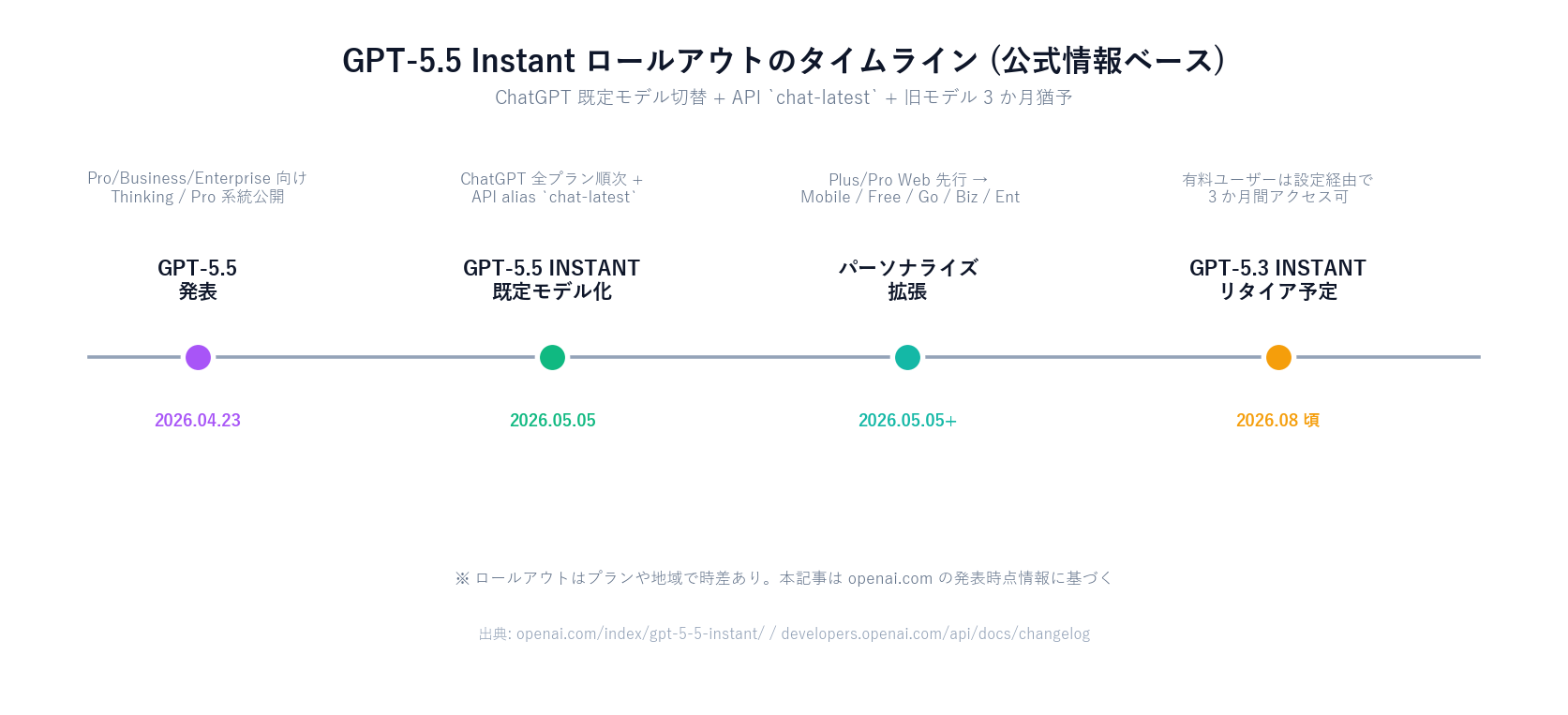
The GPT-5.5 family was announced on 2026-04-23, with Thinking / Pro variants rolling out first for Pro / Business / Enterprise customers. About two weeks later, on 2026-05-05, the Instant variant landed all at once as ChatGPT's default model.
As the name suggests, Instant is not the "heavy reasoning" type. It's tuned as the chat default for latency, cost, and workplace-friendly tone. Deep reasoning and complex code generation continue to live with GPT-5.5 (frontier), GPT-5.5 Pro, and the Codex family.

Split of duties between Instant and Thinking / Pro:
| 項目 | GPT-5.5 Instant (default chat) | GPT-5.5 / GPT-5.5 Pro (reasoning) |
|---|---|---|
| Primary use | Daily chat / work docs / short writing | Deep reasoning / code / complex analysis |
| Latency | Fast (true to the Instant name) | Heavier (thinking time) |
| API price | $5 / $30 per MTok (via chat-latest) | Same $5 / $30 (frontier) / Pro is Responses API only |
| API ID | chat-latest (auto-tracking) | gpt-5.5 / gpt-5.5-pro |
| In ChatGPT | Default model across all plans | Plan-tiered option (Plus and above) |
Tasks like Sales Claw's "generate one contact-form message" are typically Instant territory. They need tone, brevity, and reliability against misinformation — not deep reasoning.
OpenAI emphasizes the factuality improvement most. Two numbers from the launch post:
The System Card describes the methodology. A web-search-enabled LLM grader judges "does the response contain factual errors," and compares the rate. The key caveat from OpenAI: these evaluations are deliberately hard and do not represent production prevalence directly.
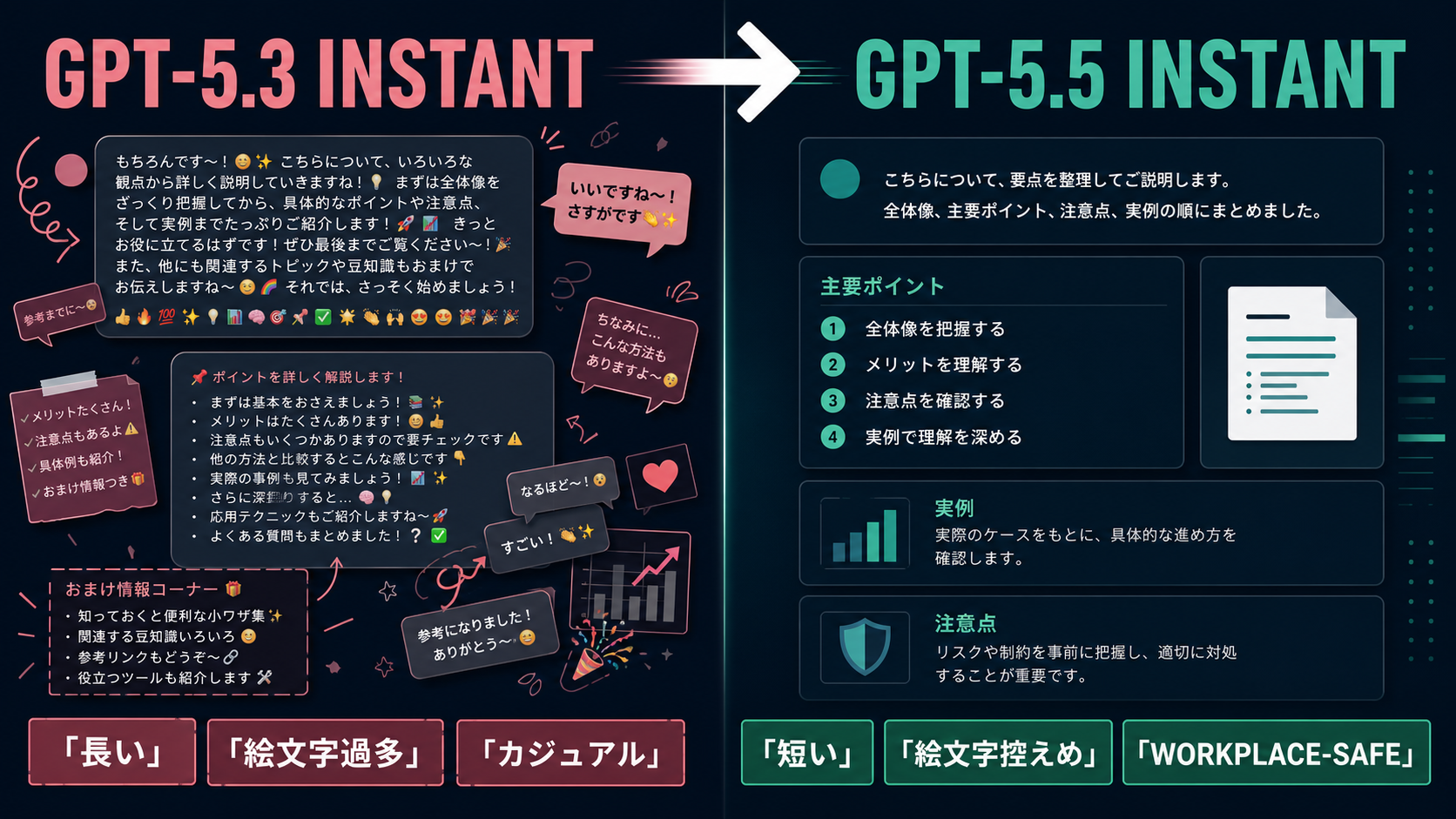
Quantification of the tone shift. Same task, responses are ~30% shorter by word count.
Not just "lower token billing." This affects editing cost when drafting work emails or proposals. If you were cutting blocks every time, you should now see fewer blocks to cut.
OpenAI took an explicit position on tone: "informal, practical, and workplace-safe without overexplaining" is the new default tone.
The launch post is explicit that overexplaining, unnecessary follow-up questions, and excessive emoji are reduced "by default." This is not "tunable via system prompt" — it's built into the model's default behavior.
Personalization across past chats, uploaded files, and connected Gmail is also expanding — Plus / Pro Web first, then mobile / Free / Go / Business / Enterprise. For sales work, "the company context you previously taught ChatGPT" is now more likely to flow into subsequent responses without prompting.
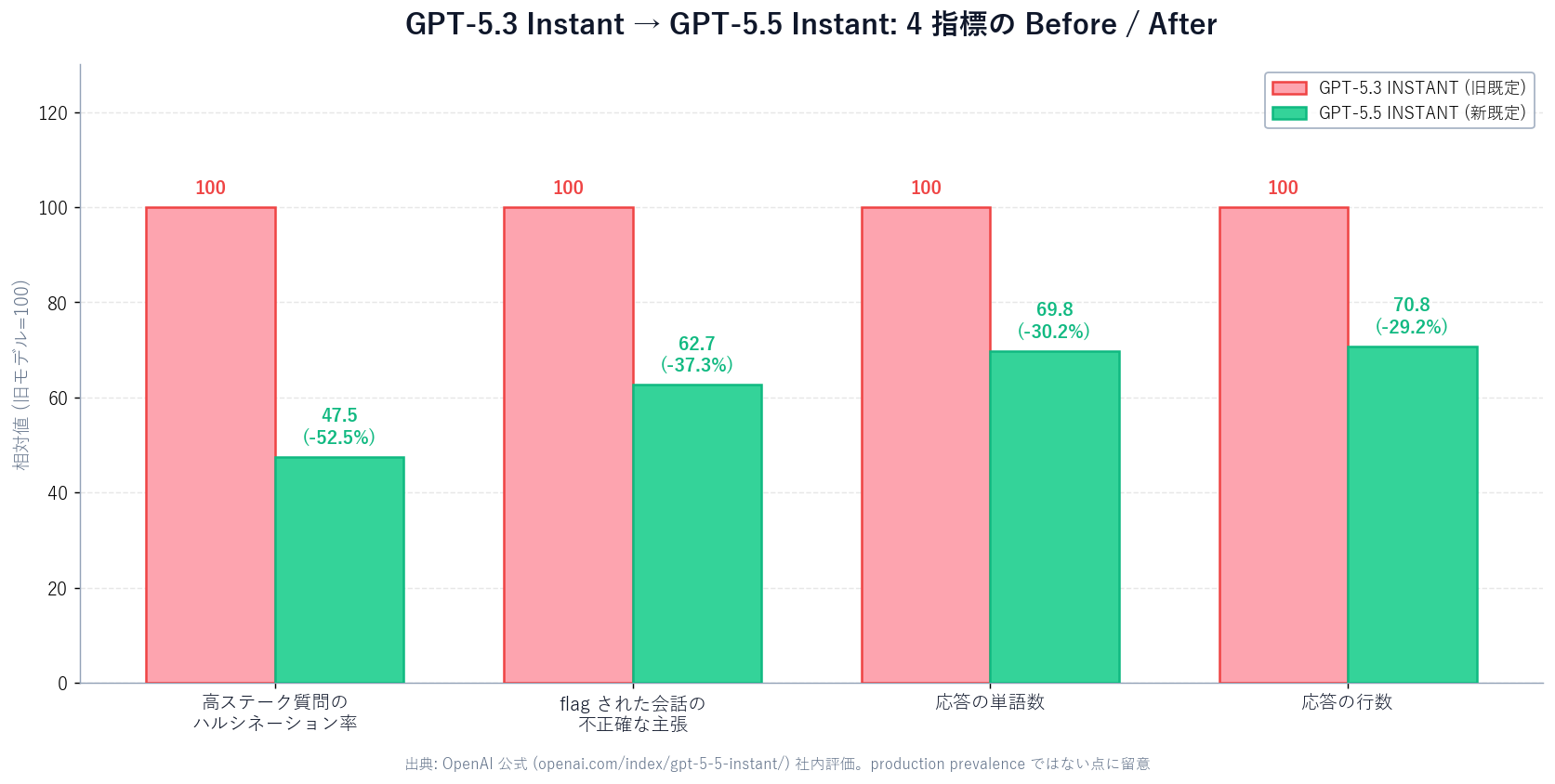
Reading OpenAI's own wording carefully, evaluation was selected on three conditions:
In short, the improvements are measured on a worst-case-curated evaluation. The same ratios won't carry into casual chat, summarization, or code-completion error rates.
That doesn't make the improvement bad. "The worst cases got better" means the tail risk of the system shrunk. For sales work that has to write facts pointed at a counterparty, reducing the "catastrophic 1% hallucination" matters more than improving the average case.
chat-latest alias and pricingPer the OpenAI API docs (developers.openai.com/api/docs/models/chat-latest), chat-latestis "a snapshot of the Instant model currently in use in ChatGPT" — it auto-tracks OpenAI's updates.
On 2026-05-05, the OpenAI API Changelog updated chat-latest to target GPT-5.5 Instant. Custom API clients pointing at chat-latest got the new model the same day with zero code changes.
Pricing as of 2026-05-13, from the official docs:
| Item | Price | Condition |
|---|---|---|
| Input tokens (≤ 272K) | $5 / 1M | Standard |
| Output tokens (≤ 272K) | $30 / 1M | Standard |
| Input tokens (> 272K) | $10 / 1M | Remaining session 2x |
| Output tokens (> 272K) | $45 / 1M | Remaining session 1.5x |
Generating one contact-form message rarely crosses 272K. Per-company total is typically 3,000–15,000 tokens — standard pricing applies. The 272K case only matters in "full submission history + bulk site reads" configurations.
Existing OpenAI Chat Completions code works unchanged — just pass chat-latest as model.
# Chat Completions (curl)
curl https://api.openai.com/v1/chat/completions \
  -H "Authorization: Bearer $OPENAI_API_KEY" \
  -H "Content-Type: application/json" \
  -d '{
    "model": "chat-latest",
    "messages": [
      {"role": "system", "content": "You are a workplace-safe sales copywriter."},
      {"role": "user", "content": "Draft a 400-character contact-form message ..."}
    ]
  }'
Calling this from Sales Claw: feed approachObjective and approachGuardrails into the system message, put the Phase A analysis into the user message.
Sales-form copy has constraints that casual chat, summaries, and code generation don't. Through those constraints, here's how GPT-5.5 Instant lands.
The worst sales-form failure is getting the counterparty's business wrong. "Regarding your SaaS business..." — except they're a custom-dev shop — escalates from no-meeting to complaint.
The 52.5% high-stakes hallucination drop, with its benchmark caveat, still points in the right direction: suppress fact errors in factuality-heavy contexts. Don't overweight it — OpenAI's caveats are explicit. Always keep the guardrail "use only the facts from the analysis."
With the old 5.3 Instant, even "keep it short" in the system prompt didn't always work — background paragraphs, boilerplate self-introductions, and closing flourishes crept in.
5.5 Instant is 30% shorter by word count. Same system prompt, same instruction strength, shorter result. Sales Claw's existing messageTemplates.approachGuardrails ("mention their business," "don't say everything," "1–2 sharp strengths") now actually works as written.
This is the biggest win. OpenAI's "informal, practical, and workplace-safe without overexplaining" phrasing aligns directly with what corporate contact-form copy needs.
| 項目 | Sales-form copy requirements | GPT-5.5 Instant defaults |
|---|---|---|
| Tone | Polite / no pushy sales | workplace-safe |
| Length | ~300–500 characters | 30.2% shorter (vs 5.3 Instant) |
| Emoji | None | Default suppresses gratuitous emoji |
| Follow-up questions | Unneeded (single send) | Default suppresses unnecessary follow-ups |
| Overexplaining | Avoid (respect the reader's time) | Reduced by default |
Sales Claw's existing approachGuardrails ("start from what the reader wants to do," "avoid template feel," "win-win is a hint, not a slogan") was written in this direction. GPT-5.5 Instant brings the model default closer.
approachObjective + chat-latest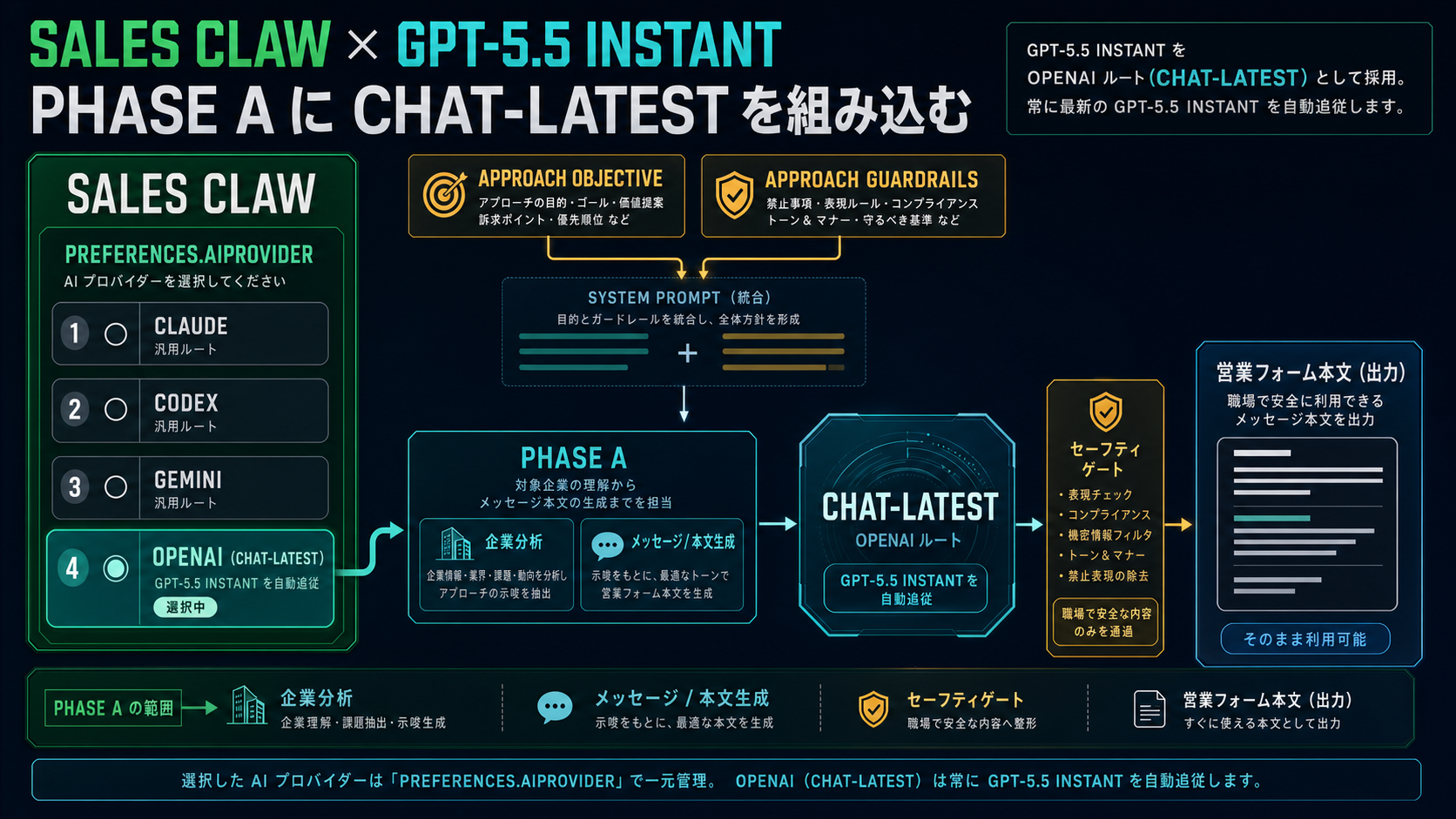
Currently preferences.aiProvider is one of claude / codex / gemini. To add OpenAI Chat Completions, options include:
openai as a value with the same managed-PTY architecture, wrapping chat-latest under the hoodchat-latest rewrites "workplace-safe and shorter"chat-latest reviews for "wrong company / pushy tone"In any configuration, keep the existing safety gates running (complianceFooter auto-append, do-not-contact detection, CAPTCHA-on-detect stop, rate limit, action-log.json audit log). Changing models doesn't remove the responsibility to run the checks. See Configuration reference for details.
Sales Claw already auto-injects messageTemplates.approachObjective and messageTemplates.approachGuardrails into CLI prompts. For direct OpenAI calls, pass them as the system message:
// Pseudocode: Sales Claw → chat-latest call (provider extension)
const settings = require('./settings-manager.cjs');
const objective = settings.getMessageTemplates().approachObjective;
const guardrails = settings.getMessageTemplates().approachGuardrails;
const analysis = phaseAResult.analysis;  // Site analysis

const response = await openai.chat.completions.create({
  model: 'chat-latest',
  messages: [
    {
      role: 'system',
      content: [
        'You are a sales copywriter producing contact-form messages.',
        'Strictly follow these rules:',
        `[Objective]\n${objective}`,
        `[Guardrails]\n${guardrails}`,
        'Output only the message body. No subject line, no signature, no emoji.',
      ].join('\n\n'),
    },
    {
      role: 'user',
      content: `Write a ~400-character message to this company:\n${JSON.stringify(analysis)}`,
    },
  ],
});
Using chat-latest means OpenAI updates flow through without client string changes. When the next Instant lands, you'll get it automatically (with regression validation, of course).
Switching to GPT-5.5 Instant doesn't change Sales Claw's responsibility to "lower misfire and policy-violation risk via automated checks." Sales Claw is OSS designed to do exactly that through policy control, pre-send checks, do-not-contact detection, CAPTCHA-on-detect stop, rate limits, audit logging, and automatic stop conditions.
preferences.complianceFooter: true. Even when GPT-5.5 Instant shortens the body, the footer is appended by a separate path.awaiting_approval, log on detect.Three operational checkpoints:
chat-latest changes behavior when OpenAI updates the snapshot. Maintain a regression suite before production.Before adopting GPT-5.5 Instant for Sales Claw / workplace writing
GPT-5.5 Instant is not a flashy feature release. It's the "ChatGPT users around the world migrated without noticing"kind of update. Precisely because of that, it's worth re-reading tone, brevity, and factuality on the user side.
For sales writing, all three changes (less hallucination, shorter, workplace-safe) blow in the right direction. But: "don't over-trust the numbers," "don't remove the check gates," and "copy proper nouns straight from the analysis" — these three keep policy-controlled autonomous operation honest.
Next action: add a "chat-latest review" step to your existing analysis → copy generation pipeline. You don't have to swap the whole pipeline. A thin final-check layer is enough to feel the tone and length effects. Sales Claw integration starts at the Quick start; current message-generation design is in Message generation. Free download: Download page.