
AIニュース
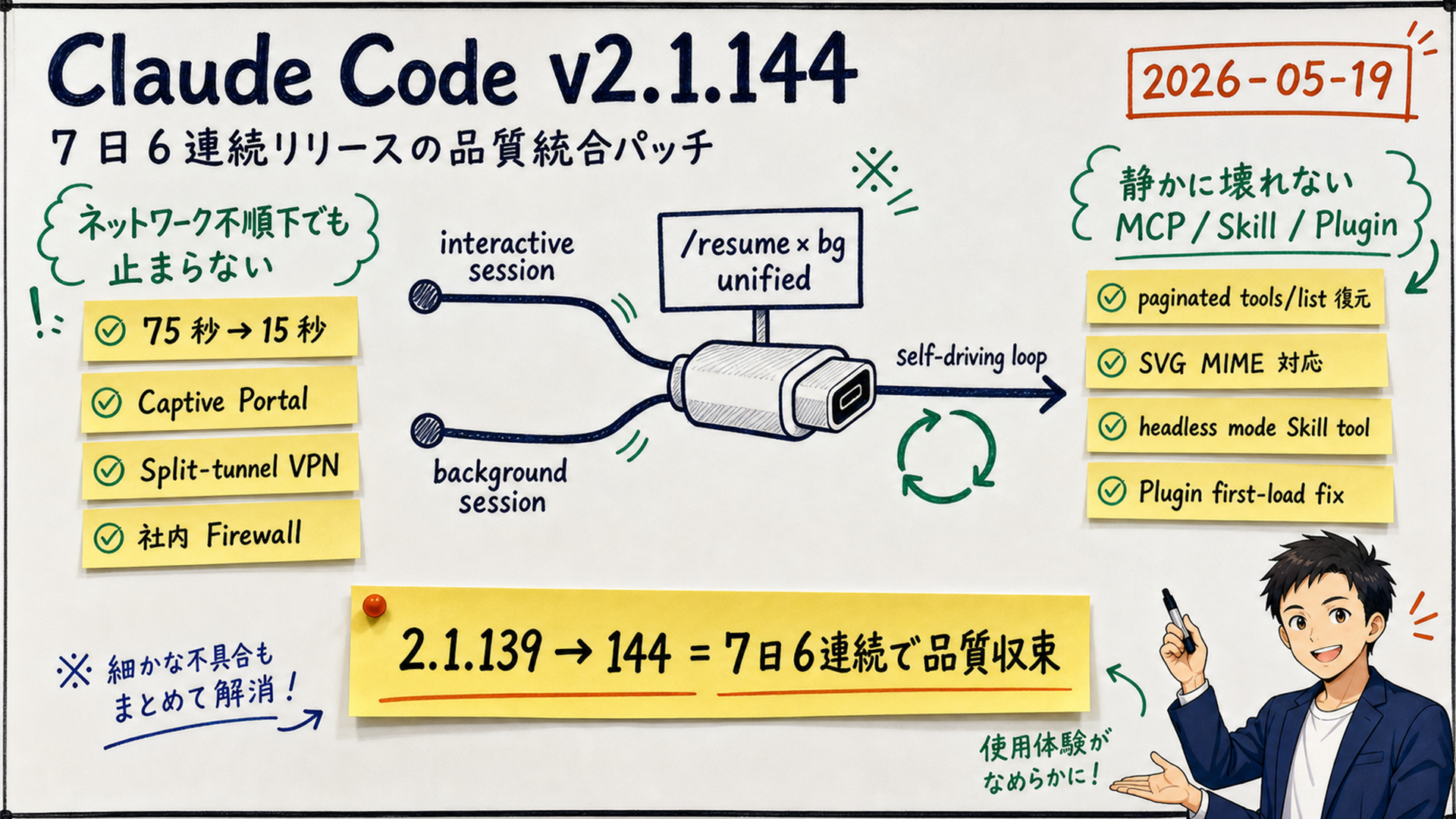
Claude Code v2.1.144 explained: /resume for background sessions, 75-second startup hang fixed, /usage-credits rename — what production users should know
12 分
Claude Code 2.1.143 closes a 96-hour run of five consecutive releases (2.1.139 → 143). Headlines: plugin dependency enforcement, PowerShell tool default-on for Windows enterprise users, and the /goal × background shell race fix. We walk through the four primary change groups and the operational impact on Sales Claw.

中澤 圭志
@keishi_nakazawaSales Claw maintainer

Key Facts
Release
v2.1.143 (2026-05-15 22:28 UTC, commit 8bdbb72)
Highlights
Plugin dependency enforcement + PowerShell default-on + /goal × background race fix
Streak
2.1.139 → 140 → 141 → 142 → 143 — 5 releases in 96 hours
Scope
dashboard / background / plugin / PowerShell / macOS / Windows
"2.1.143 dropped the day after 2.1.142? What is plugin dependency enforcement, and what changes on Windows when PowerShell goes default-on?" This article walks through the four primary change groups in Claude Code 2.1.143 (released 2026-05-15, 22:28 UTC, commit 8bdbb72), using the official GitHub Releases as primary source, with focus on AI sales automation and Sales Claw.
Claude Code shipped 2.1.139 (/goal + Agent View) on 2026-05-12; 2.1.140 (subagent_type improvements) the same day; 2.1.141 (Rewind + Workload ID) on 5/13; 2.1.142 (8 flags + Fast Mode Opus 4.7) on 5/14; and now 2.1.143 on 5/15 — five releases in 96 hours. 2.1.143 is not a flashy feature drop. It's the convergence patch that finishes what 2.1.139–2.1.142 started: a production-readiness release.
At a glance, 2.1.143 has four primary change groups:
claude plugin disable refuses to disable when another enabled plugin depends on the target; claude plugin enable force-enables transitive dependencies-ExecutionPolicy Bypass default — auto-enabled for Bedrock / Vertex / Foundry Windows users; opt-out via env varsclaude agents flag propagation to the dashboard — the 8 flags added in 2.1.142 now apply both to the dashboard and to background sessions dispatched from it/goal × background shell race fix; model/effort retention across idle wake; /bg carries MCP / settings / fallback-model; worktree cleanup safety; and morePrimary sources: Claude Code official Changelog, GitHub Releases (v2.1.143), Claude Code Docs. For 2.1.142's claude agents 8 flags and Fast Mode Opus 4.7, see the 2.1.142 article; for 2.1.141 (Rewind / Workload ID), see the 2.1.141 article; for 2.1.140 (subagent_type / /goal hang fix), see the 2.1.140 article.
Claude Code 2.1.143 shipped about 24 hours after 2.1.142. The arc is now clear: 2.1.139 added /goal + Agent View; 2.1.140 relaxed subagent_type matching; 2.1.141 added Rewind / Workload ID; 2.1.142 added the 8 claude agents flags and Fast Mode Opus 4.7; and 2.1.143 brings the patches that "run those features for real in production."
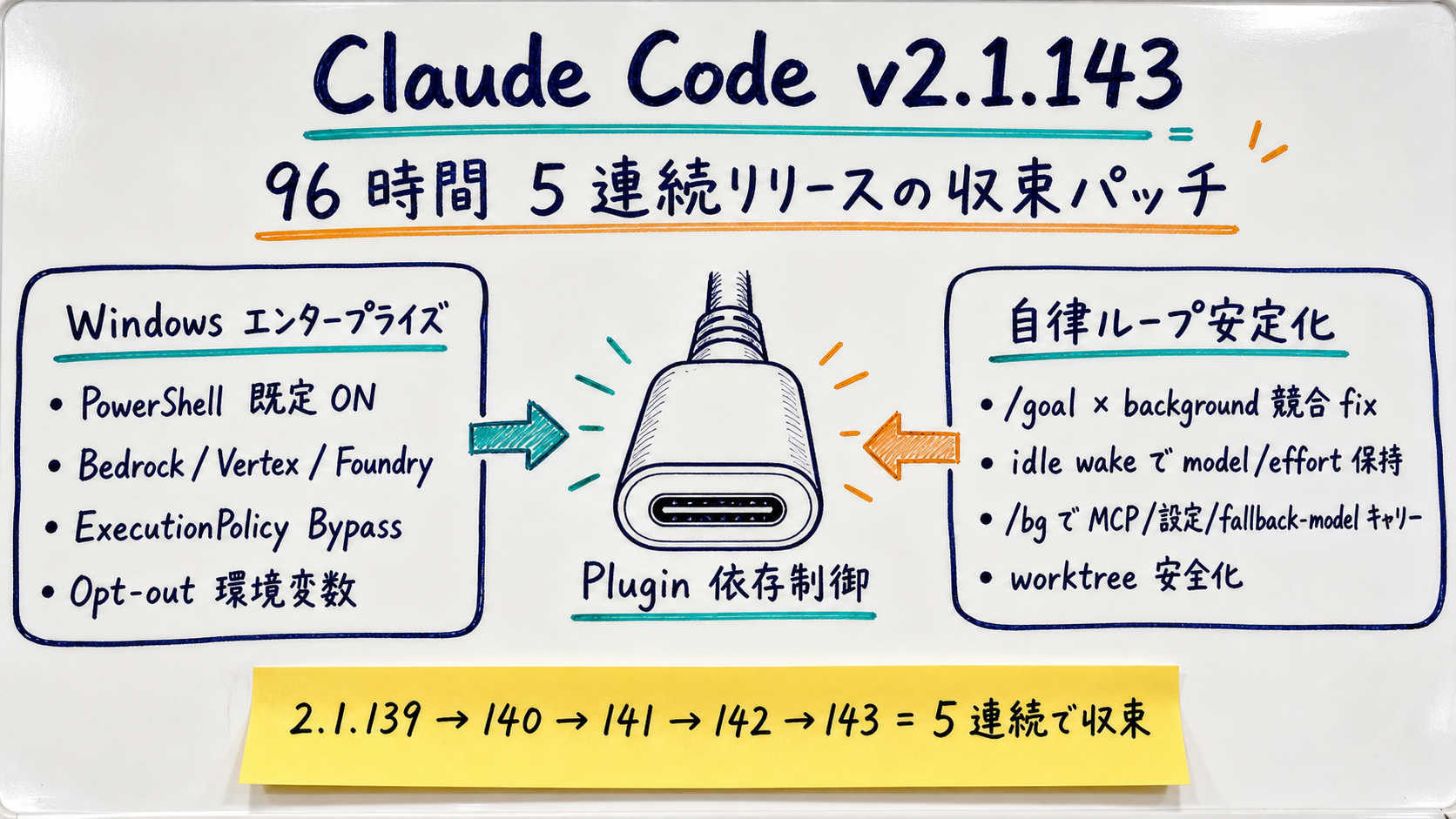
2.1.143 itself is a mid-size release combining new features and fixes. The GitHub release notes list 20+ fixes. For AI sales automation use cases — multiple /goal sessions in parallel, each with its own project / MCP / permissions — three improvement groups stand out:
/goal × background race fix, background session model/effort persistence, /bg flag carry, worktree.bgIsolation setting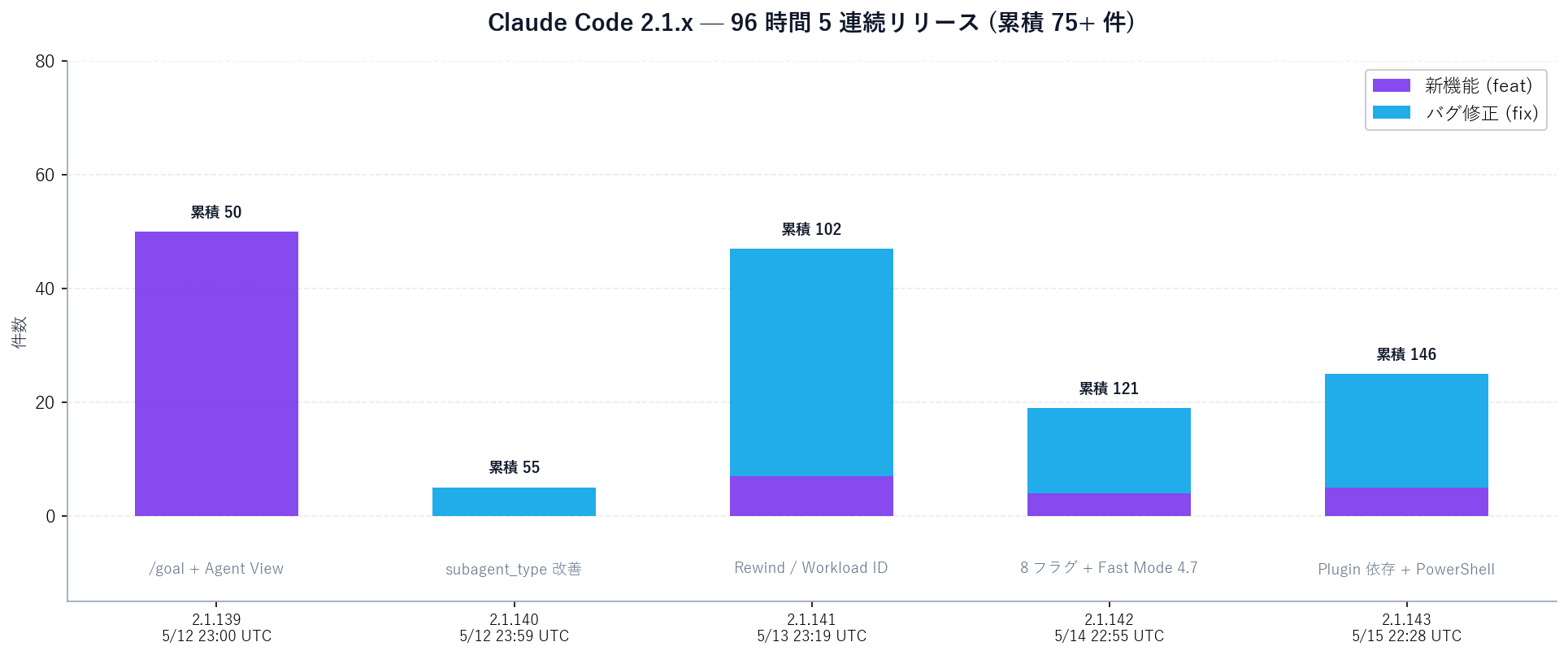
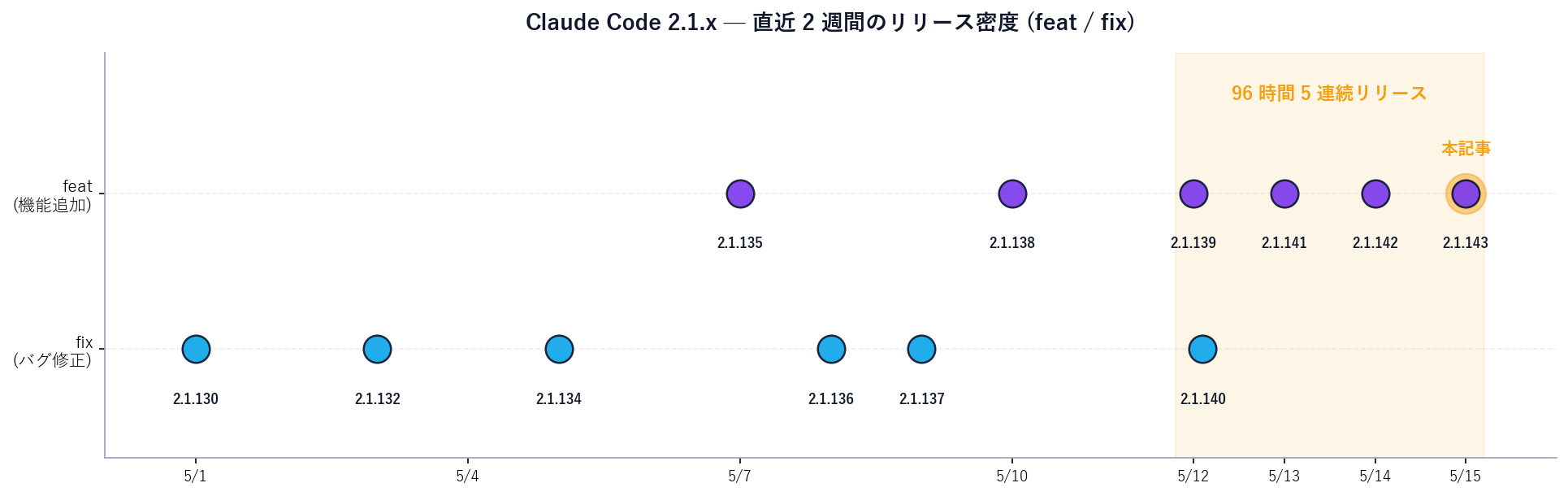
Excerpts and clarifications from the GitHub Releases v2.1.143 notes, with the four groups that hit AI sales automation directly.
Until now, plugin enable / disable were per-operation. If Plugin A depended on Plugin B and a user disabled B, Plugin A would silently break at startup (no error message) or throw mid-flight.
2.1.143 makes claude plugin disable refuse to disable when a dependent plugin is still enabled. The refusal includes a copy-pasteable disable-chain hint — the one-liner that disables the dependent plugin first and then the target. The reverse direction, claude plugin enable, follows transitive dependencies (A → B → C) and force-enables them all.
The /plugin marketplace browse pane now shows per-plugin projected context cost (per-turn and per-invocation token estimates). You can see "how many tokens per turn does this plugin burn?" before installing it — making context-window budgeting concrete.
A major Windows-environment change.
Through 2.1.142, Windows users running PowerShell scripts from Claude Code frequently hit organizational ExecutionPolicy blocks. In Bedrock / Vertex / Foundry enterprise environments where IT enforces Restricted or AllSigned, the PowerShell tool calls from Claude Code would fail with execution-policy violations.
2.1.143:
-ExecutionPolicy Bypass by default (opt out: CLAUDE_CODE_POWERSHELL_RESPECT_EXECUTION_POLICY=1)CLAUDE_CODE_USE_POWERSHELL_TOOL=0)claude agents flag propagation to dashboard2.1.142 added 8 flags to claude agents (--add-dir, --settings, --mcp-config, --plugin-dir, --permission-mode, --model, --effort, --dangerously-skip-permissions). 2.1.143 makes them carry to both the dashboard itself and background sessions dispatched from it.
This means "2.1.142 let you pass flags at session start" vs. "the same flags now also apply when managing multiple sessions through the dashboard." For SDR teams running multiple pipelines through Agent View, launch flags propagate end-to-end.
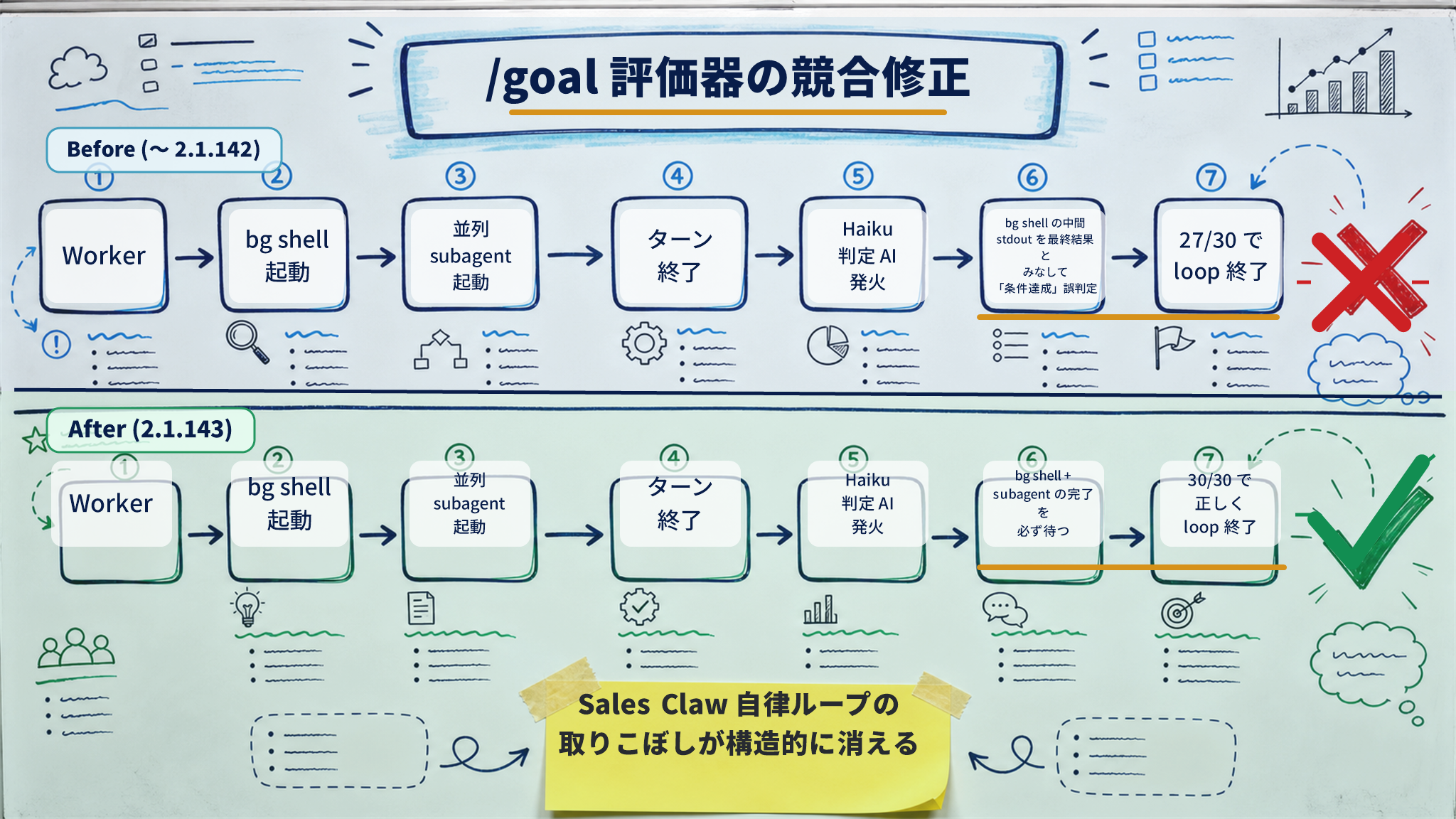
/goal × background shell race fix + 20+ bug fixesFrom a Sales Claw perspective, the most important fix is to the /goal evaluator that was firing while background shells and delegated subagents were still running.
Previously, /goal's completion-judge AI (Haiku) could fire before background shells / subagents finished. That led to races where "the shell's mid-flight stdout" was treated as the final result and the loop exited early, or where the judge said "done" before a subagent's response arrived. 2.1.143 makes the evaluator wait for background shells / subagents to complete. For Sales Claw's "/goal + background /bg+ parallel subagents" pattern, this is the final stabilization step.
Other operationally meaningful fixes:
/bg now preserves --mcp-config / --settings / --add-dir / --plugin-dir / --strict-mcp-config / --fallback-model / --allow-dangerously-skip-permissions across respawnCLAUDE_CODE_STOP_HOOK_BLOCK_CAP)/loop wakeup during idle statesrm -rf on git worktree remove failure (prevents gitignored / in-progress file loss)~/Documents / ~/Desktop / ~/Downloads with Full Disk Access granted (previous "Operation not permitted" fixed)worktree.bgIsolation: "none" setting — background sessions edit the working copy directly without EnterWorktree, for repos where worktrees are impracticalclaude agents right-click paste, repeated PowerShell processes, and unresponsive input during streamingstatus.claude.comEach fix is small individually; cumulatively they push toward "dispatched background sessions survive 96 hours of neglect."
Running Sales Claw on Claude Code increasingly means composing multiple plugins (e.g., form-html-language-server, Sales Claw skills plugin, MCP plugin bundles). Some implicitly depend on others' skills or hooks — an invisible chain to the user.
Problems through 2.1.142:
2.1.143 makes claude plugin disable <name> detect "another enabled plugin depends on <name>" and refuse. Along with the refusal, it prints a copy-pasteable disable-chain hint — the one-liner that disables the dependent first and then the target.
# Through 2.1.142 (silent break)
claude plugin disable salesclaw-form-skills
# → succeeds silently, but salesclaw-mcp-bundle breaks at next startup

# 2.1.143+ (refuse + hint)
claude plugin disable salesclaw-form-skills
# → ❌ Refused: salesclaw-mcp-bundle depends on salesclaw-form-skills.
#    To disable the chain, run:
#    claude plugin disable salesclaw-mcp-bundle && \
#    claude plugin disable salesclaw-form-skills

# Reverse: enable also force-enables transitive deps
claude plugin enable salesclaw-mcp-bundle
# → ✅ Enabled. Also force-enabled transitive dependency: salesclaw-form-skills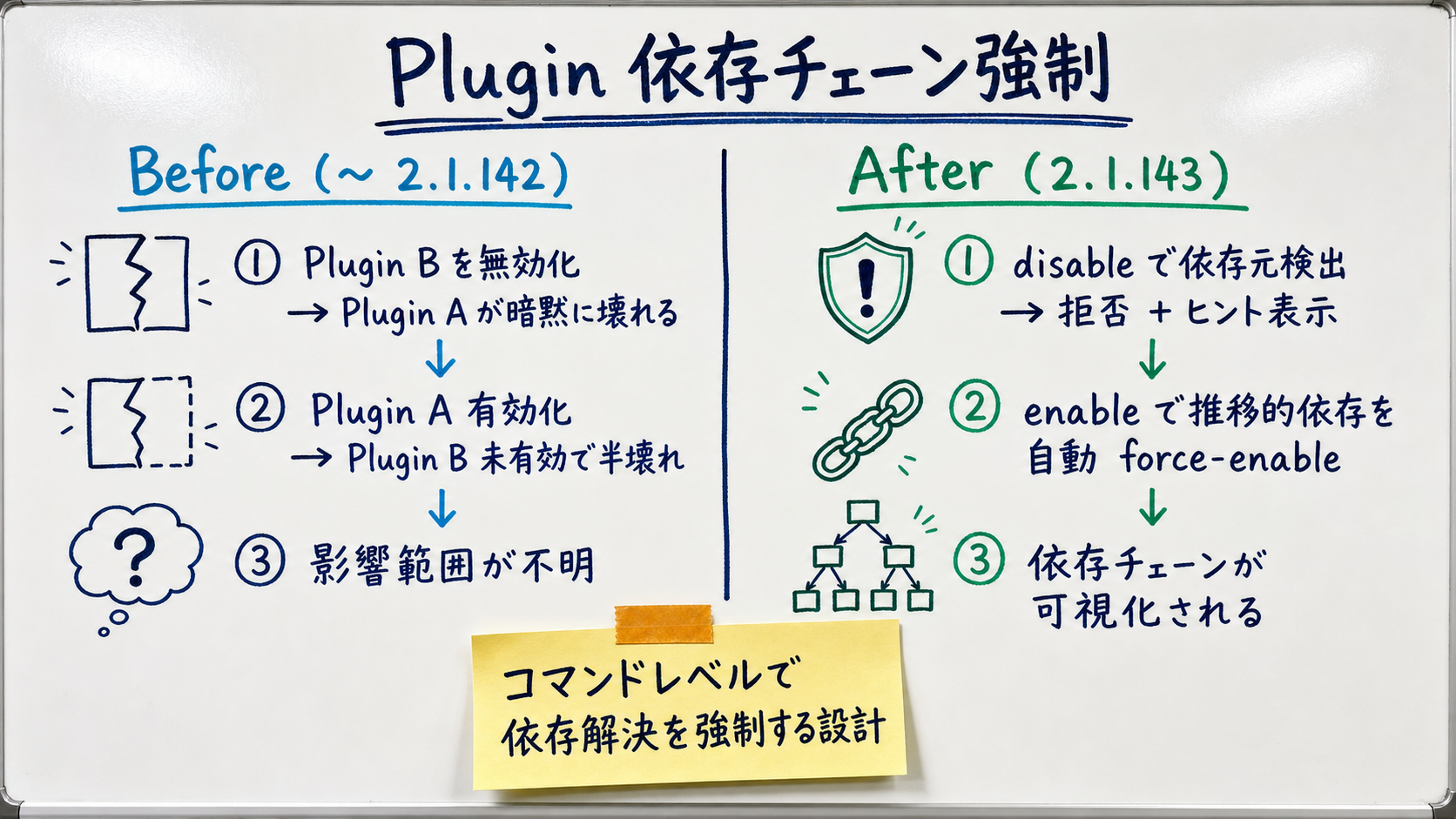
| 項目 | Through 2.1.142 | 2.1.143 (dependency enforcement) |
|---|---|---|
| On disable | Unconditional (no dep check) | If dependent exists → refuse + chain hint |
| On enable | Target only enabled | Transitive deps auto-enabled |
| Dep-accident detection | Only after plugin breaks | At command time |
| Impact visualization | Impossible | Disable-chain hint visualizes it |
| Team-shared plugin.json | Silently breaks at startup | Enable auto-completes required deps |
Windows Claude Code users, especially in enterprise environments (Bedrock / Vertex / Foundry), faced:
Restricted / AllSigned ExecutionPolicy blocked Claude Code's PowerShell calls with policy violationspowershell -ExecutionPolicy Bypass2.1.143 integrates these into "works out of the box":
CLAUDE_CODE_USE_POWERSHELL_TOOL=0CLAUDE_CODE_POWERSHELL_RESPECT_EXECUTION_POLICY=1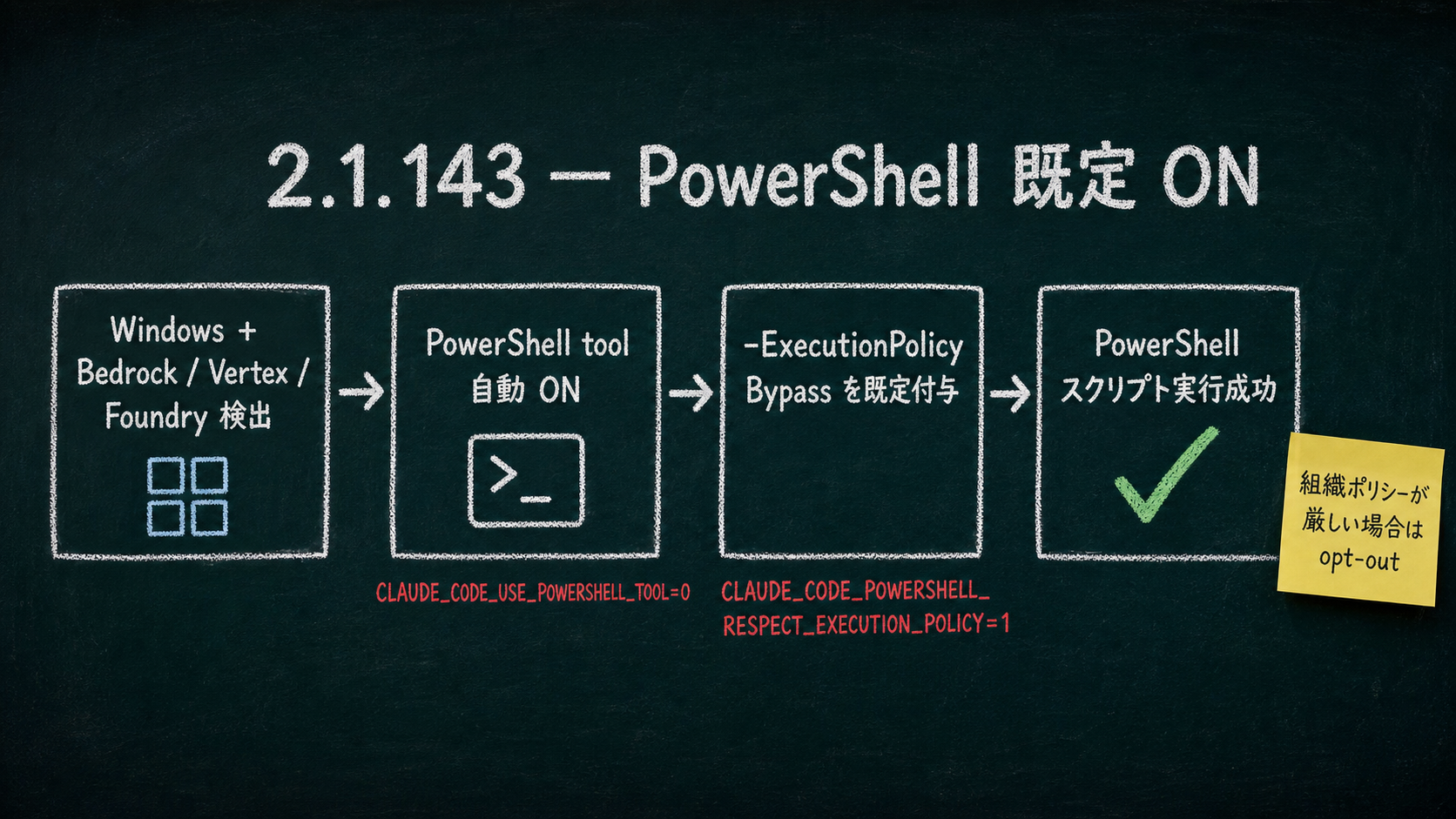
/goal × background shell race fix lands on Sales Claw autonomous loopsSales Claw Phase B (form copy generation + pre-send checks) increasingly runs as /goal loops. Internally:
/bg/goal judge AI (Haiku) decides "condition met?"Through 2.1.142, the judge could fire before background shells / subagents finished, treating the shell's mid-flight stdout as the final result and exiting the loop early. Sales Claw internal validation (1.2.111+) on "/goal awaiting_approval reaches 30" showed loops ending at ~27 — a structural under-shoot.
2.1.143 makes the /goal evaluator wait for background shells and delegated subagents to complete before judging. Effects:
2.1.141 added bg permission-mode retention; model (haiku / sonnet / opus) and effort (high / medium / low) still reset on idle wake. 2.1.143 retains both — the session keeps running with the same model / effort after waking from idle.
/bg flag carryForking from foreground to background via /bg previously dropped some flags back to defaults. 2.1.143 permanently carries these:
--mcp-config — MCP config preserved--settings — settings file preserved--add-dir — additional directories preserved--plugin-dir — plugin directory preserved--strict-mcp-config — strict checking preserved--fallback-model — overload fallback preserved (new addition, prevents hard-fail under overload)--allow-dangerously-skip-permissions — bypass remains available in the Shift+Tab cycleworktree.bgIsolation: "none" settingNew setting. Previously claude --bg isolated background sessions in a separate worktree via EnterWorktree. For repos where worktrees are impractical (e.g., Sales Claw's Electron + Node.js monolith, partial work in a huge monorepo), you can now disable isolation and edit the working copy directly.
// .claude/settings.json
{
  "worktree": {
    "bgIsolation": "none"
  }
}
Use this setting cautiously. Because background sessions edit the working copy directly, they can conflict with foreground work in progress. For workflows like Sales Claw where "background runs while the user is in the GUI," define explicit conflict-detection and restart rules.
macOS background-job sessions failing with "Operation not permitted" on ~/Documents / ~/Desktop / ~/Downloads — even with Full Disk Access — is fixed. An edge case that quietly tripped up Sales Claw flows referencing user work files.
| 項目 | Through 2.1.142 | 2.1.143 (durability patches) |
|---|---|---|
| Model setting across idle wake | Resets to default | Preserved |
| Effort setting across idle wake | Resets to default | Preserved |
| /bg fork — MCP config | Reverts to global | --mcp-config carries |
| /bg fork — fallback-model | Not supported | Carries; no hard-fail on overload |
| Repos where worktree is impractical | EnterWorktree always required | worktree.bgIsolation: "none" → edit working copy |
| macOS Documents/Desktop/Downloads | FDA-on yet Operation not permitted | Reads/writes correctly |
Sales Claw is OSS that lowers misfire and policy-violation risk through policy control, pre-send checks, do-not-contact detection, CAPTCHA-on-detect stop, rate limits, audit logging, and automatic stop conditions. Since Claude Code is the CLI backend, Claude Code stability flows directly into Sales Claw.
# 1. Upgrade Claude Code to 2.1.143
npm install -g @anthropic-ai/claude-code@latest

# 2. Confirm
claude --version
# → 2.1.143 or newer

# 3. Restart Sales Claw dashboard
#    Click [Start Claude] to relaunch the managed PTY

# 4. (Optional) On Windows / Bedrock environments where you want to keep org ExecutionPolicy
export CLAUDE_CODE_POWERSHELL_RESPECT_EXECUTION_POLICY=1
# Or disable the PowerShell tool entirely
export CLAUDE_CODE_USE_POWERSHELL_TOOL=0
No code changes in Sales Claw itself. See Sales Claw Quick start for full setup.
After upgrading to 2.1.143, re-measure on Sales Claw 1.2.111+:
/goal awaiting_approval N under-shoot rate — does the "average N-3" through 2.1.142 return to "exactly N" with the evaluator-wait fix?.claude/settings.json plugin changes propagate cleanly to the whole team?# Sales Claw pipeline management script (example)
# 2.1.143's /bg flag carry means launch parameters persist across respawn
claude agents \
--add-dir ~/work/sales-claw/lines/btob-saas \
--settings ~/work/sales-claw/lines/btob-saas/.claude/settings.json \
--mcp-config ~/work/sales-claw/lines/btob-saas/.claude/mcp.json \
--plugin-dir ~/work/sales-claw/lines/btob-saas/.claude/plugins \
--permission-mode acceptEdits \
--model sonnet \
--effort high \
--fallback-model haiku \
--bg
# All flags persist across respawn — no more 'config was lost overnight' incidents
# Watch progress in Agent View
claude agents2.1.143 finalizes stability, but running AI sales automation unattended for long periodsstill requires multiple guards. Don't claim "safe" — lower risk structurally.
preferences.complianceFooter: trueawaiting_approval, log on detectWith PowerShell tool now default-on and Bypass default-on, the org security boundary moves forward to the Claude Code edge. Running Sales Claw on internal endpoints, the Bypass-acceptance scope needs explicit documentation.
With /goal × background race resolved, autonomous-loop completion rate goes up — which is both a benefit (fewer under-shoots) and a risk (loops may run longer than intended). The responsibility for termination-condition design remains heavy.
worktree.bgIsolation: "none"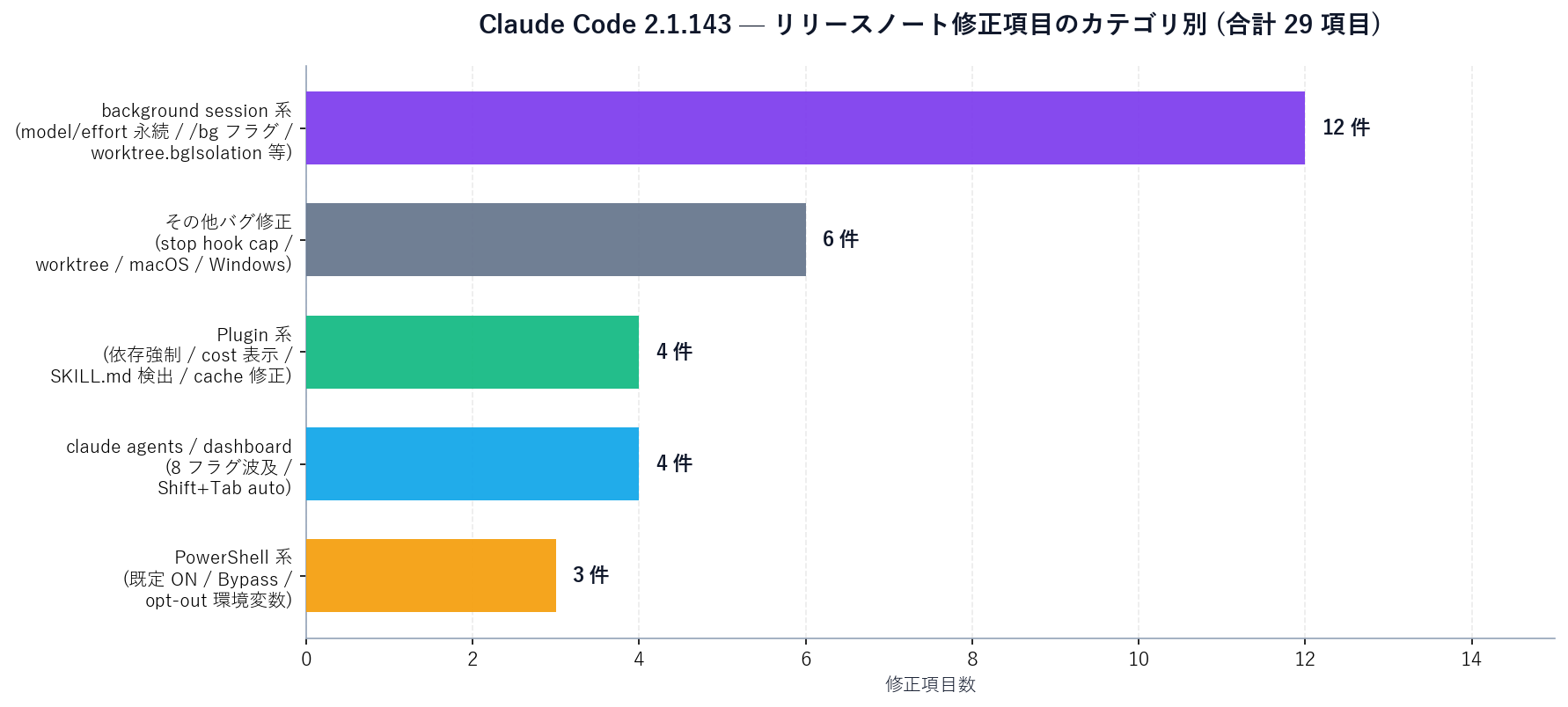
Checks when switching to Claude Code 2.1.143
In isolation, Claude Code 2.1.143 looks like "plugin dependency enforcement, PowerShell default-on, 20+ bug fixes" — a mid-size release. Lined up against 2.1.139 (/goal + Agent View), 2.1.140 (subagent_type + /goal hang fix), 2.1.141 (Rewind / Workload ID + 40+ fixes), 2.1.142 (8 flags + Fast Mode 4.7 + 15+ fixes), and 2.1.143 (Plugin deps + PowerShell + 20+ fixes) — five consecutive 96-hour releases— you can see Anthropic shipping a deliberate cluster aimed at "getting autonomous loops and dispatched background sessions to production-ready quality."
For AI sales automation — multiple industry pipelines on one machine, long-running MCP calls in daily batches — you really need to take in the headline feature, the next day's consistency patch, the day-after's stabilization, the day-after-that's ops flags, and the day-after-that's convergence patch — together — before you can run it in production.
Next action: npm install -g @anthropic-ai/claude-code@latest for 2.1.143, set the PowerShell opt-out env vars as needed on Windows, and re-measure Sales Claw's Phase B "awaiting_approval N" across 5 sessions to verify the under-shoot is gone. See Quick start and Workflow overview for details. Sales Claw itself is free at the download page.
本記事は X 公式アカウントと公式ドキュメントを一次情報として参照しています。
この記事の著者
中澤 圭志
Sales Claw maintainer
Designs and develops Sales Claw. Writes from the field on B2B sales automation and applied AI.