ツール解説
What are Claude Skills? Understanding Anthropic's New "Recipe-Book Files for AI" in 8 Minutes (Cookbook Analogy)
12 分
Understand the harness in one shot via the tack metaphor → five inconveniences of factory default → the six-component map → when to use Skills vs Subagents → safety belts with Hooks × Permissions → the 6-step recipe to build it in 30 days → risks (over-add / name conflicts / security / runaway cost) → finally, full disclosure of the Sales Claw production harness (87 items). Anthropic's official Claude Code Docs (Overview / Settings / Skills / Subagents / Hooks / MCP) are the primary sources.

中澤 圭志
@keishi_nakazawaSales Claw maintainer
Key Facts
Harness components
6 types (CLAUDE.md / settings.json / Skills / Subagents / Hooks / MCP)
Main locations
Two tiers: ~/.claude/ (global) and ./.claude/ (project)
Official reference
docs.anthropic.com/en/docs/claude-code (Overview / Settings / Skills / Subagents / Hooks / MCP)
Sales Claw production size
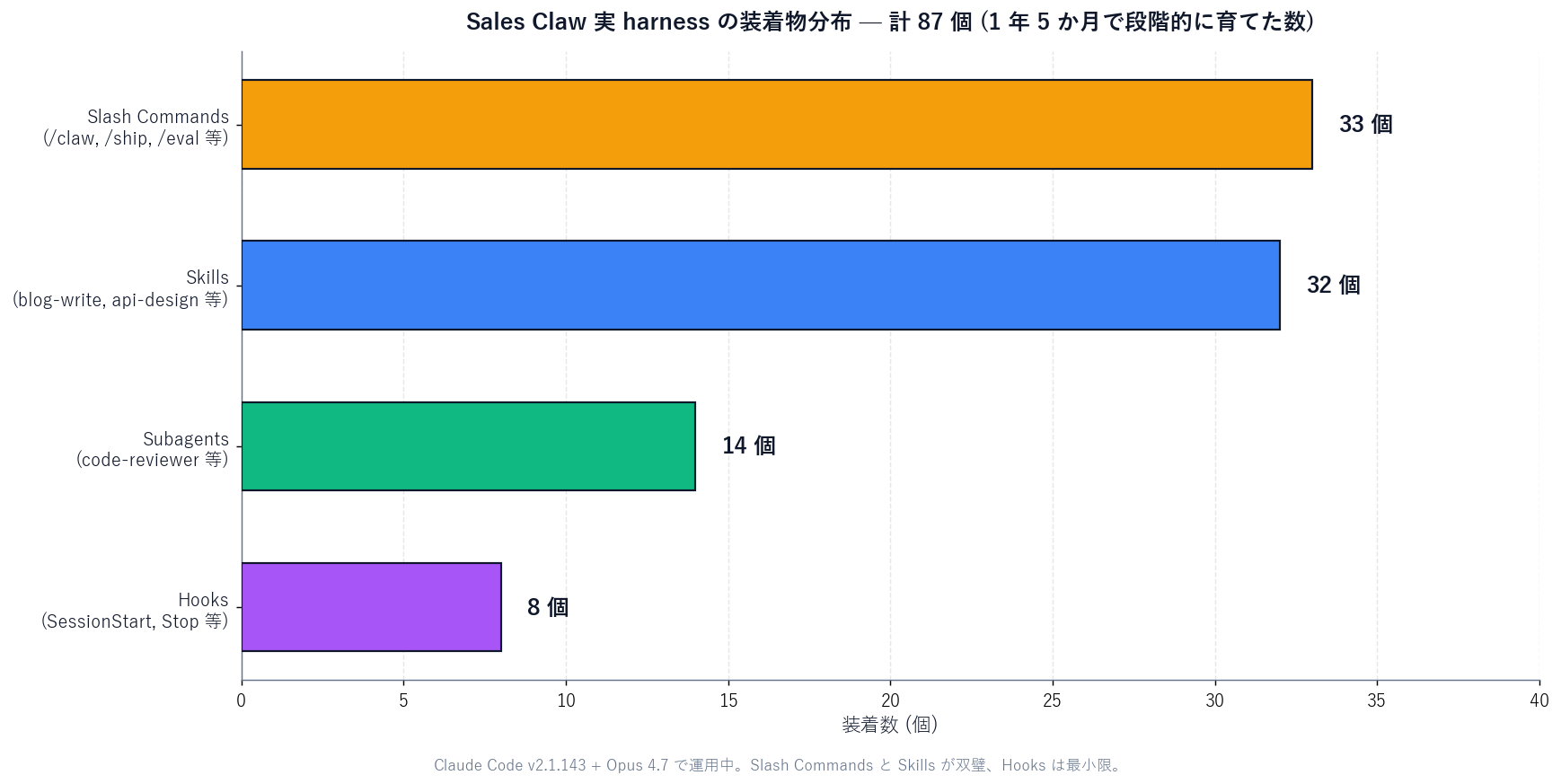
32 Skills + 14 Subagents + 33 Slash Commands + 8 Hooks = 87 items
"I installed Claude Code, but I have no idea what to configure." "I'm copy-pasting other people's settings without understanding them." "Am I even allowed to touch the .claude folder?" — This article walks through how to take Claude Code beyond the "factory default" and tune it into a "your-spec" setup, written for readers who are not deep AI users. With the harness (tack / saddle) metaphor as the spine, the roles of configuration files, skills, hooks, and MCP should fall neatly into place.
In the second half, the author (a Sales Claw maintainer) fully discloses the 32 skills + 14 subagents + 33 slash commands + 8 hooks in actual use, with the reasoning behind each choice. By the end, you should have everything you need to start building your own optimal harness.
This article uses Anthropic's official Claude Code Docs (Overview / Settings / Skills / Subagents / Hooks / MCP / Slash Commands) and the anthropics/claude-code GitHub repository as primary sources. Related reading: Claude Code Slash Commands Complete Guide, MCP Complete Guide, and Claude Skills: 12 Useful Skills.
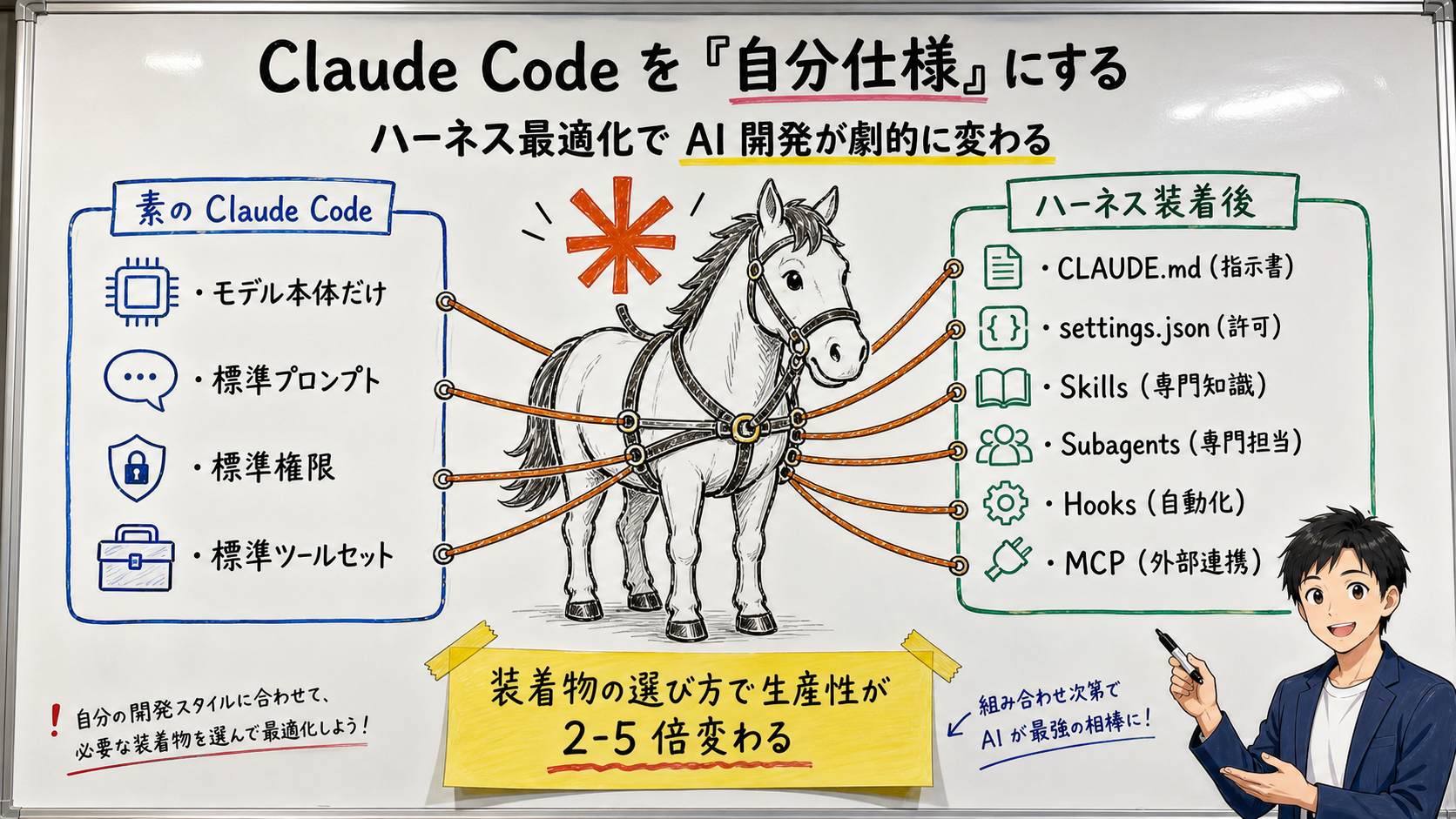
Claude Code itself refers to the AI model that Anthropic serves from the cloud (Claude Opus / Sonnet / Haiku). On its own it is "very smart but needs the user to direct every step." Once you start strapping local files and tools onto it, Claude begins to remember "what it should be doing" and starts running with less prompting per step. The bundle of strapped-on equipment is the harness.
[Official] The official Docs describe it as "an agentic coding tool that lives in your terminal." The "terminal" part is important: Claude Code is built around the assumption that it has access to local files. That is precisely why a harness placed locally can change its behavior so much.
[Author's view] Anthropic's own Docs stay neutral with words like "configuration," "customization," and "extensions." The term "harness" spread through the local developer community (Hacker News, GitHub Discussions, personal blogs) and started catching on in English by late 2025. The Japanese-speaking community also uses "ハーネス" / "装備品" / "装着物" now, and this article follows that convention. The reason the tack metaphor works, in the author's view, is that it makes one intuition extremely clear: "the horse (model) is the same, but the tack dramatically changes the ride."
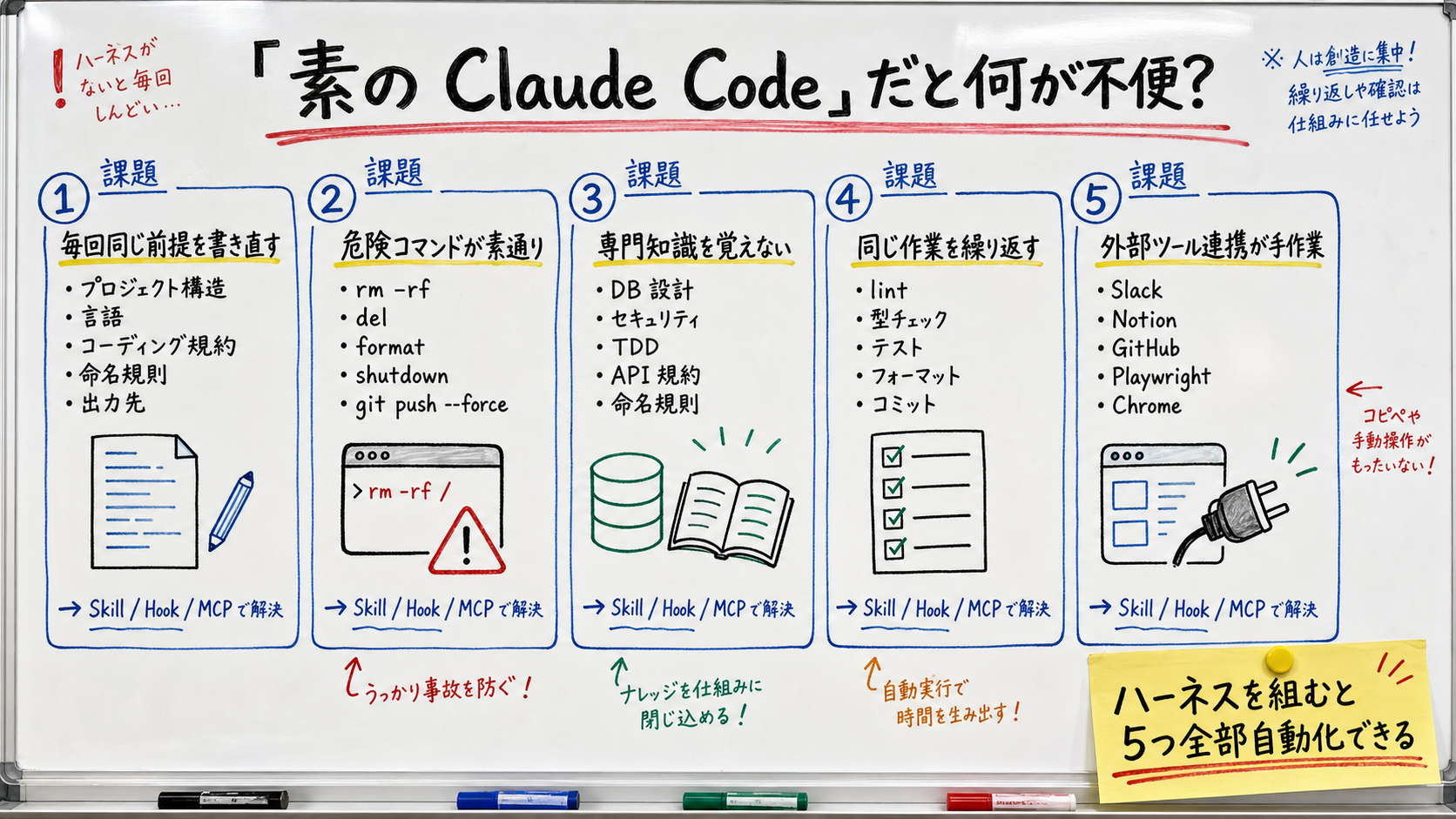
With vanilla Claude Code you find yourself prefacing every session with "My project is on Next.js 16," "TypeScript is strict," "Commit messages follow conventional commits" over and over. Write these into CLAUDE.md (with global and project tiers) and Claude Code reads them automatically every session, starting the conversation already aligned. [Official] The Anthropic Docs state that "CLAUDE.md lets you give Claude project-specific instructions persistently."
Vanilla Claude Code, given user approval, will happily run `rm -rf` / `git push --force` / `format` and other destructive commands. To avoid accidents, write a list of dangerous patterns into permissions.deny in settings.json so they are blocked outright. This is the "safety belt" of the harness — the seatbelt of the tack analogy.
Claude is a general-purpose AI; it does not know your company's DB schema conventions, your TDD style, or your security review checklist. Re-prompting every session is wasteful. So you bundle "DB design knowledge" or "security review criteria" into a Skill folder and let Claude load it on demand. In the tack metaphor, this is "attaching pouches to the saddle."
Manually running lint / type-check / tests after every edit wastes time. With Hooks, you can have a quality gate run automatically right after Edit / Write, blocking the next step if something is wrong. In the tack metaphor, this is "automating the reins."
Want to notify Slack? Want to push to Notion? Want to drive a browser with Playwright? Wiring these by hand every time is inefficient. By adding an MCP (Model Context Protocol) server to the harness, Claude sees a "list of available tools" and reaches for them on its own. In the tack metaphor, this is "putting a map and a compass in the saddlebag."
| Component | Role (tack metaphor) | Main location | Priority |
|---|---|---|---|
| CLAUDE.md | "Instruction sheet" for prerequisites | `~/.claude/CLAUDE.md` and `./CLAUDE.md` | ★★★ Required |
| settings.json | "Seatbelt" for allow / deny | `~/.claude/settings.json` and `./.claude/settings.json` | ★★★ Required |
| Skill | "Saddlebag" for specialist knowledge | `~/.claude/skills/[name]/` and `./.claude/skills/[name]/` | ★★ Recommended |
| Subagent | "Companion horse" — a specialist | `~/.claude/agents/[name].md` | ★★ Recommended |
| Hook | "Reins" that automate | The `hooks` section of `settings.json` | ★ Optional |
| MCP server | "Map and compass" to the outside world | The `mcpServers` section of `settings.json` | ★ Optional |
With this table in your head, you will be able to read the Claude Code Docs and ask "which piece are they talking about right now?" with much less friction. The following H2 sections dig into two important pairs: (3) Skills × (4) Subagentsand (5) Hooks × (2) settings.json.
Every component has two possible homes: global (under `~/.claude/`, applies to all projects) and project-local (under `./.claude/`, applies only to that repo). As a rule of thumb, personal taste = global, team-shared = projectis the safe split. The project tier overrides the global tier on conflict.[Official] Anthropic's Docs support both locations and recommend committing the project-level config to the repo for team sharing.
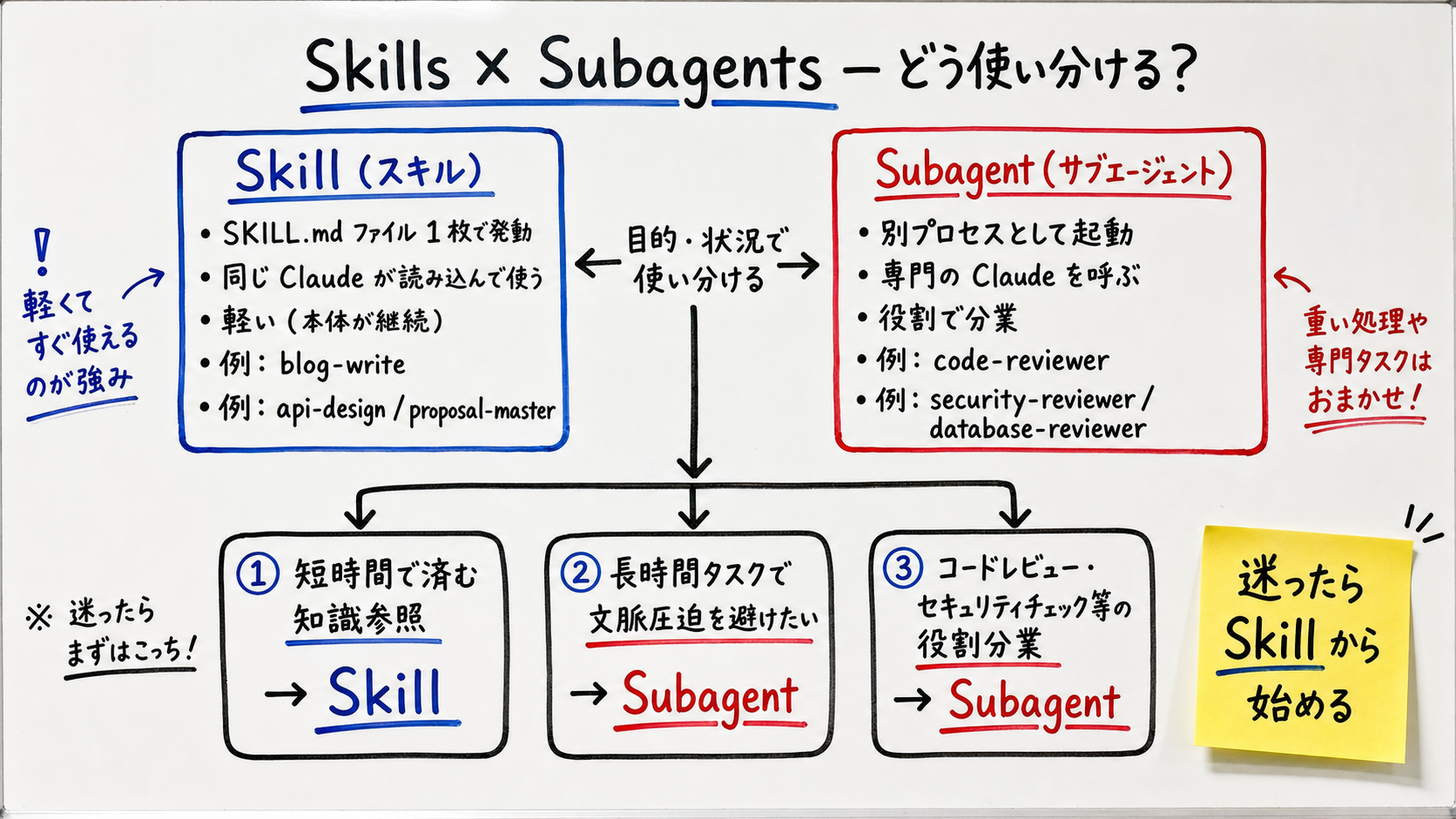
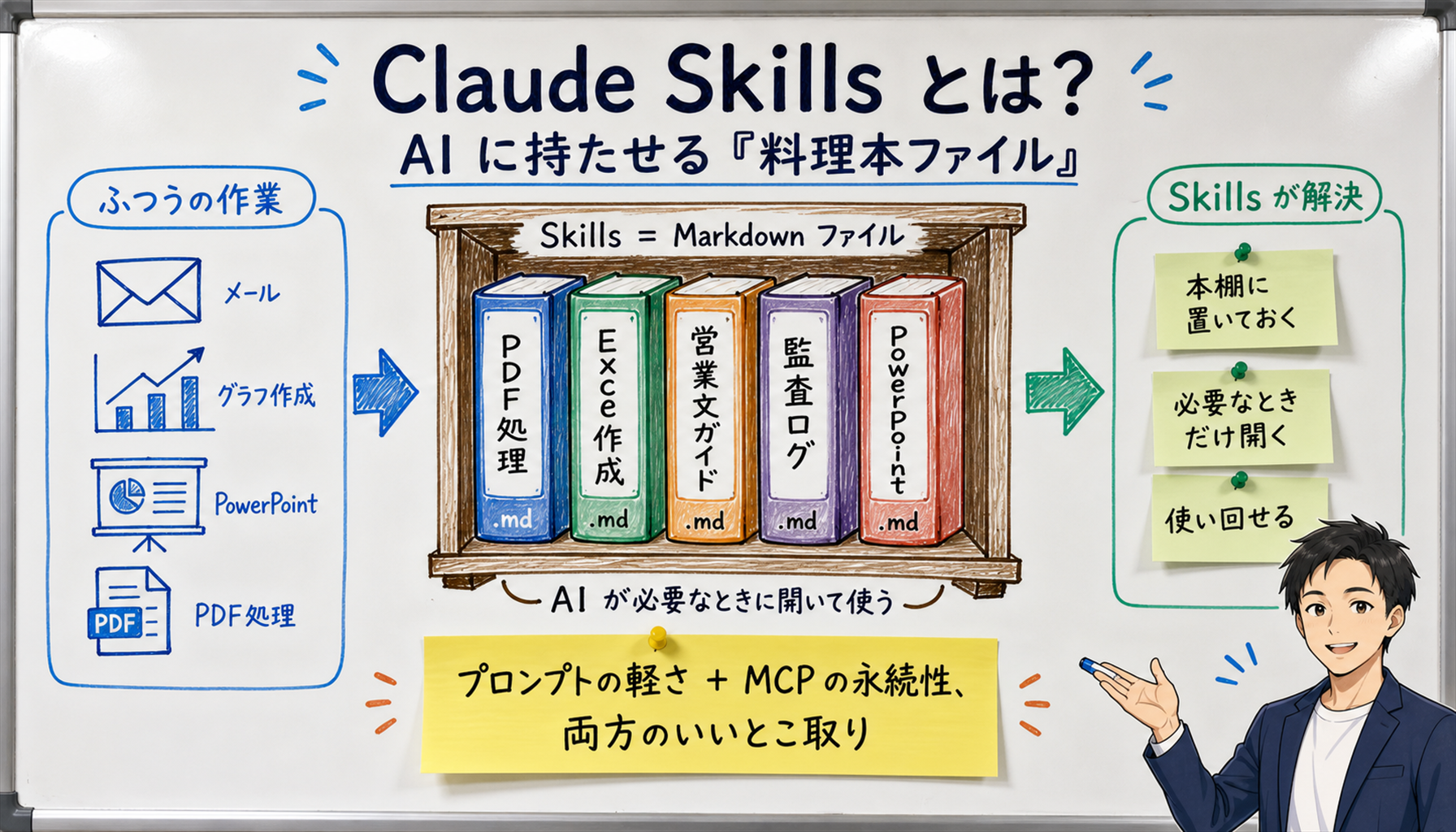
A skill is a "folder + SKILL.md (instruction file)" pair. The header metadata in SKILL.md — a name (short identifier) and a description (what it does and when to use it) — is loaded permanently. When the user's request matches the description, Claude reads the body of the SKILL.md on demand and the skill fires. Anthropic released this officially in 2025-10 and[Official] opened it as a standard in 2025-12.
Representative skills Sales Claw uses: blog-write (the skill writing this article), note-publish (note.com posting), api-design (REST API design), postgres-patterns (DB query tuning), security-review (security review) — 32 in total. The full list is at the end of this article.
A subagent is "a specialist Claude spawned as a separate process." The main Claude (the orchestrator) decides "I need a code review" or "I need a security check" and calls the subagent; the subagent works in its own context and returns just the result.[Official] The Claude Code Docs describe subagents as "independent AI assistants with their own context and tools."
Representative subagents Sales Claw uses: code-reviewer (code quality), security-reviewer (vulnerability check), database-reviewer (SQL / schema), e2e-runner (E2E test execution), build-error-resolver (build error resolution), harness-optimizer (improvements to the harness itself) — 14 in total.
The author's operating rules ([Author's view]):
| 項目 | Skill | Subagent |
|---|---|---|
| Startup cost | Low (main Claude continues) | Medium-high (separate process, 30-60K tokens) |
| Main context bloat | Yes (read into main) | No (separate context) |
| Parallel execution | × | ◯ Multiple at once |
| Best for | Knowledge, templates, guidelines | Reviews, audits, exploration, fixes |
| Authoring difficulty | Low (folder + md) | Medium (md + tools spec) |
The eight officially supported hook moments are [Official]:
The author's harness wires SessionStart with "show skill list + load claude-mem," PreToolUse(Bash) with "git push reminder," PostToolUse(Edit/Write) with "quality gate + post-edit formatting," and Stop with "session summary + zombie cleanup + ntfy notification." In particular, the `cleanup-zombies.ps1` in Stopwas written to solve "Claude Code leaves chrome / playwright zombies behind" — a single PowerShell script that dramatically stabilized the local machine.
The `permissions` section of settings.json holds three things: allow / deny / defaultMode. The author's operating rules ([Author's view]):
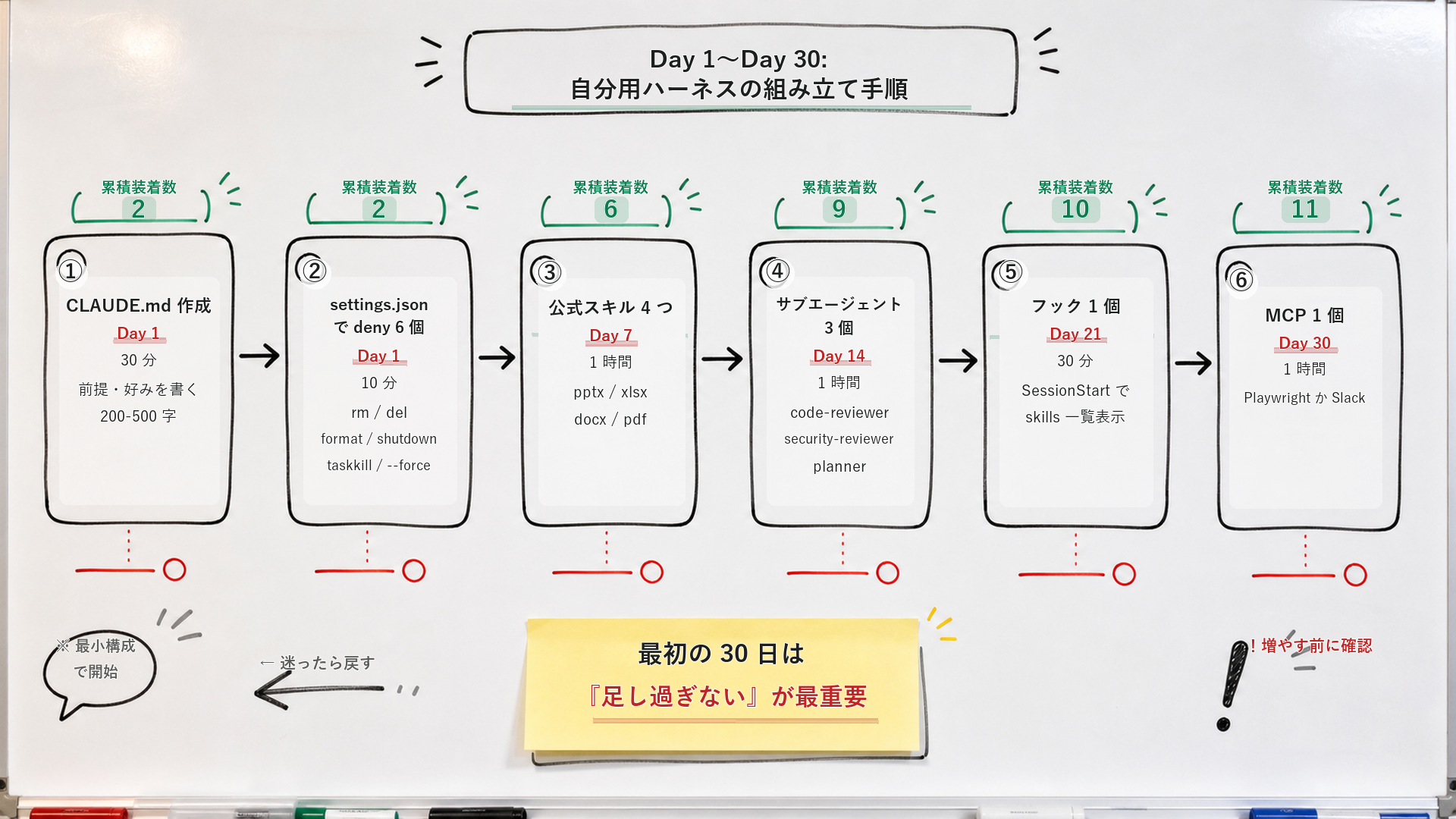
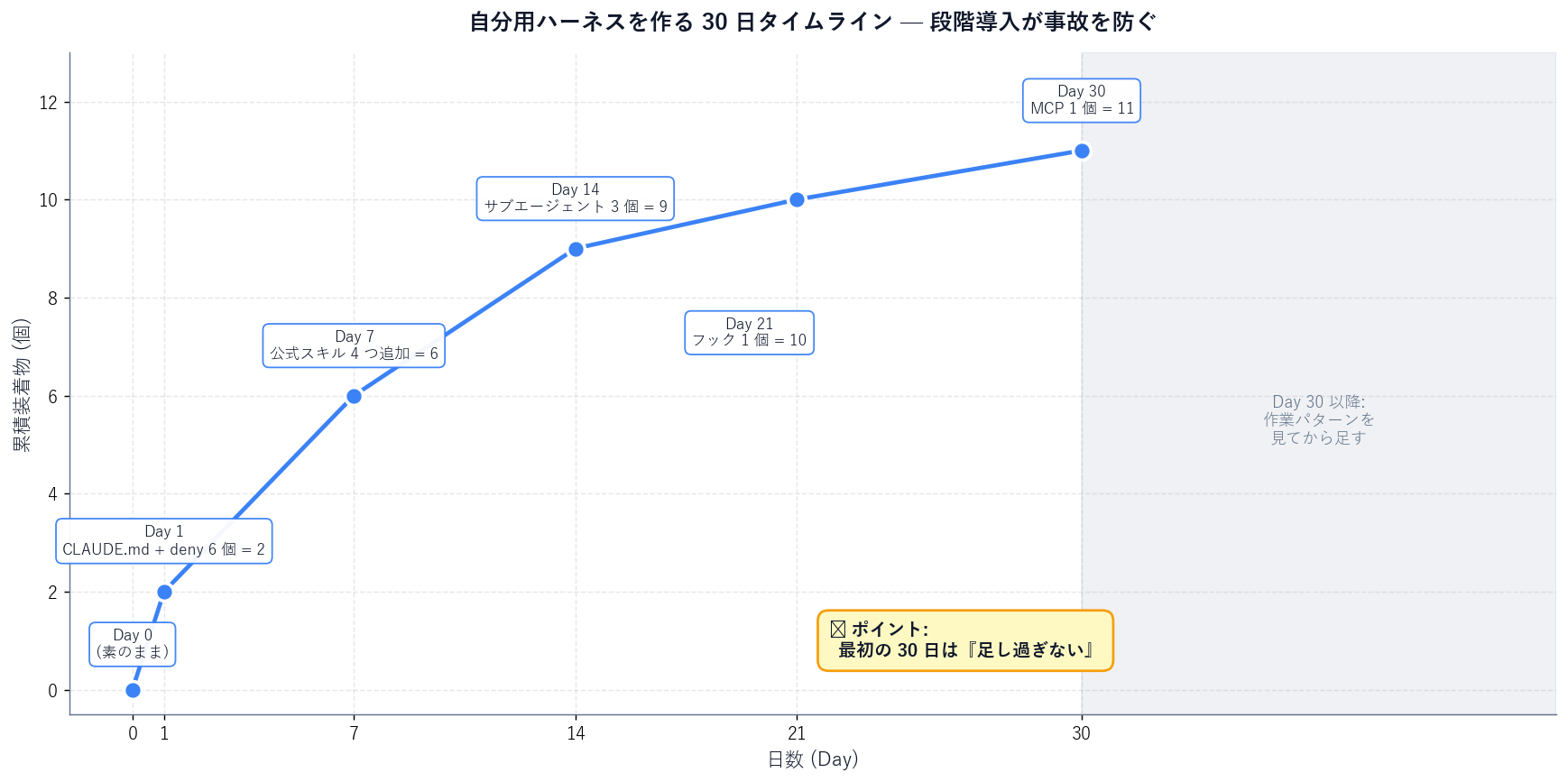
Create `~/.claude/CLAUDE.md` in your home directory and write 200-500 characters of preferences, role, and main projects. Examples: "respond in Japanese," "use conventional commits," "make minimal changes." This alone deletes the preamble at the start of every session. Project-specific details go in `./CLAUDE.md`at the repo root.
Create `~/.claude/settings.json` with at least:
{
  "permissions": {
    "deny": [
      "Bash(rm *)",
      "Bash(del *)",
      "Bash(rmdir *)",
      "Bash(* --force*)",
      "Bash(format *)",
      "Bash(shutdown *)"
    ],
    "defaultMode": "auto"
  }
}
Now "commands that end you in one shot" are blocked outright. Day 1 setup is done.
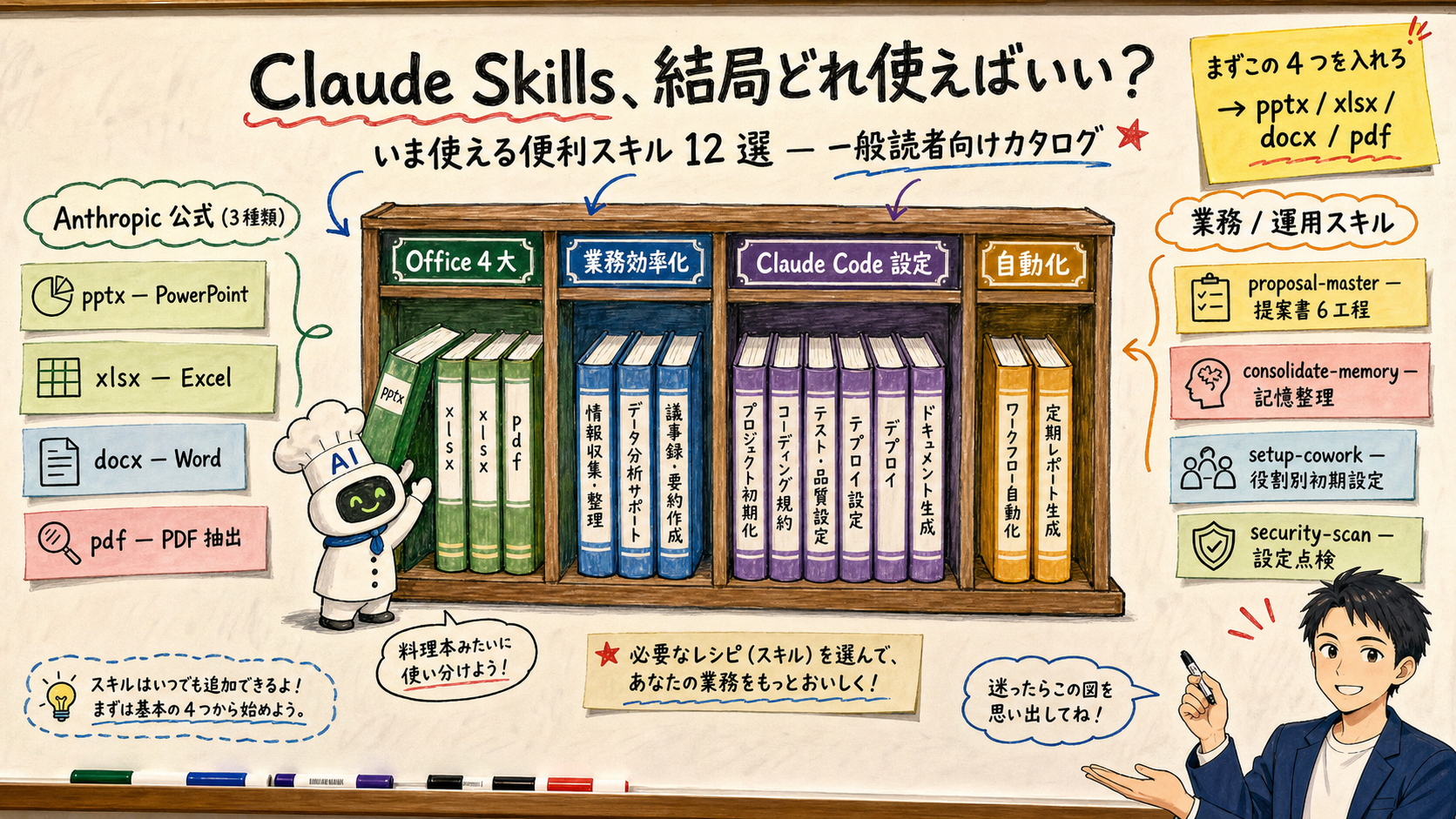
Install Anthropic's official pptx / xlsx / docx / pdf skills with/plugin marketplace add anthropics/skills followed by/plugin install anthropic-skills. Details: Claude Skills: 12 Useful Skills. This alone unlocks "make me a PowerPoint," "tidy up an Excel sheet," "draft a Word template," "extract a table from this PDF" as routine AI tasks.
Start with code-reviewer (code quality), security-reviewer (security), planner (design planner). Place each as a Markdown file with front matter under `~/.claude/agents/[name].md`. The easiest way is to ask Claude to draft the first subagent definition, then tune it by eye.
Start with just one: SessionStart that shows the skill list. Right after you do this, "every session starts with a clear inventory of my own equipment" is the feeling, and the harness clicks emotionally. Then layer on PostToolUse(Edit) for a quality gate, etc.
Finish with one MCP server. Playwright MCP (browser automation) or Slack MCP are good first picks. Adding two at once puts you right back into the "nothing is understandable" state — one at a time.
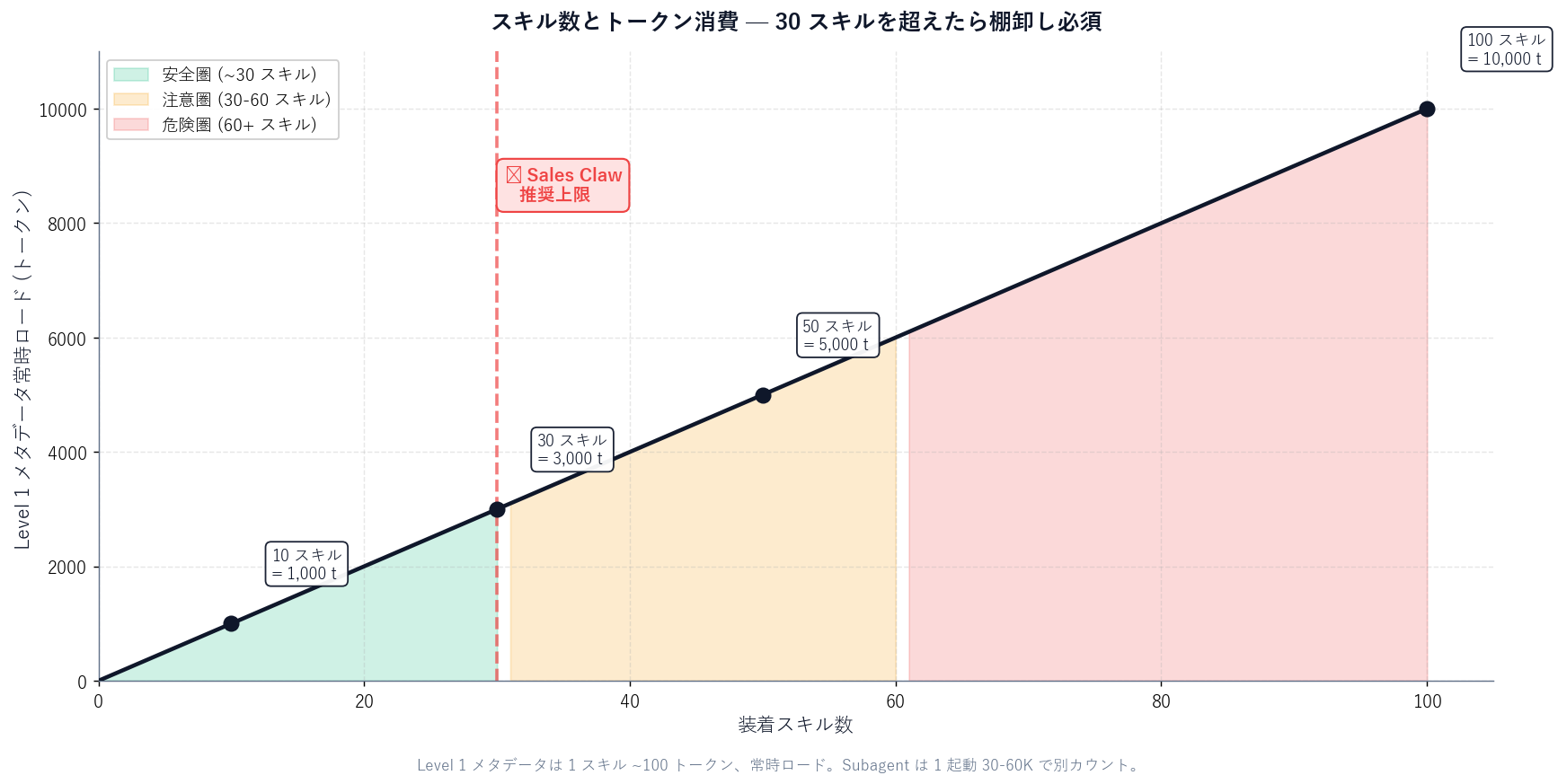
A skill keeps its Level 1 metadata (~100 tokens per skill) loaded all the time. With 100 skills that is 10,000 tokens of system-prompt baseline per session, and Claude's decision speed slows. [Author's view] Sales Claw treats "around 30 active skills" as the soft ceiling and runs a monthly trim (drop the skills you stopped using).
When multiple skills share similar descriptions, Claude's choice of which to fire becomes unpredictable. [Official] Anthropic's Docs warn "Use unique, descriptive names" and recommend a naming convention with no in-org duplicates. Sales Claw uses a "verb-target" convention (blog-write, note-publish, security-scan, etc.).
A SessionStart hook that errors can stop the session from starting or leave you with a blank screen. Author's mitigation: append `|| true` to the hook command so failures do not block the session. Example:command="powershell.exe -File cleanup.ps1 || true". This actually saved the author once — when cleanup-zombies.ps1 errored, the session-start path froze.
Adding a third-party MCP server makes "what tools that server gives Claude"a black box. [Official] Anthropic's Docs warn that "MCP servers run with your local privileges" and advise against trusting unverified servers. Sales Claw limits itself to official servers (Anthropic / Microsoft / Google) or OSS projects whose source can be audited.
A subagent costs 30-60K tokens per invocation. Auto-triggering code-reviewer + security-reviewer + database-reviewer on every code change blows up the monthly token bill. Author's mitigation: restrict the auto-trigger conditions to "5+ files changed," "auth / API touches," or "SQL / schema changes" and document the rule in CLAUDE.md.
Global (~/.claude/skills/): api-design, backend-patterns, claude-office-skills, coding-standards, debug-issue, e2e-testing, explore-codebase, find-skills, frontend-patterns, frontend-slides, grant-rewrite, keiba-analysis, keiba-race-analyst, learned, postgres-patterns, proposal-master, refactor-safely, review-changes, search-first, security-review, security-scan, strategic-compact, task-planner, tdd-workflow, workspace-init plus marketplace installs of anthropic-skills (pptx / xlsx / docx / pdf, etc.) and cowork-plugin-management bundles.
Project (./.claude/skills/): blog-write (the skill writing this article) and note-publish (note.com posting). These are Sales Claw–specific, so they live in the project tier and are committed to the repo.
architect (architecture), bp-sales (sales automation), build-error-resolver (build error resolution), code-reviewer (code quality), database-reviewer (DB / SQL), doc-updater (documentation), e2e-runner (E2E tests), harness-optimizer (the harness itself), loop-operator (autonomous loops), planner (design planner), python-reviewer (Python review), refactor-cleaner (refactor cleanup), security-reviewer (vulnerability check), tdd-guide (TDD guidance) — 14 in all. Named with a "verb + target" or "role" convention.
The seven the author uses most: /claw (Sales Claw dev REPL), /ship (deploy prep), /eng-review (technical review), /ceo-review (product-thinking review), /eval (evaluation), /harness-audit (harness audit), /checkpoint (intermediate save). The rest: /code-review, /security-review, /python-review, /quality-gate, /tdd, /e2e, /test-coverage, /build-fix, /refactor-clean, /update-codemaps, /update-docs, /verify, /plan, /orchestrate, /loop-start, /loop-status, /model-route, /pptx-build-public, /skill-create, /learn, /learn-eval, /promote, /instinct-export, /instinct-import, /instinct-status, /projects, /sessions, /evolve.
SessionStart: show skill list + load claude-mem + session-start.js. UserPromptSubmit: claude-mem session-init. PreToolUse(Bash): git-push-reminder. PreToolUse(Edit|Write): suggest-compact. PostToolUse(Bash): post-bash-pr-created. PostToolUse(Edit|Write|MultiEdit): quality-gate.js + post-edit-all.js. PreCompact: pre-compact.js. Stop: claude-mem summarize + session-end.js + cost-tracker.js + ntfy-stop.py + cleanup-zombies.ps1. Total: 14 commands triggered across 8 hook moments.
Since adopting this harness, the average round-trips per session dropped from 12 to 6, and "explaining the same thing twice"has essentially disappeared. That, in the author's view, is the real prize of harness optimization.
Optimizing the Claude Code harness yields 80% of the benefit on Day 1 from just "CLAUDE.md (prerequisites) + settings.json (deny)." The remaining 20% comes from adding skills → subagents → hooks → MCP in that order over 30 days — the author's recommended pace.
The biggest secret: "do not over-add." Equipment is like armor — the more you layer on, the more sluggish your moves. The 87-item Sales Claw harness disclosed above was grown gradually over 1 year and 5 months. Start with the Day 1 CLAUDE.md + six deny rules.
Sales Claw itself is a product that uses this kind of harness to automate BtoB contact-form sales. Following a "policy-controlled autonomous operation" philosophy, it lowers misfire and policy-violation risk with pre-send automated checks, sales-NG detection, CAPTCHA-detection auto-stop, send-rate limiting, and audit logs.
Japanese-language original: Claude Code を「自分仕様」にする — ハーネス最適化で AI 開発が劇的に変わる設計ガイド
本記事は X 公式アカウントと公式ドキュメントを一次情報として参照しています。
この記事の著者
中澤 圭志
Sales Claw maintainer
Designs and develops Sales Claw. Writes from the field on B2B sales automation and applied AI.