ツール解説
Chrome DevTools MCP: How to let Claude Code drive real Chrome — 42 tools in v0.26.0, Lighthouse audits, and Sales Claw integration
14 分
MCP is the LLM-app extension protocol Anthropic launched in November 2024 that became an industry standard in 18 months. We walk through the Host / Client / Server tiers, JSON-RPC 2.0, six primitives, ecosystem adoption, and what 'Sales Claw as MCP server' looks like in practice — including safety risks and mitigations.

中澤 圭志
@keishi_nakazawaSales Claw maintainer
Key Facts
Spec version
2025-11-25 (current) / first announced 2024-11-25
Originator
Anthropic (D. Soria Parra + J. Spahr-Summers)
Role A (Host)
Claude / ChatGPT / VS Code / Cursor / Gemini CLI — the LLM side
Role B (Server)
Filesystem / Git / DB / API / Slack — the tools and data side
"You keep seeing 'MCP' everywhere — Claude, ChatGPT, Cursor, VS Code, Gemini CLI — but what actually is it, why did it become a de facto standard, and how would you build it into AI-driven sales automation?" This article answers that head-on. We work from the official MCP spec (2025-11-25 revision) and Anthropic / OpenAI / Google primary docs, walking through architecture, primitives, implementation, and operational risk from a Sales Claw maintainer's perspective.
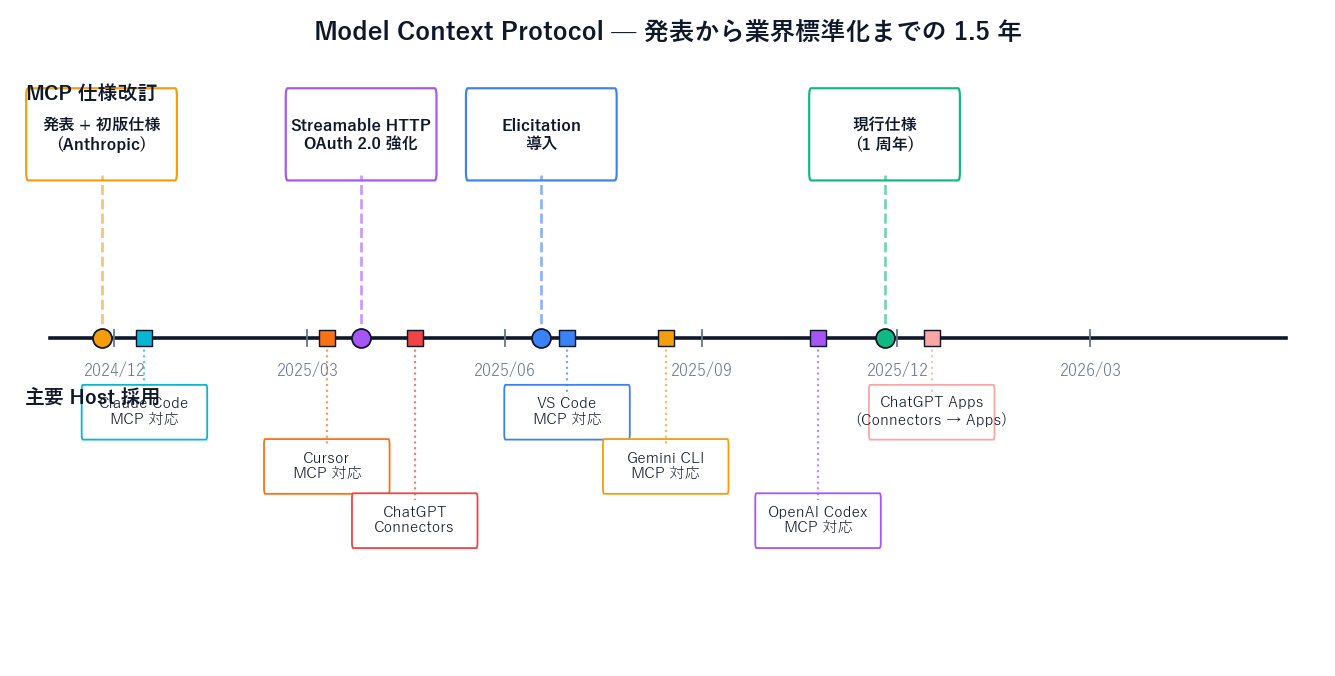
Model Context Protocol (MCP) was announced by Anthropic on 2024-11-25. Eighteen months later (May 2026), every major AI development tool — Claude Code, ChatGPT (Apps), Codex, Gemini CLI, Cursor, VS Code, Zed, Replit — has adopted it. The official site frames MCP as "a USB-C port for AI applications." That framing is good marketing, but the real story underneath is a stateful JSON-RPC 2.0 protocol with a clean Host / Client / Server three-tier separation, deeply inspired by the Language Server Protocol (LSP).
Primary sources: the modelcontextprotocol.io official spec (2025-11-25), the modelcontextprotocol/specification GitHub repo, the modelcontextprotocol/servers GitHub repo, Anthropic Newsroom (2024-11-25 launch), Claude Code MCP Docs (code.claude.com), OpenAI MCP Docs (developers.openai.com/api/docs/mcp), and Gemini CLI MCP Docs (geminicli.com). If you've read the Claude agents × Codex remote-control orchestration piece or the Claude Code slash commands guide, read this article as "the common protocol layer underneath both." The Sales Claw Quick start is also worth reading alongside the implementation section.
The formal MCP definition from modelcontextprotocol.io:
Decomposed: there's "(a) the AI-application side" and "(b) the external-system side," with "(c) an open standard protocol" inserted between them. The USB-C metaphor is accurate in the sense that hardware connectors went from "every vendor invents their own port" to "one USB-C cable handles everything," and MCP brings that same answer to the AI × tools problem.
But if you stop at the metaphor, you miss the real design decision. The spec (modelcontextprotocol.io/specification) is explicit that MCP was inspired by the Language Server Protocol (LSP).
Microsoft designed LSP in 2016 for VS Code. Before LSP, "editor × language" was an N × M problem — every editor had to integrate every language. LSP collapsed it into "editor ← LSP → language server" — a 1:N abstraction. MCP is best understood as the same trick, applied to "LLM app × data sources / tools".
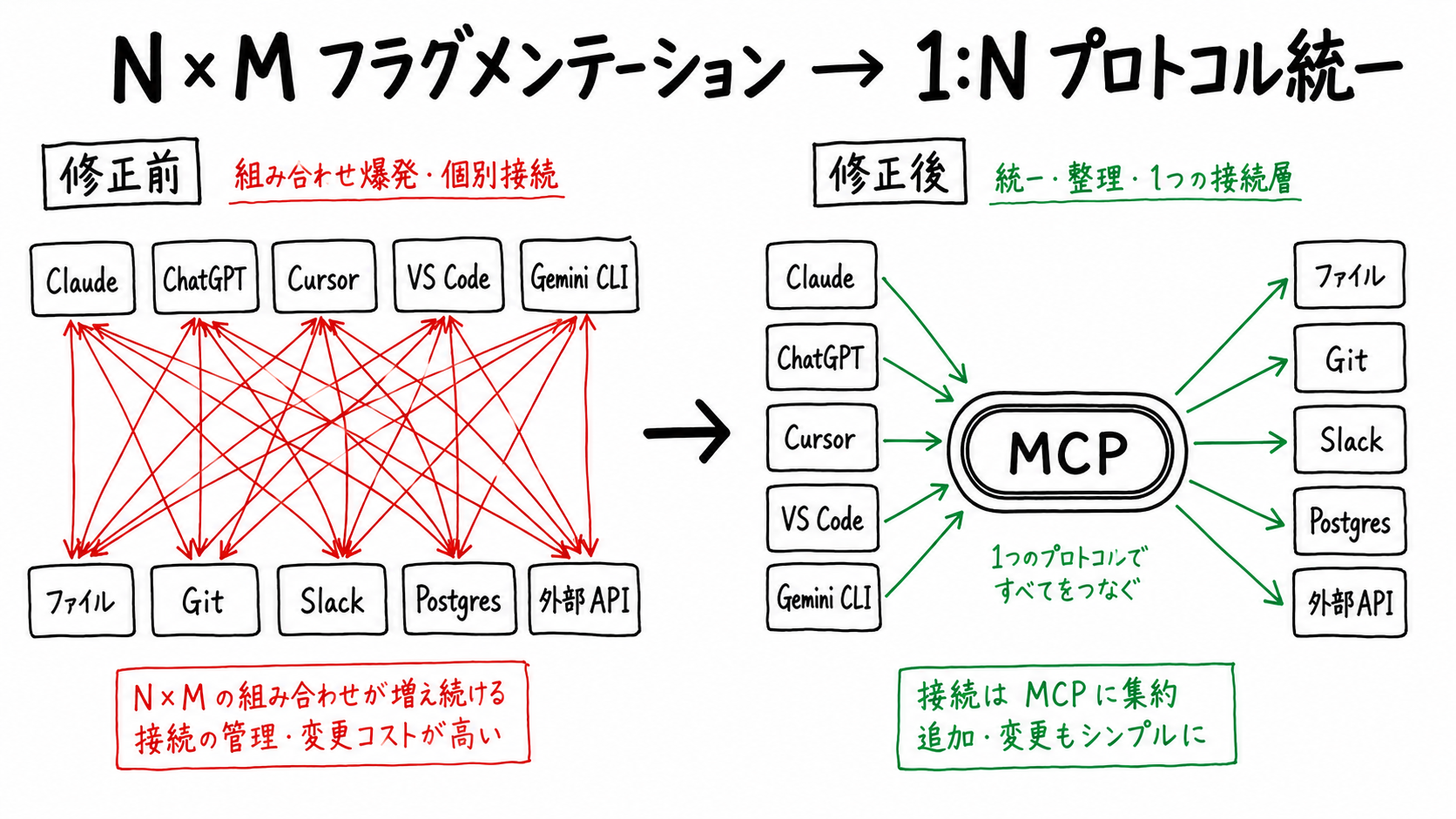
Holding the "LSP for AI" framing in mind makes the rest of the design click: capability negotiation and stateful sessions exist for reasons that LSP also encountered. Rather than each vendor inventing their own format (one for Claude, one for OpenAI, one for Google), Anthropic proposed: let's all speak the same protocol.
The historical thread, from primary sources:
On 2024-11-25, Anthropic posted "Introducing the Model Context Protocol" on its Newsroom. Highlights:
The modelcontextprotocol/specification repo's schema folder stacks TypeScript schemas by version. The lineage looks roughly like this (based on the repo's naming convention):
| Spec version | When | Main additions / changes |
|---|---|---|
| 2024-11-05 | November 2024 | Launch version (Resources / Tools / Prompts / Sampling) |
| 2025-03-26 | March 2025 | Streamable HTTP transport formalized, OAuth 2.0 authorization strengthened |
| 2025-06-18 | June 2025 | Elicitation introduced (server-to-user requests for additional info) |
| 2025-11-25 | November 2025 (1-year anniversary) | Current. Schema cleanup, clearer capability negotiation, security principles elevated to the spec body. |
As of May 2026, reference the 2025-11-25 spec. The official spec page (modelcontextprotocol.io/specification) is organized in five sections: Architecture / Base Protocol / Server / Client / Contributing.
The modelcontextprotocol/servers repo provides seven official reference implementations. They are the canonical examples of how MCP should behave — the best place to study before writing your own server.
| Official server | Role | Primary primitives used |
|---|---|---|
| Everything | Reference / test server exercising every primitive | Resources / Tools / Prompts |
| Fetch | Fetch web content and convert to Markdown | Tools |
| Filesystem | Safe file operations with access control | Resources / Tools |
| Git | Repository read / search / operate | Tools / Resources |
| Memory | Knowledge-graph-based persistent memory | Tools / Resources |
| Sequential Thinking | Structured chain-of-thought assistance | Tools |
| Time | Time / timezone conversion | Tools |
The README links to well over 150 community implementations, and Anthropic Directory (claude.ai/directory) lists officially reviewed remote MCP servers. Slack, Notion, Linear, Figma, Google Drive, PostgreSQL, Sentry, Datadog, Statsig, Cloudflare — almost every major SaaS now has an official or semi-official MCP server.
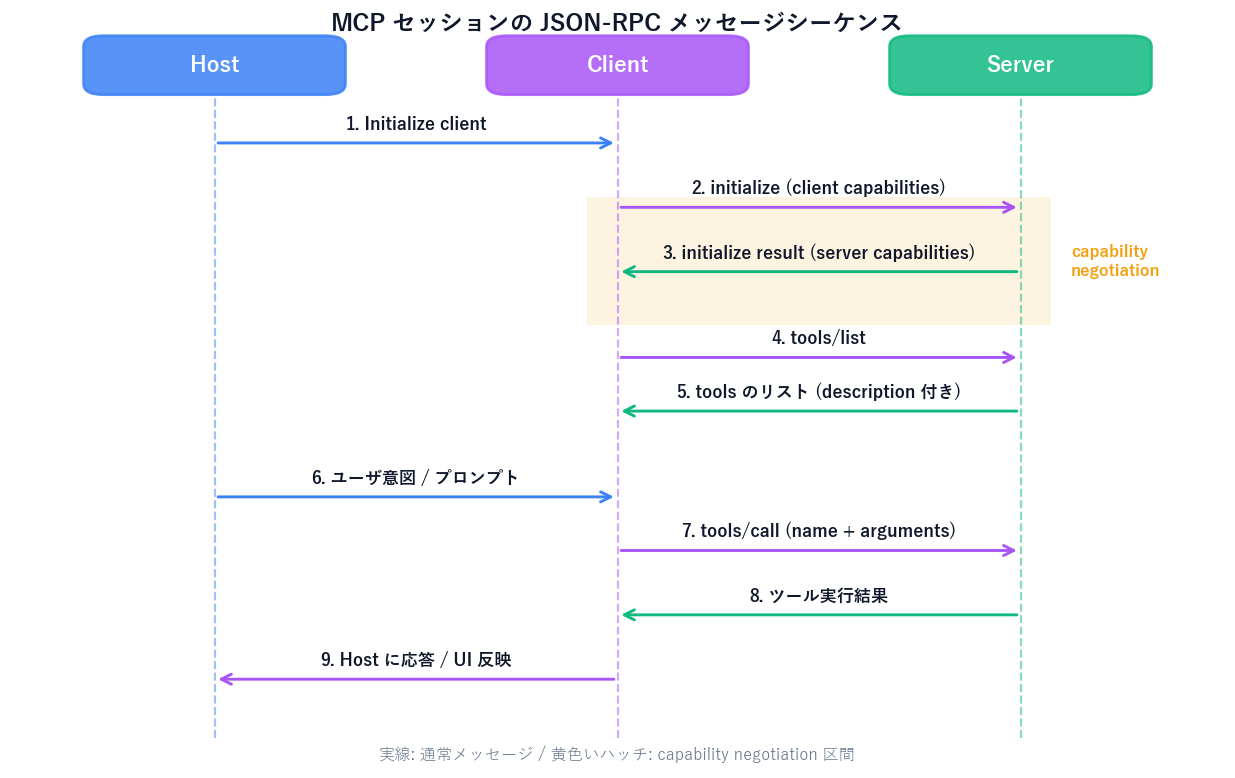
Summarizing the spec's architecture definition (modelcontextprotocol.io/specification/2025-11-25/architecture):
The messaging layer is JSON-RPC 2.0 — bidirectional request / response / notification between Client and Server. Three standardized transports:
| Transport | Use | Typical scenario |
|---|---|---|
| stdio | Local inter-process communication (stdin/stdout) | Local Servers like Filesystem or Git |
| Streamable HTTP | HTTP POST + SSE bidirectional | Remote SaaS Servers like Slack, Notion, Sentry |
| SSE (legacy) | Server-Sent Events legacy remote transport | Compat for older implementations (use Streamable HTTP for new) |
An MCP session starts with an initialize request. The Client declares its own capabilities; the Server responds with its capabilities — this is capability negotiation. It fixes "does this Server support tools?" and "does this Client support sampling?" at session start.
// Client → Server: initialize
{
  "jsonrpc": "2.0",
  "id": 1,
  "method": "initialize",
  "params": {
    "protocolVersion": "2025-11-25",
    "capabilities": {
      "sampling": {},
      "roots": { "listChanged": true }
    },
    "clientInfo": { "name": "Claude Code", "version": "2.1.142" }
  }
}

// Server → Client: initialize result
{
  "jsonrpc": "2.0",
  "id": 1,
  "result": {
    "protocolVersion": "2025-11-25",
    "capabilities": {
      "tools": { "listChanged": true },
      "resources": { "subscribe": true },
      "prompts": {}
    },
    "serverInfo": { "name": "salesclaw-mcp", "version": "0.1.0" }
  }
}
After that the Client issues tools/list, resources/list, prompts/list and so on. The LLM calls tools as needed via tools/call. Servers can also send requests back to the Client — typical examples: sampling/createMessage ("please continue this with the LLM") and roots/list("which directories may I operate in?").
Every MCP capability decomposes into one of these six. The spec's server features table (modelcontextprotocol.io/specification/2025-11-25/server) splits them by who controls them:
| Primitive | Controlled by | Role | Methods |
|---|---|---|---|
| Resources | App | Structured data / context (files, Git history) | resources/list, resources/read |
| Prompts | User | Templated workflows (slash commands, menu items) | prompts/list, prompts/get |
| Tools | Model | Functions the LLM calls that have side effects (API POST, file write) | tools/list, tools/call |
The three are fundamentally different by who triggers them. Resources are "the Host app attaches them to context via UI." Prompts are "the user explicitly fires them via slash command or menu." Tools are "the LLM decides on its own." The same "Server-exposed capability" comes with very different safety layers. A "delete file" Tool fires at the LLM's discretion — explicit user consent is mandatory every time. A "file list" Resource only loads when the user picks it in the UI.
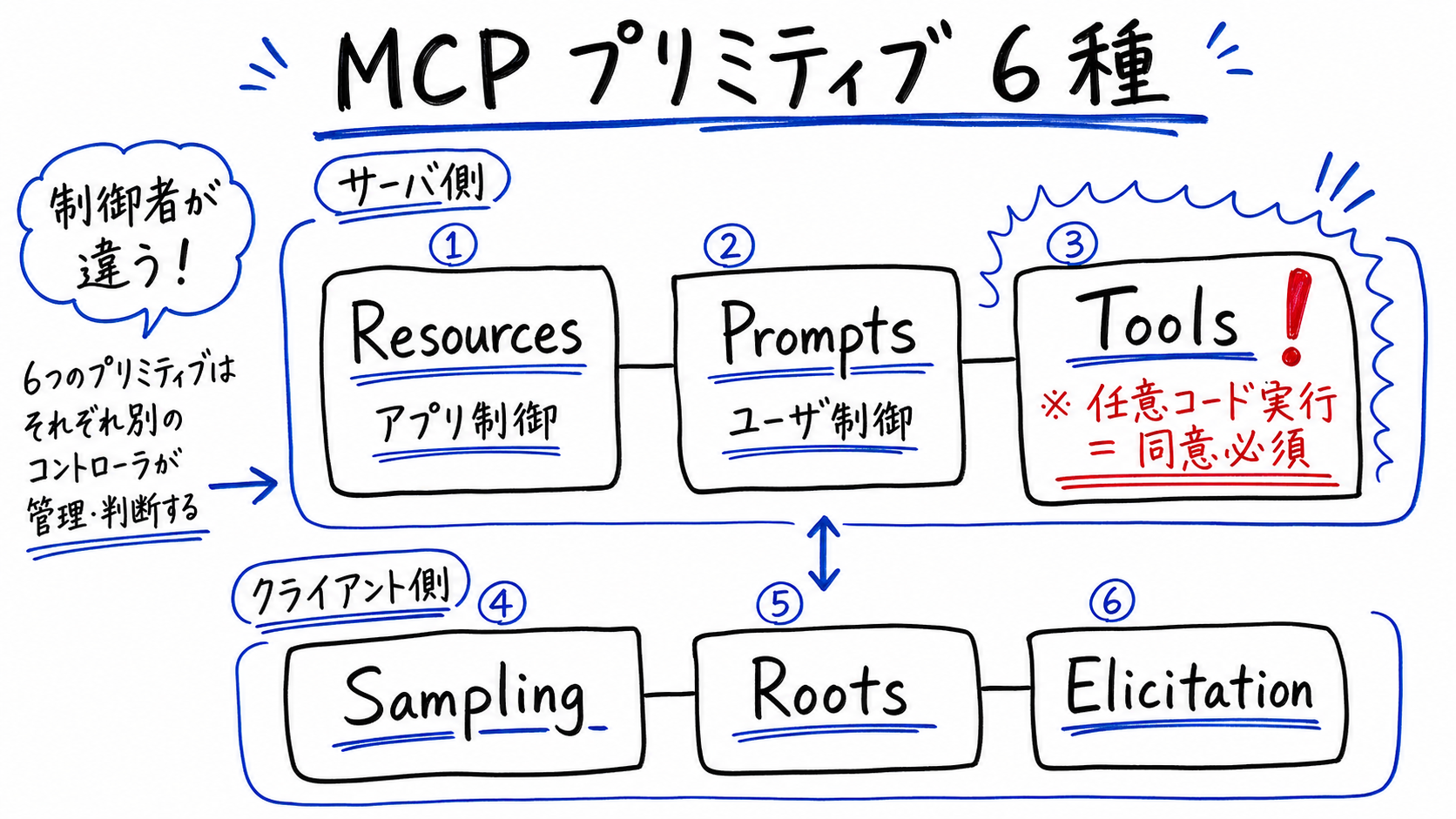
The reverse direction (Server → Client) has three primitives. These are callable from the Server only when the Client declares the matching capability.
| Primitive | Role | When to use |
|---|---|---|
| Sampling | Server asks the Client "let the LLM continue this" | Agentic MCP servers; recursive LLM-call patterns |
| Roots | Server asks "which URIs / directories may I operate on?" | Filesystem-class servers declaring scope to the user |
| Elicitation | Server asks the user (via Client form) for additional input | Instead of guessing or erroring on missing parameters, request user input |
Elicitation is a relatively new primitive added in the 2025-06-18 spec. Before that, the Server had no clean way to request user input — it had to guess or error. Cleanliness of design jumped significantly.
| Host | Config location | Transports | Note |
|---|---|---|---|
| Claude Code | claude mcp add / .mcp.json | stdio / Streamable HTTP | code.claude.com/docs/en/mcp |
| Claude Desktop | claude_desktop_config.json | stdio / Streamable HTTP | Remote servers listed at claude.ai/directory |
| ChatGPT | Apps (formerly Connectors) | Streamable HTTP | Renamed from Connectors to Apps on 2025-12-17 |
| OpenAI Codex | ~/.codex/config.toml | stdio / Streamable HTTP | developers.openai.com/codex |
| Gemini CLI | ~/.gemini/settings.json | stdio / SSE / HTTP (OAuth 2.0) | Project config overrides user config |
| VS Code | .vscode/mcp.json | stdio / Streamable HTTP | Managed from Copilot Chat > MCP servers tab |
| Cursor | .cursor/mcp.json | stdio / Streamable HTTP | cursor.com/docs/context/mcp |
The key point: config formats differ, but the MCP server on the other end is the same binary. That's the value of MCP as an open protocol. An MCP server you wrote for Claude Code runs identically when called from Gemini CLI or Cursor.
# Add a stdio (local process) server
claude mcp add salesclaw -- npx -y @salesclaw/mcp-server

# Add a Streamable HTTP (remote) server
claude mcp add --transport http salesclaw https://mcp.salesclaw.site

# Share via .mcp.json (one project config for the whole team)
cat > .mcp.json <<EOF
{
  "mcpServers": {
    "salesclaw": {
      "type": "stdio",
      "command": "npx",
      "args": ["-y", "@salesclaw/mcp-server"],
      "env": { "SALESCLAW_API_KEY": "${SALESCLAW_API_KEY}" }
    }
  }
}
EOF# Append to ~/.gemini/settings.json
cat >> ~/.gemini/settings.json <<EOF
{
"mcpServers": {
"salesclaw": {
"command": "npx",
"args": ["-y", "@salesclaw/mcp-server"],
"env": {
"SALESCLAW_API_KEY": "$SALESCLAW_API_KEY"
}
}
}
}
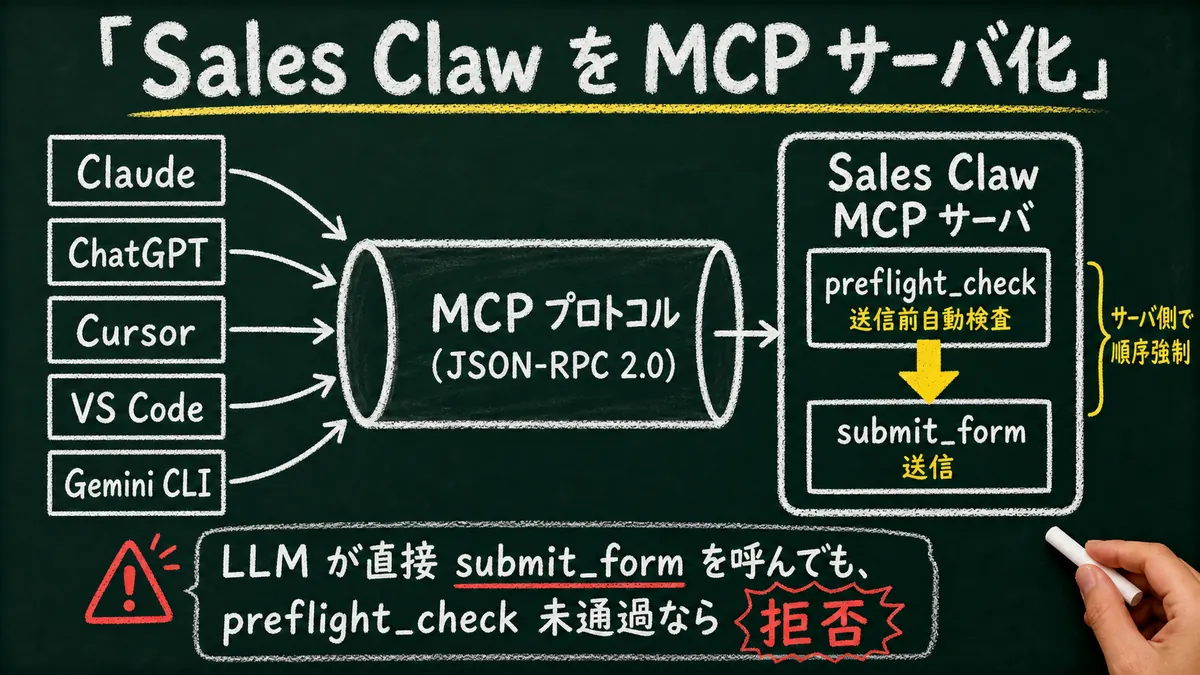
EOFSales Claw is OSS designed to lower misfire and policy-violation risk through policy control, pre-send checks, do-not-contact detection, CAPTCHA-on-detect stop, rate limits, audit logging, and automatic stop conditions. Exposed as an MCP server, it becomes callable through the same interface from Claude / ChatGPT / Cursor / VS Code / Gemini CLI.
A draft of the primitives Sales Claw MCP would expose (design proposal — implementation staged):
| Type | Name (draft) | Role |
|---|---|---|
| Resources | salesclaw://leads/{id} | Structured data for a single prospect / account |
| Resources | salesclaw://action-log | Past submission history and audit log (read-only) |
| Prompts | /draft-outreach | Industry- and touchpoint-aware copy-drafting workflow |
| Tools | preflight_check | Pre-send checks (do-not-contact / policy / CAPTCHA / compliance footer) |
| Tools | submit_form | Submit the contact form (only if preflight_check passed) |
| Tools | list_recent_submissions | Recent submission counts and states |
The design choice that matters: preflight_check and submit_form are intentionally split. Even if the LLM (Claude / ChatGPT) tries to call submit_form directly, the Sales Claw server enforces "only accept if preflight_check has passed." That gives you a second defense layer that runs independently of the Host's --permission-mode— the answer at the design level to the spec's "tools = arbitrary code execution" assumption.
Internal validation at Sales Claw (around 300 contact-form submissions observed under autonomous looping + parallel batches + Hooks-driven event-loop monitoring) found that even when Sales Claw runs as an MCP server, these five conditions must all be enforced on the server side: (1) AND of goal / volume cap / elapsed-time cap as termination conditions; (2) awaiting_approval state preservation on CAPTCHA detection; (3) automatic compliance footer append; (4) per-subagent audit-log traceability; (5) immediate stop on do-not-contact detection. For enterprise deployment, per-tenant Resources isolation is also required.
# Local dev / debug with MCP Inspector
npx -y @modelcontextprotocol/inspector npx -y @salesclaw/mcp-server

# Call from Claude Code
claude mcp add salesclaw -- npx -y @salesclaw/mcp-server
# In Claude Code: "Run @salesclaw preflight_check, then @salesclaw submit_form."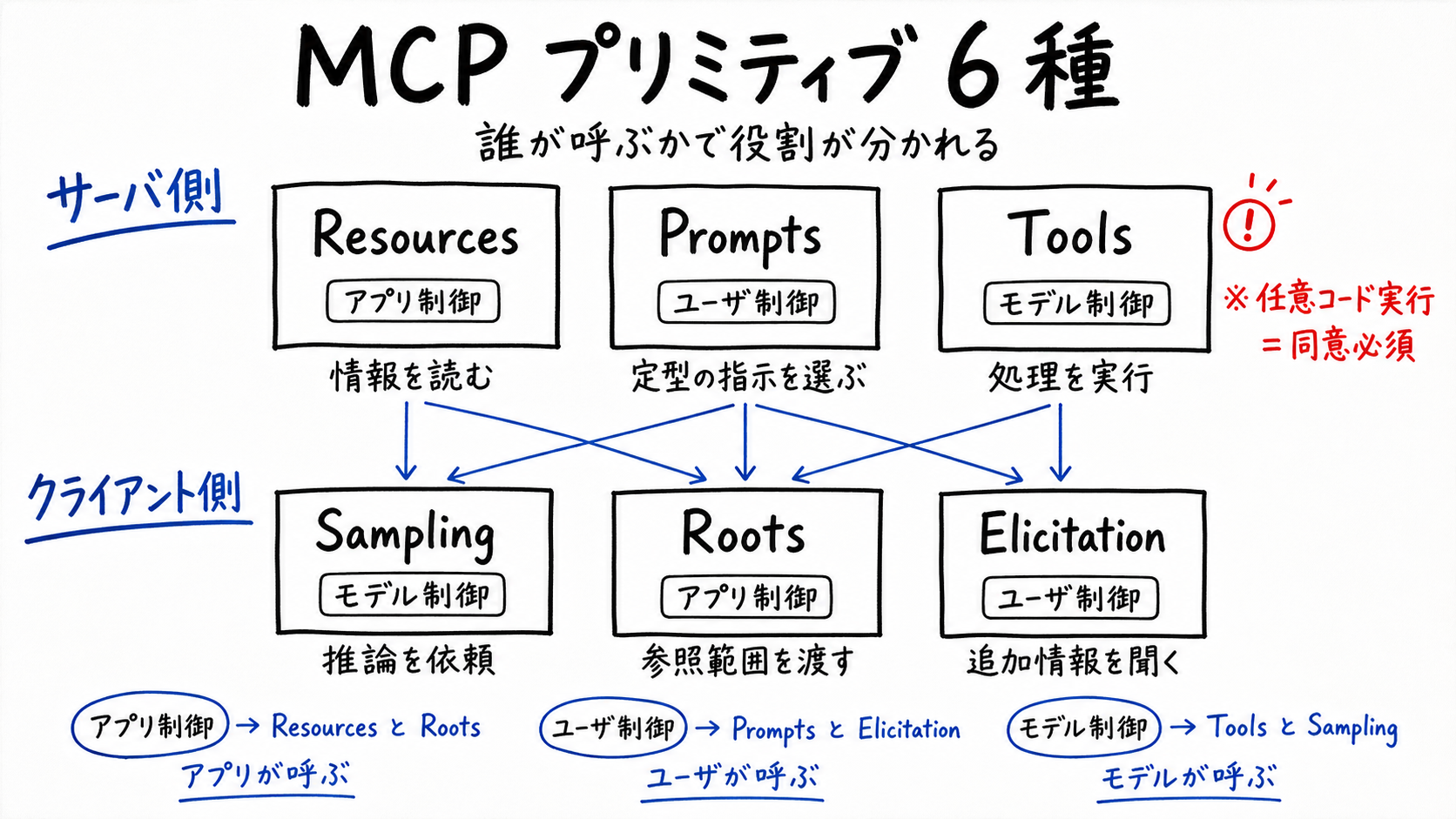
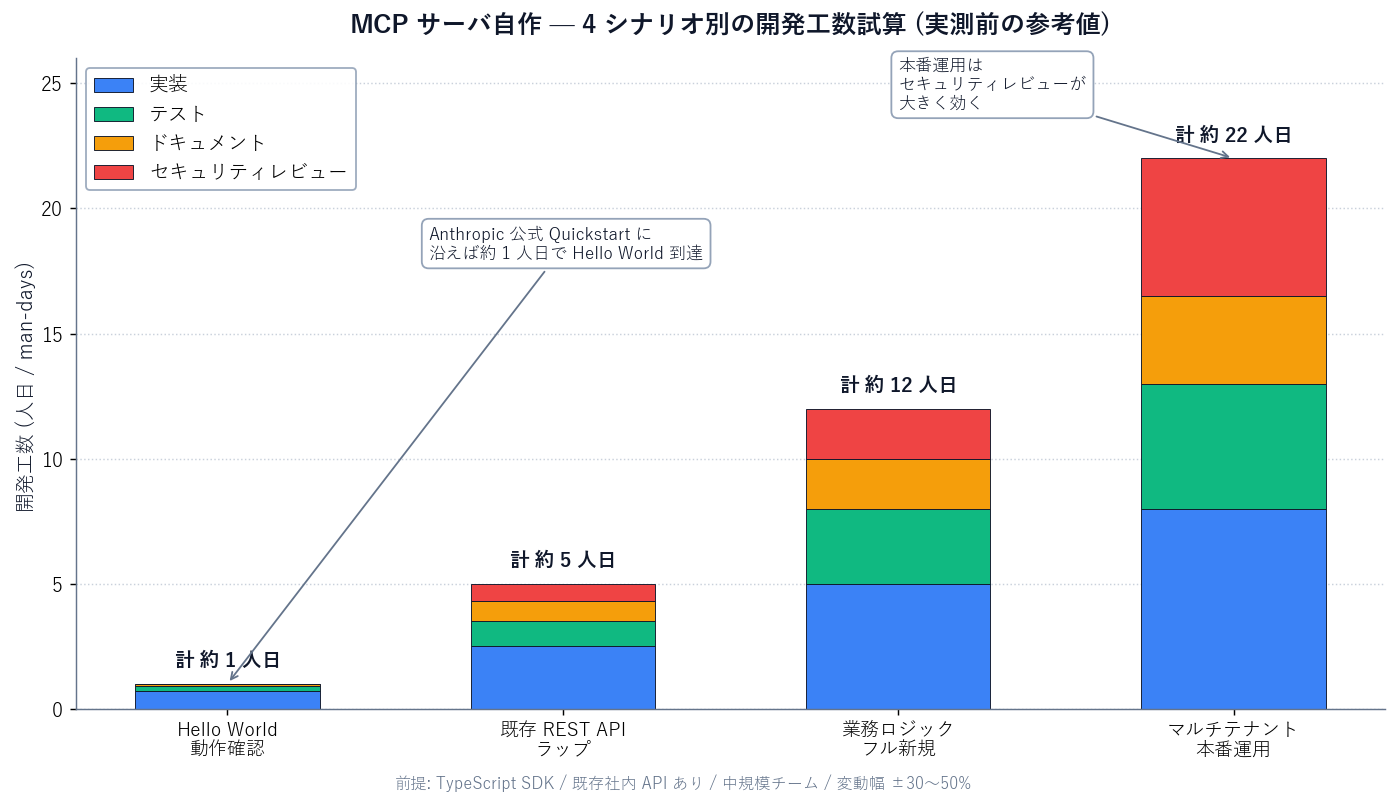
| Scenario | Effort (estimate) | What it includes |
|---|---|---|
| Hello World | ~1 day | One tool built with the official SDK, callable from Claude Code |
| Wrap existing REST API | ~5 days | 3–5 internal APIs exposed as Tools, with tests and docs |
| Full new build (business logic) | ~12 days | Full Resources / Tools / Prompts coverage with auth |
| Multi-tenant production | ~22 days | Streamable HTTP + OAuth 2.0 + audit log + metering + security review |
Expect ±30–50% variance. Security review and per-tool permission design swing 2–3× by organizational maturity.
MCP is a protocol where Hosts and Servers exchange "tools equivalent to arbitrary code execution." The security chapter of the spec is explicit that MCP cannot enforce these guarantees at the protocol level alone — it leaves responsibility with the implementers (both Host and Server). Whether you expose Sales Claw as an MCP server or just run it standalone, the risks below need to be reduced through automated checks.
--permission-mode default / ask exists for this.preflight_check → submit_form) on the server too.Even with protocol design and server implementation done well, these remain structurally:
Run through this before putting your own MCP server into production, or before adding a third-party MCP server to your Host.
Before going live with MCP
MCP gets sold as "a USB-C port for AI" for accessibility, but the real essence is LSP applied to AI — a protocol abstraction that re-organizes the LLM-app × external-system N × M problem into 1:N. Three tiers (Host / Client / Server), JSON-RPC 2.0, six primitives (Resources / Tools / Prompts / Sampling / Roots / Elicitation), and the strong premise that tools equal arbitrary code execution — all stable in the 2025-11-25 spec.
From a Sales Claw maintainer's perspective, MCP is significant because Sales Claw can be both called (Server) and caller (Client inside a Host). Designing "pre-send checks enforced at the protocol level" via MCP tool-order control means Sales Claw's safety design works identically no matter which Host (Claude, ChatGPT, Cursor) invokes it.
Next action: if you're building one MCP server, read the Everything server in modelcontextprotocol/servers first. It demonstrates the minimum implementation of Resources / Prompts / Tools, and teaches the SDK along the way. For Sales Claw operational integration, start with the Quick start and study the preflight_check logic.