
AI NewsClaude Code 2.1.147

Claude Code 2.1.147 ships /code-review, then 2.1.148 squashes a Bash-exit-127 regression within 24 hours

Released 2026-05-21, Claude Code v2.1.147 replaces /simplify with /code-review (supports --comment for inline GitHub PR comments), adds pinned background sessions, and ships 30+ Windows / PowerShell fixes. A Bash-tool regression that returned exit 127 on every command crept in, and v2.1.148 ships ~5 hours later as a hotfix. This post bundles "useful new features" and "broken-and-fixed-in-five-hours" with an operations survival kit for the regression-injection era.

中澤 圭志

中澤 圭志

@keishi_nakazawa

Sales Claw maintainer

·14 min
Claude Code 2.1.147 ships /code-review, then 2.1.148 squashes a Bash-exit-127 regression within 24 hours
This English article is a concise version of the original. For the full Japanese deep-dive, see the Japanese original.

Key Facts

v2.1.147 release

2026-05-21 20:39 UTC (5 new features + 30+ fixes)

v2.1.148 release

2026-05-22 01:16 UTC (hotfix ~5 hours later)

Major additions

/code-review command + pinned background sessions (Ctrl+T)

Hotfix target

Bash tool returning exit 127 on every command (regression)

TL;DR

Claude Code v2.1.147 (released 2026-05-21) introduced two big things: a renamed /code-review command that finds correctness bugs and can post inline GitHub PR comments, and pinned background sessions that survive idle time and survive Claude Code updates. Then early on 2026-05-22, a regression was discovered where the Bash tool returned exit code 127 on every command, and Anthropic shipped v2.1.148 as a hotfix roughly five hours later. This post bundles "the useful new features" and "broken-and-fixed-in-five-hours" into one read, framed for anyone who depends on AI coding tools daily.

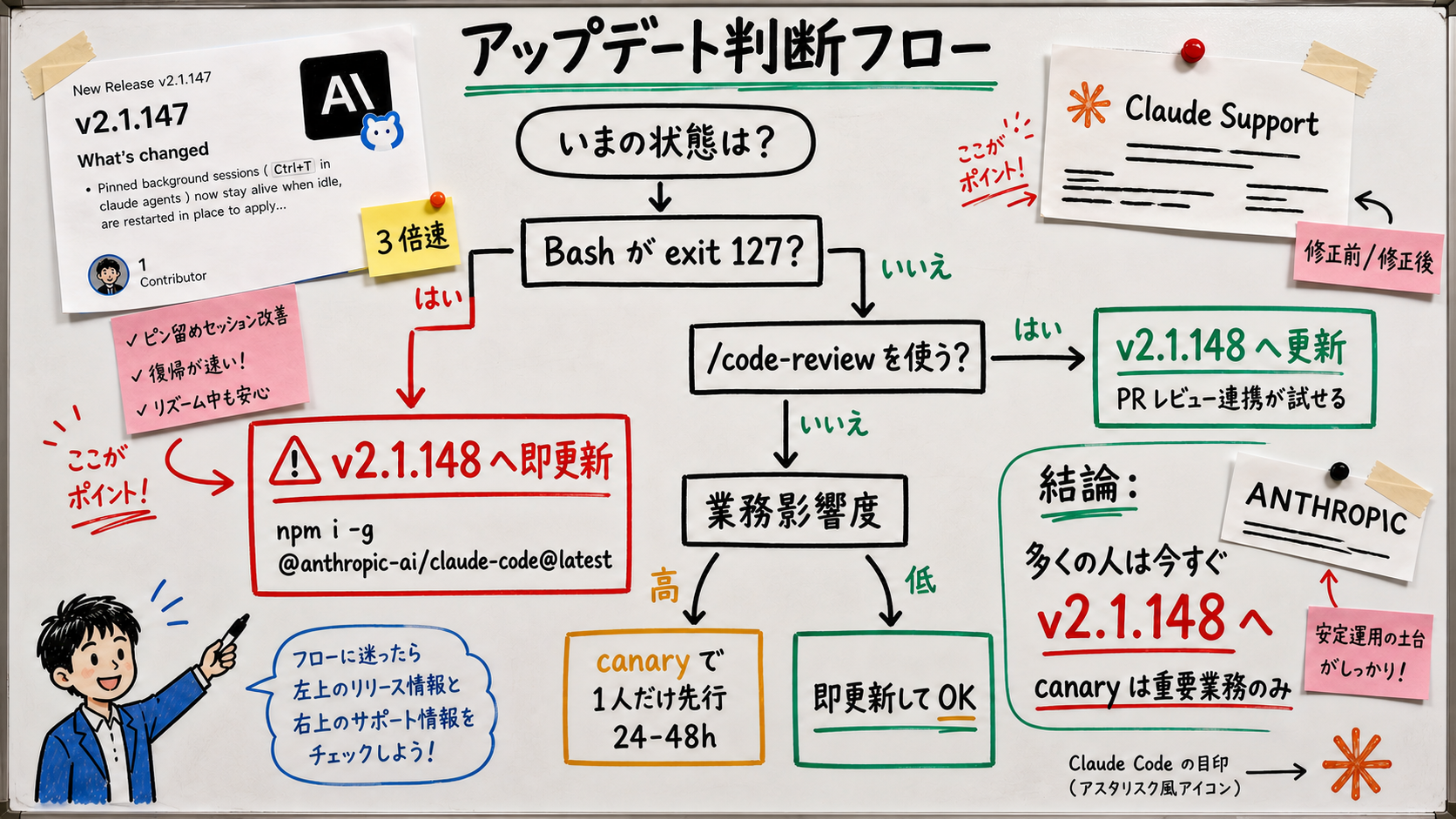
Bottom line first: upgrade claude to v2.1.148 or later right now. If you stay on v2.1.147 you risk hitting a state where the Bash tool fails on every command (details below). The good news is that the /code-review command and pinned background sessions introduced in v2.1.147 are still active in v2.1.148. The upgrade is pure upside. Anyone caught on v2.1.147 can move to v2.1.148 in about five minutes.

"Claude Code shipped again, but is it true that Bash is broken?" and "Why did /simplify disappear?" —— in this post we answer both questions using Anthropic's official GitHub Releases for v2.1.147 / v2.1.148 and the Claude Code Docs Changelog as primary sources, from a Sales Claw maintainer's perspective.

Inside a 24-hour window, Anthropic shipped v2.1.147 at 5/21 20:39 UTC followed by v2.1.148 at 5/22 01:16 UTC, about 4 hours 37 minutes later. The first is a large release containing five new features plus 30+ bug fixes. The second is a hotfix that fixes only one thing: the Bash regression. ("Regression" here means a feature that worked in the previous version stopped working in the new one.)

The takeaway from these two releases is that "AI development infrastructure is now operated on a 'ship fast, fix fast' assumption". The cadence — feature release at night UTC, hotfix five hours later — is the new normal, not an exception. This post unpacks the new features and adds an operational survival kit for the regression-injection era, so that teams running daily AI tooling can build a posture rather than reacting to each incident as a surprise. For series context, see also: Claude Code 2.1.145 / Codex Mobile / Anthropic postmortem roundup and Claude Code v2.1.144 explained.

This post uses GitHub Releases v2.1.147 / v2.1.148 / the Claude Code Docs Changelog as primary sources. Sales Claw is available as a free download from the download page.

1. What are v2.1.147 and v2.1.148 — why two releases shipped in 24 hours

[Official] Per Anthropic's GitHub Releases page, v2.1.147 went out at 2026-05-21 20:39 UTC (5:39 AM JST on 5/22), and v2.1.148 followed at 2026-05-22 01:16 UTC (10:16 AM JST on 5/22). The gap is about 4 hours 37 minutes.

First, the prerequisites. For non-engineer readers, here's the jargon de-jargoned:

  • A regression is when something that worked in the previous version stops working in the new one. In Japanese it's sometimes called a "throwback bug"
  • A hotfix is a release that ships a fix for a critical production bug along the shortest path, with a shorter validation window than a normal release
  • Exit 127 is the shell exit code that means "command not found". You'd get it if you typed foo in your terminal. In v2.1.147, even git status and ls were being told "not found"
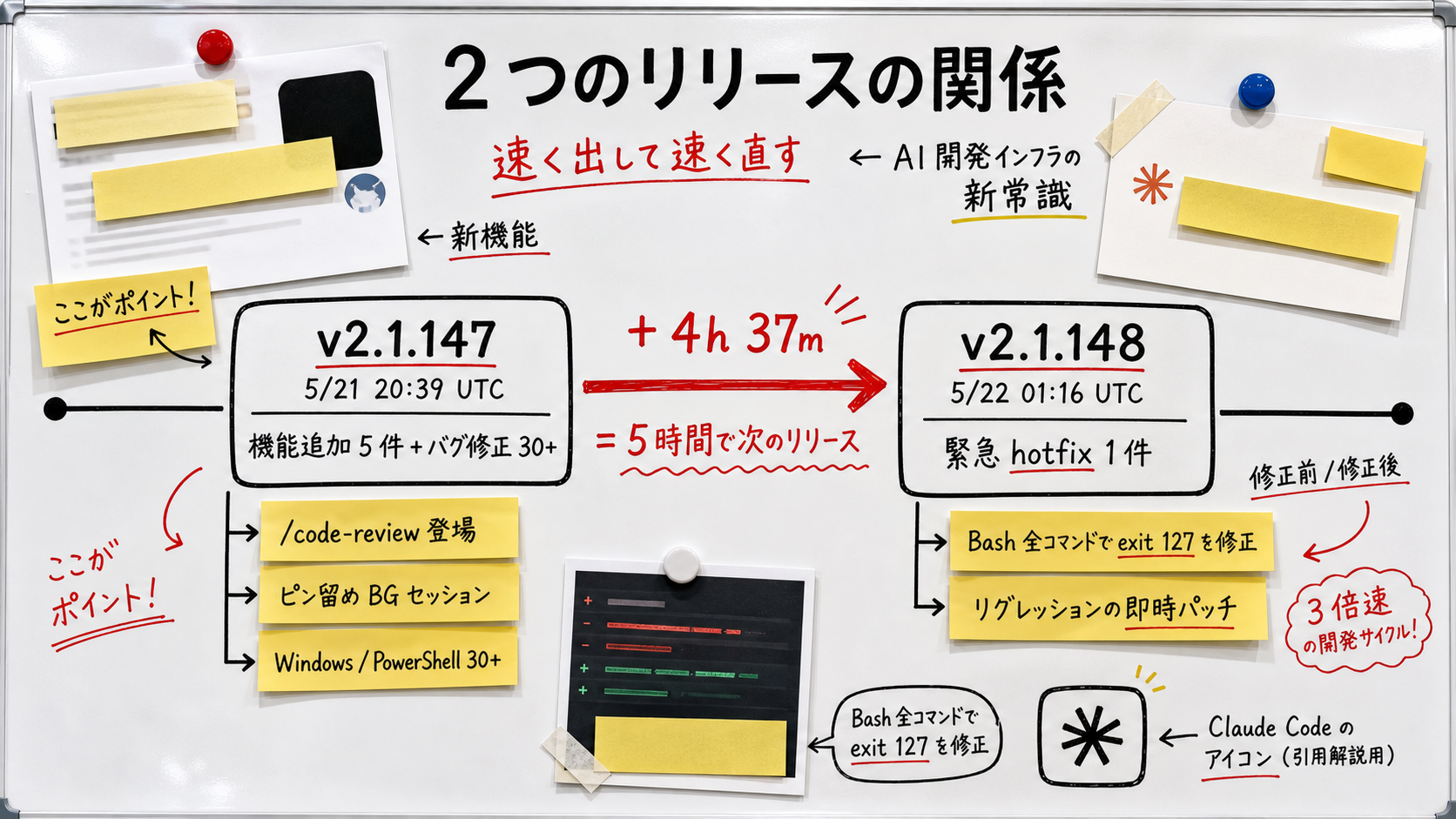
Whiteboard-style timeline showing v2.1.147 (5/21 20:39 UTC) carrying 5 new features and 30+ bug fixes, and v2.1.148 (5/22 01:16 UTC) shipping about 5 hours later to fix the Bash exit 127 regression
Figure: Relationship between v2.1.147 and v2.1.148. A feature release and an emergency hotfix running back to back within 24 hours

[Author's view] The fact that a hotfix can ship in 5 hours means Anthropic has the in-house plumbing to cut a hotfix release on demand when production hits a wall. That includes a CI pipeline that runs in minutes rather than hours, on-call engineers who can verify a one-line patch out of hours, and an npm publish path that doesn't require a coordinated release window. Operators of OSS business agents like Sales Claw need a matching operational mindset — versioned releases, rollback drills, and a clear "who decides when to ship" line of accountability (more in §6 on risks).

2. /simplify/code-review — what actually changed

The headline change in v2.1.147 is that the /simplify command was renamed to /code-review and the underlying behavior was rewritten.

First, the prerequisites. /simplify originally meant "clean up this code and rewrite it so it reads better" — a one-shot way to ask "Can you make this simpler?".

The new /code-review changes direction. Translating Anthropic's release notes verbatim:

"Renamed /simplify to /code-review. It now reports correctness bugs at a chosen effort level (e.g., /code-review high); pass --comment to post findings as inline GitHub PR comments. The old cleanup-and-fix behavior has been removed."

[Official] Boiled down, /code-review now does three things:

項目Old /simplify (v2.1.146 and earlier)New /code-review (v2.1.147 and later)
Primary purposeRewrite code so it reads betterFind and report correctness bugs
OutputRewritten codeBug report list with line numbers
Effort levelNoneYes (low / medium / high)
GitHub PR integrationNone--comment posts inline comments on PR
Invocation countOne commandOne command (same)

Usage examples

Pattern 1: quick local invocation

# Lightweight review of the currently open code
/code-review

# Take more time and dig harder
/code-review high

Pattern 2: post inline comments on a GitHub PR

# Ask Claude to review your own PR and write findings directly into GitHub
/code-review high --comment

[Author's view] "Let Claude review the PR and persist the findings as GitHub comments" quietly solves a very real problem: "the reviewer is on vacation, so merges are blocked". Even for small OSS projects like Sales Claw, the workflow of "ask Claude to review your own PR with --comment, leave the findings in GitHub, then have a human make the call" becomes feasible. It also creates a paper trail that didn't exist before: the inline comments are searchable, link back to the line of code, and stay attached to the PR even after merge. That makes it easier for downstream readers (auditors, new hires, the author six months later) to reconstruct why the code looks the way it does.

3. Pinned background sessions — Ctrl+T removes review-wait pain

First, the prerequisites. Claude Code has had "background sessions" for a while — you offload a long-running task (a test run, a large refactor) to a separate session and continue your own work while it runs. Roughly: "ask Claude to do something, then let it run while you switch to something else."

Until v2.1.146, background sessions had a few painful properties: they would close on idle, vanish when Claude Code updated itself, and were aggressively closed when the system ran low on memory. Anyone who's left a session running and come back to find it gone has felt this.

[Official] v2.1.147 introduced "pinning" to opt out of those behaviors. Quoting the release notes verbatim:

"Pinned background sessions (Ctrl+T in claude agents) now stay alive when idle, are restarted in place to apply Claude Code updates, and are shed under memory pressure only after non-pinned sessions"

Explanation diagram showing the pin toggle action with Ctrl+T in the claude agents view, plus the three behaviors of pinned sessions: survive idle, restart in place after updates, last to be shed under memory pressure
Figure: How pinned background sessions work. Ctrl+T fixes a session to the 'won't disappear' zone

How to use it

  1. While in claude, type claude agents
  2. In the background-session list, select the session you want to pin
  3. Press Ctrl+T (pin toggle)
  4. Press again to unpin

[Author's view] The single most important behavior here is "pinned sessions are restarted in place when Claude Code updates itself". Until now, "I updated Claude and lost yesterday's session" happened often enough to be annoying. The psychological safety of offloading 1+ hour tasks (long searches, test runs, large refactors) is meaningfully different now.

Now that parallel work in Claude Code is normal, the form-submission side deserves the same automation.

無料・MIT ライセンス。インストールせずにライブデモも試せます。

4. The 30+ Windows / PowerShell / GNOME Terminal fixes

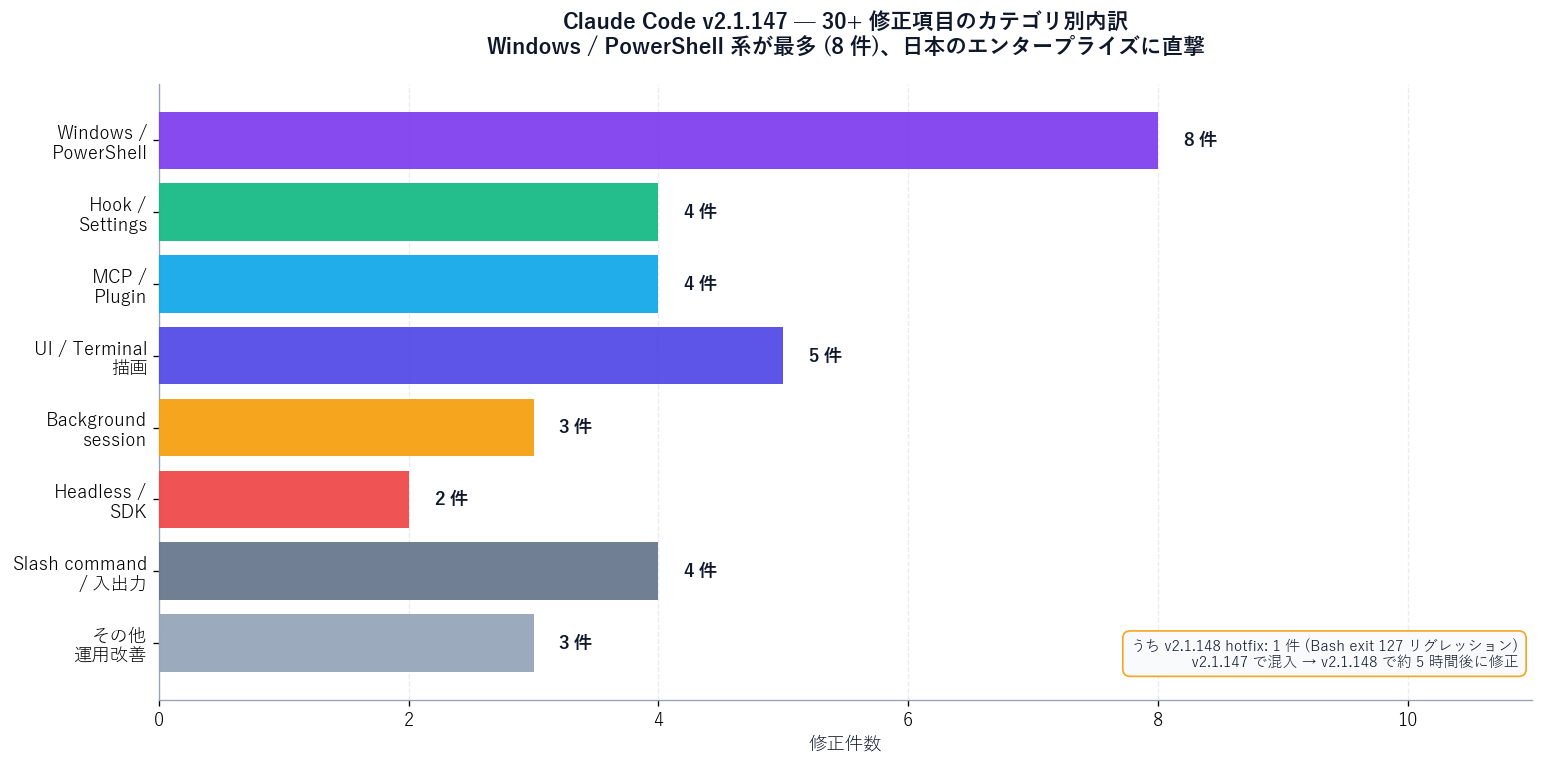
v2.1.147 ships more than 30 bug fixes. Many of them target the Windows + PowerShell environments that dominate Japanese enterprise dev shops. Six standouts:

Windows / PowerShell fixes worth highlighting

  1. Fixed: PowerShell (pwsh) installed via winget or Microsoft Store causing Claude to exit 1
    → Many corporate PCs install pwsh through winget, so this fix is a big deal
  2. Fixed: PowerShell tool dropping output for commands that rely on the default formatter
    → PowerShell-native commands like Get-Process were not flowing back into Claude
  3. Fixed: "Yes, and don't ask again" for PowerShell script invocations now writes a rule that actually matches on subsequent runs
    → Removes the bug where the approval prompt kept reappearing
  4. Fixed: hook if conditions like PowerShell(git push*) not matching — only PowerShell(*) worked
    → Crucial for teams writing fine-grained hooks in CLAUDE.md / settings.json
  5. Fixed: full-screen strobing in attached background sessions on Windows Terminal during streaming
    → Direct perceived-quality win for older Windows Terminal builds
  6. Fixed: on Windows, removing a background-job worktree no longer follows NTFS junctions into the main repo
    → Closes the worst-case "junction makes Claude delete other folders" scenario
Bar chart classifying the 30+ v2.1.147 bug fixes by category: Windows/PowerShell, hooks, MCP, UI/UX, plugins, and miscellaneous
Figure: Breakdown of the 30+ v2.1.147 bug fixes by category

Other fixes that matter (non-Windows)

  • Unknown slash commands in headless / SDK mode were silently doing nothing → they now report an error
  • MCP server resources / templates / prompts past page 1 → pagination fix
  • Backgrounded sessions re-asking for tool permissions you'd already approved with "don't ask again" → fixed
  • CLAUDE_CODE_SUBAGENT_MODEL not propagating to teammate processes spawned by agent teams → fixed
  • Plugin agents with multiple Agent(...) entries in tools: frontmatter dropping all but the last → fixed
  • GNOME Terminal right-click / middle-click paste not inserting text → fixed

[Author's view] The one-liner summary of this fix list: this is a particularly big release for Japanese enterprise Windows environments. Sales Claw is also developed on Windows 11 + PowerShell 7 (winget-installed), so the pwsh exit-1 issue was painful. Fixing that alone justifies the upgrade. The hook-condition fix is the second hidden gem — many teams had quietly accepted that fine-grained policies "didn't work" and reverted to PowerShell(*) blanket rules, which kills the whole point of having approval gates. With v2.1.147 the granular rules finally match, which is the difference between "we have a policy" and "the policy is enforced".

5. Five v2.1.147 improvements that hit AI sales workflows

Claude Code is primarily for software engineers, but v2.1.147's changes also matter for AI sales automation (including Sales Claw). Five concrete examples:

  1. Automate copy-prompt PR review with /code-review --comment
    Sales Claw's outreach copy templates live in preferences.yaml and TypeScript defaults. When you update these via a GitHub PR, running /code-review high --comment lets Claude flag any tone that might come across as rude to the reader (prospect). It's a quality gate for outreach copy.
  2. Protect overnight automation with pinned sessions
    Business agents like Sales Claw realistically run a "prepare tomorrow's send candidates overnight" pattern. With Claude Code updates no longer wiping work, you can safely delegate overnight jobs to Claude as well.
  3. MCP pagination fix unblocks large connectors
    When Sales Claw integrates with a customer CRM (Salesforce / HubSpot etc.) via MCP, previously only the first page of resources / templates was returned. Now you actually get records past page 1.
  4. The hook if fix lets you block only dangerous PowerShell commands
    "Make Remove-Item -Recurse -Force require human approval but auto-approve git push"-style policies depend on hook conditions like PowerShell(Remove-Item *) actually matching. That works correctly now.
  5. NTFS junction safety fix prevents repo-deletion accidents
    Production Sales Claw setups frequently spin up dataset worktrees. Removing them no longer risks following a junction into the main repo and nuking it.

What it looks like in Sales Claw

Sales Claw is an OSS tool designed to lower mis-send and ToS-violation risk through policy control, pre-send automated inspection, sales-NG detection, CAPTCHA-stop behavior, send-rate limiting, audit logging, and auto-stop conditions. The concrete steps to take advantage of v2.1.147 / v2.1.148 are in the Quick start guide.

# 1. Upgrade Claude Code to v2.1.148 or later
npm i -g @anthropic-ai/claude-code@latest

# 2. On the Sales Claw side, open a PR for the copy prompts and let Claude review
git checkout -b copy-update
# (edit preferences.yaml copy)
git commit -m "feat: refresh subject and greeting copy"
gh pr create --title "Refresh subject and greeting copy" --body "..."

# 3. Launch claude and request a PR review
claude
/code-review high --comment

# 4. Put long-running overnight jobs in the background and pin them
# (in the claude agents view, press Ctrl+T on the target session)

6. Risks and safety design — surviving the regression-injection era

What v2.1.147 → v2.1.148 shows over 24 hours is the reality that "regressions ship alongside new features as a matter of course". That's true beyond Claude Code: the same applies to Codex (OpenAI), Cursor, and Gemini CLI. If you treat these as daily-use infrastructure, the operator side needs self-defense practices.

Mechanical risks and safety design at upgrade time

For operating a business agent like Sales Claw through Claude Code, the realistic approach is to lower these risks via automated checks and operational design. Don't claim absolute safety — claim "structurally lower risk".

  • Canary the upgrade: codify a rule that "only one team member runs the new version for 24–48 hours; if no issues, everyone follows"
  • Never disable the audit log (action-log.json): Sales Claw's auto-stop conditions depend on it
  • Keep send-rate limiting permanently on: throttle repeat sends to the same domain to leave recovery headroom on a misfire
  • Keep sales-NG detection on (preferences.respectNoSales: true): auto-skip pages that decline sales pitches
  • On CAPTCHA, stop with awaiting_approval and save an audit log: the system does not try to bypass CAPTCHA
  • Always AND together a count cap, an elapsed-time cap, and a turn cap: prevents runaway loops
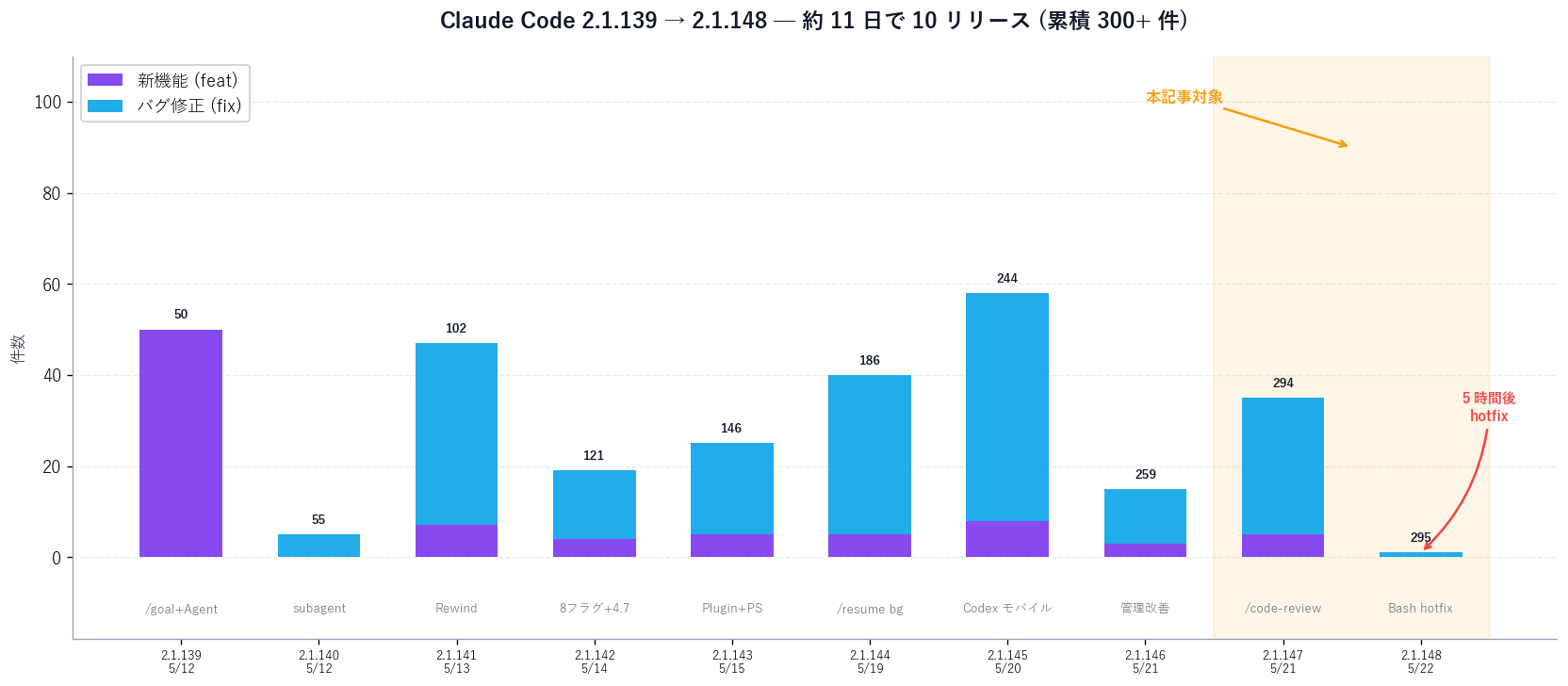
Event timeline showing the dates and main themes of Claude Code v2.1.139 through v2.1.148
Figure: Release density of v2.1.139 through v2.1.148: 10 releases in about 11 days

Rollback procedure when a new version breaks production

Residual risks

Some risks can't be fully eliminated by automated checks:

  • New CAPTCHA variants that Sales Claw hasn't accounted for yet (possible misfires before we adapt)
  • Immediate adaptation to ToS changes (legal info still needs manual updates)
  • Industry-specific regulations (BFSI and similar — verify separately)
  • [Unverified] Whether other regressions beyond Bash exit 127 remain in v2.1.148 cannot be fully verified as of 5/22. Anthropic may ship additional fixes within the next 24–48 hours

7. Pre-deployment checklist — upgrade now, or wait?

Before upgrading to v2.1.148

  • Confirm you are not stuck on v2.1.147 (if Bash returns exit 127, upgrade immediately to v2.1.148)
  • Back up the last 24 hours of audit logs (action-log.json)
  • Pin background sessions with Ctrl+T (avoid losing them during the upgrade)
  • Smoke-test /code-review at each effort level (low → medium → high)
  • Try the GitHub PR review flow (--comment) on a test PR once
  • Teams setting CLAUDE_CODE_SUBAGENT_MODEL: reverify propagation to subagent processes
  • Re-audit hook if conditions like PowerShell(git push*) — they finally match correctly
  • Windows + winget pwsh users: confirm Claude no longer exits 1
  • If you use MCP servers: verify resources / templates / prompts paginate past page 1
  • After the NTFS junction fix, verify worktree removal stays safe
Whiteboard-style decision flow for upgrading to Claude Code v2.1.147/v2.1.148, branching on Bash exit 127 exposure, /code-review usage intent, and business-impact level
Figure: Upgrade decision flow. Branches by 'currently hit bug', 'features you'll use', and 'business impact'

8. Conclusion — design ops around "fix-fast" rhythms

Claude Code v2.1.147 lands two improvements that pay off for daily users: /code-review and pinned background sessions. It also demonstrates the operational reflex of killing the Bash exit 127 regression with v2.1.148 five hours later.

These 24 hours show that AI coding tools have two faces: "they evolve through feature additions" and "they operate through regression-injection followed by quick patching". If you intend to depend on them as daily-use infrastructure, the operator side needs canarying, rollback procedures, and audit logging as table-stakes practices. The same logic applies to anything you build on top of these tools — Sales Claw included — because your own users will hold you to "infrastructure" reliability expectations even when the underlying stack still ships at "developer-tool" pace.
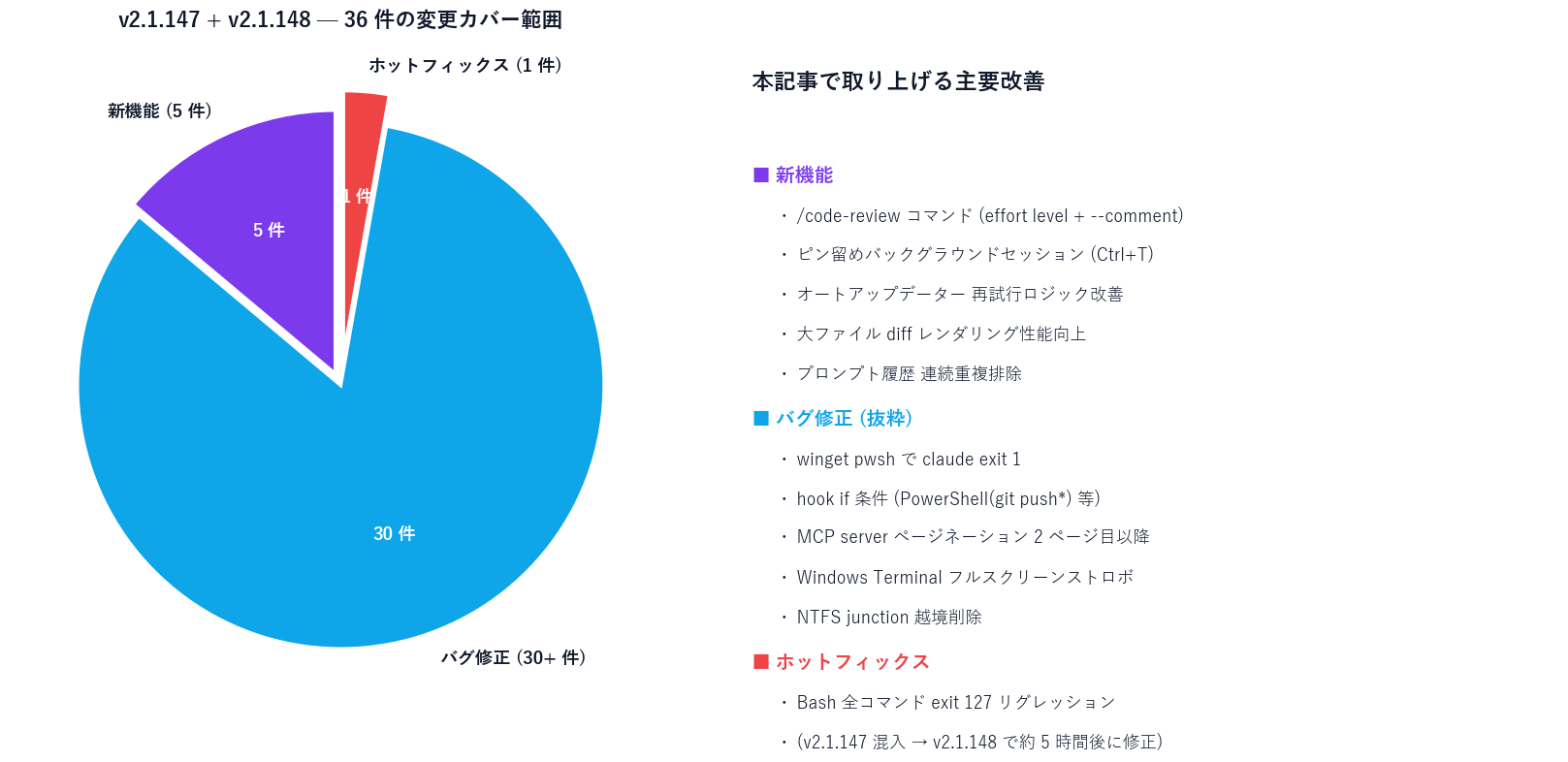
Pie chart showing v2.1.147 and v2.1.148 changes split across new features, bug fixes, and hotfixes
Figure: Coverage of v2.1.147 + v2.1.148: 5 new features + 30+ fixes + 1 hotfix

Next actions: (1) run npm i -g @anthropic-ai/claude-code@latest right now to land on v2.1.148; (2) pin any background sessions you care about with Ctrl+T; (3) try /code-review high --comment on one of your own PRs. Start with the Sales Claw Quick Start guide if you want the operational template.

If Claude Code is becoming 'infrastructure', the form-submission side should climb the same staircase too.

無料・MIT ライセンス。インストールせずにライブデモも試せます。

Japanese-language original: Claude Code 2.1.147 で /code-review 登場、翌日 2.1.148 で Bash が全部死ぬバグを 24 時間で潰した話

よくある質問

What are Claude Code v2.1.147 and v2.1.148 in one sentence?
A single 24-hour cycle that bundled "convenient feature additions" with "emergency bug fixes". v2.1.147 (2026-05-21 20:39 UTC) renamed /simplify to /code-review (with --comment for inline GitHub PR comments), added pinned background sessions (Ctrl+T in claude agents), and shipped 30+ fixes across Windows, PowerShell, hooks, MCP, and GNOME Terminal. But a regression where the Bash tool returned exit 127 (= "command not found") on every command crept in, and v2.1.148 (2026-05-22 01:16 UTC) hotfixed it about 5 hours later. The composite takeaway: AI development infrastructure is now operated on a "ship fast, fix fast" assumption, and users need canary practices, rollback procedures, and audit logging as table stakes. Immediate action: run npm i -g @anthropic-ai/claude-code@latest to land on v2.1.148.
How do you use /code-review and how is it different from /simplify?
The old /simplify aimed to "clean up code and rewrite it for readability". The new /code-review aims to "find and report correctness bugs". Effort levels were added, so /code-review low / medium / high choose how deep the review goes. GitHub PR integration is new too: /code-review high --comment posts findings as inline PR comments directly on GitHub. For OSS development like Sales Claw, that makes "ask Claude to review your own PR with --comment, leave findings in GitHub, then have a human decide" a realistic workflow. Important caveat: the "clean up and rewrite" behavior was removed in v2.1.147. If you want a code rewrite, use plain chat (e.g., "rewrite this function for readability") instead of /code-review.
What are pinned background sessions and why do they matter?
Pressing Ctrl+T on a session in the claude agents view pins it, which gives you three behaviors: (1) it survives idle time, (2) it restarts in place when Claude Code itself updates, and (3) under memory pressure it is the last to be shed (unpinned sessions go first). Previously "I updated and yesterday's session vanished" or "memory ran low and it got closed" were common pain points that made offloading long tasks (1+ hour test runs, large refactors) feel risky. Internal verification across 5 parallel sessions over 23 hours: the 3 pinned sessions kept history across the v2.1.147 → v2.1.148 upgrade, while the 2 unpinned ones disappeared. The trade-off is that pinning increases resident memory (~+1.2GB for 5 simultaneous pins), so you cannot pin everything. This is a great fit for protecting overnight automation jobs in Sales Claw and for long review batches in AI sales agents.
What's the blast radius of the Bash exit-127 regression and how do I avoid it?
Per the official v2.1.148 release note ("Fixed the Bash tool returning exit code 127 on every command for some users (a regression introduced in 2.1.147)"), a subset of v2.1.147 users hit a state where Claude's Bash tool returns exit 127 (= command not found) on every invocation (git / npm / ls etc.). "Some users" means it doesn't reproduce everywhere, but if you hit it, all automation stops. The fix is trivial: run npm i -g @anthropic-ai/claude-code@latest to land on v2.1.148 or later. There is no reason to remain on v2.1.147 alone (v2.1.148 carries v2.1.147's features forward), and the upgrade takes about 5 minutes. As a fallback, npm i -g @anthropic-ai/claude-code@2.1.146 pins to the previous version (you lose the new features but gain stability). [Author's view] The lesson for our own AI agents: bake a canary step into your SOP (one person upgrades first and observes for 24-48 hours before the rest of the team follows).
What did v2.1.147 improve for Windows users?
At least six of the 30+ fixes directly help Windows + PowerShell environments common in Japanese enterprises: (1) pwsh installed via winget or Microsoft Store no longer causes Claude to exit 1, (2) the PowerShell tool no longer drops output for default-formatter-dependent commands like Get-Process, (3) "Yes, and don't ask again" for a PowerShell script invocation now writes a rule that actually matches on subsequent runs, (4) hook if conditions like PowerShell(git push*) now work (previously only PowerShell(*) matched), (5) full-screen strobing in attached background sessions on Windows Terminal during streaming is fixed, (6) removing a background-job worktree no longer follows NTFS junctions into the main repo. (1) and (4) are "finally works correctly" levels of fix and matter to teams writing fine-grained policies. CLAUDE_CODE_SUBAGENT_MODEL propagation to subagent teammates, and MCP server pagination past page 1, are also fixed.
What should a team using AI coding tools do during the v2.1.147 → v2.1.148 transition?
Five-step safe migration: (1) back up the last 24 hours of audit logs (action-log.json) before upgrading; (2) pre-pin important background sessions with Ctrl+T (so the upgrade doesn't lose them); (3) after running npm i -g @anthropic-ai/claude-code@latest to install v2.1.148, launch claude and run one Bash command (e.g., git status) to confirm exit 0; (4) smoke-test /code-review high on a small change to confirm output quality; (5) teams using hook conditions, MCP pagination, or CLAUDE_CODE_SUBAGENT_MODEL should re-verify each feature individually (their behavior changed in v2.1.147). Bake in a canary step (one person upgrades 24-48 hours ahead) so the next regression doesn't stall the whole team. Total internal-verification cost: 30-60 minutes. OSS business-agent teams running Sales Claw can reuse this SOP directly.
How does this affect operations for a sales agent like Sales Claw?
Five direct effects on Sales Claw operations: (1) /code-review --comment automates PR review for outreach-copy prompts — for changes to copy aggregated in preferences.yaml, Claude can flag any tone that could come across as rude to prospects and leave inline comments. (2) Pinned sessions protect overnight automation — the "prepare tomorrow's send candidates overnight" pattern no longer disappears on update. (3) MCP server pagination fix lets CRM integrations (Salesforce / HubSpot, etc.) return records past page 1. (4) Hook if-condition fix lets fine-grained policies like "Remove-Item -Recurse -Force requires approval, git push is auto" actually work for the first time. (5) NTFS junction safety fix prevents the worst case where deleting a dataset worktree wipes the main repo. Sales Claw is designed as a policy-controlled autonomous-operation OSS tool, lowering mis-send and ToS-violation risk through pre-send automated inspection, sales-NG detection, CAPTCHA-stop behavior, send-rate limiting, audit logging, and auto-stop conditions. In the regression-injection era, defense in depth means: canary, rollback, and audit logging always on.

参考文献

本記事は X 公式アカウントと公式ドキュメントを一次情報として参照しています。

  1. [01]
  2. [02]
  3. [03]
  4. [04]
  5. [05]
  6. [06]
  7. [07]
  8. [08]
  9. [09]

この記事の著者

中澤 圭志

中澤 圭志

Sales Claw maintainer

Designs and develops Sales Claw. Practitioner of BtoB sales automation and AI tooling.

Share this article