Tool Deep DivesGemini Omni

Gemini Omni Explained: Google's New 'Talk-to-it' Video AI, for Non-Technical Readers (May 2026)

Gemini Omni is Google's new 'talk-to-it' video AI, announced at I/O 2026 on 2026-05-19. This guide explains how it differs from Sora 2 and Veo 3, what's bundled into the new $100 Google AI Ultra plan, the real limits of SynthID watermarking, and how business teams should pair video AI with sales-outreach tools like Sales Claw — all written for non-technical readers.

中澤 圭志

中澤 圭志

@keishi_nakazawa

Sales Claw maintainer

·14 min
Gemini Omni Explained: Google's New 'Talk-to-it' Video AI, for Non-Technical Readers (May 2026)
This English article is a concise version of the original. For the full Japanese deep-dive, see the Japanese original.

Key Facts

Announced

2026-05-19 (Google I/O 2026 keynote by Sundar Pichai)

First model

Gemini Omni Flash (video output)

Entry points

Gemini app / Google Flow / YouTube Shorts Remix / YouTube Create App

Plans

Google AI Plus / Pro / Ultra (YouTube Shorts is free for users 18+)

"You keep hearing about Gemini Omni — but what actually is it? How is it different from Sora? And does that $100/month plan have anything to do with regular people?" this article reads Google's official blog posts, the Gemini Apps release notes, and the Google AI subscriptions page as primary sources, and lays out what non-technical readers should understand before bringing this technology into their personal life or workplace. As of May 2026 the first available model is Gemini Omni Flash; image and audio output, plus a developer-facing API, are on the published roadmap. Getting the big picture now means you can react quickly when the heavier-duty releases land.

Primary sources for this article: Google Blog "Introducing Gemini Omni" (2026-05-19), Google Blog "100 things we announced at Google I/O 2026" (2026-05-20), Google Blog "Everything new in our Google AI subscriptions" (2026-05-20), the Gemini Apps Release Notes, and the official Gemini subscriptions page. For the wider Google I/O 2026 context and the relationship to Antigravity and Gemini Spark, read our Google I/O 2026 roundup alongside this piece. For the OpenAI-side comparison of image generation, see the gpt-image-2 practical guide. For the general "explainer for non-tech users" pattern applied to a different product, see our GitHub Copilot 2026 features & pricing explainer and the ChatGPT Atlas general-reader guide.

1. What Gemini Omni really is — "the video AI you can talk to"

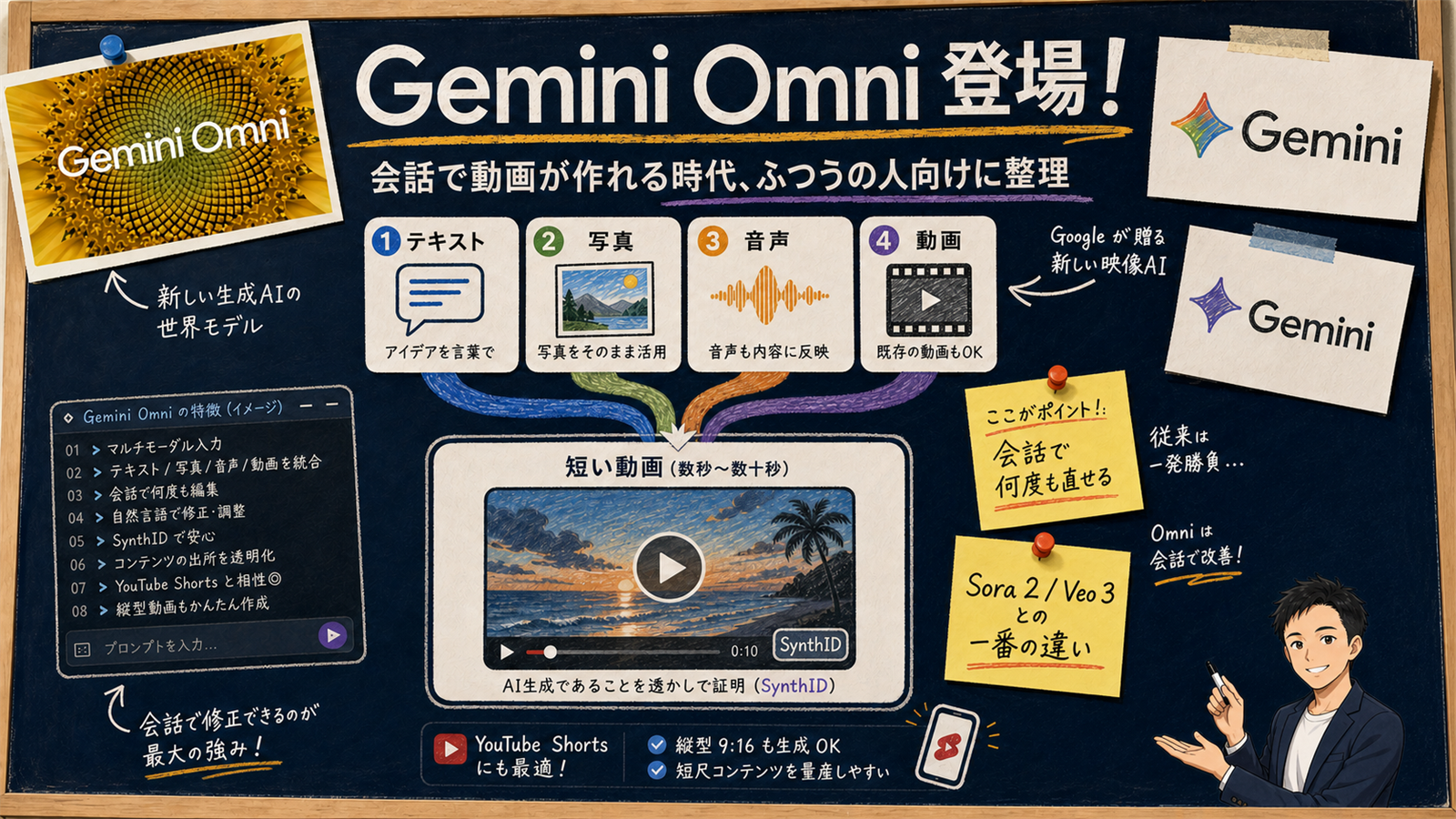
Gemini Omni cover illustration. A whiteboard-style diagram titled 'What is Gemini Omni?' with the subtitle 'A new Google AI that builds video from a conversation, explained for non-technical readers'. In the center, four input icons (text, photo, audio, video) converge into a single video frame. Left zone: 'Traditional video editing (humans do all the steps)' with timeline, cuts, captions, and a human figure. Right zone: 'Gemini Omni (edit by talking to it)' with chat bubble, automatic character consistency, SynthID watermark, and direct hand-off to YouTube Shorts. Yellow sticky-note callout at the bottom: 'The biggest difference vs. Sora 2 is that you can iterate by talking to it'.
Figure: Gemini Omni — the big picture of Google's new video AI

Gemini Omni ("Omni" for short) is the new AI model family announced by Google and Google DeepMind on 2026-05-19. [Official] Google's official page positions Omni as a model that can "create anything from any input", with Gemini Omni Flash as the first member of the family going live that same day.

For ordinary users, the biggest difference shows up in the editing loop. Where previous video AIs felt like a vending machine — you put in a prompt, you take what comes out — Omni feels more like an assistant who remembers what you've been editing and lets you iterate by talking. Concretely:

  • "Make the orange in the sunset a bit stronger" — adjusts the color without rebuilding the clip from scratch
  • "Put the same character in a different scene" — preserves the character's look in a brand-new shot
  • "Quieter background music" — touches only the audio without redoing the visuals

This "video AI you iterate on by talking to it"design is what makes Omni structurally different from prior video models. Earlier video AIs were "change the prompt, regenerate" tools. Omni is built as a generation tool that also edits, and Google describes that fusion as the fundamental philosophical difference between Omni and every other video model in the race.

[Author's view] The real significance of Omni is the shift from "video AI = prompt gacha" to "video AI = an assistant you talk to until you're happy". As of May 2026, single-shot output quality on third-party leaderboards still favors Seedance 2 and Sora 2 Pro, but the "don't throw it all away every time you tweak something" experience is what makes generative video usable for non-experts. That's what Omni gets right.
2. What it can and can't do today — input and output mapped

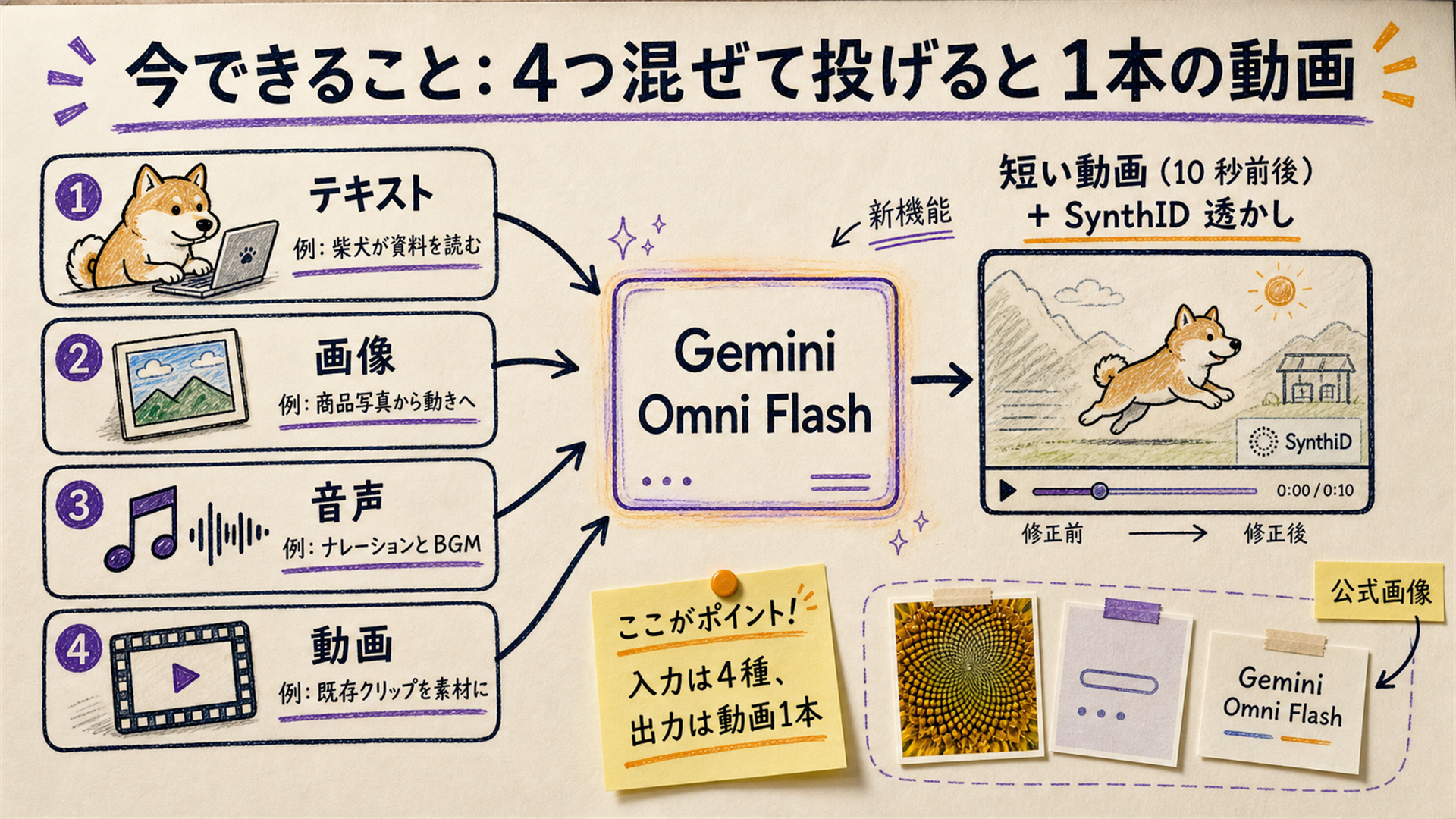
A whiteboard map of Gemini Omni Flash's four supported input types (text, image, audio, video) and one output type (video). On the left, four input icons with example prompts: 'a dog running through the sunset', 'remix this photo', 'use this BGM', 'edit this clip by talking'. In the center, the Gemini Omni Flash logo with the fused stack 'Gemini reasoning + Veo rendering + Genie physics + Nano Banana editing'. On the right, output: 'short video (~10s) + SynthID watermark'. A footnote reads 'As of May 2026 the only output is video. Image / audio output are on the roadmap.'
Figure: Gemini Omni Flash — four kinds of input, one kind of output (for now)

The four kinds of material you can feed in

[Official] Google's official blog says Omni accepts "a combination of images, audio, video and text" as input and returns high-resolution video and audio. That multimodal pipeline is the cleanest differentiator versus Sora 2 and Veo 3. Some example combinations:

Example input combinationWhat kind of video you get
Text only: "a dog running through the sunset, cinematic"~10s high-resolution clip
One photo + "turn this dog into a running shot"Clip that preserves the dog's look from the photo
An existing short clip + "refresh the BGM and add a logo at the end"Same clip with new audio and a fresh ending
An audio track + "build a 10s opening that fits this music"Opening clip synchronized to the music

What it can't do yet

On the other side, the May 2026 Omni Flash still has some honest limitations. On the third-party Artificial Analysis Video Arena leaderboard, Seedance 2.0 ranked first in both text-to-video and image-to-video in May 2026, with Omni Flash, Veo 3.1, and Sora 2 sitting below it. [Third-party benchmark, not official]

  • Long-form video: capped at roughly 10 seconds per clip (Google says this is a deployment choice, not a model constraint)
  • Narrative video with very strict character consistency: Sora 2 still leads on cross-scene character fidelity
  • Cinematic camera work: deliberate film-style pans, dollies, and slow lens control are still stronger on Veo 3
  • Image output and audio output: on the roadmap, not yet shipping (output today is video only)

3. Omni vs. Sora 2 vs. Veo 3 vs. Seedance 2 — picking the right model

"Which one should I actually use?" is the question most regular people care about. Below is a use-case breakdown based on the May 2026 state of the Artificial Analysis Video Arena leaderboard and each vendor's official documentation.
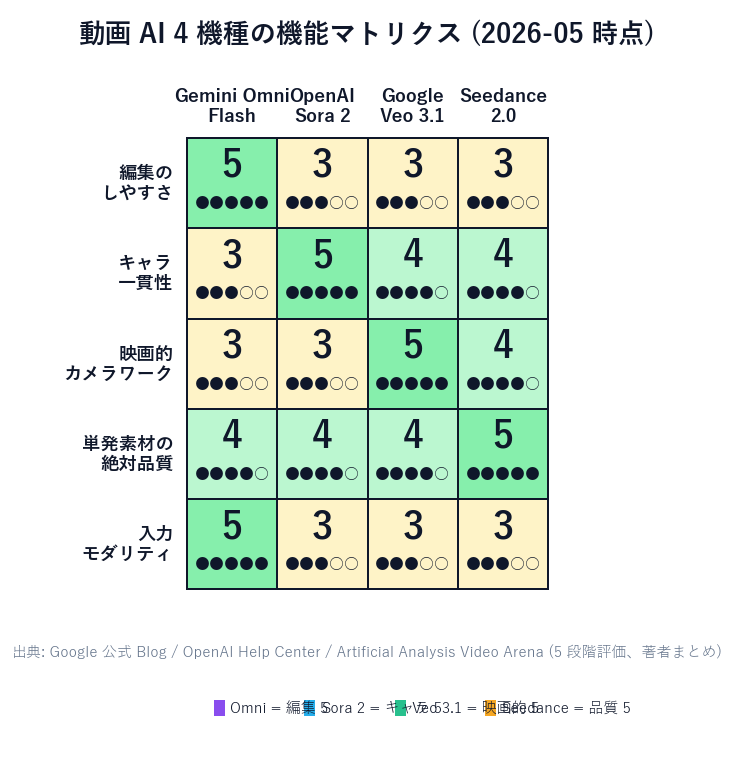
Feature matrix for four video AI models. Columns: ease of editing / character consistency / cinematic camera work / single-shot quality. Rows: Gemini Omni Flash, OpenAI Sora 2, Google Veo 3.1, Seedance 2.0. Each cell has a 1-5 rating. Omni scores 5 on ease of editing, Sora 2 scores 5 on character consistency, Veo 3.1 scores 5 on cinematic camera work, Seedance 2.0 scores 5 on single-shot quality.
Figure: Feature matrix across four leading video AI models (May 2026, based on Artificial Analysis Video Arena and vendor docs)
項目Gemini Omni FlashOpenAI Sora 2
Biggest strengthIterate on the same clip by talking to itCharacter consistency and storytelling
Input modalitiestext + image + audio + videotext + image (audio input is weak)
Max single-clip lengtharound 10sup to 25s on Sora 2 Pro
Subscription gateGoogle AI Plus / Pro / UltraChatGPT Plus / Pro
Free entry pointYouTube Shorts Remix (18+)Limited free tier
WatermarkingSynthID (DeepMind standard)OpenAI proprietary watermark

Use-case picker

  • Crank out social / YouTube Shorts clips → Gemini Omni Flash (free via YouTube Shorts Remix)
  • Keep the same character across multiple scenes → Sora 2 (best character consistency)
  • Need cinematic camera work / film-style shots → Google Veo 3.1 (still alive alongside Omni, accessed via Google Flow)
  • Want the highest single-shot quality, full stop → Seedance 2.0 (tops the third-party leaderboard, though distribution in Japan is limited)
  • Animate product photos / iterate on an existing clip by talking → Gemini Omni Flash (image-to-video plus the conversational edit loop)

4. Pricing — the new $100 Google AI Ultra plan vs. ChatGPT and Claude

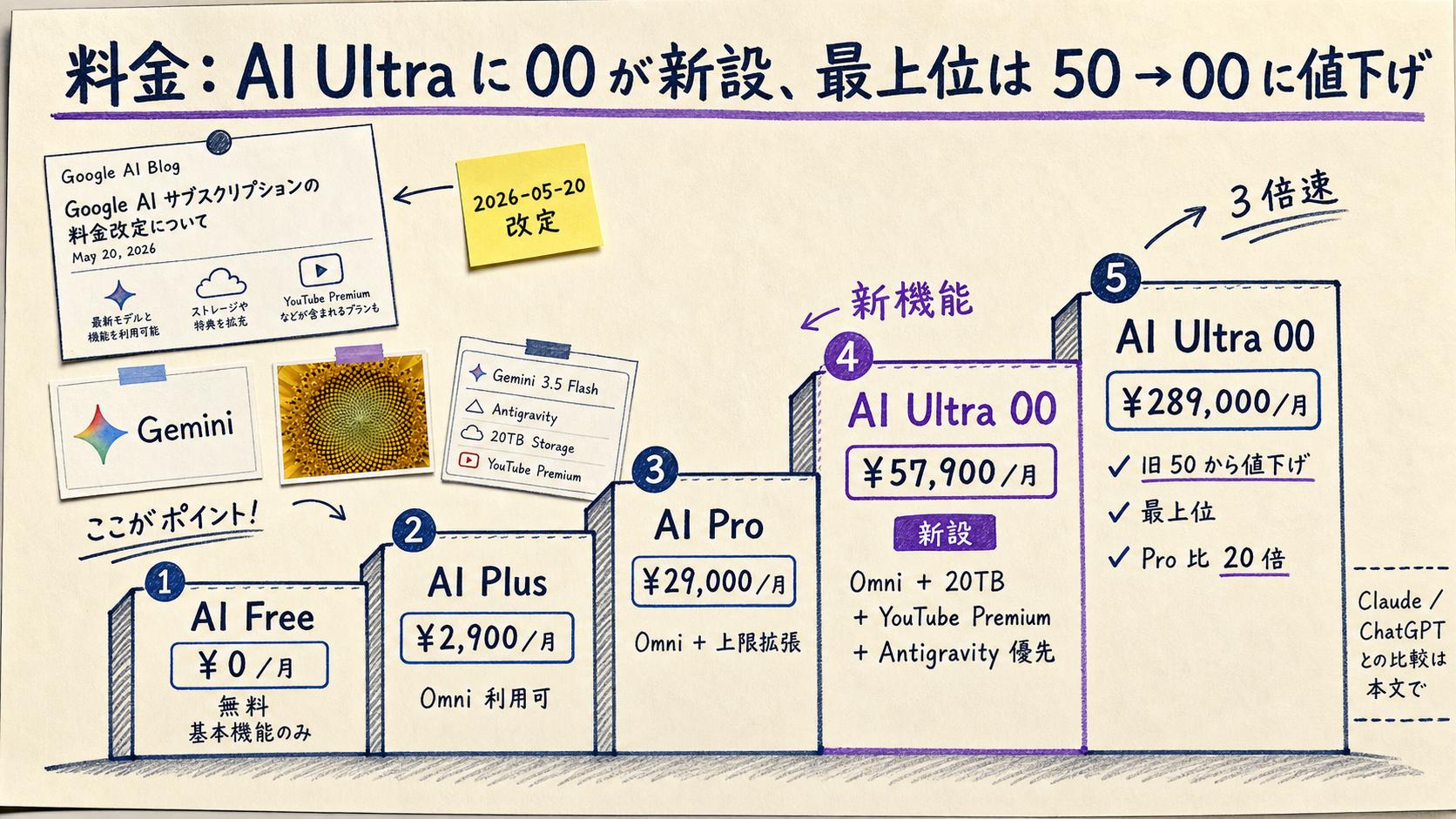
A staircase chart of Google AI subscriptions. Bottom step: AI Free (free, basic features only). AI Plus (Omni access). AI Pro (Omni + higher caps). AI Ultra $100/month (new mid-tier with Omni + 20TB + YouTube Premium + Antigravity priority). AI Ultra $200/month (former $250, now reduced, top tier with 20x Pro usage). Right column compares with ChatGPT Plus $20, ChatGPT Pro $200, and Claude Max, with a note that 'Omni-equivalent video is Sora 2 on OpenAI; Claude does not have video generation'.
Figure: Google AI subscription staircase (post-May 2026 revamp) — where Omni starts

Concurrent with I/O 2026, Google overhauled its AI subscription lineup. [Official] The newly added "Google AI Ultra $100/month" tier is, in the words of Google VP Shimrit Ben-Yair, designed for "developers, technical leads, knowledge workers and advanced creators".
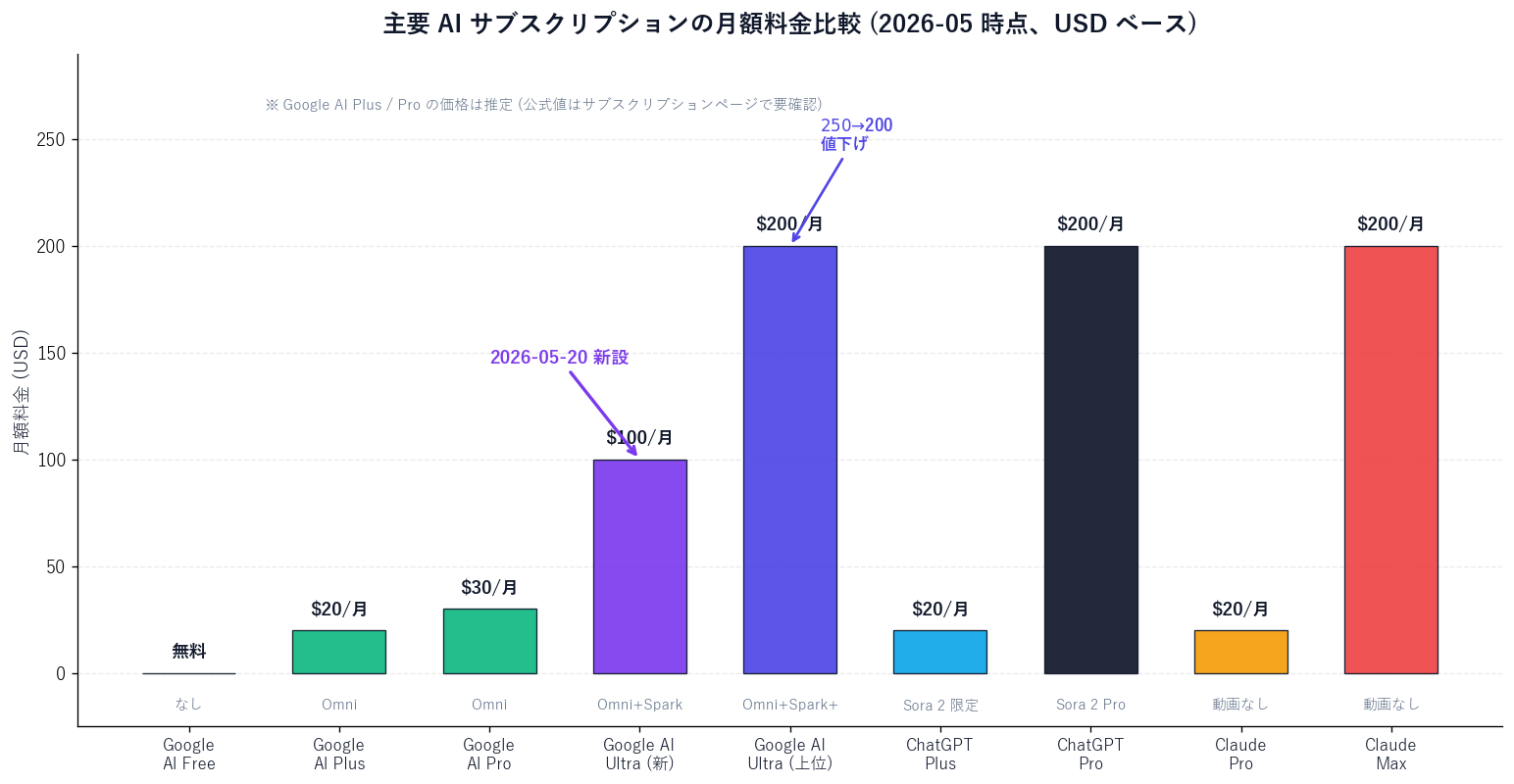
Bar chart of major AI subscription prices in USD per month. Google AI Free 0 / AI Plus ~20 (estimated) / AI Pro ~30 (estimated) / AI Ultra (new) 100 / AI Ultra (top) 200 / ChatGPT Plus 20 / ChatGPT Pro 200 / Claude Pro 20 / Claude Max 200. Bars are color-coded by whether the plan includes video generation.
Figure: Major AI subscription monthly prices (May 2026, USD-based)

What you get for $100/month on AI Ultra

[Official] According to the Google blog, the $100/month AI Ultra plan includes:

  • 5x higher usage limits than Pro across the Gemini app and Google Antigravity
  • Access to Gemini Omni and Gemini 3.5 Flash
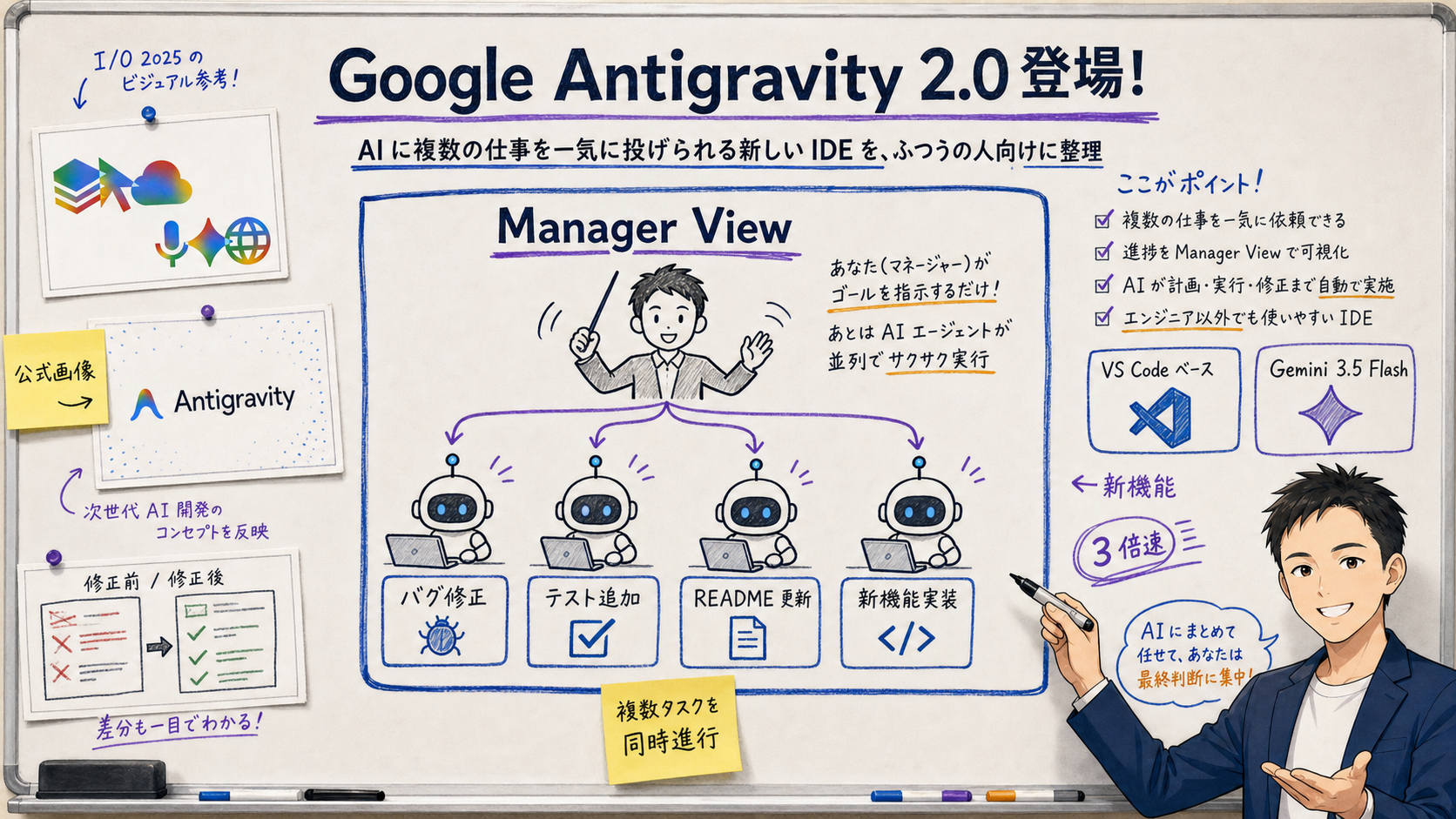
  • Priority access to Google Antigravity (the new AI IDE)
  • 20TB of cloud storage
  • YouTube Premium individual plan bundled in
  • Access to Gemini Spark (the new 24/7 AI agent)

How it compares to ChatGPT and Claude plans

項目Google AI Ultra ($100/mo)ChatGPT Pro ($200/mo)
Video generationGemini Omni Flash + Veo 3.1Sora 2 + Sora 2 Pro
Image generationNano Bananagpt-image-2
Reasoning modelGemini 3.5 FlashGPT-5.5 Pro
Storage20TB(separate, e.g. Google Drive)
Media perkYouTube Premium individualNone
Coding integrationPriority access to AntigravityCodex

[Author's view] If you want video generation, YouTube Premium, and 20TB of cloud storage all in one bundle — or you're already deeply in the Google ecosystem — the $100 AI Ultra is simply a good deal. On the other hand, if you skip video and only care about high-quality text reasoning, the $20 plans on ChatGPT Plus or Claude Pro will be plenty for many people. The real deciding factor is how much video AI you'll actually use per month.
Even when video AI handles the visuals, lead capture and outbound messaging are still a separate automation problem.

無料・MIT ライセンス。インストールせずにライブデモも試せます。

5. How to start — three entry points (Gemini app / Google Flow / YouTube Shorts)

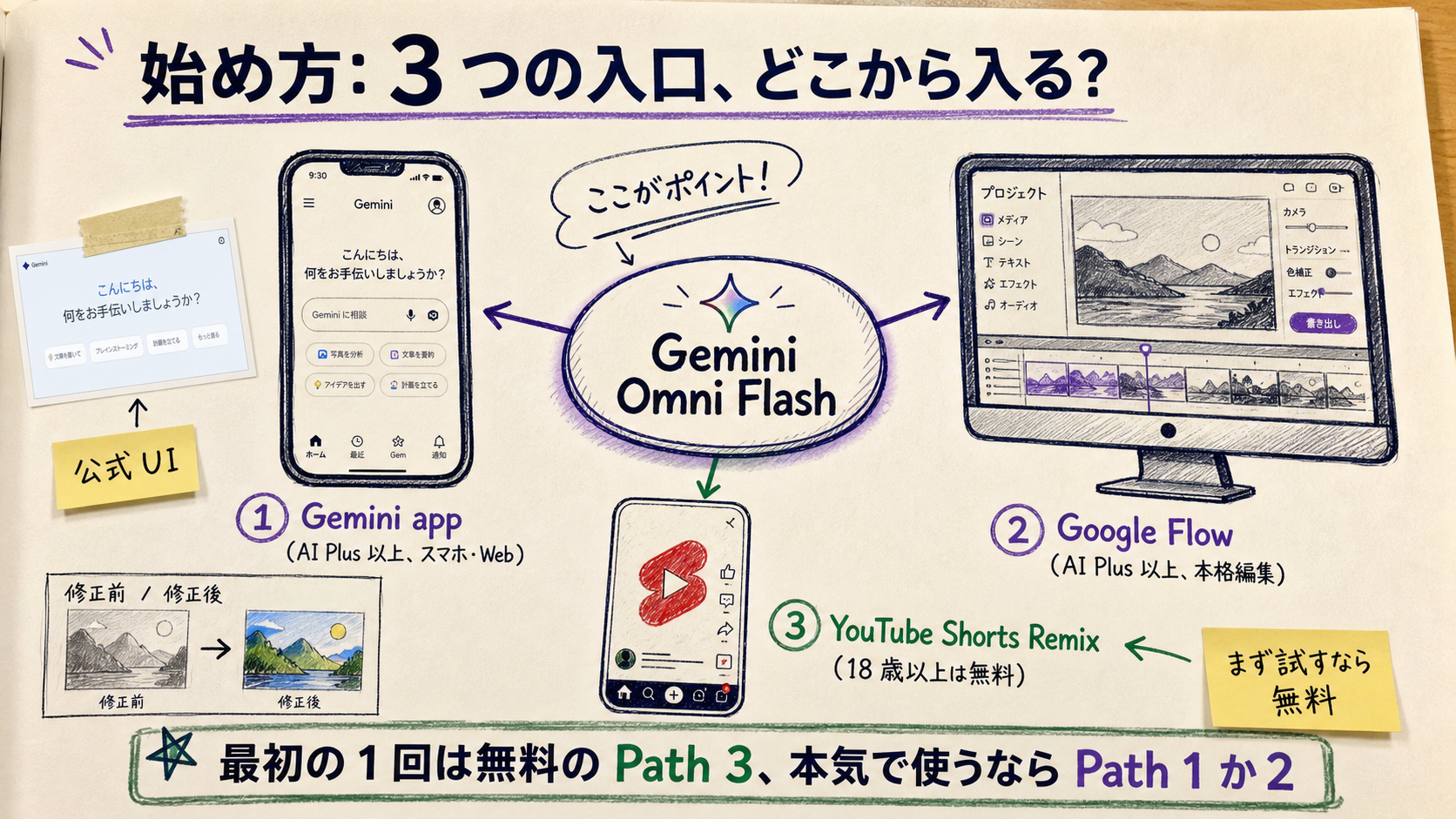
A diagram of three entry points into Gemini Omni. Center node: 'Gemini Omni Flash'. Three branches: Route 1 'Gemini app' (Google AI Plus or above, mobile + web, the best place for first try). Route 2 'Google Flow' (Google AI Plus or above, full editing workflow, multi-scene continuity by chat). Route 3 'YouTube Shorts Remix' (free for users 18+, ideal for high-volume social clips). A sticky-note at the bottom reads: 'For your first try use Route 3 (free); for serious use, pick Route 1 or 2.'
Figure: Three entry points into Gemini Omni — first try vs. serious use

Route 1: try it through the Gemini app

  1. Sign in to gemini.google.com or the Gemini app
  2. Subscribe to Google AI Plus, Pro, or Ultra (the free AI Free tier does not include Omni)
  3. In the chat box, type something like "Make a short video: a dog running through the sunset, cinematic"
  4. Wait 10-30 seconds for the clip; then iterate by chat ("a bit more orange in the sky, please")

Route 2: get serious in Google Flow

  1. Open Google Flow (available on Google AI Plus and up)
  2. Drop in source material (text instructions + photos + existing clips + audio tracks)
  3. Generate and edit scene by scene, conversationally
  4. Stitch multiple scenes together while preserving character consistency

Route 3: try the free YouTube Shorts Remix

  1. Open the Shorts section of the YouTube app
  2. Pick a Short you like, hit Remix, and ask Omni Flash to generate material (18+ only)
  3. The output is sized for short-form social
  4. The YouTube Create app (free starting this week) also supports it

6. Risks — fake video, copyright, and what SynthID does (and doesn't) cover

Fake-video risk and the limits of SynthID

[Official] Google says every Omni-generated video carries an invisible SynthID digital watermark, and that the watermark can be checked from the Gemini app or a dedicated tool to confirm whether a piece of footage is AI-generated.

That said, SynthID is "a way to detect AI-made content" — it is not "a way to prevent misuse". Specifically:

  • The SynthID watermark can break under aggressive re-encoding
  • It only matters if the receiving side actually checks it (most social platforms don't check automatically)
  • Adversarial watermark-removal techniques can keep evolving faster than the defenders

Absolute don'ts, even for casual use

Additional considerations for business use

  • Internal guidelines: document the bounds within which employees may use generative video AI
  • Copyright review workflow: visually inspect outputs for accidental similarity to existing IP
  • "AI generated" disclosure: when shipping to customers, disclose that the video is AI-generated
  • Industry regulation: healthcare, finance, education, and public-sector use cases have additional rules — get legal involved

7. Business uses — the Sales Claw perspective

Realistic use cases

  • Social marketing: weekly batches of 10-second clips for X / Instagram / Threads / TikTok
  • Recruiting: AI-generated "life at the company" ambience clips (without using real employees' faces)
  • Service marketing: hero clips for the landing page showing "what using the product feels like"
  • Internal training: drop short "scenario" clips into otherwise text-only training materials
  • Event teasers: short teasers for webinars and conferences

From the Sales Claw side

Sales Claw is open-source software designed to reduce mis-send and policy-violation risk through policy control, pre-send automated checks, sales-banned-content detection, CAPTCHA-stop behavior, send-rate limiting, audit logging, and automated kill-switch conditions. The relationship between video AI like Gemini Omni and Sales Claw is cleanest if you split them this way:
  • Video AI = inbound material generation: produces the clips that live on your social and landing pages
  • Sales Claw = outbound contact-form motion: sends carefully drafted messages through prospects' contact forms
  • Attaching video to a B2B contact-form submission is typically counterproductive; keep them on different channels
  • AI-generated content belongs on your LP / social / recruiting site; Sales Claw drafts and sends the messages that drive people to those surfaces

8. Wrapping up — meeting "the era of conversational video AI" well

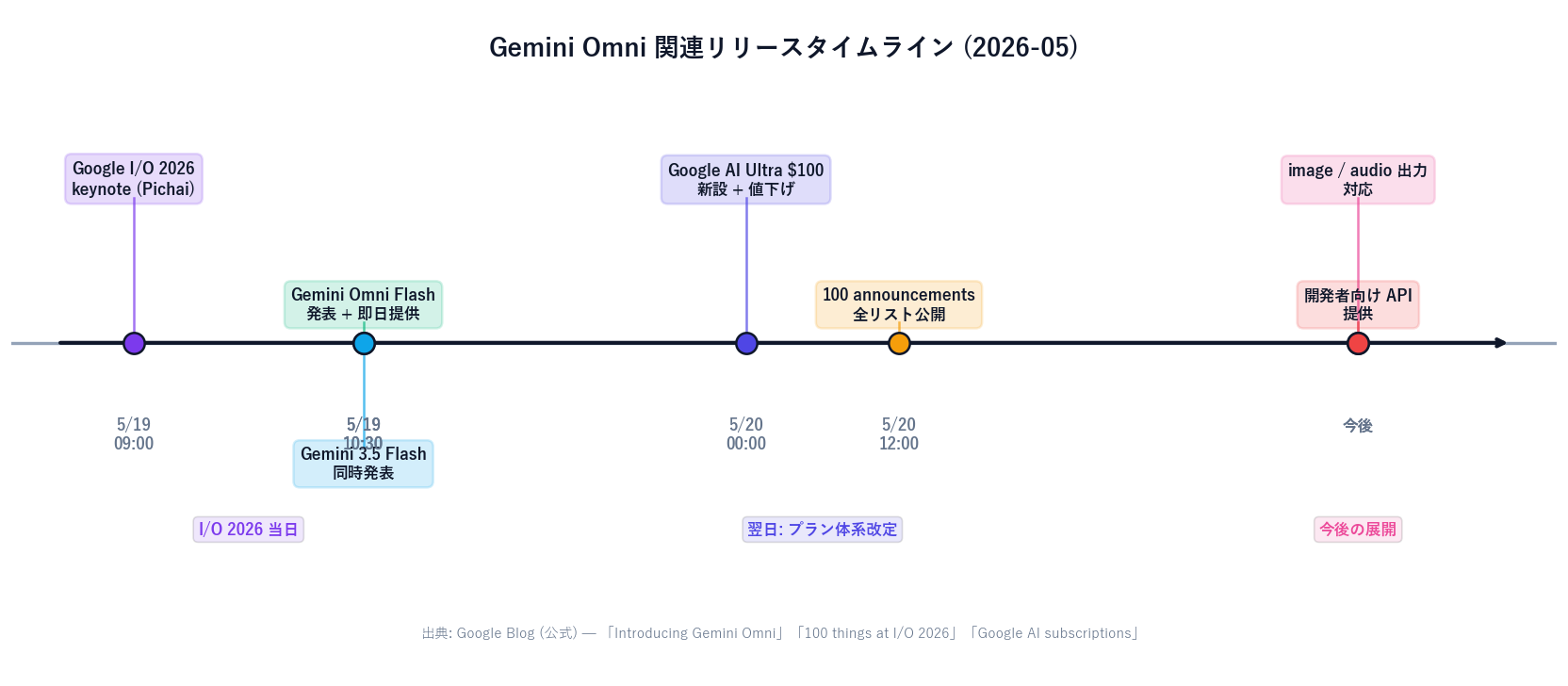
Timeline of Gemini Omni-related releases. 2026-05-19 Google I/O 2026 keynote (Sundar Pichai). 2026-05-19 Gemini Omni Flash announced and available the same day. 2026-05-19 Gemini 3.5 Flash announced concurrently. 2026-05-20 Google AI Ultra $100 plan added; previous Ultra reduced from $250 to $200. 2026-05-20 the '100 announcements' list published. Future: image / audio output and developer-facing API.
Figure: Gemini Omni release timeline (May 2026, based on Google's official communications)

Gemini Omni marks a meaningful shift in the video AI race: from "how good is the single shot?" to "how easily can you iterate on it?" Rather than replacing Sora 2 or Veo 3, it pushes the entire market into an era where you pick the right model for the job. That's the May 2026 status quo.

For ordinary users, the practical question is "how often will I actually use video AI?"If a couple of clips a month, the free YouTube Shorts Remix is enough. If you're generating multiple social clips a week, Google AI Plus or Pro becomes reasonable. If you're bringing video AI into business workflows, the new $100 AI Ultra plan is the realistic baseline. And if video isn't on your radar at all, the $20 ChatGPT Plus or Claude Pro tiers will keep covering text reasoning just fine.

Next steps: the lowest-risk way to feel out Omni is to make one clip from the free YouTube Shorts Remix. If you're bringing this into a business, do the legal / internal-policy work first. If you also want to automate the form-outreach side, you can start with a free download of Sales Claw. For related context, the Google I/O 2026 roundup is a useful companion piece.

Note: This is the English version. The Japanese original is available at /blog/2026-05-23-gemini-omni-video-ai-general-readers-guide.

Generate the material with video AI; send the messages with Sales Claw — two-sided workflow.

無料・MIT ライセンス。インストールせずにライブデモも試せます。

よくある質問

What is Gemini Omni, in one paragraph?
Gemini Omni is a new AI model family announced by Google at I/O 2026 on 2026-05-19. The first member, Gemini Omni Flash, went live the same day. You feed it any mix of text, images, audio, and video, and it produces roughly 10-second high-resolution video clips. The signature feature is the conversational edit loop — you can keep refining the same clip by talking to it, instead of regenerating from scratch every time. Under the hood it fuses Gemini's reasoning, Veo's rendering, DeepMind's Genie world simulation, and the Nano Banana image-editing model into one stack. Every output carries a SynthID watermark. For a regular user the safest first taste is the free YouTube Shorts Remix integration (18+).
How much does it cost? What is the new $100 Google AI Ultra plan?
On 2026-05-20 Google overhauled its AI subscriptions. A new $100/month 'Google AI Ultra' tier sits between Pro and the flagship Ultra, which itself dropped from $250 to $200. The $100 plan includes 5x higher usage limits than Pro across the Gemini app and Google Antigravity, access to Gemini Omni and Gemini 3.5 Flash, priority access to Antigravity, 20TB of cloud storage, a YouTube Premium individual plan, and access to Gemini Spark. Google VP Shimrit Ben-Yair positioned it for 'developers, technical leads, knowledge workers and advanced creators'. If you want video AI plus YouTube Premium plus 20TB of cloud storage in one bundle, $100 AI Ultra is a strong deal. If you only care about text reasoning, you can keep using ChatGPT Plus or Claude Pro at $20/month. Always verify current pricing on Google's official subscriptions page before subscribing — country, currency, and promotions affect the actual numbers.
How does Gemini Omni compare to Sora 2 or Veo 3?
The clearest mental model is 'each one has a different superpower.' Omni: best 'edit by talking' loop, accepts text + image + audio + video as inputs, ~10-second clips, gated to Google AI Plus/Pro/Ultra. Sora 2: best character consistency across scenes, up to 25s on Sora 2 Pro, gated to ChatGPT Plus/Pro. Veo 3: best cinematic camera work, 8s clips with extension support, accessed via Google Flow. Seedance 2: highest single-shot quality (ranked #1 on the Artificial Analysis Video Arena leaderboard in May 2026 for both text-to-video and image-to-video), though distribution in Japan is limited. A useful selector: short social clips → Omni; multi-scene narrative with the same character → Sora 2; film-style cinematic shots → Veo 3; one shot at maximum quality → Seedance 2; animate a product photo or iterate by chatting → Omni.
What is the SynthID watermark? Does it matter for regular users?
SynthID is a Google DeepMind technology that embeds an invisible digital watermark into AI-generated images and video. Every clip produced by Gemini Omni carries this watermark, and you can verify it in the Gemini app or via a dedicated tool. For regular users it matters in two ways. First, when you create AI video, faking 'this is not AI' becomes technically harder thanks to the embedded watermark. Second, when you watch video from others, you can in principle verify whether a clip is AI-generated — though most social platforms do not yet check automatically. The important caveat: SynthID is a detection mechanism, not a prevention mechanism. The watermark can break under aggressive re-encoding, only matters if the recipient actually checks, and is vulnerable to adversarial removal techniques. Don't rely on 'a watermark exists, therefore it's safe' — design from the start around 'whose consent, for which audience, doing what?'
Can I use Gemini Omni for commercial / business purposes? What should I watch out for?
Yes, commercial use is permitted within the terms of the AI Plus / Pro / Ultra subscriptions as of May 2026. Realistic business uses: weekly batches of 10-second social-marketing clips for X, Instagram, Threads, or TikTok; 'life-at-the-company' ambience clips for the recruiting page (without using real employees' faces); hero clips for landing pages; short scenario examples in internal training material; teasers for events and webinars. The hard 'never do this' list: putting real people in AI video without their consent; faking videos of politicians or public figures; commercial content with someone else's logos or trademarks; unauthorized remixes of music or film; inappropriate scenes centered on minors; passing AI footage off as real news. Before going live, have legal review the Google AI usage terms, publish internal guidelines, set up a copyright check workflow, decide on 'AI generated' disclosure rules, check regulated-industry obligations (medical, financial, education, public sector), and define a takedown/correction procedure for incidents.
Is Gemini Omni available in Japan? Any restrictions?
[Unverified / partly speculative] Google's official blog uses the phrase 'rolling out globally' and we found no text explicitly excluding Japan. Separately, Google announced a free Gemini upgrade for students 18 and older in Indonesia, Japan, the UK, and Brazil through July 2026 — so Japan is explicitly in scope for the broader rollout. Practically this suggests the Gemini app's Omni access should be available in Japan, while the YouTube Shorts Remix integration with Omni and the YouTube Create app appear to be in regional rollout. The $100 / $200 Google AI Ultra prices are USD-based; the Japan retail price depends on the JPY exchange rate and Google's local strategy. For up-to-the-minute regional availability, Japanese-yen pricing, and stock status, consult the Gemini Apps Release Notes and the official Gemini subscriptions page. This article reflects Google's official communications from 2026-05-19 through 2026-05-23; regional availability could shift over the following 1-2 weeks.

参考文献

本記事は X 公式アカウントと公式ドキュメントを一次情報として参照しています。

  1. [01]
  2. [02]
  3. [03]
  4. [04]
  5. [05]
  6. [06]
  7. [07]
  8. [08]

この記事の著者

中澤 圭志

中澤 圭志

Sales Claw maintainer

Designs and develops Sales Claw. Writes from the field on B2B sales automation and applied AI.
Share this article