Tool Deep DivesGitHub Copilot

GitHub Copilot in 2026: What It Actually Is Now, How Free / Pro / Pro+ Differ, and When to Use Agent / Coding Agent / Spark

GitHub Copilot has shifted from 'in-editor autocompleter' to 'AI teammate that takes Issues and returns PRs.' Five plans (Free, Pro $10, Pro+ $39, Business $19/seat, Enterprise $39/seat); four pillars (Inline + Chat, Agent mode, Coding Agent, Spark). New Pro and Pro+ sign-ups have been paused since 2026-04-20; billing moves to AI Credits on 2026-06-01. Here's the practical picture for non-technical readers — and how it interlocks with Sales Claw.

中澤 圭志

中澤 圭志

@keishi_nakazawa

Sales Claw maintainer

·12 min
GitHub Copilot in 2026: What It Actually Is Now, How Free / Pro / Pro+ Differ, and When to Use Agent / Coding Agent / Spark
This English article is a concise version of the original. For the full Japanese deep-dive, see the Japanese original.

Key Facts

Pricing (USD)

Free $0 / Pro $10 / Pro+ $39 / Business $19/seat / Enterprise $39/seat

Four pillars

Inline + Chat / Agent mode / Coding Agent (Issue → PR) / GitHub Spark

Recent changes

2026-04-20 Pro/Pro+ sign-up pause / 2026-06-01 AI Credit billing migration

Spark availability

Pro+ ($39) or Enterprise ($39) only — public preview

"What is GitHub Copilot, actually?" "Pro vs Pro+ — what's the difference?" "Spark really only on Pro+?" "If I assign an Issue, will Copilot really open a PR?"— this article walks through the GitHub Copilot 2026 picture from primary sources (GitHub Docs, Plans page, GitHub Blog, Changelog) for non-technical readers, including the April 2026 sign-up pause and the June 2026 billing migration.

Primary sources: GitHub Docs (docs.github.com/copilot), the GitHub Copilot Plans page (github.com/features/copilot/plans), GitHub Blog, and GitHub Changelog. For adjacent context, see our Codex CLI vs Claude Code comparison, the AI agent definition guide, the ChatGPT Atlas explainer, and the MCP complete guide.

1. What Copilot 2026 is — from "autocompleter" to "PR-returning teammate"

A medium-density whiteboard illustration of GitHub Copilot 2026: a central GitHub-logo trunk with four arms extending to Editor, Cloud, App Builder, and Terminal. Left zone shows the local-side capabilities (Inline completion, Chat, Agent mode, Copilot CLI), right zone shows the cloud-side capabilities (Coding Agent, Code Review, Spark, Spaces). A yellow sticky note at the bottom highlights the Apr 20 sign-up pause and the Jun 1 AI Credit billing migration.
Fig: GitHub Copilot 2026 — four faces, one contract

GitHub Copilot (from Microsoft-owned GitHub) launched in 2021 as in-editor code completion. Through 2025 and 2026, autonomous capabilities were stacked on top: Agent mode (in-editor autonomy), Coding Agent (cloud-side issue-to-PR), and Spark (plain-English app generation). Today it's less "the autocompleter got smarter" and more "multiple AI products under one subscription."

[Author opinion] Three things made Copilot suddenly newsworthy in April–May 2026: (1) the 2026-04-20 pause on new Pro / Pro+ / Student sign-ups; (2) the 2026-06-01 migration from request-count billing to AI-Credit (token) billing; (3) Codex and Claude Code aggressively shipping in the same coding-agent layer, which is making existing Copilot users actively re-evaluate. We thread all three through this article.

2. What you can actually do with Copilot in May 2026 — the four pillars

A whiteboard-style illustration of Copilot's four pillars: numbered zones for (1) Inline completion + Chat (all plans), (2) Agent mode (Pro and up), (3) Coding Agent / Cloud Agent (Pro and up), (4) GitHub Spark (Pro+ only). Sticky notes call out which features need which plan.
Fig: Fig 1: Copilot's four pillars
PillarWhat it doesWhen to use itPlans
Inline + ChatEditor suggests the next lines; ask coding questions in natural languageDay-to-day codingAll plans, Free included
Agent modeCopilot reads/writes files and runs commands inside your editor to complete a request"Refactor this," "write tests"Pro and up
Coding AgentAssign a GitHub Issue to Copilot; it returns a PRSmall bugs, features, docsPro and up
GitHub SparkDescribe an app in plain English; get working code + live previewRapid prototypes, internal toolsPro+ / Enterprise only

3. The five plans — Free / Pro / Pro+ / Business / Enterprise

PlanPrice (USD)Who it's forKey features
Free$0Trial / light personal useInline + Chat (capped monthly)
Pro$10/moDaily individual developmentInline + Chat + Agent + Coding Agent
Pro+$39/moPros / freelancers wanting SparkPro + Spark + larger premium allowance
Business$19/seat/moSMB / mid-market teamsPro + org policy / audit log
Enterprise$39/seat/mo*Large orgs on GitHub EnterpriseBusiness + Spark + advanced controls

* Enterprise adds on top of an existing GitHub Enterprise contract (combined ~$60/seat/mo).

[Official] Since 2026-04-20, new sign-ups for Copilot Pro, Pro+, and Student are temporarily paused. Since 2026-04-22, Copilot Business self-serve sign-ups for orgs on GitHub Free / Team plans are also paused. Existing users continue normally; new entrants either wait for the pause to lift or go through Enterprise sales.

[Official] Starting 2026-06-01, Copilot moves from premium-request counting to AI-Credit (token-based) billing. Base monthly prices stay the same. Heavy Agent mode use and large-context tasks will burn more credits than the old per-request model implied.
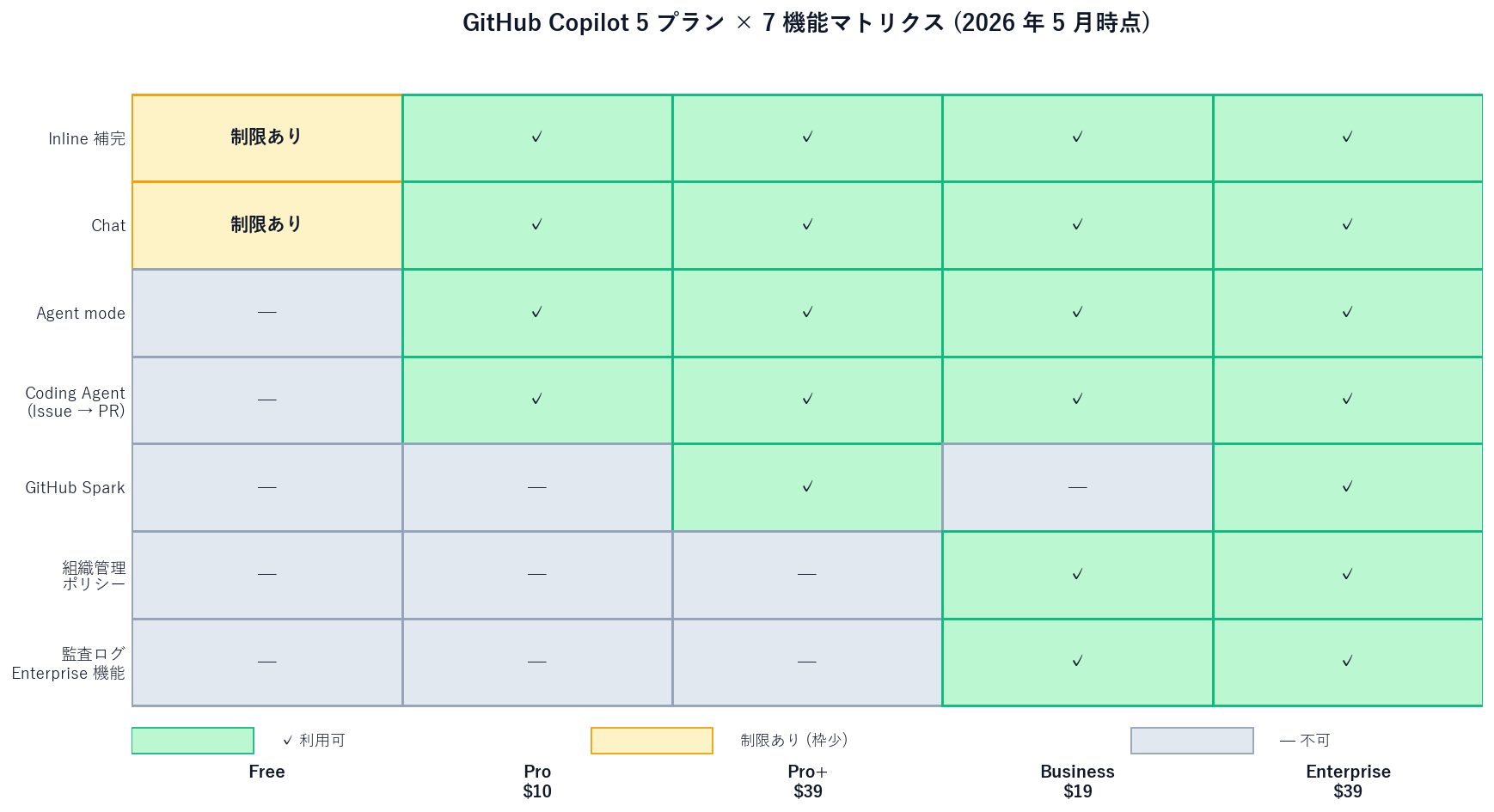
A heatmap matrix of five GitHub Copilot plans versus seven features. Columns are Free / Pro / Pro+ / Business / Enterprise; rows are Inline completion, Chat, Agent mode, Coding Agent, GitHub Spark, organization controls, and audit logs. Green cells mark availability, yellow marks 'limited (smaller quota)', grey marks unavailable. Spark is green only on Pro+ and Enterprise; organization controls and audit logs are green only on Business and Enterprise.
Fig: Fig 3: Copilot 5-plan × 7-feature matrix

4. Agent mode vs Coding Agent — two autonomies with confusingly similar names

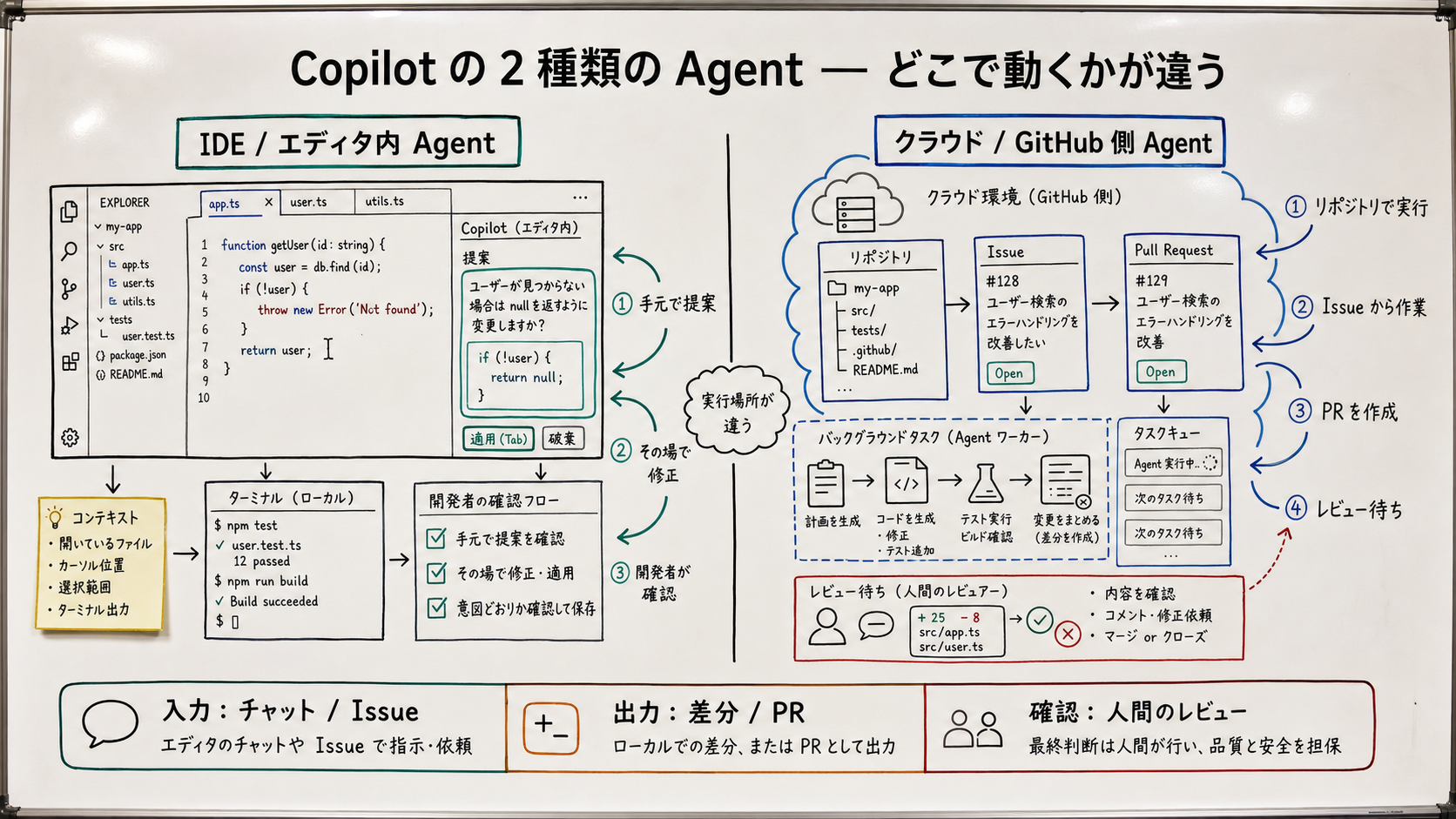
A whiteboard-style illustration comparing Agent mode and Coding Agent. Left zone (Agent mode): runs inside the editor on your PC, edits local files, runs tests, typical command 'refactor this'. Right zone (Coding Agent): runs on GitHub's servers via GitHub Actions, you assign an Issue and it returns a PR, no local PC required, typical command 'fix this Issue'. Sticky note: both need Pro or higher.
Fig: Fig 2: Agent mode vs Coding Agent — same name, different location

Agent mode lives in VS Code / JetBrains / Eclipse / Xcode and was GA across these IDEs in July 2025. It's the "AI pair-programmer at your desk" — multi-file refactors, test generation, on-the-fly debugging.

Coding Agent lives on GitHub.com itself, running on GitHub Actions. Assign an Issue to "Copilot" as the assignee; it plans the work, opens a PR, and iterates on review feedback. It's the "AI teammate who turns in work overnight."

項目Agent mode (in editor)Coding Agent (cloud)
Runs onYour PC, in the editorGitHub servers (GitHub Actions)
TriggerToggle Agent mode in the editorAssign a GitHub Issue to Copilot
InteractionWatch and steer in real timePR comments, asynchronous
Best forMulti-file refactors, exploratory work, test generationWell-scoped Issues: small bugs, features, docs
RequiresPC on, editor openNo local PC required
PlansPro and upPro and up

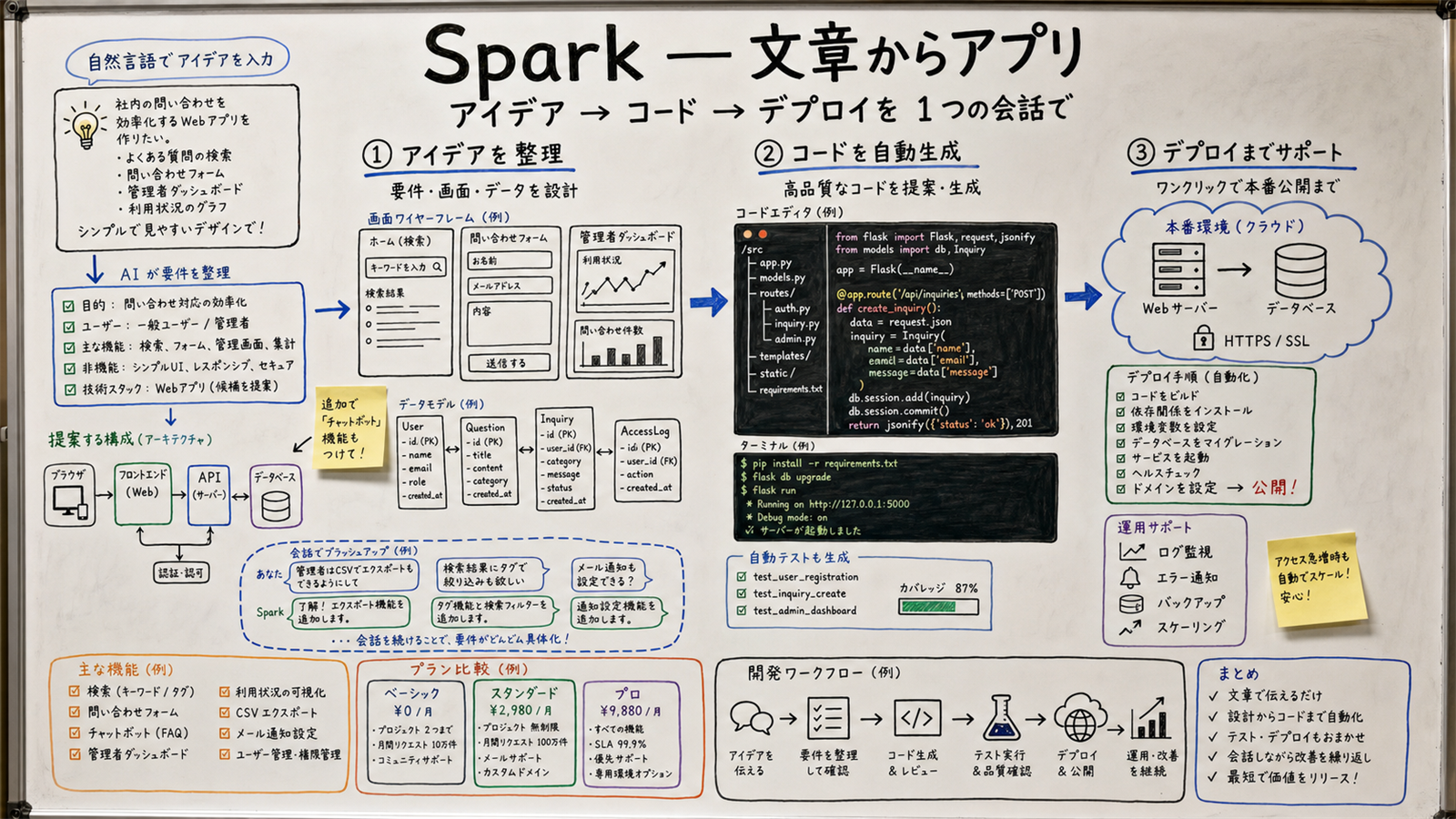
5. GitHub Spark — natural-language app generation (Pro+ only)

A whiteboard-style illustration of GitHub Spark: three numbered stages from prompt to live preview to deploy. Stickies indicate Spark is Pro+ ($39) and Enterprise only (public preview), fits personal tools and internal prototypes, and is not suited for production-grade SaaS or sensitive data.
Fig: Fig 3: GitHub Spark — three stages from sentence to running app

[Author opinion] Realistic Spark fit:

  • ✅ Personal tools (budget tracker, list manager, light CRM); internal prototypes; demo apps.
  • ✅ Non-engineers turning ideas into running prototypes.
  • ⚠️ Mid-sized SaaS (only if an engineer post-edits the generated code).
  • ❌ Production-grade SaaS, sensitive-data workloads, high-availability systems.
  • ❌ Embedding into an existing codebase — Spark generates standalone apps.

[Speculation] Over the next 6–12 months, expect Spark to extend from standalone app generation toward feature-level additions to existing repos — the boundary with Coding Agent will likely blur.

6. Getting started — three free steps for non-technical readers

Step 1: Create a GitHub account and turn on Copilot Free

Sign up at GitHub.com, enable Copilot in your settings, and install the GitHub Copilot extension in VS Code. Inline completion and Chat work inside the Free monthly cap. That's enough to get a feel for what Copilot is.

Step 2: Upgrade to Pro $10 for Agent mode + Coding Agent

Once you want to actually use Agent mode (in-editor autonomy) or Coding Agent (Issue → PR), you need Pro. [Unconfirmed] But Pro sign-ups are paused as of 2026-04-20, so this step is on hold for new users until the pause lifts.

Step 3: Pro+ $39 for Spark and a larger premium allowance

If you want to try Spark or you regularly hit the Pro premium-model cap, step up to Pro+. For team rollouts, your org admin contracts Business ($19/seat) or Enterprise ($39/seat).
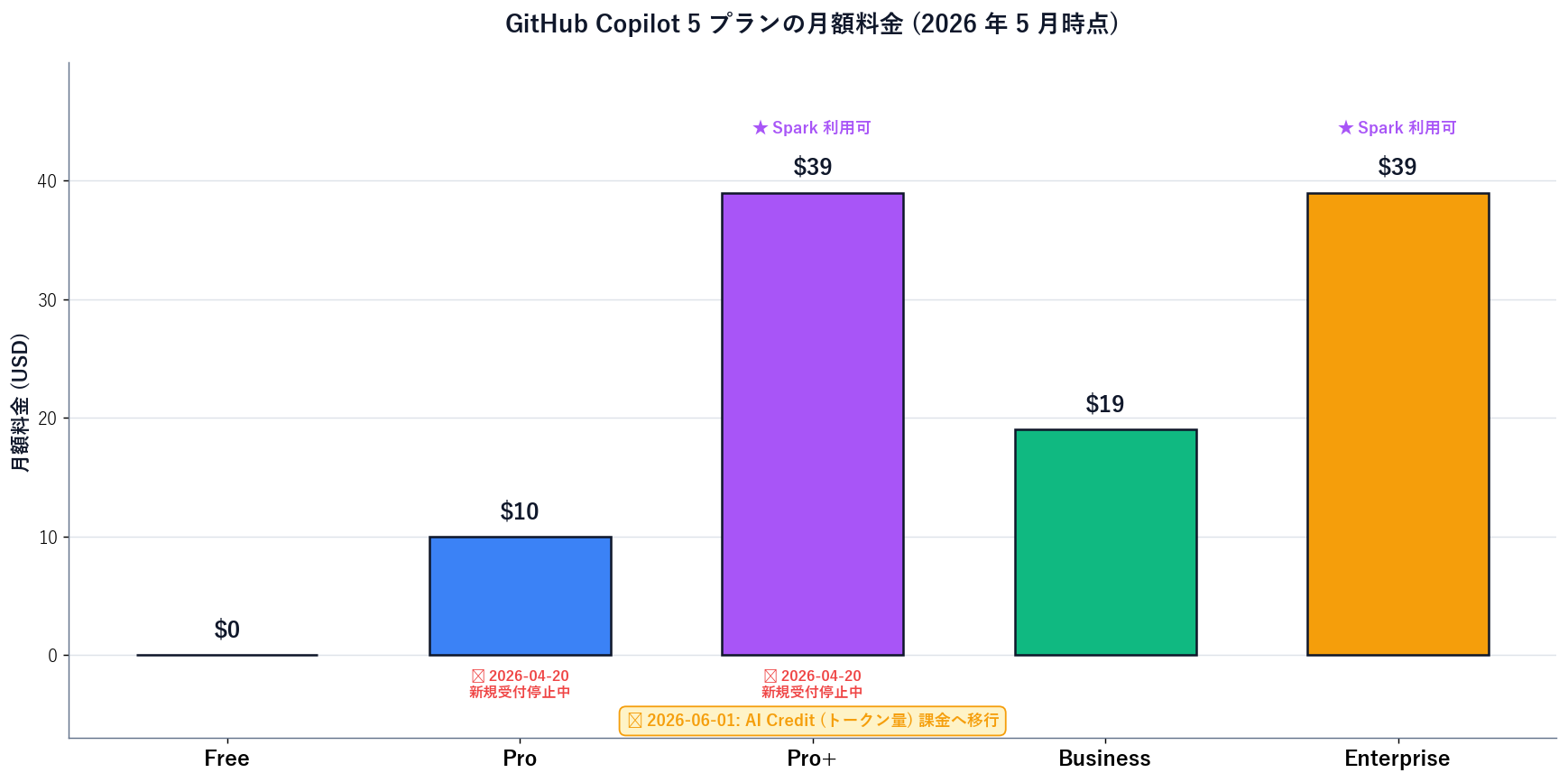
Bar chart of GitHub Copilot's five plan prices in USD per month: Free $0, Pro $10, Pro+ $39, Business $19, Enterprise $39. Pro+ and Enterprise are highlighted with a yellow border marked 'Spark included'. A red banner over Pro/Pro+/Student marks the 2026-04-20 sign-up pause. A timeline bar marks 2026-06-01 as the AI Credit billing migration.
Fig: Fig 4: Copilot's five plans — monthly pricing

7. Risks and caveats — billing migration, sign-up pause, security boundaries

The April pause may persist for weeks. If your team needs Copilot urgently, the practical paths are Enterprise (via GitHub sales) or staying on Free while waiting.

The June billing migration changes how heavy Agent / large-context usage bills. Base monthly prices stay the same, but credit-consumption visibility becomes a real ops requirement for orgs.

[Unconfirmed] For regulated industries in Japan (finance, healthcare, defense), Copilot's cloud-send model may still be a compliance blocker. Confirm with your security team before rollout.

[Author opinion] Coding Agent opens PRs; humans should still merge. Do not combine Coding Agent with auto-merge. Strengthen CODEOWNERS and required reviews when you roll it out.
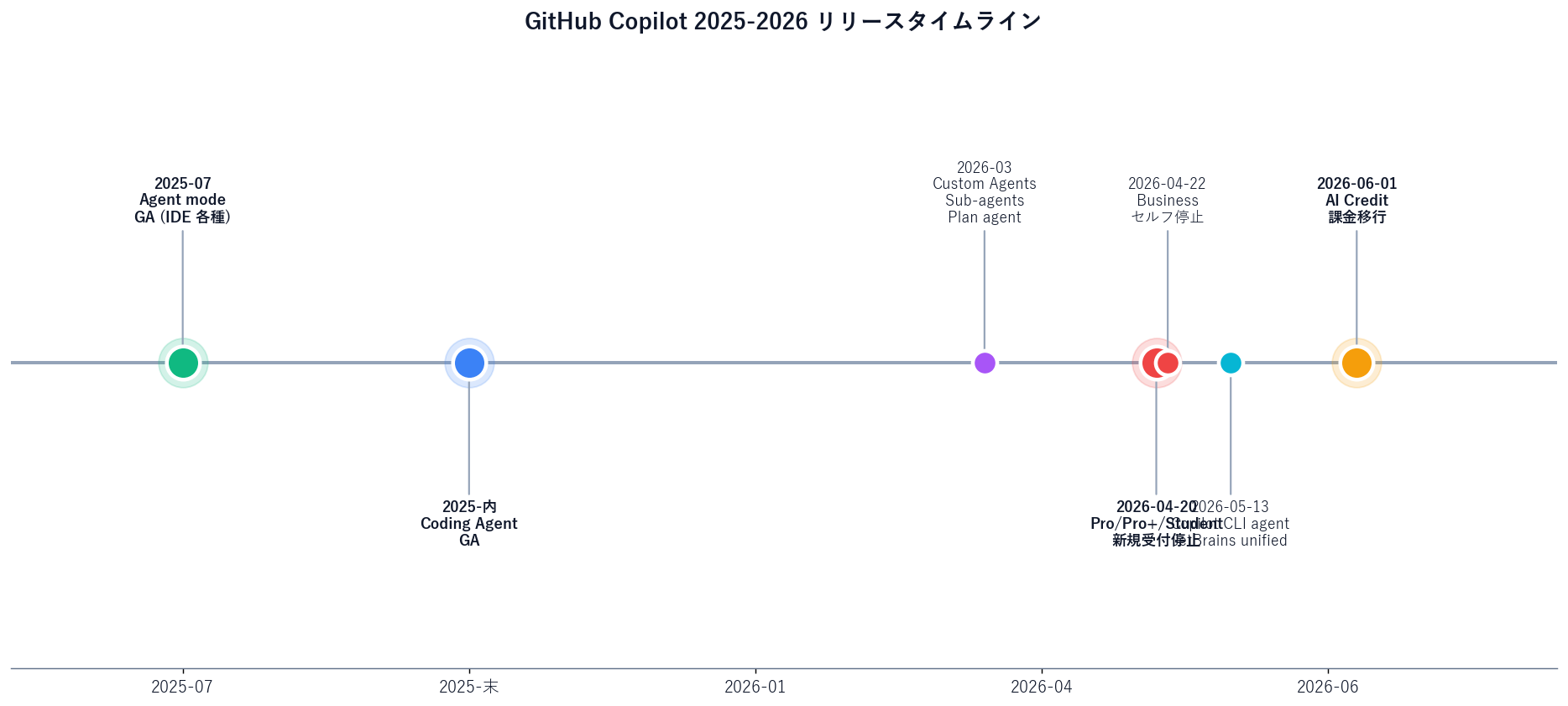
Timeline chart of GitHub Copilot releases from Jan 2025 to Jun 2026: 2025-07 Agent mode GA across IDEs; 2025 Coding Agent GA; 2026-03 custom agents, sub-agents, plan agent, agentic code review; 2026-04-20 Pro/Pro+/Student sign-up pause; 2026-04-22 Business self-serve pause; 2026-05-13 Copilot CLI agent + JetBrains unified sessions; 2026-06-01 AI Credit billing migration.
Fig: Fig 5: Copilot 2025–2026 timeline

8. Business use and the Sales Claw context — what this means for sales orgs

Coding Agent makes "small bugs get fixed overnight" and "PRs land while you're in meetings" real for teams that lean into it. The practical wins:

  • Offload routine bugfixes to Coding Agent on low-risk Issues.
  • Offload test scaffolding ("write unit tests for this file").
  • Offload documentation drafting (README, API docs).
  • Use Agent mode in-editor to accelerate exploratory refactoring.

For non-engineers (sales, marketing, execs), Copilot is rarely used directly. But the headcount-productivity implication is a real planning input: "same engineers, +30% output" is a credible scenario once Coding Agent is in the workflow.

項目Copilot 2026 (coding AI)Other tools (non-coding AI)
Task focusRead / write code, generate PRs, tests, refactorsResearch, summaries, customer-facing writing
Where usedGitHub Copilot (VS Code / GitHub / CLI)ChatGPT / Claude / Perplexity / Sales Claw
SetupGitHub account + supported IDEEach vendor's web / mobile app
Best forDaily development, Issue triage, bugfixesSales research, reply drafting, email outreach
Data boundaryCode sent to GitHub/Microsoft cloudCloud-side processing (Sales Claw runs locally and is the exception)

Sales Claw and Copilot

Sales Claw is a locally-run OSS that handles the actual sending of contact-form messages for B2B sales workflows. Where Copilot 2026 is "all of coding gets AI-assisted," Sales Claw is "the B2B sales send layer." Different layers, complementary roles.

Sales Claw applies pre-send automated checks, sales-NG detection, CAPTCHA stop, send-rate limiting, and audit logging so misfires and ToS violations get caught before they happen. A realistic combined setup:

  • Development phase: improve Sales Claw and approachGuardrails with Copilot Agent / Coding Agent.
  • Operations phase: run Sales Claw overnight; assign error-handling Issues to Coding Agent.
  • Analysis phase: analyze action-log.json via Copilot Chat; reporting via ChatGPT / Claude.
  • Boundary: keep Sales Claw's sales-NG detection rules out of public-model contexts.

Pre-rollout checklist (7 items)

  1. Get sign-off from your security team — Copilot sends code to the cloud.
  2. Enforce Public Code Filter / Content Exclusion at the org level.
  3. Document Coding Agent review requirements (CODEOWNERS, required reviews); disable auto-merge.
  4. Prepare for AI Credit visibility before 2026-06-01.
  5. Assume Pro / Pro+ sign-ups stay paused — plan via Enterprise sales or wait.
  6. Constrain Copilot scope on sensitive repos with org policies.
  7. Review GitHub Changelog quarterly to fold Spark and Coding Agent evolution into operations.

This is an English summary of the Japanese-language original; read the full Japanese article here.

As engineering orgs adopt Copilot Agent and Coding Agent for coding-side productivity, Sales Claw handles the B2B sales send layer with local execution, pre-send checks, and audit logging — anchoring the operational side of AI sales automation.

無料・MIT ライセンス。インストールせずにライブデモも試せます。

よくある質問

What is GitHub Copilot in 2026?
GitHub Copilot is GitHub's (Microsoft-owned) AI coding platform. As of May 2026 it's five plans (Free, Pro $10, Pro+ $39, Business $19/seat, Enterprise $39/seat) wrapped around four core capabilities: (1) Inline completion + Chat across VS Code, JetBrains, Eclipse, and Xcode; (2) in-editor Agent mode (GA in July 2025); (3) Coding Agent / Cloud Agent — assign a GitHub Issue to Copilot and it returns a PR (GA in 2025, custom/sub/plan agents added 2026-03); and (4) GitHub Spark, a Pro+/Enterprise-only natural-language app builder. New Pro / Pro+ / Student sign-ups are paused since 2026-04-20, and billing moves to AI-Credit (token-based) on 2026-06-01.
What is the difference between Pro and Pro+?
Two real differences. (1) GitHub Spark, the natural-language app builder, is Pro+ only. (2) Pro+ gives a larger monthly allowance for premium models (GPT-5.5, Claude Opus 4.7, etc.). The other three pillars — Inline + Chat, Agent mode, and Coding Agent — work on both Pro and Pro+. So unless you want Spark or you're a heavy premium-model user, Pro at $10 is the realistic choice for individuals. Note: since 2026-04-20, new Pro / Pro+ sign-ups are paused — new entrants either wait or go through Enterprise sales.
How is Agent mode different from Coding Agent?
Where they run. Agent mode runs inside your editor on your PC (VS Code / JetBrains / Eclipse / Xcode) — GA in July 2025. It reads and writes local files to finish a task. Coding Agent (Cloud Agent) runs on GitHub's servers via GitHub Actions — you assign a GitHub Issue to Copilot as the assignee, and it plans, codes, tests, and opens a PR. Custom agents, sub-agents, and plan agents were added in 2026-03. Both are Pro and up. In practice, use Agent mode for exploratory multi-file refactors and Coding Agent for well-scoped Issues (bug fixes, docs, small features).
What does GitHub Spark do?
Spark generates a working app from a plain-English description — Pro+ ($39) and Enterprise only, in public preview. You write what you want, Spark produces HTML / CSS / JavaScript / backend code with a live preview, and you can deploy from there (GitHub Pages, etc.). Strong fits: personal tools (budget trackers, list managers, light CRMs), internal prototypes, hackathon projects, demo apps. Weak fits: production-grade SaaS, sensitive-data workloads, high-availability systems, embedding into an existing codebase. Spark is also useful for non-engineers turning ideas into running prototypes.
Why are new sign-ups paused since 2026-04-20?
GitHub paused new sign-ups for Copilot Pro, Pro+, and Student on 2026-04-20, and Copilot Business self-serve for orgs on GitHub Free / Team plans on 2026-04-22. The pause hasn't been lifted as of 2026-05-17, so individual new users can only sign up for Free. The most plausible reading is that this is preparation time for the 2026-06-01 migration from request-count billing to AI-Credit (token) billing — slowing intake while existing users migrate. Orgs that need Copilot urgently can go through Enterprise sales, or fall back to Free / Codex / Claude Code while waiting.
What changes with the 2026-06-01 AI-Credit migration?
On 2026-06-01, Copilot moves from premium-request counting to AI-Credit (token-volume) billing. Base monthly prices ($10 / $39 / $19 / $39) stay the same. What changes is consumption metering: Agent mode, Code Review, and premium-model use bill against credits proportional to tokens. Heavy use (large-context Agent tasks, frequent premium-model invocation) consumes credits faster than the old per-request model implied. For individuals the impact is modest; for orgs with many active Agent users, you'll need credit-consumption dashboards and alerts in place before rollout.
How do I choose between Copilot, Codex, and Claude Code?
All three converge on the 'coding agent' layer, so pick on (1) existing contracts, (2) ecosystem integration, and (3) team culture. GitHub Copilot wins on GitHub-centric flows, the broadest IDE coverage, and a mature Issue → PR Cloud Agent. Codex wins on ChatGPT ecosystem integration and Codex Mobile for on-the-go ops. Claude Code wins on local CLI ergonomics and a security-first design posture. Pragmatic rule: start from the platform you already standardize on (GitHub Enterprise / ChatGPT Enterprise / Claude Enterprise), then mix tools per project.
Can I use Copilot for sales or research work?
Not really — Copilot is a coding AI. For sales, research, and customer-facing writing, ChatGPT, Claude, Perplexity, and Sales Claw fit better. The Sales Claw connection point is engineering-side: use Copilot Agent mode / Coding Agent to improve Sales Claw itself or the approachGuardrails logic. A practical pattern is running Sales Claw on an overnight batch and assigning error-handling Issues to Coding Agent for next-day PRs — that splits 'sales send' (Sales Claw) and 'codebase maintenance' (Copilot Coding Agent) cleanly.

参考文献

本記事は X 公式アカウントと公式ドキュメントを一次情報として参照しています。

  1. [01]
  2. [02]
  3. [03]
  4. [04]
  5. [05]
  6. [06]
  7. [07]
  8. [08]
  9. [09]

この記事の著者

中澤 圭志

中澤 圭志

Sales Claw maintainer

Designs and develops Sales Claw. Writes from the field on B2B sales automation and applied AI.

Share this article