ツール解説
What's an Agent Harness? Understanding Claude Code and Codex CLI in 8 Minutes Using a Car Analogy
12 分
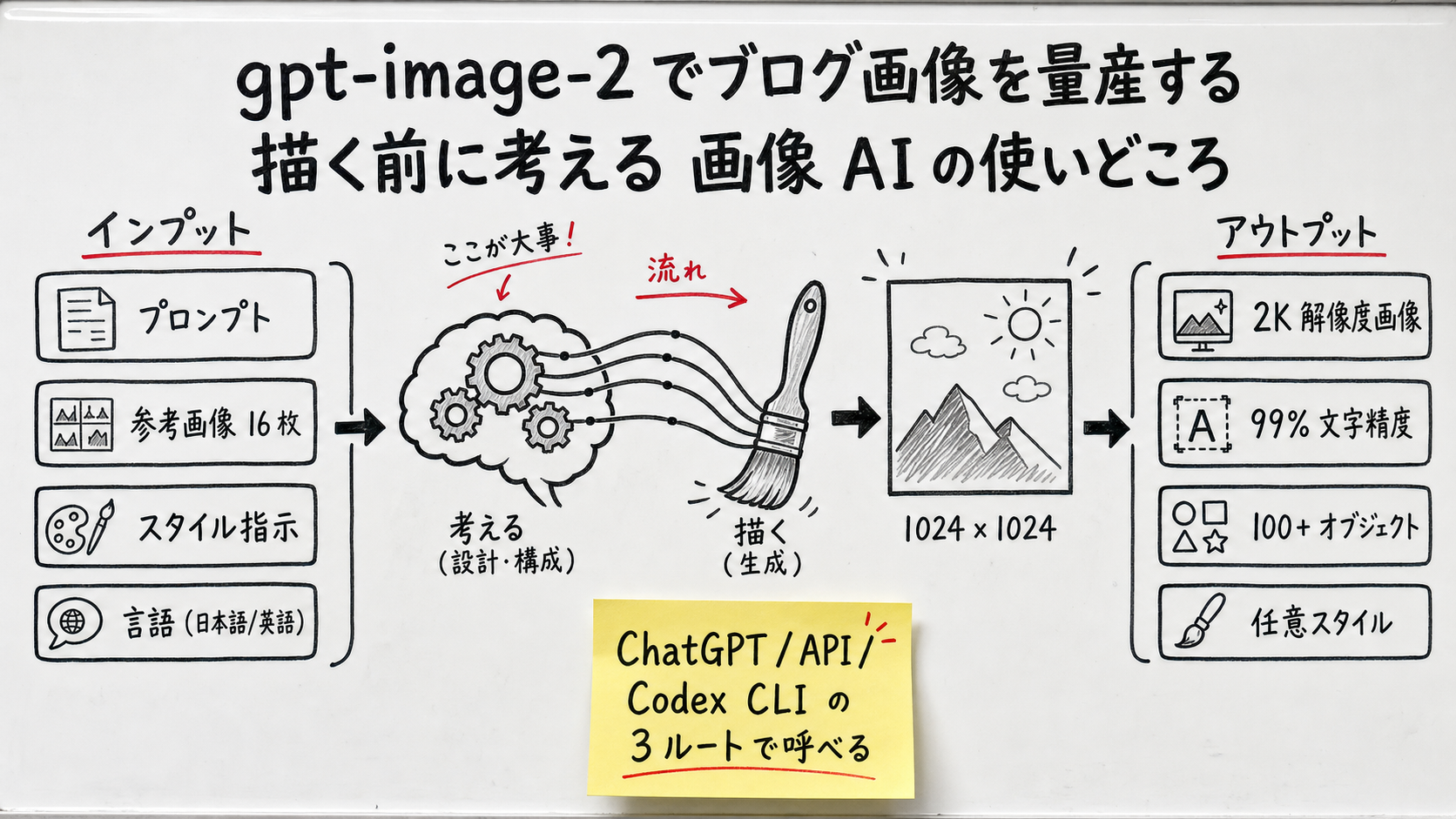
gpt-image-2 is OpenAI's third-generation image model (announced 2026-04-21), the first one that reasons about composition before drawing. ~$0.05 per medium 1024×1024 image, ~99% multilingual text accuracy, up to 16 reference images, 2K output. Sales Claw uses it to ship ~100 illustrations per month. This is the practical workflow — what it does, what it costs, and the two real traps.

中澤 圭志
@keishi_nakazawaSales Claw maintainer
Key Facts
Announced / GA
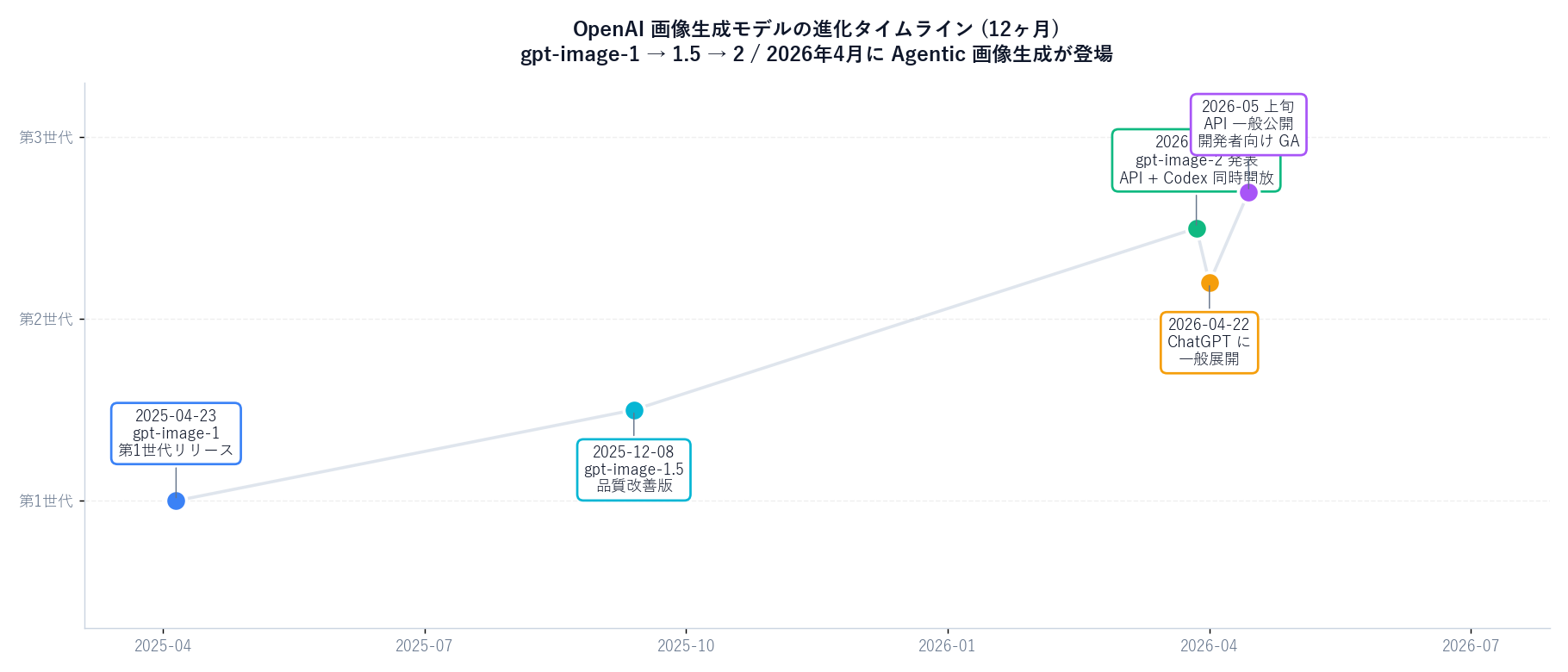
2026-04-21 announced / 4-22 ChatGPT / early May API & Codex GA
Price (1024×1024)
low $0.006 / medium $0.053 / high $0.211 per image
Four new pillars
99% text accuracy / pre-render reasoning / 16 reference images / 100+ objects
Calling routes
ChatGPT (Plus+) / API (images.generate) / Codex CLI (image_generation)
If you've ever thought "making blog cover art every time is exhausting,""the AI keeps mangling Japanese text," or "which model — DALL-E, Midjourney, Imagen, gpt-image-2 — should I actually pick?", this article is for you. We work through gpt-image-2 from primary sources, then open the Sales Claw production workflow that powers every cover image and body diagram on this blog.
Primary sources: OpenAI Newsroom (gpt-image-2 announcement), the OpenAI Developer Community thread, the Codex CLI Features page, and the OpenAI API Pricing page. Related reading: Codex CLI vs Claude Code benchmark, GitHub Copilot 2026 explained, ChatGPT Atlas for general readers, and the MCP complete guide.
gpt-image-2 was announced by OpenAI on April 21, 2026. The announcement describes it as "the first true Agentic image generation model" — meaning it has an explicit planning step before rendering pixels.
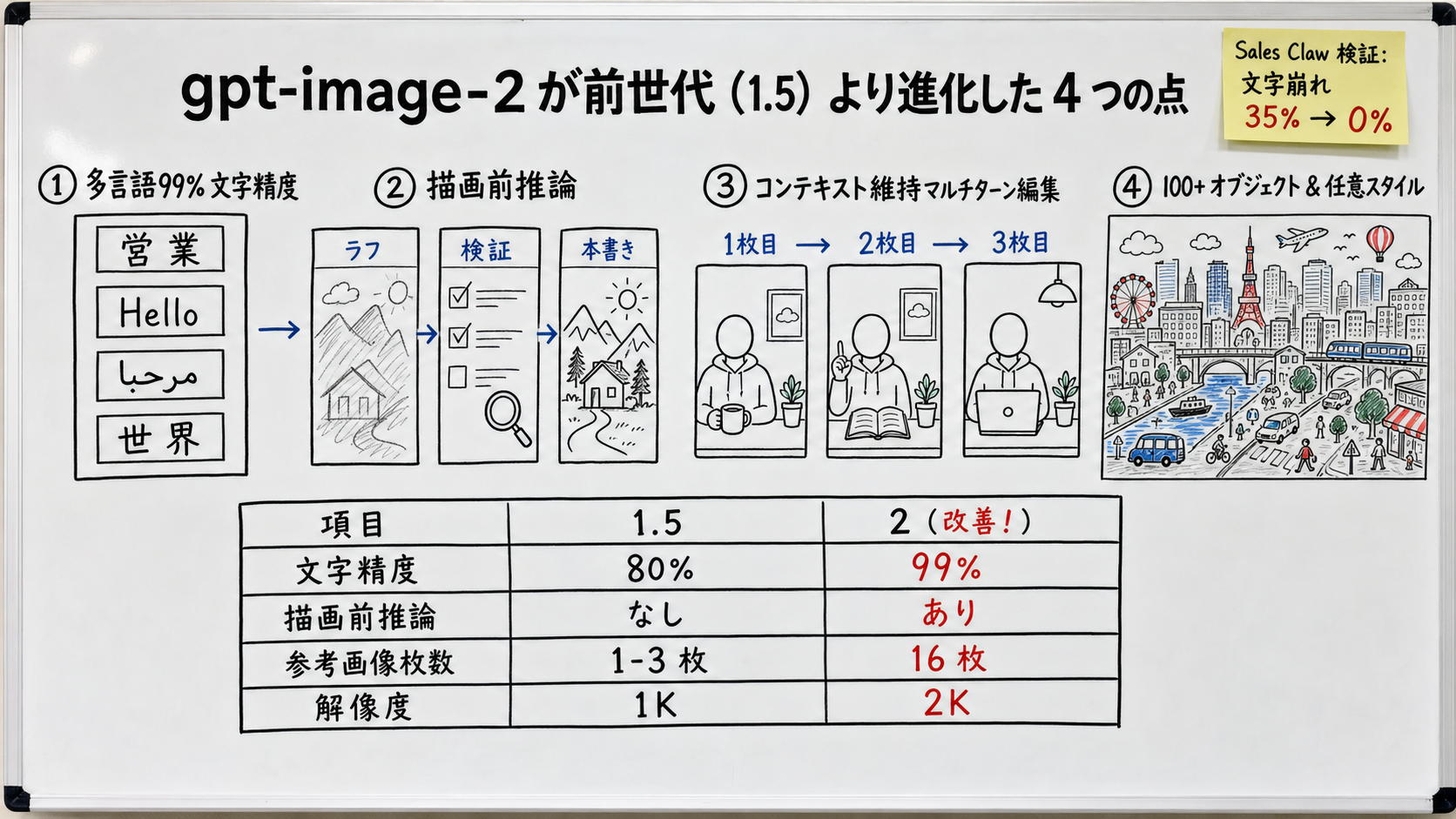
| Capability | gpt-image-1.5 | gpt-image-2 (Apr 2026) |
|---|---|---|
| Multilingual text accuracy | EN ~90% / JP 70-80% | ~99% across writing systems |
| Pre-render reasoning | None | Plans layout and checks constraints |
| Multi-turn editing | Drifts (subjects/props change) | Context-preserving edits |
| Objects per scene | ~30-50 | 100+ |
| Resolution | 1024 / 1536 | 1024 / 1536 / 2048 (some 4K) |
| Reference images | 1-3 | Up to 16 |
gpt-image-2 is token-billed. Per the official OpenAI API pricing page:
| Line | Rate (USD / 1M tokens) |
|---|---|
| Image input | $8.00 |
| Cached image input | $2.00 |
| Image output | $30.00 |
| Text input | $5.00 |
| Quality | Per image | Per 100 images |
|---|---|---|
| low | $0.006 | $0.6 |
| medium | $0.053 | $5.3 |
| high | $0.211 | $21.1 |
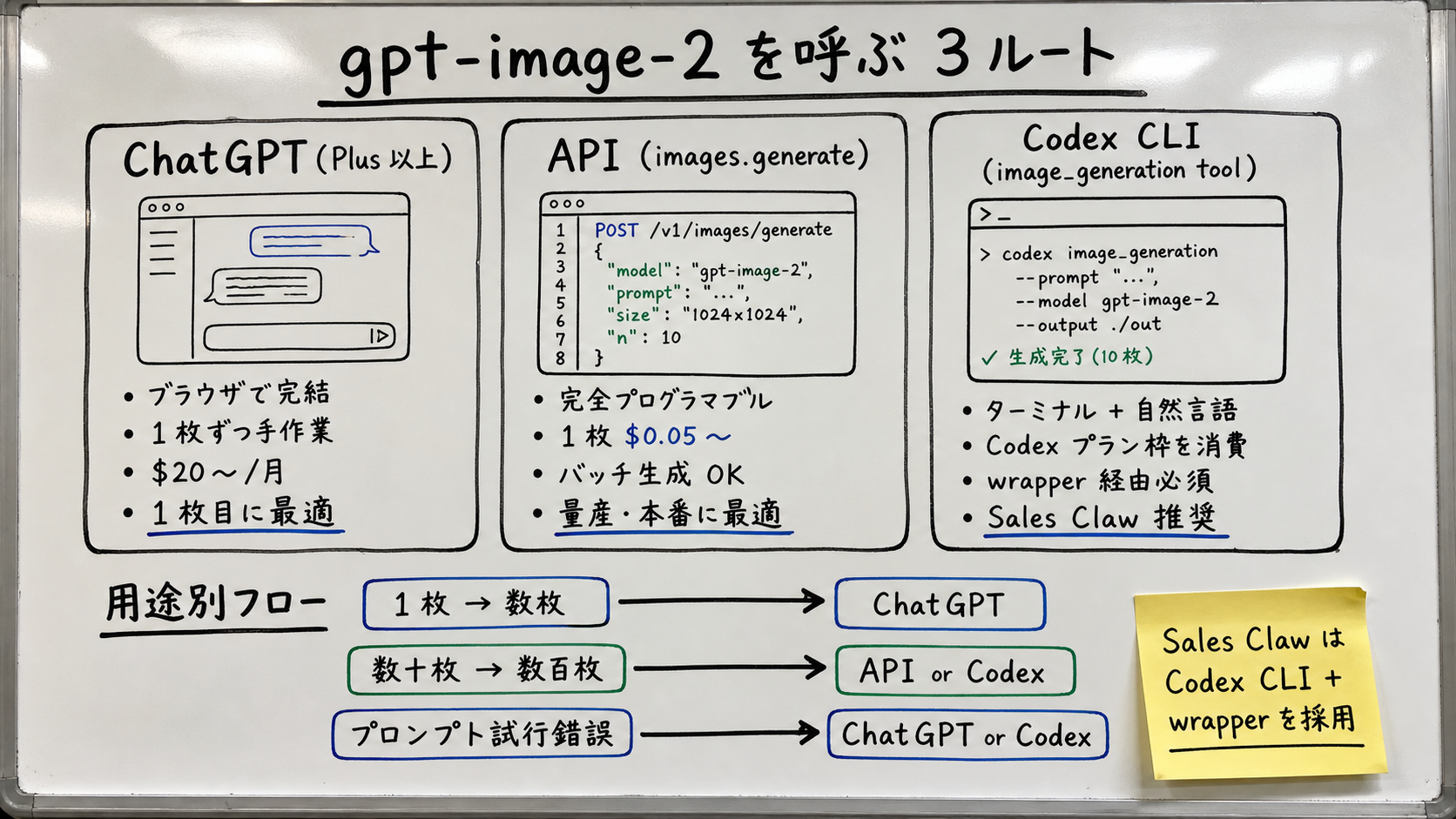
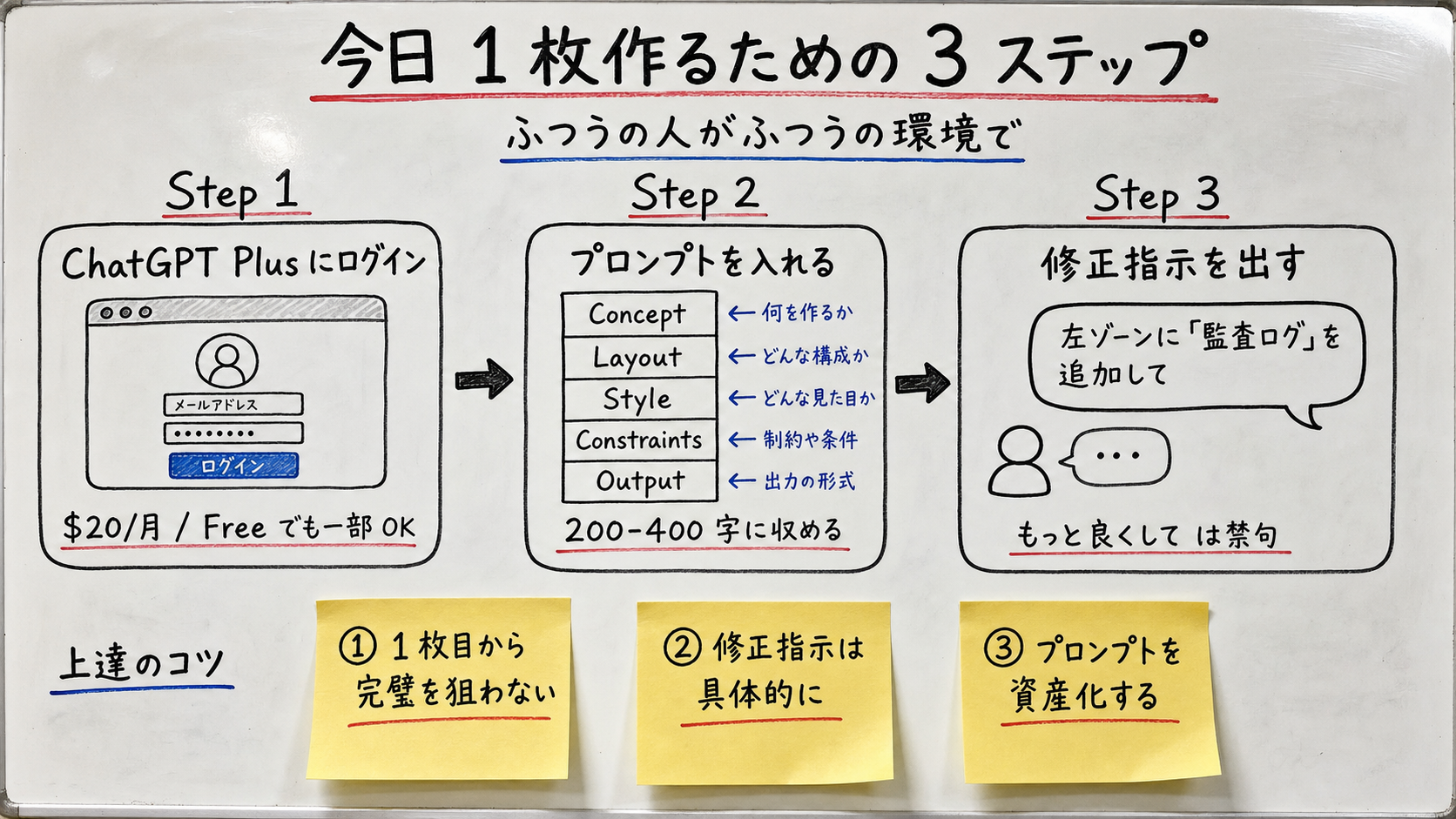
Type "make an image of ___" into ChatGPT. Plus and above get gpt-image-2 by default starting 2026-04-22. No code, instant preview, iterate by chat. Sales Claw uses this for "first-pass prompt exploration" and quick rough sketches.
Call client.images.generate(model="gpt-image-2", prompt=...) from Python or Node. Fully programmable: batch generation, automatic filenames, metadata DB, post-validation (PNG magic bytes, etc.). This is the right answer once you're past a handful per week.
Codex CLI ships an image_generation tool since 2026-04-21. You type codex exec ... "draw an image" in your terminal and Codex calls gpt-image-2, dropping the PNG in ~/.codex/generated_images/. It draws from your Codex plan quotarather than per-image billing, which simplifies accounting.
Quality with gpt-image-2 is decided by the shape of the prompt. Sales Claw locks every blog image into one of three styles:
Title + subtitle, one central visual metaphor, two labeled zones (3-5 elements each), and one yellow sticky-note highlight. The reader should grasp the whole picture in three seconds.
Used inside the article. Numbered stages, comparison tables, flow lines, many sticky notes — designed to reward closer reading. Denser than the cover.
Used for postmortems and deep technical writeups. Black background, chalk, one accent color. Avoid for general-audience posts.
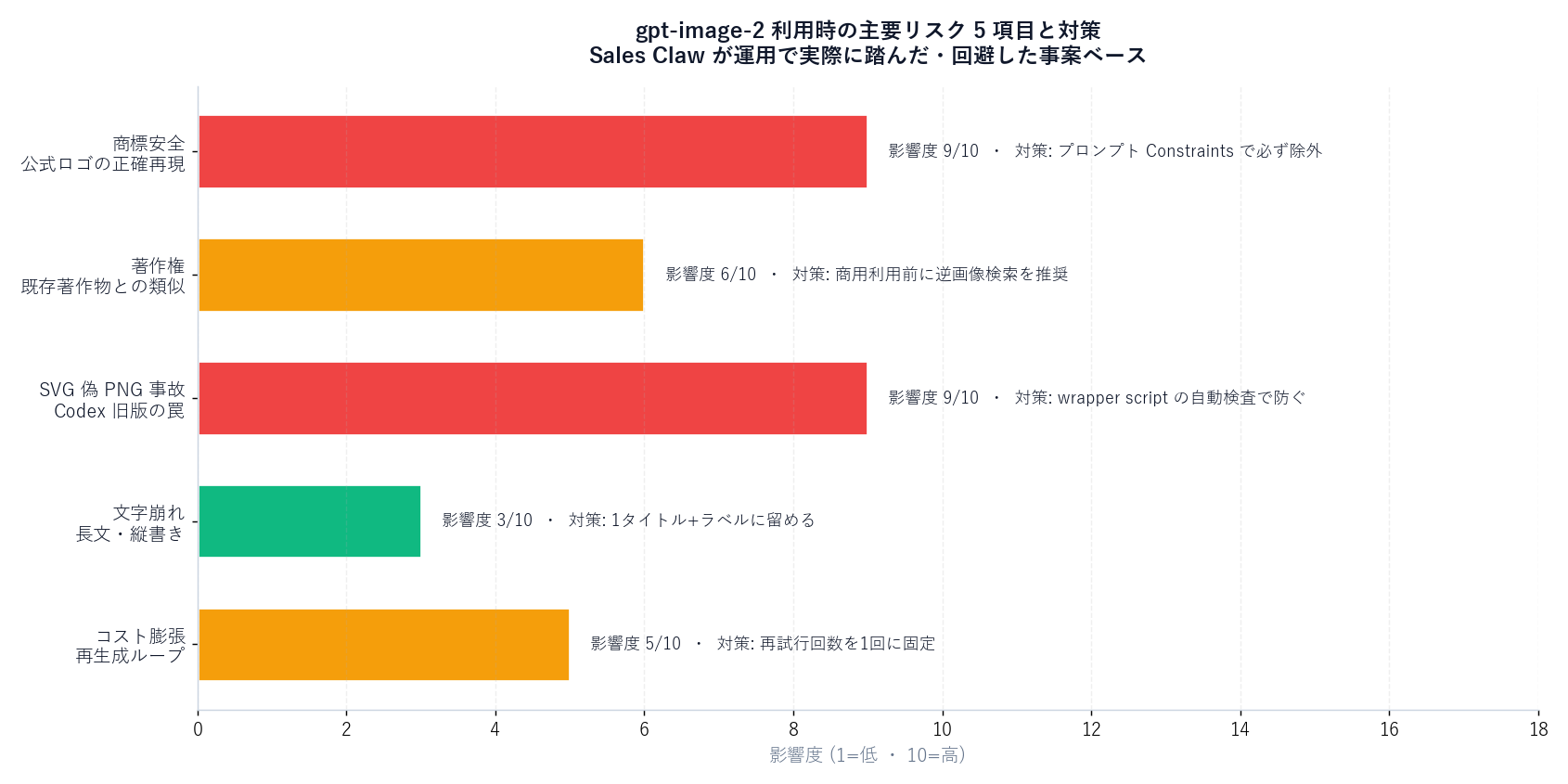
Accurately reproducing the Claude Code asterisk, the Codex logo, the GPT mark, etc. exposes you to trademark/publicity issues. Sales Claw ships the constraint "do not accurately reproduce official logos, trademarks, or app icons" in every prompt; the output is positioned as editorial illustration.
Under OpenAI's terms, you own images generated through the API. The residual risk is the model approximating an existing work; a reverse-image search before commercial use is cheap insurance. [Unverified] Japanese case law is still evolving — consult a lawyer for the final call.
Real incident at Sales Claw: codex 0.118 with -m gpt-5.4 wrote SVG XML because the text model isn't allowed to call image_generation. sharp rasterized it to PNG. The result looked "coded" instead of "drawn." Fix: wrapper script that validates PNG magic bytes, file size, and resolution.
Down to effectively 0% in our 14-image sample. Long strings (50+ chars) and tiny fonts can still break. Keep on-image text to one title, one subtitle, and a handful of labels.
$0.05/image is cheap, but 10× regenerations is $0.5; 32 images × 5 regenerations is $8/mo. Trivial for individuals; in CI, cap the retry count. Sales Claw's wrapper allows a single attempt per image — failures get human review.
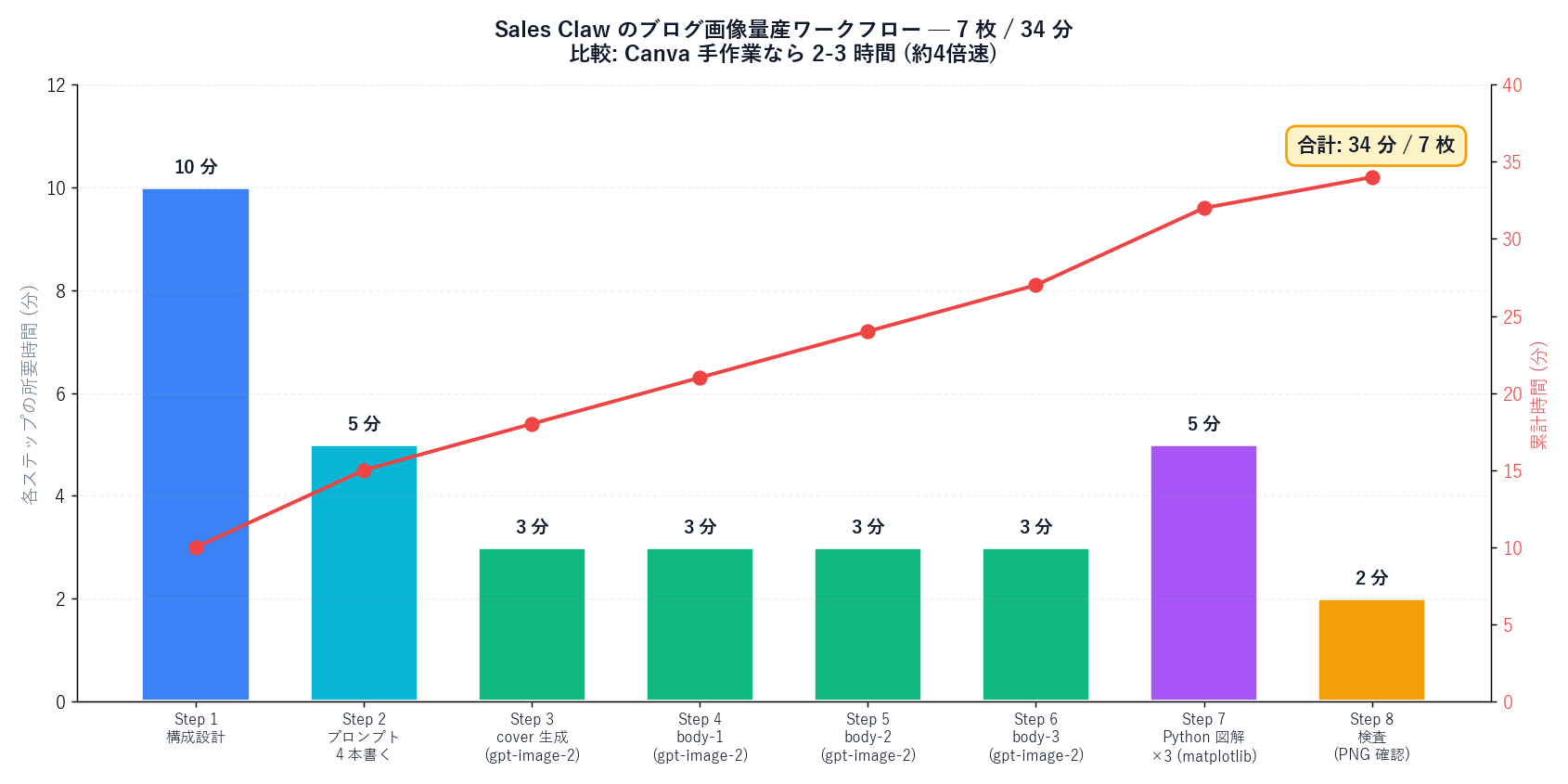
| Step | Time | Tool |
|---|---|---|
| Plan H2 ↔ image mapping | 10 min | Notion / handwritten |
| Write 4 prompts | 5 min | Five-block template |
| Generate cover (medium) | 3 min | npm run blog:image-gen --kind cover |
| Generate body-1 / 2 / 3 | 9 min | npm run blog:image-gen --kind body-N (sequential) |
| Python diagrams ×3 | 5 min | scripts/blog-diagrams/<slug>.py |
| Validate (magic bytes + size) | 2 min | wrapper auto-check |
| Total | ~34 min / 7 images | — |
Sales Claw angle. Sales Claw itself is a contact-form sales automation tool. But the unit economics of content marketing changed when image cost dropped from "time × hourly rate" to "$0.05 per image." The bottleneck moves from "design" to "thinking + primary-source checking." We went from 5 posts/week to 8-10 posts/week without growing the team. [Author view] The next differentiator for small teams in H2 2026 is "how often you can publish given near-zero image cost." Worth trying on your own blog, LP, or social.
Japanese-language original: gpt-image-2 でブログ・SNS 画像を量産する実践ガイド
本記事は X 公式アカウントと公式ドキュメントを一次情報として参照しています。
この記事の著者
中澤 圭志
Sales Claw maintainer
Designs and develops Sales Claw. Writes from the field on B2B sales automation and applied AI.