

ツール解説
Google Antigravity 2.0 Explained: The 'Hand Multiple Jobs to AI at Once' IDE, for Non-Technical Readers (May 2026)
15 分
On 2026-05-22 the two terminal-AI giants updated the same day. Claude Code v2.1.149 makes cost breakdowns visible via /usage; Gemini CLI v0.43.0 steers the AI to fix only what is needed via surgical edits. Written for non-expert readers: the "explainable / non-destructive" direction, a 5-minute setup, and remaining risks.

中澤 圭志
@keishi_nakazawaSales Claw maintainer

Key Facts
Release date
2026-05-22 (UTC, both tools same day)
Main releases
Claude Code v2.1.149 + Gemini CLI v0.43.0
Claude Code role
/usage shows per-category cost breakdown (skills/subagents/plugins/MCP)
Gemini CLI role
Steers edit tool preference to make AI edits surgical
In one sentence
On 2026-05-22, the two giants of terminal-based AI coding tools shipped major updates on the same day: Anthropic's Claude Code v2.1.149 and Google's Gemini CLI v0.43.0. Claude Code made it possible to see exactly what your AI spending broke down into, while Gemini CLI started steering the AI to fix only the lines that need fixing, rather than rewriting the whole file. This article explains, for readers not deep in AI coding, why these two changes happened on the same day and what they mean for regular users, using a hospital metaphor (a medical chart and surgical precision).
Bottom line up front: The fact that both updates landed in the same week is not a coincidence — it's a signal that AI coding tools have entered the era of "explainable" and "non-destructive". For regular users, Claude Code's /usage is a tool to know in advance whether next month's AI bill will explode, and Gemini CLI's surgical edits is a safeguard that reduces the "blast radius" when you ask AI to fix something small. Both updates are worth installing today.
"I'm letting AI write code for me, but I have no idea how much I'm spending each month." "I asked the AI to make one small fix, and it ended up rewriting files that had nothing to do with the task." — This article addresses those two pain points by explaining how Claude Code v2.1.149 and Gemini CLI v0.43.0, both released on 2026-05-22, answered them. We cite official GitHub Releases as primary sources, and analyze them from the perspective of a Sales Claw maintainer.
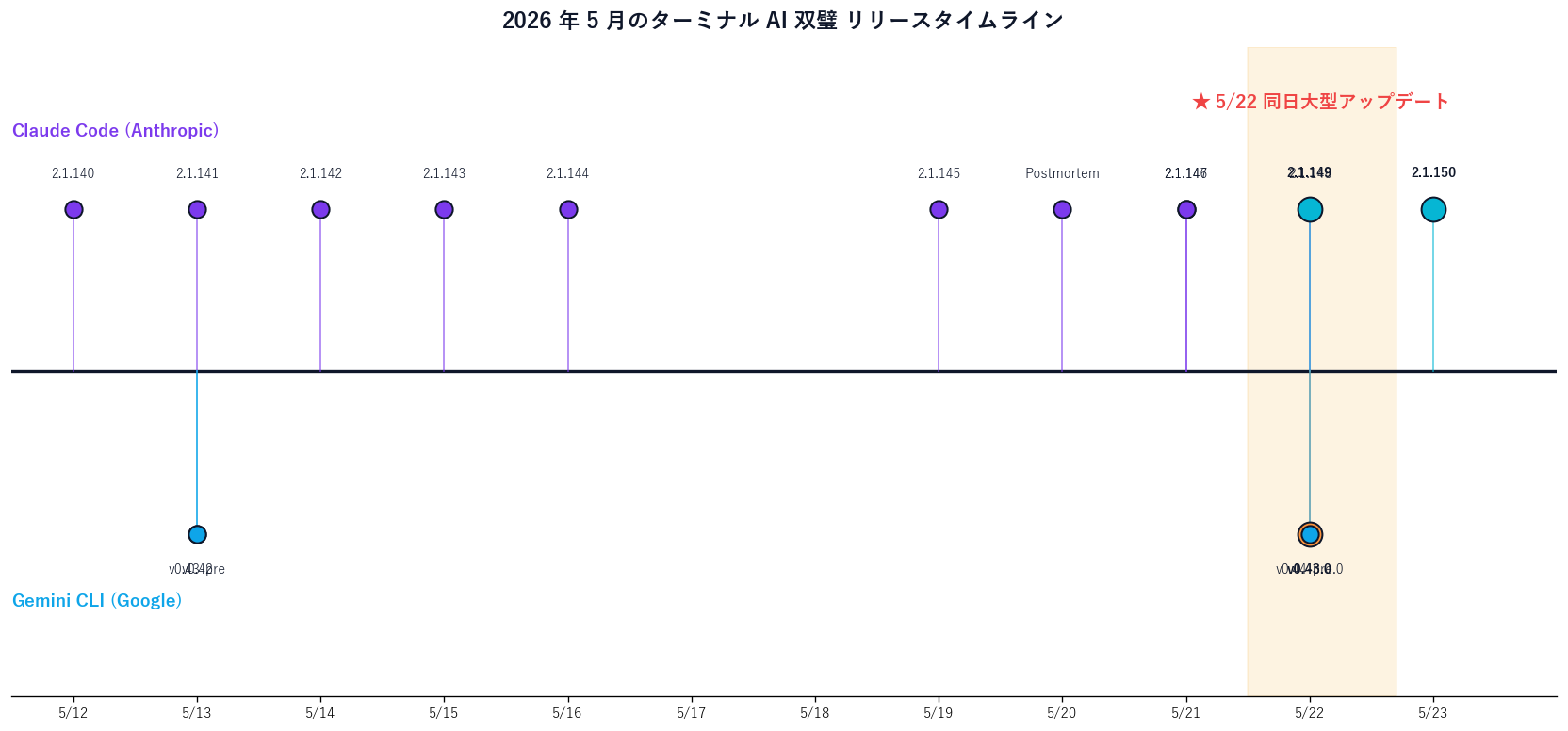
This was an unusually busy 24-hour window for the AI coding industry. Anthropic's Claude Code shipped v2.1.149 (a major update on 5/22) followed by v2.1.150 (an internal fix on 5/23 early morning), while Google's Gemini CLI shipped v0.43.0 stable and v0.44.0-preview.0 on the same 5/22. This article focuses on the "/usage per-category breakdown" feature of v2.1.149, and the "surgical edits via the edit tool" behavior change in v0.43.0, explained for non-expert readers.
For context, see also: the previous Claude Code release write-up Claude Code v2.1.147 / 148 — /code-review and pinned background sessions, the previous Gemini CLI write-up Gemini CLI v0.42 / v0.43-preview dual release, and the broader picture in Claude Code harness design optimization.
Primary sources for this article: GitHub Releases — Claude Code v2.1.149 / Gemini CLI v0.43.0 / Claude Code Docs Changelog / Gemini CLI Release Notes. The free download for Sales Claw is also available.
Let's start with the timeline. [Official] Per Anthropic's official GitHub Releases, Claude Code v2.1.149 shipped on 2026-05-22 (UTC), followed about six hours later by v2.1.150 at 2026-05-23 04:03 UTC, an internal-only fix. On the Google side, Gemini CLI v0.43.0 stable also shipped on 2026-05-22, along with its preview v0.44.0-preview.0 on the same date.
For readers not deeply familiar with AI coding tools, let me first introduce the cast. "Claude Code" is Anthropic's terminal-based AI coding tool — it runs in the "black screen" (terminal) on your computer. You can ask it to write code, fix errors, and delegate complex multi-step tasks. "Gemini CLI" is Google's near-equivalent competitor. Both are installed with a single command, and unlike chat-based products like ChatGPT, they run in the terminal that developers already use day-to-day, with the AI directly editing files on your machine.
What makes the same-day shipping interesting is that the two companies did not coincidentally land updates on the same date by accident — the problems they're trying to solve are converging. [Author's view] For the last six months, the AI coding industry has been shifting from a "speed and intelligence" competition (model release wars) to a "trust and predictability" competition (cost transparency and safety). From the position of building a production AI tool like Sales Claw, the two releases look like a joint declaration that "explainable" and "non-destructive" are about to become table stakes.
Let's look at the 24-hour timeline in a table first.
| Datetime (UTC) | Product | Version | Main change |
|---|---|---|---|
| 5/21 20:39 | Claude Code | v2.1.147 | /code-review, pinned background sessions |
| 5/22 01:16 | Claude Code | v2.1.148 | Bash exit 127 hotfix |
| 5/22 (day) | Claude Code | v2.1.149 | /usage per-category breakdown, Windows security fixes |
| 5/22 | Gemini CLI | v0.43.0 | surgical edits, context management improvements, OAuth fixes |
| 5/22 | Gemini CLI | v0.44.0-preview.0 | Preview (Auto-mode merge, auth fixes) |
| 5/23 04:03 | Claude Code | v2.1.150 | Internal infrastructure only (no user-facing changes) |
This article focuses on the two highlighted entries: v2.1.149 and v0.43.0. For a recap of the immediate predecessors, see our previous Claude Code write-up.
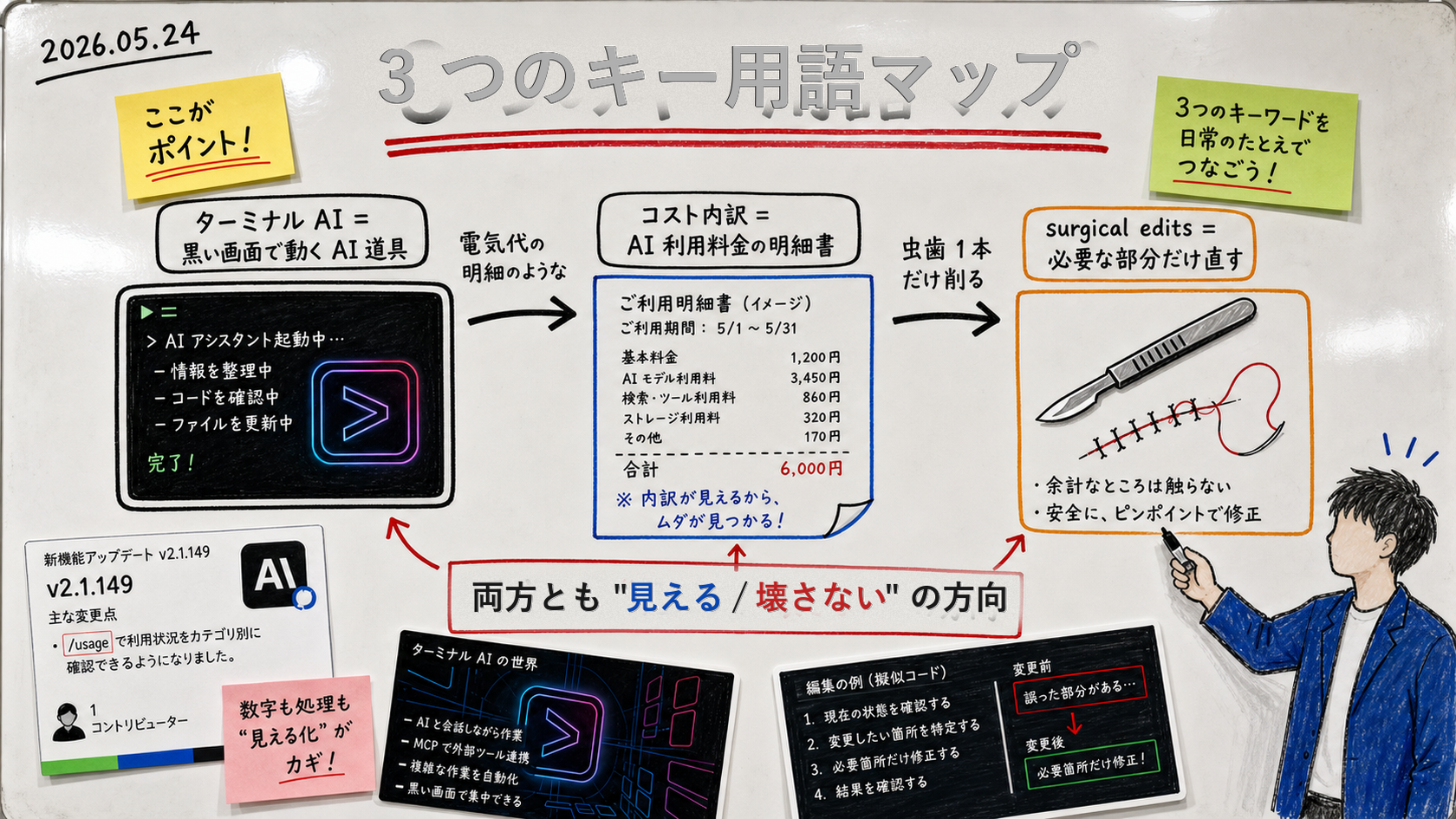
First, some context:When most people hear "use AI to write code", they imagine the ChatGPT chat window — "please write this code for me". But what engineers actually use day-to-day are CLI-based tools in the black screen (the terminal). Both Claude Code and Gemini CLI are this kind of tool. You ask in plain text, and the AI directly reads and writes files in your local filesystem.
Below, the three frequently used jargon terms are translated step-by-step into plain English.
| Jargon | Plain English | Everyday analogy |
|---|---|---|
| Terminal AI coding tool | AI tool that lives in the black screen and edits your files directly | A secretary robot that organizes papers on your own desk |
| Cost breakdown (per-category usage) | A monthly bill that shows what consumed your AI quota | An electricity bill: "fridge $X, AC $Y, lights $Z" |
| Surgical edits | AI fixes only the specific lines it needs to, not the whole file | Drilling only one cavity, not pulling the whole tooth |
| MCP (Model Context Protocol) | A common standard for AI to use external services (GitHub / Slack / DB, etc.) | Power-plug shapes becoming standardized worldwide |
| skills / subagents / plugins | Mechanisms to give the AI roles or extra abilities (like extensions) | Adding apps to your phone to expand what it can do |
/usage now shows cost breakdown[Official] The first line of Anthropic's v2.1.149 release notes reads: "/usage now shows a per-category breakdown (skills, subagents, plugins, per-MCP-server costs) to help identify what's driving limits usage." Plainly, this means the /usage command will now show how your weekly quota is distributed across skills, subagents, plugins, and per-MCP-server costs, helping you pinpoint what's squeezing your limit.
The word "limits" here refers to the weekly quota assigned to your Claude Code paid plan (Pro / Max, etc.). Once you exceed it, you either pay overage or service stops for that week. Until now, /usage only showed the aggregate consumption, leaving users in the dark about what was driving the burn. The new breakdown shows the inside of that aggregate.
# In the Claude Code terminal
> /usage

# Before v2.1.148 (aggregate only)
This week: 65% of weekly limit used.

# After v2.1.149 (per-category breakdown)
This week: 65% of weekly limit used.
  Skills:        38% (mainly grant-rewrite, blog-write)
  Subagents:     14% (code-reviewer x12, planner x8)
  Plugins:        9% (anthropic-skills / xlsx)
  MCP servers:    4% (notion: 3.2%, slack: 0.8%)
The essential value of this feature is the shift from "panic when the bill arrives" to "decide what to cut while it's still actionable". [Author's view] Through building Sales Claw, I've found that AI cost explosions usually come from one of two causes: (a) a heavy skill being invoked habitually without realizing it, or (b) too many subagents being spawned. The per-category view in /usage is exactly the surface needed to catch both in flight.
Beyond the /usage upgrade, v2.1.149 includes multiple improvements. The /diff detail view now supports keyboard scrolling (arrow keys, vim-style j/k, PgUp/PgDn, Space, Home/End), and Markdown checkboxes (- [ ] todo) finally render correctly. For enterprise, a new managed setting allowAllClaudeAiMcps lets admins load claude.ai cloud MCP connectors in bulk instead of allow-listing each one.
On the security side, Windows / PowerShell users get a particularly welcome set of fixes. PowerShell built-in shortcuts like cd.. and cd\\ previously could change the working directory undetected, allowing subsequent commands to read outside the workspace — this vulnerability is now patched. The git worktree sandbox write allowlist was also tightened from "entire repository root" to "only the shared .git directory (with hooks/ and configdenied)".
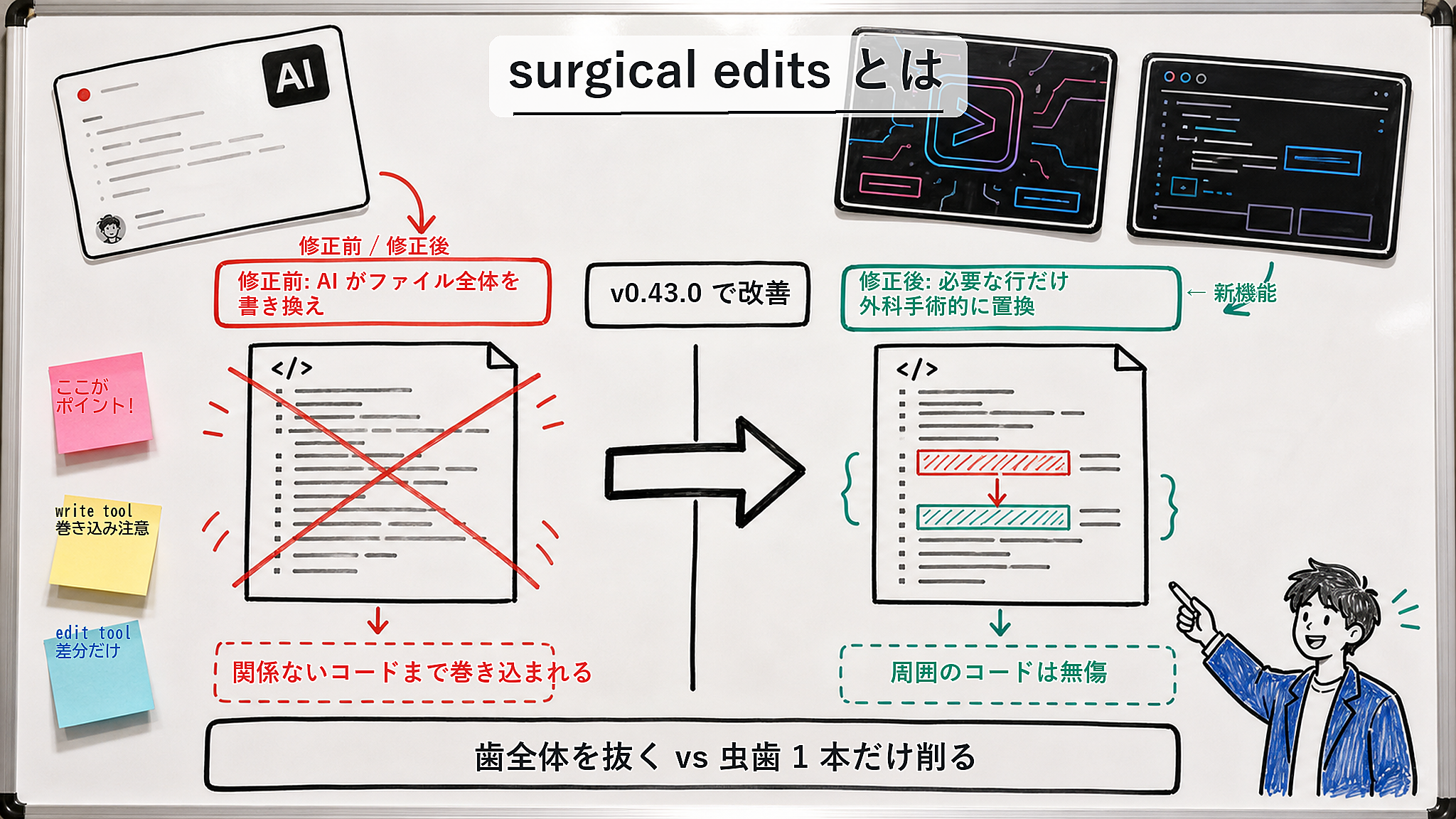
[Official] Gemini CLI v0.43.0 release notes include the change "steer model to use edit tool for surgical edits". Paraphrased: at the model-steering level, the AI is now nudged to use the dedicated edit tool that replaces only specific lines, rather than the write tool that rewrites the whole file.
Let me explain the problem this was solving in more concrete terms. When you asked the AI to "fix this bug", prior Gemini CLI often chose the write tool — which rewrites the entire file. From the AI's perspective this is the easy path (just write the new whole), but from the user's perspective it triggers collateral damage: irrelevant comments vanish, formatting rules shift, and a teammate's recent edits get clobbered.
v0.43.0 changes the model's preference to prioritize the edit tool (which performs targeted line-range replacements). [Author's view] This sounds like a tiny adjustment, but it's actually a significant design pivot. The principle shifts from "let the AI cleverly rewrite everything" to "let the AI narrow down what it touches" — the locus of responsibility moves.
Beyond the surgical edits improvement, v0.43.0 contains many stability fixes:
Additionally, the same-day v0.44.0-preview.0 released the Sublime Text and Emacs client integrations first introduced in earlier nightlies, now elevated to preview status. Gemini CLI integrations were previously VS Code-centric; Sublime Text and Emacs users are now first-class citizens.
| 項目 | Up to v0.42.x (old) | From v0.43.0 (new) |
|---|---|---|
| Edit unit | Whole file (write tool) | Targeted lines (edit tool preferred) |
| Collateral damage | Common | Structurally reduced |
| Editor integration | VS Code-centric | Sublime / Emacs clients added (preview) |
| OAuth authentication | Headless Linux freezes reported | Silent hang fixed |
| ACP mode | Infinite thought loop incidents | nextSpeakerCheck disabled to avoid |
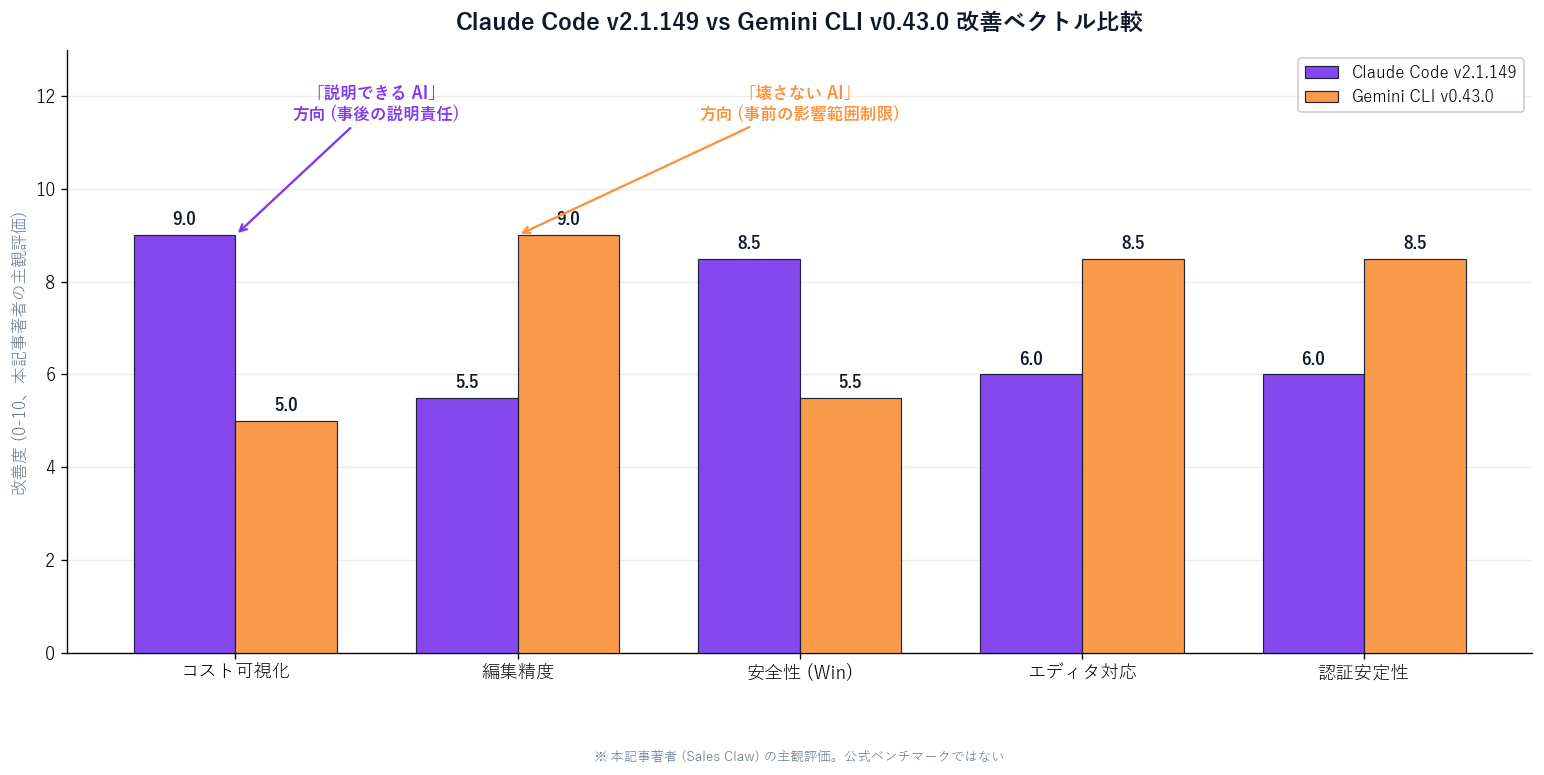
Placing the two updates side-by-side reveals something interesting. [Author's view] Claude Code pushes in the direction of "/usage breakdown = make AI's actions explainable after the fact"; Gemini CLI pushes in the direction of "surgical edits = limit the AI's blast radius before the fact". The former strengthens after-the-fact accountability; the latter strengthens before-the-fact scope containment.
In Japan-based AI sales workflows — especially for "AI, not humans, contacting unfamiliar companies" patterns like Sales Claw — both directions are simultaneously required. Only when "auditable in hindsight" and "structurally low blast-radius" are both present does policy-controlled autonomous operation become production-ready.
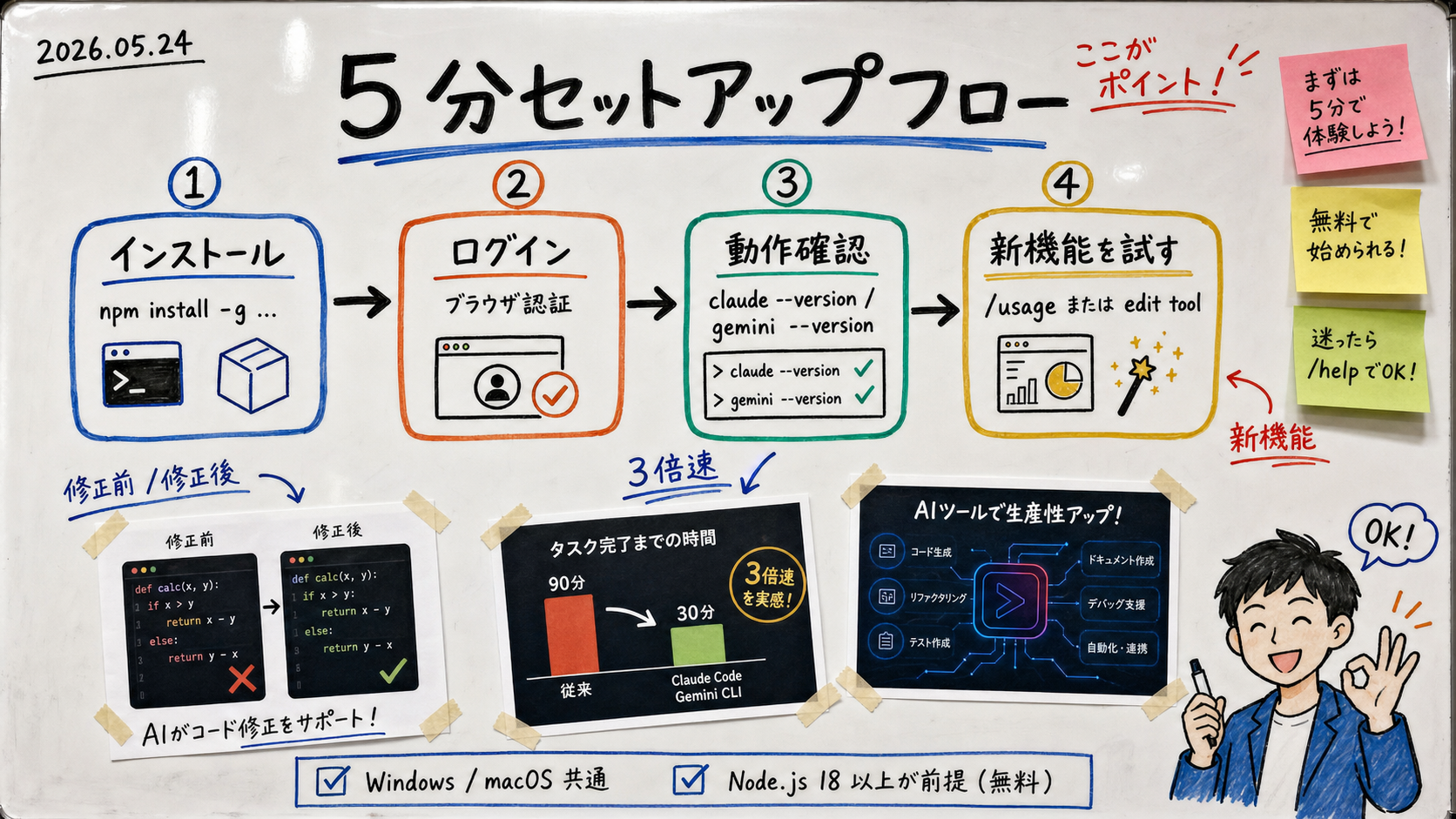
Below are common Windows / macOS steps for first-timers. Prerequisite: Node.js 18 or higher installed (available free from nodejs.org).
/usage# 1) Install via npm
npm install -g @anthropic-ai/claude-code
# 2) Verify version (should be v2.1.149 or higher)
claude --version
# 3) Log in (browser opens for Anthropic account auth)
claude login
# 4) Move to any project directory and launch
cd ~/path/to/your/project
claude
# 5) Inside Claude Code, run /usage
> /usage
# 6) If "Skills", "Subagents", "Plugins", and "MCP servers" sections appear, you're good# 1) Install via npm
npm install -g @google/gemini-cli
# 2) Verify version (should be v0.43.0 or higher)
gemini --version
# 3) Log in (Google account)
gemini
# 4) From a project directory, ask the AI for a fix
# (Try on a sample file from this article to see the difference clearly)
# 5) Check whether the AI chose "edit tool" by watching the bottom of the screen
# for output like "Using edit tool to modify file.ts at lines 42-48"
# (edit tool, not write tool, indicates a successful surgical edit)claude update → /usage first. Five minutes tells you what's driving your bill — highest priority/usage. Gemini CLI is fine for the next step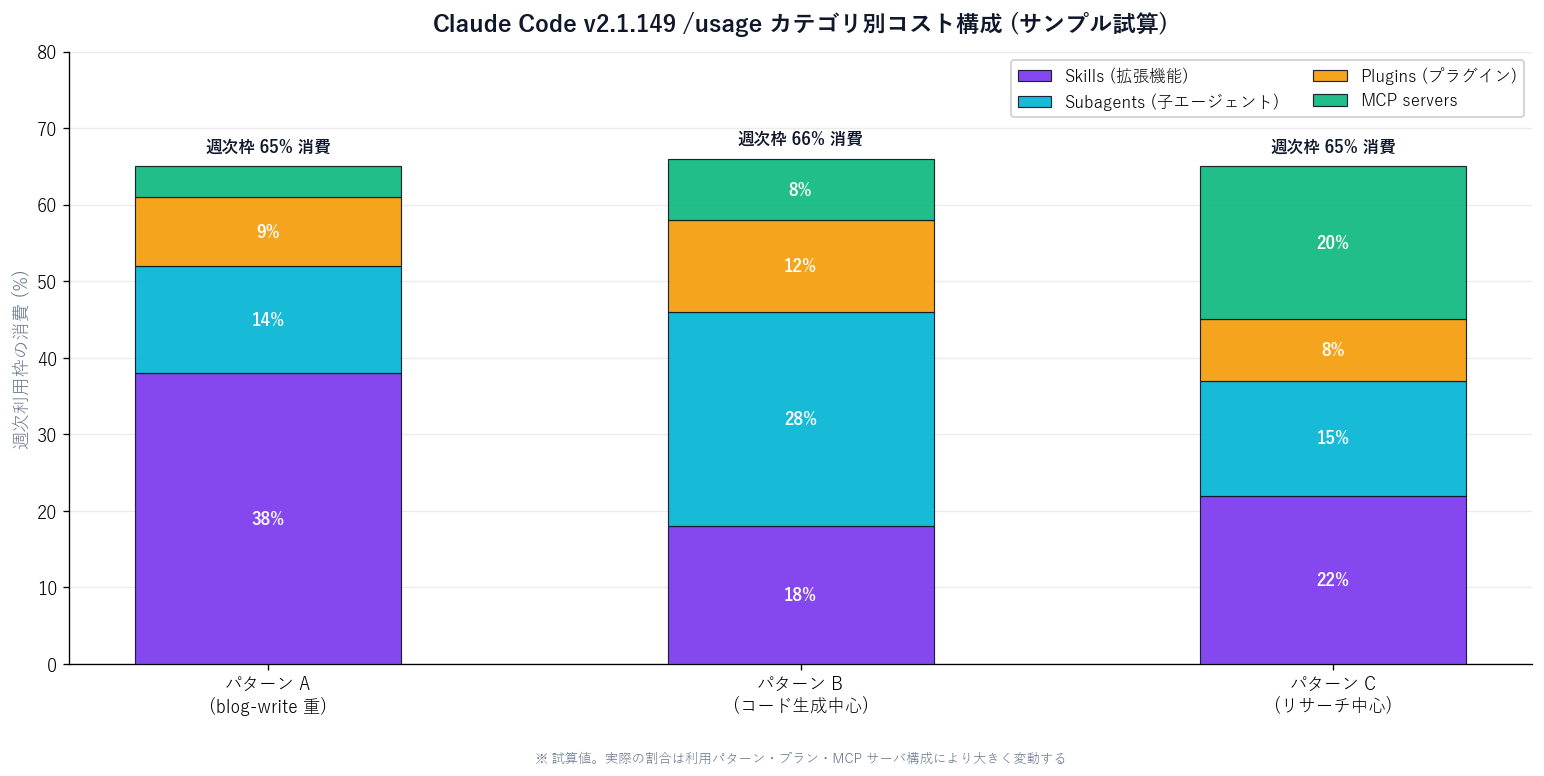
Both releases are directionally important, but neither is a silver bullet. Be aware of the following limits:
/usage.gitignore / .env before launching in directories that contain secretsSales Claw is an OSS tool designed to lower the risk of misfires and policy violations through policy control, pre-send automated inspection, sales-NG detection, CAPTCHA stop-on-detect, rate limiting, audit logging, and automatic stop conditions. The directions of "explainable AI" and "non-destructive AI" described in this article align almost perfectly with the design principles Sales Claw has emphasized since its inception.
In AI sales automation, the risk that "AI sends messages to unfamiliar companies on its own" cannot be avoided. One option is to require "mandatory human review", but Sales Claw chose the other path: "structurally lower the risk via automated pre-send policy inspection and audit logs". The Claude Code / Gemini CLI updates strengthen the developer-side "explainability / scope containment of the implementation tool", which converges with the operations-side "explainability / scope containment of the send policy" Sales Claw has pursued.
Next action: Run claude update to v2.1.149 or higher, then execute /usage to inspect your cost breakdown. Install Gemini CLI v0.43.0 and ask it to handle one of your routine fixes. To operate AI sales workflows "structurally safe without relying on human review", start with the Sales Claw free download. Details in the Quick Start Guide.
Japanese-language original: 日本語版はこちら
本記事は X 公式アカウントと公式ドキュメントを一次情報として参照しています。
この記事の著者
中澤 圭志
Sales Claw maintainer
Designs and develops Sales Claw. Writes from the field on B2B sales automation and applied AI.