ツール解説
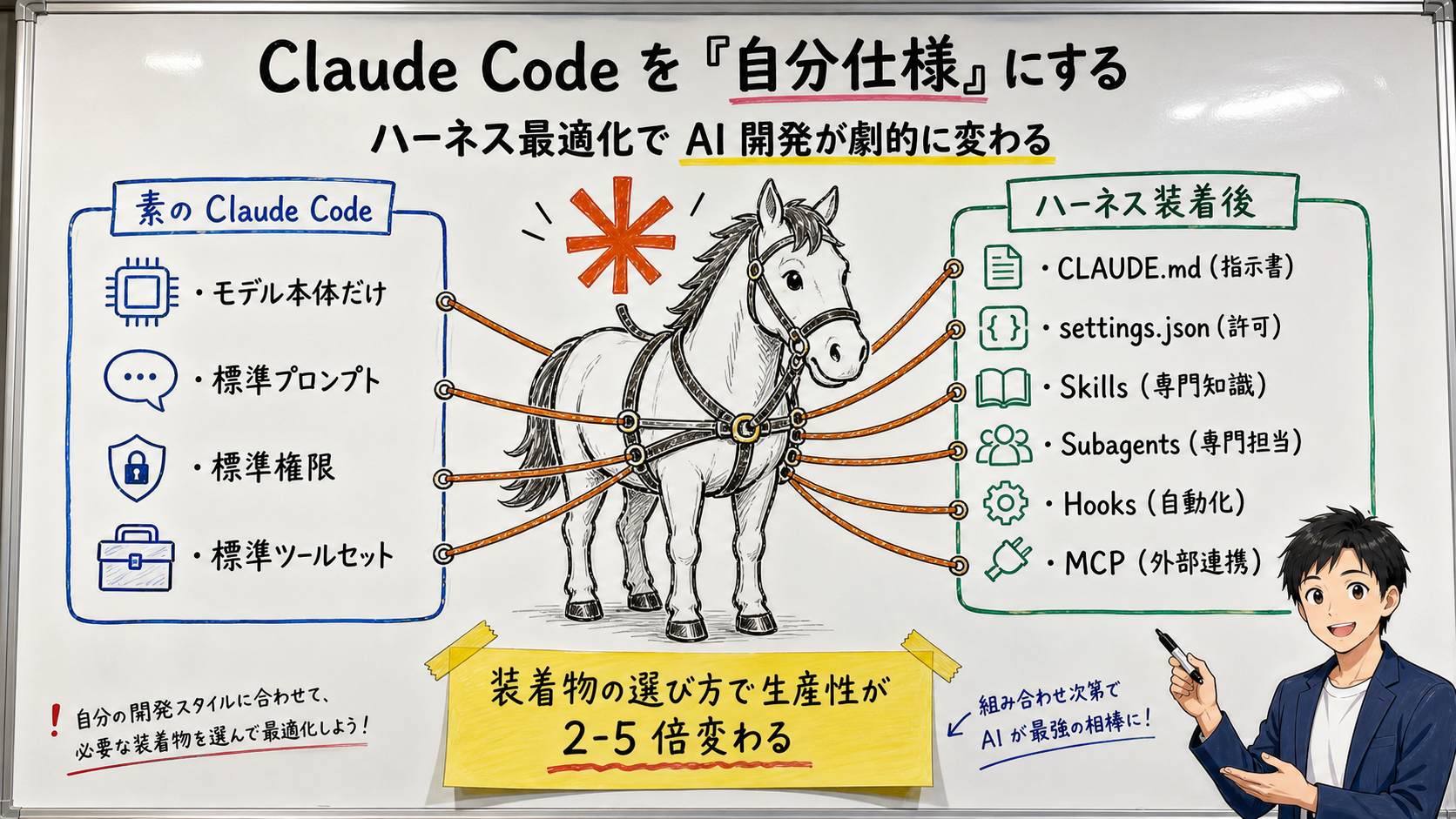
Tune Claude Code to Your Spec — A Practical Harness-Optimization Guide for General Readers
14 分
Bottom line: subagents are not about "building one smarter AI" but about "preparing several AIs with different roles and assigning the right one." From the real experience of failing when I made one AI do everything, explained so non-experts can follow.

中澤 圭志
@keishi_nakazawaSales Claw maintainer
Key Facts
Tool
Claude Code subagents
What it is
One Markdown file with YAML
Set of three
Independent context / custom prompt / tool restriction
Recent
v2.1.154 dynamic workflows
In one line
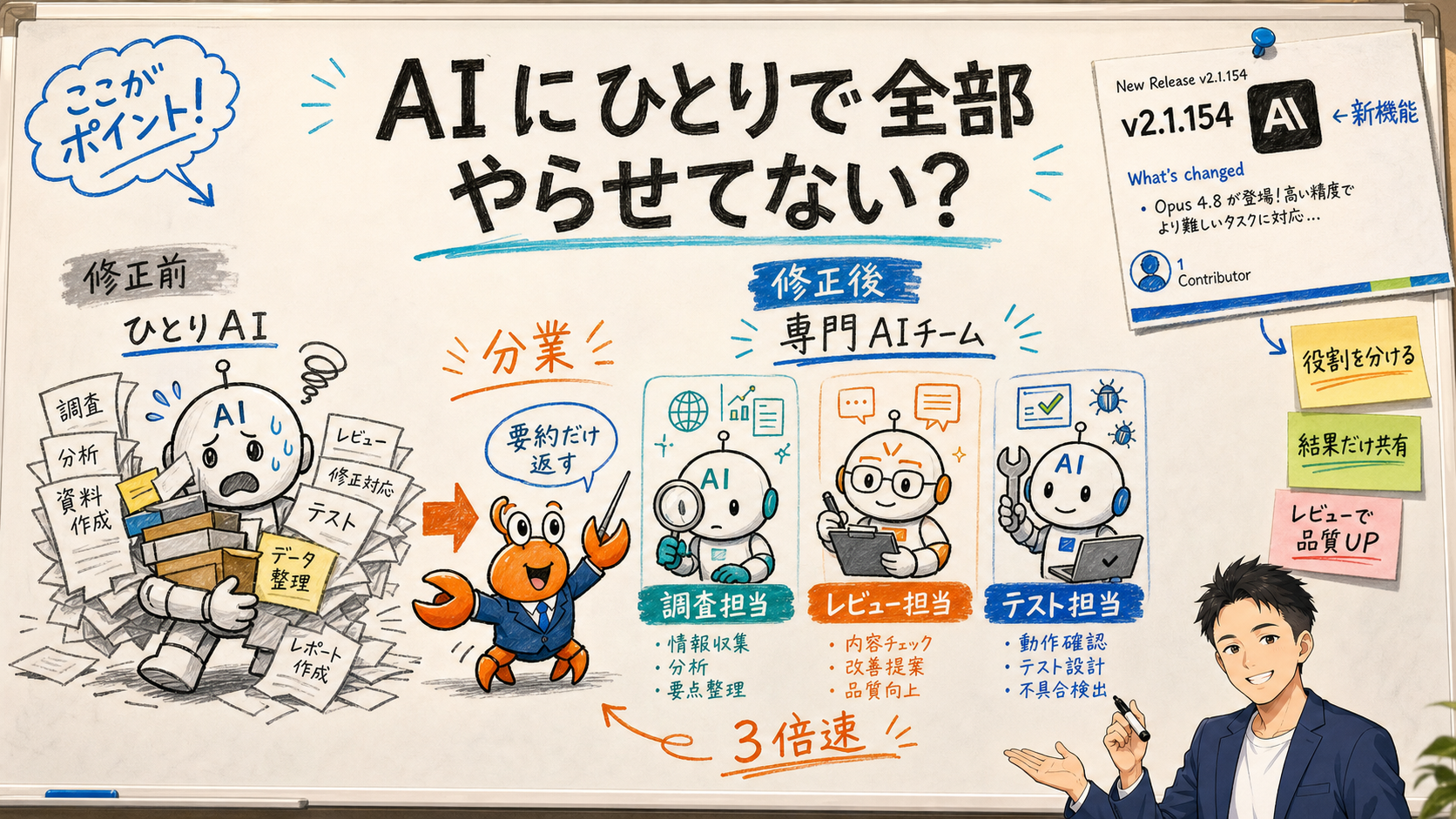
A subagent means: instead of making one AI do everything, you set up a "team of specialist AIs"—a research specialist, a code-review specialist, a testing specialist—and let work be divided among them. In Claude Code (the command-line edition of Claude for developers), you can add one specialist AI with a single sticky note (a Markdown file). The benefits are three: (1) your main conversation doesn't overflow with side research (it saves memory space), (2) you can restrict "this AI can only use these tools," which is safer, and (3) you can route light work to a cheaper model to cut costs. And in Claude Code v2.1.154 (May 28, 2026), "dynamic workflows" that run hundreds of subagents at once arrived too. This article explains, even for non-programmers, what this really is and how it helps your work—using the metaphor of one overworked new hire vs. building a specialist team.
Bottom line: Subagents are not about "getting one smarter AI." They are about "preparing several AIs with different roles and letting the main AI assign the right one." Think of it as giving a brilliant but overloaded new hire some colleagues for research, review, and testing. The main AI then isn't buried under "scattered research" and can focus on the real task. Because you can narrow each one's tools, it's safer—give the research AI no send permission and it structurally cannot misfire. And because light work goes to a cheaper model, it's easy on the wallet. Conversely, if you skimp on role design, it becomes "team cosplay" that just slows you down—that's the pitfall.
Let me be honest. At first, I (a Sales Claw developer) threw the entire sales workflow at a single Claude. "Research these 44 companies, find each contact form, draft the message, and judge whether to send"—all on one AI. After a while, the AI started saying "wait, which company was that again?" Its head (its context—the working memory an AI can hold at once) was stuffed with research, and its judgment began to drift. What fixed it was exactly this "division of labor" into subagents.
Related reading: What an "AI agent" even means, The "harness" that runs agents, The complete MCP guide for connecting AI to external tools. Subagents are one of the basic building blocks for putting AI to real work, alongside these.
This article cites Claude Code "Create custom subagents" / Claude Code GitHub Releases / Claude Code Changelog as primary sources. See also the Sales Claw free download page.
First, the premise: an "agent" here means an AI that, given one instruction, does the research and the execution itself (see the AI agent definition). The "sub"—a "subordinate" or "specialist colleague" the main AI calls—is the subagent.
[Official] The Claude Code docs define a subagent as a "specialized AI assistant that handles a specific type of task," to be used "when a side task would flood your main conversation with search results, logs, or file contents you won't reference again"—the subagent does that work in its own context and returns only the summary.
[Author's view] Here's the make-or-break analogy. Imagine someone in a meeting saying "let me check all 100 past emails" and reading all 100 aloud right there—awful. The room's air (the context) fills up with irrelevant content. A subagent is the division of labor where you say "go read those 100 in another room and report the key points in three lines." The meeting room (your main conversation) stays clean.
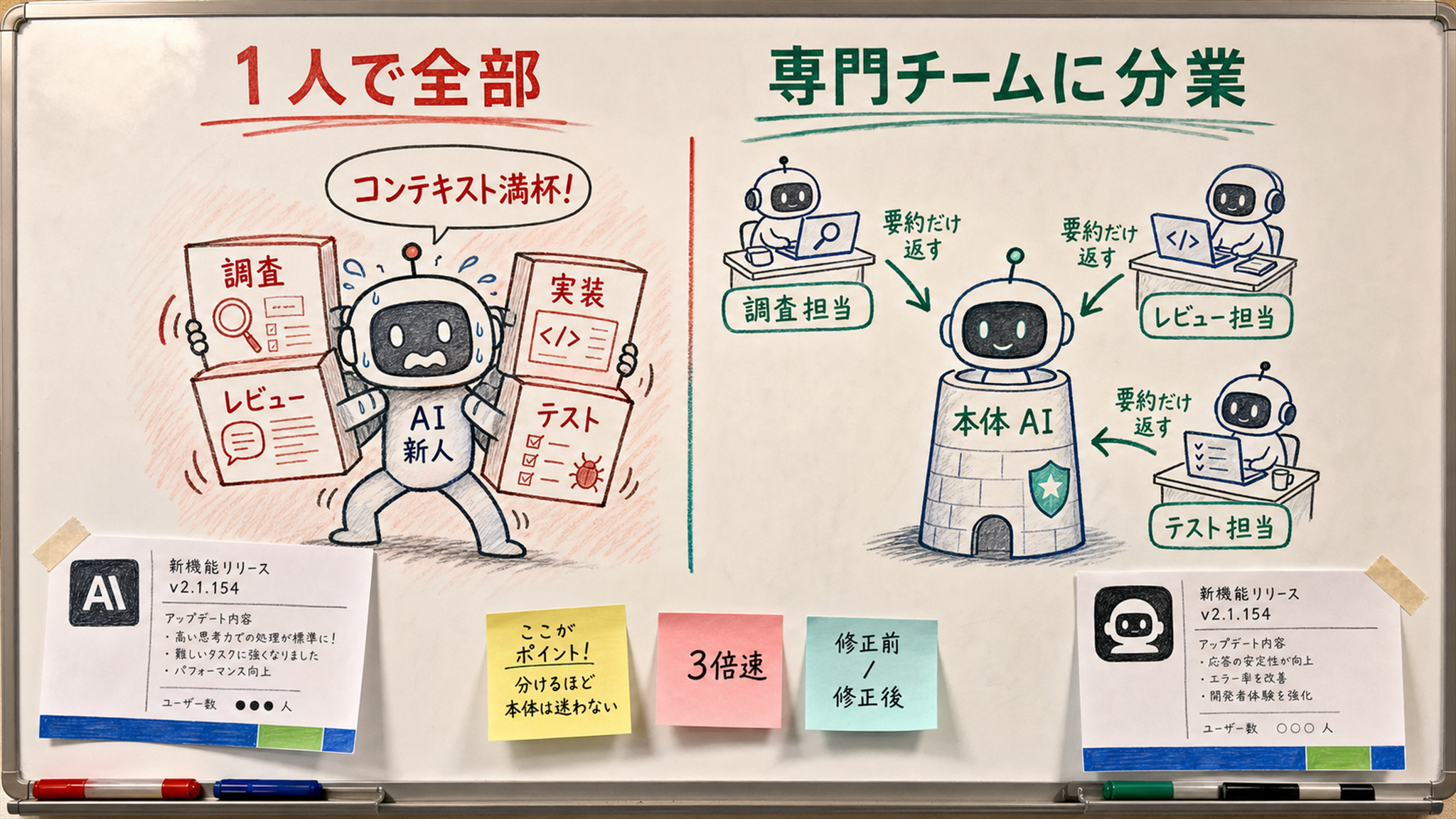
An AI has a limit on how much it can hold at once. This is called context (its working memory)—like a human's short-term memory or a desk that's currently full. When the desk fills with paper, new work gets hard. AI is exactly the same: once context fills with what it researched, judgment drifts the further it goes.
[personal_metric / failure] As I wrote above, this is exactly how I first failed. When I threw "research 44 companies, find the forms, draft the messages" at a single Claude, past around the 20th company it started mixing up earlier companies' details. The cause was clear: "throwaway research" devoured the head space that should have been reserved for judgment.
Here's the pitfall: many people think "the AI was wrong because it's dumb," but often it's just that the way the task was handed over was bad. The same AI recovers its accuracy simply by offloading research to a separate head (a subagent). The docs themselves list "preserving context by keeping exploration and implementation out of your main conversation" as the first benefit.
| 項目 | One AI does everything | Divide work into subagents |
|---|---|---|
| Working memory | Fills with research junk fast | Main one only gets summaries; stays free |
| Late-stage accuracy | More mix-ups and forgetting | Runs stably for longer |
| Permissions | Keeps all permissions | Tools narrowed per role |
| Cost | Everything on an expensive model | Light work routed to a cheaper model |
| Best for | Short one-off tasks | Long, repetitive, or parallel work |
[Official] Claude Code states that each subagent runs with "its own context window, a custom system prompt, specific tool access, and independent permissions." In plain words:
| Jargon | In plain words | Everyday analogy |
|---|---|---|
| Independent context | That AI's own working memory; a separate desk from the main one | A colleague working in another room; messes don't dirty the meeting room |
| System prompt | The "you are the X specialist" role instructions | The job manual handed over on day one |
| Tool access / permissions | The range of allowed tools (search only, can edit, etc.) | Which keys you hand over; no send permission for a read-only person |
[Author's view] Of these three, the one that matters most for business use is "you can narrow the tools." If you decide "the research subagent never gets a tool that sends data outside," then that AI structurally cannot misfire. Rather than preventing accidents with intelligence, simply don't hand over the dangerous tool—a classic of safe design.
/agents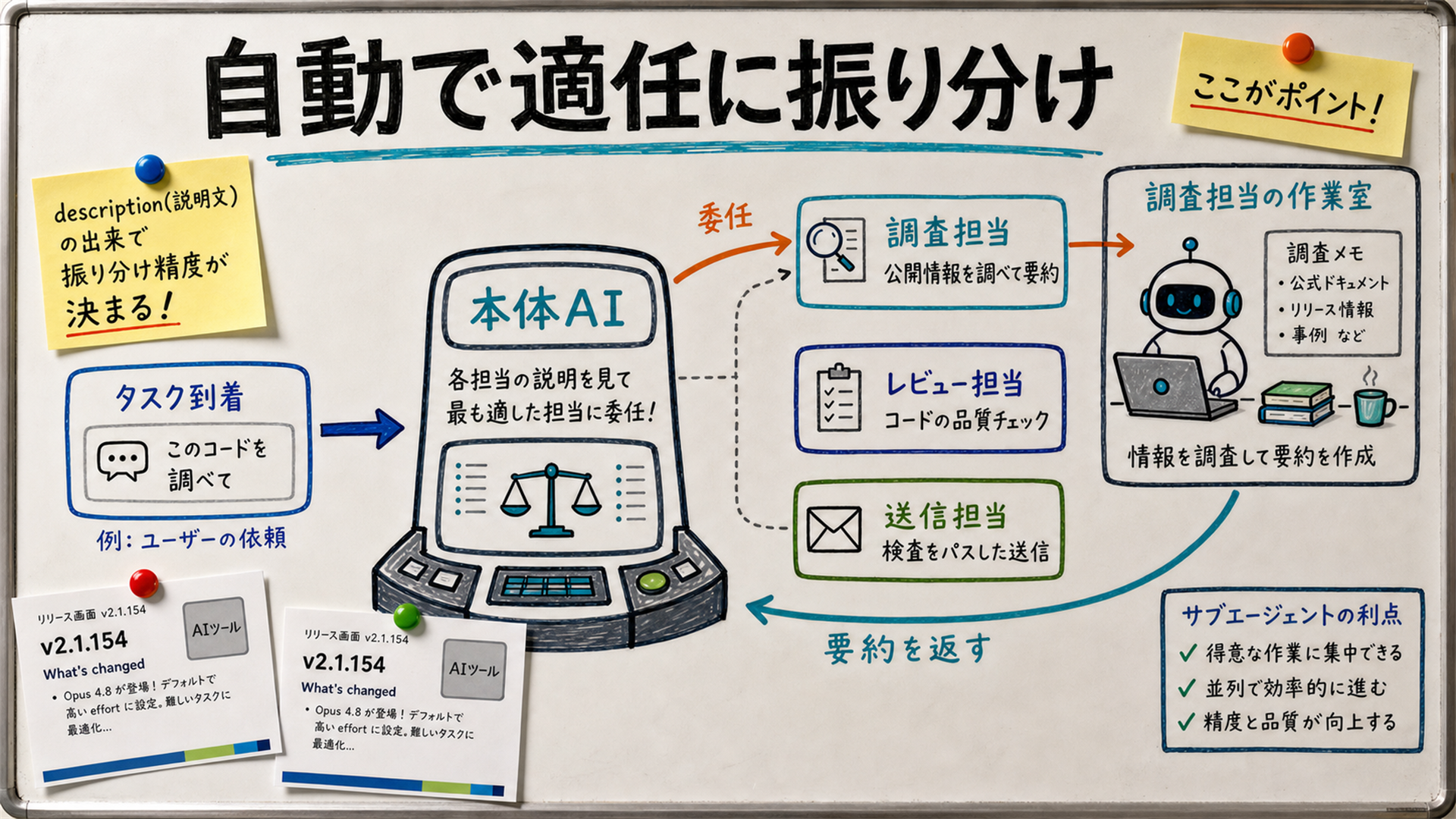
[Official] Claude Code says "Claude uses each subagent's description to decide when to delegate. When you create one, write a clear description so Claude knows when to use it." So routing intelligence is decided by the quality of the "description" on each specialist.
An everyday analogy: it's the difference between a new colleague's badge saying just "Accounting" vs. "Specializes in invoice-defect checks and monthly expense settlement." With the latter, everyone correctly thinks "let's ask that person." In the AI world too, a vague description means the main AI never knows when to call—wasted talent.
To manage manually, use the /agents command in Claude Code. [Official] From there, choose "create a new agent" and pick whether it's project-level (just for that project) or user-level (usable across all projects). Also, Claude Code v2.1.153 (May 2026) strengthened claude agents autocomplete to even suggest native slash commands and bundled skills.
"Build" sounds like it needs programming, but in reality it's a single note. [Official]A subagent is a "Markdown file with YAML frontmatter" shaped like this:
---
name: research-helper
description: Research specialist that checks a company's public info and returns only the key points. Never sends anything externally.
tools: Read, Grep, WebSearch   # Omit to inherit all tools
model: haiku                   # Omit to inherit the main model
---

You are a corporate research specialist. Look up only public
information about the given company and summarize the facts and
sources in 3-5 lines. Mark any guess explicitly as "guess."| Field | Meaning | Required? |
|---|---|---|
name | The specialist's name (alphanumeric) | Required |
description | When to call it. The most important field; it decides routing | Required |
tools | Allowed tools. Omit to use all of them | Optional |
model | Which model (e.g., haiku). Save cost with a cheaper model | Optional |
[Author's view] To build your first one, the fastest path—also recommended officially—is to "let Claude generate a draft first, then fine-tune it for yourself." Editing a starting point beats writing from zero. And don't forget to narrow tools to "only what's needed." Simply not handing edit/send permission to a research specialist removes one seed of accidents.
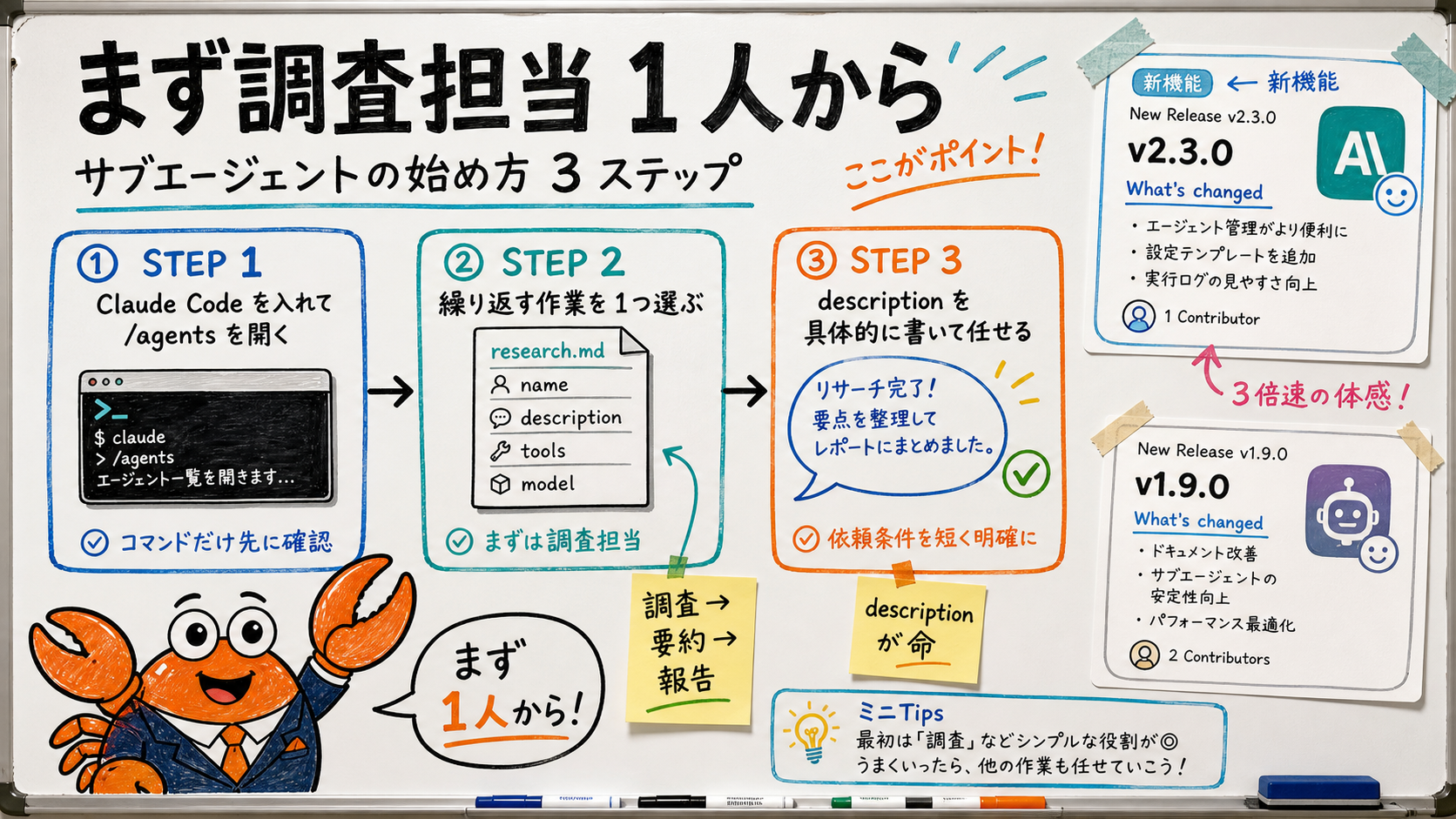
[Official] The shortest path: (1) run /agents in Claude Code, (2) choose "Create New Agent," (3) pick project- or user-level and let Claude generate it first, then adjust to taste. The first one is best as a "research specialist that just summarizes and returns"—easy to feel the effect.
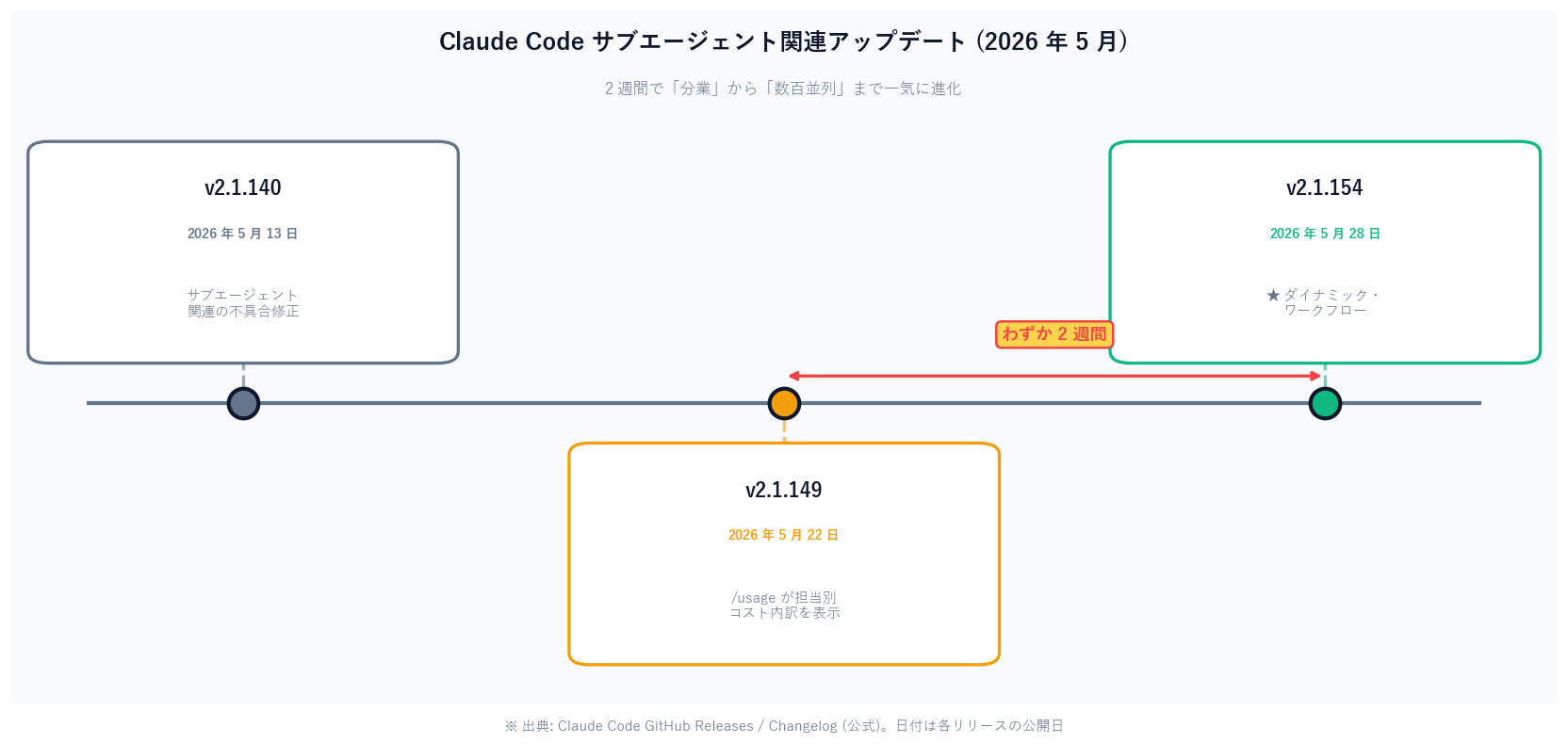
[Official] Note the recent progress. Claude Code v2.1.154 (May 28, 2026) added "dynamic workflows": ask Claude to create a workflow and it orchestrates work across dozens to hundreds of agents in the background (check runs with /workflows). And v2.1.149 the same month let you see usage broken down by skill, subagent, plugin, and MCP server, so you can tell which specialist is eating cost.
[Author's view] "Hundreds of subagents in parallel" sounds like overkill, but for wide work like "research 1,000 companies one by one," it shines. 100 people doing 10 each beats one doing 1,000—though cost grows in proportion to parallelism, so set limits as a pair (more below).
[Unverified] Exactly how many subagents you can run in parallel depends on your environment, plan, and model, so this article does not assert a hard number. The docs say only "dozens to hundreds"; the safe approach is to test small in your own setup first. [Speculation]Going forward, I expect humans will less often hand-pick "how many to run in parallel," and the AI will increasingly tune parallelism itself based on workload (this is my forecast, not an official statement).
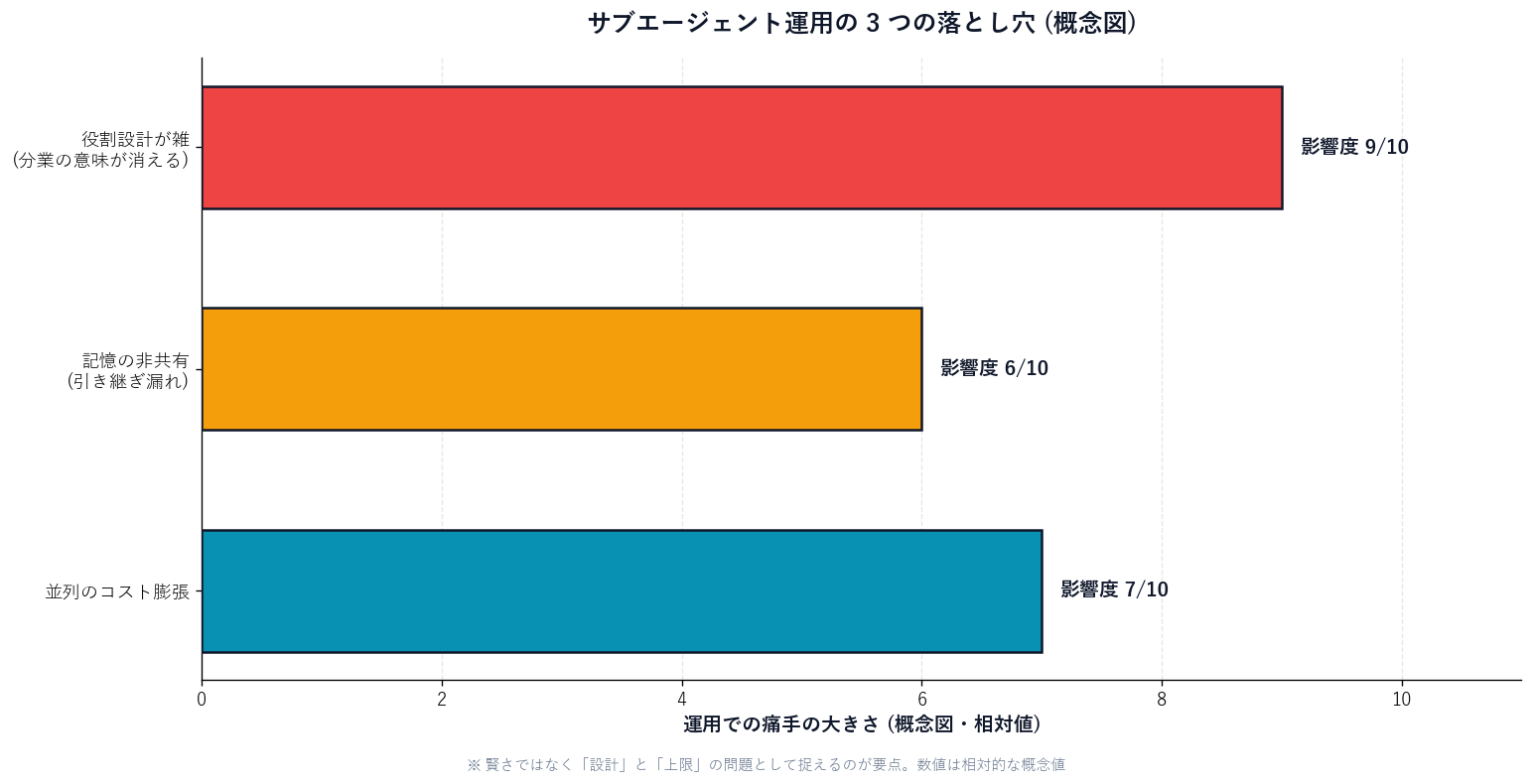
[Author's view] The most common failure is "just make five specialists." If roles overlap or descriptions are vague, the main AI dithers over "who do I route this to?" and the supposed division turns into a traffic jam. In my experience, making just one (a research specialist), confirming it "works," then a second is fastest in the end.
If you delegate external-facing work like sales-form submission or support replies to a subagent, in Japan you must check the following.
[Author's view] A subagent is only a tool, so legal compliance stays with the user. That's exactly why structural brakes—"narrow the send role's permission," "run pre-send inspection"—pay off.
From here, as a Sales Claw developer, I'll describe how we use "subagent-style division" in actual sales work. Sales Claw is an OSS tool that lowers misfire and ToS-violation risk through policy control, pre-send automatic inspection, sales-NG detection, halting on CAPTCHA detection, send-rate limiting, audit logging, and automatic stop conditions.
The subagent philosophy of "split roles and narrow each one's tools" is the same direction as Sales Claw's design. We split the "research head," the "is-it-OK-to-send inspection head," and the "actually-operate head," and give the inspection head no external send permission. Prevent accidents by structure, not intelligence—that's the shared idea.
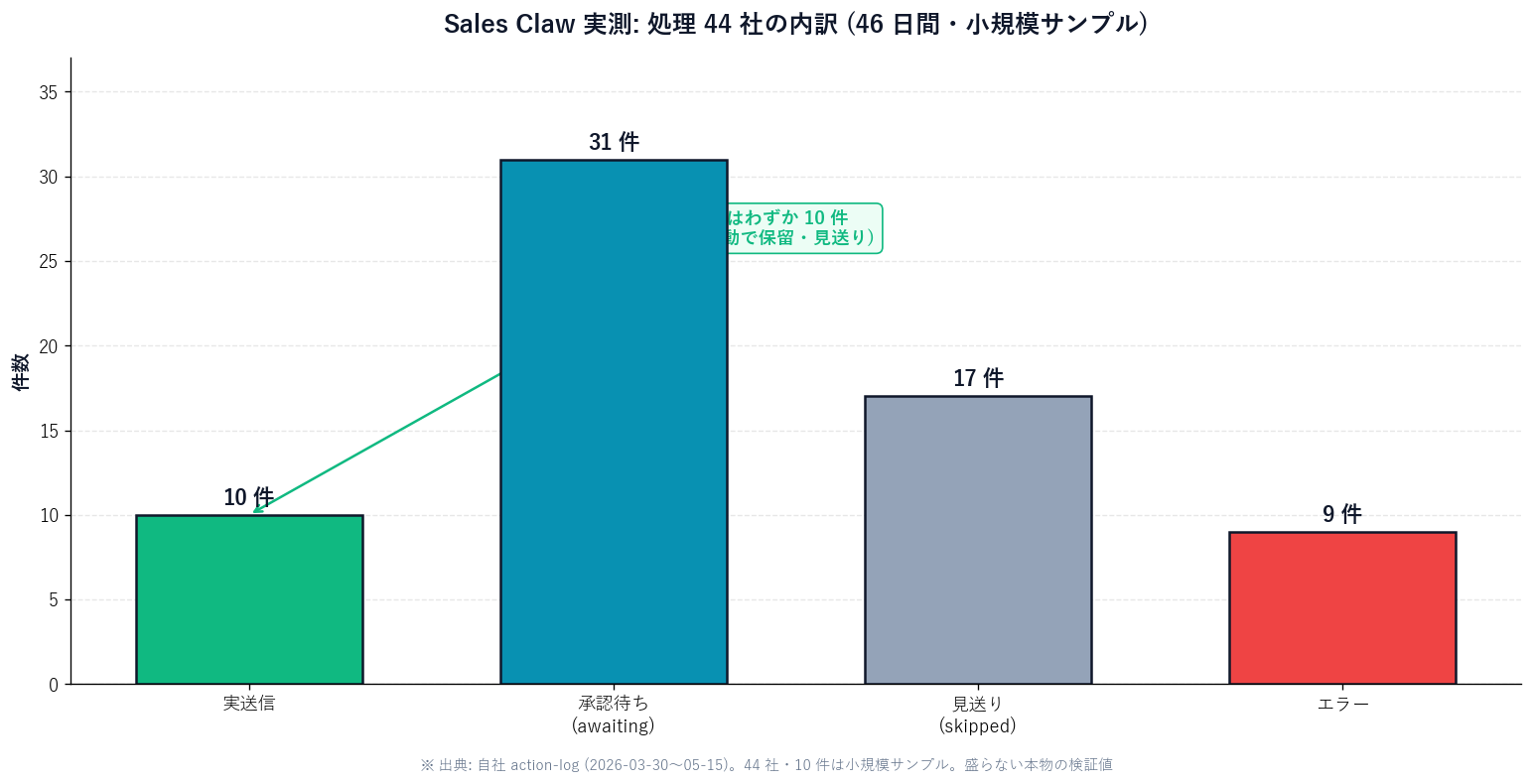
[personal_metric / dev fact] Honestly, I rewrote the autonomous loop many times before reaching this division. First, one AI for everything → context overflowed and collapsed. Then I over-split roles → handoff gaps. Finally I settled on "split research, inspection, and operation, and give inspection no send permission." The numbers are small (44 companies), but this is a real test value I won't inflate. Precisely because the sample is small, it's worth writing honestly here.
The essence of subagents is a shift in thinking: not "get one smarter AI" but "prepare several AIs with different roles and assign the right one."That alone keeps the main one's head uncluttered, makes it safer by narrowing tools, and cheaper by routing light work. In Claude Code you can start with one Markdown file, and v2.1.154's dynamic workflows put hundreds-scale parallelism in view.
Meanwhile, "build a team and it magically gets faster" is not true. Sloppy role design jams; sloppy summaries drop info; more parallelism inflates cost. Subagents' payoff is decided by "design and limits," not "intelligence"—that's my honest conclusion after rewriting it many times.
Before you start using subagents
Next action: open /agents in Claude Code and create just one "research specialist that summarizes and returns." If you want to put AI into sales or research work, you can start from the Sales Claw quick-start guide, which builds in role-splitting and safe design from the start.
Related: see the "harness" that runs agents and the complete MCP guide.
This is the English edition. Read the Japanese-language original.
本記事は X 公式アカウントと公式ドキュメントを一次情報として参照しています。
この記事の著者
中澤 圭志
Sales Claw maintainer
Designs and develops Sales Claw. Writes from the field on B2B sales automation and applied AI.