ツール解説
Gemini Omni Explained: Google's New 'Talk-to-it' Video AI, for Non-Technical Readers (May 2026)
14 分
Google Antigravity 2.0 is Google's new 'hand multiple jobs to AI in parallel' IDE, announced at I/O 2026 on 2026-05-19. This guide covers the VS Code fork + Manager View + Gemini 3.5 Flash setup, the free tier, pricing, risks, and Sales Claw-side business workflows — all written for non-technical readers.

中澤 圭志
@keishi_nakazawaSales Claw maintainer
Key Facts
Announced
2026-05-19 (Google I/O 2026 keynote, Varun Mohan + Logan Kilpatrick)
Form factors
Desktop App + CLI (Go) + SDK + Managed Agents + Enterprise Platform
Pricing
Free tier / $20 AI Pro / $100 AI Ultra (new) / $200 AI Ultra (down from $250)
Default model
Gemini 3.5 Flash (~289 tok/s, 76.2% on Terminal-Bench 2.1)
"What actually is Google Antigravity? How is it different from Cursor or Claude Code? Is the free tier for real?" — this article reads Google's official blog post, the Antigravity product site, the official Codelab, and the Google DeepMind Gemini 3.5 Flash model card as primary sources, and explains what non-technical readersshould understand before deciding whether to use it themselves or roll it out to their team. Antigravity is a VS Code fork, so if you've ever touched VS Code, Cursor, or Windsurf, the first ten minutes will feel familiar. And if you've never used any IDE before, the realistic on-ramp is installing the free tier and getting a feel for it.
Primary sources: Google Blog "I/O 2026 developer highlights" (2026-05-19), Google Blog "Gemini 3.5" (2026-05-19), the Antigravity product site (antigravity.google), the official Antigravity pricing page, Google Codelabs "Getting Started with Google Antigravity," and the Google DeepMind Gemini 3.5 Flash Model Card. For the companion announcement (Gemini Omni) and the broader AI Ultra plan reshuffle, read our Gemini Omni general-reader guide alongside this piece. For the broader I/O 2026 context, see our Google I/O 2026 roundup. The latest from the Claude Code side is in our Claude Code 2.1.147 + 2.1.148 deep dive, and the latest Cursor release in our Cursor Composer 2.5 release note.
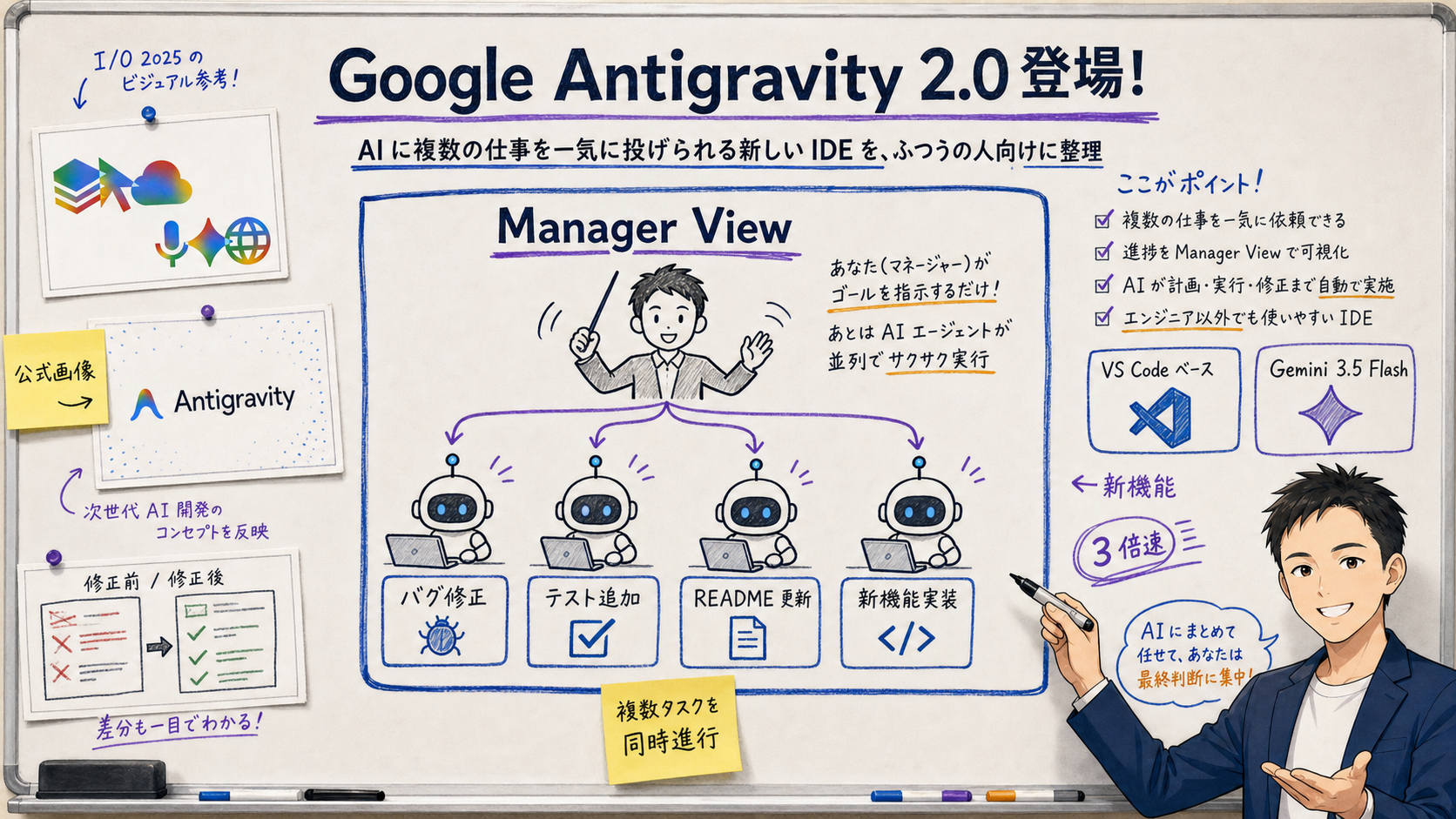
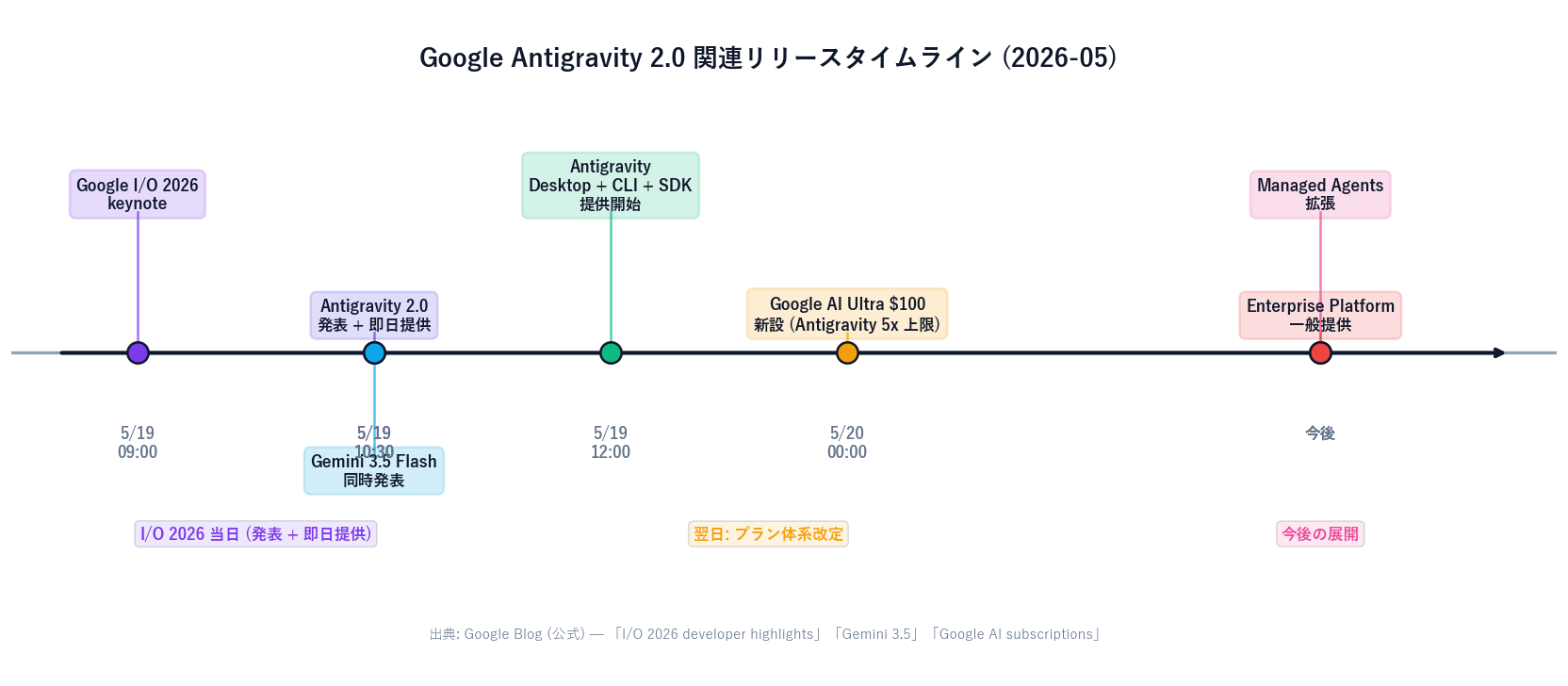
Google Antigravity 2.0 ("Antigravity" for short) is the new AI IDE Google announced at I/O 2026 on 2026-05-19. The presenters were Varun Mohan, Director of Software Engineering, and Logan Kilpatrick of Google DeepMind. [Official] Google positions Antigravity as "an agent-first development platform."
The big difference for everyday users: where previous AI IDEs feel like "programming alongside a sharp assistant," Antigravity feels like "managing a small AI team of three or four agents."Inside Antigravity there's a dedicated "Manager View" where you assign work to multiple agents at once. For example:
On top of that, when an agent decides "this subtask is better handed off," it spawns sub-agents dynamically. Antigravity also supports background scheduling for runs that keep going while you sleep. The underlying ideas overlap with Claude Code's subagents and Codex's cloud workers, but Antigravity is distinctive in that the parallel-agent manager is built directly into the IDE itself.
[Author's view] The fundamental shift Antigravity 2.0 stakes a claim on is "pair programming with one AI" → "managing a team of AI agents." That tracks the broader move in coding AI from "automate individual tasks" to "automate the entire workflow."
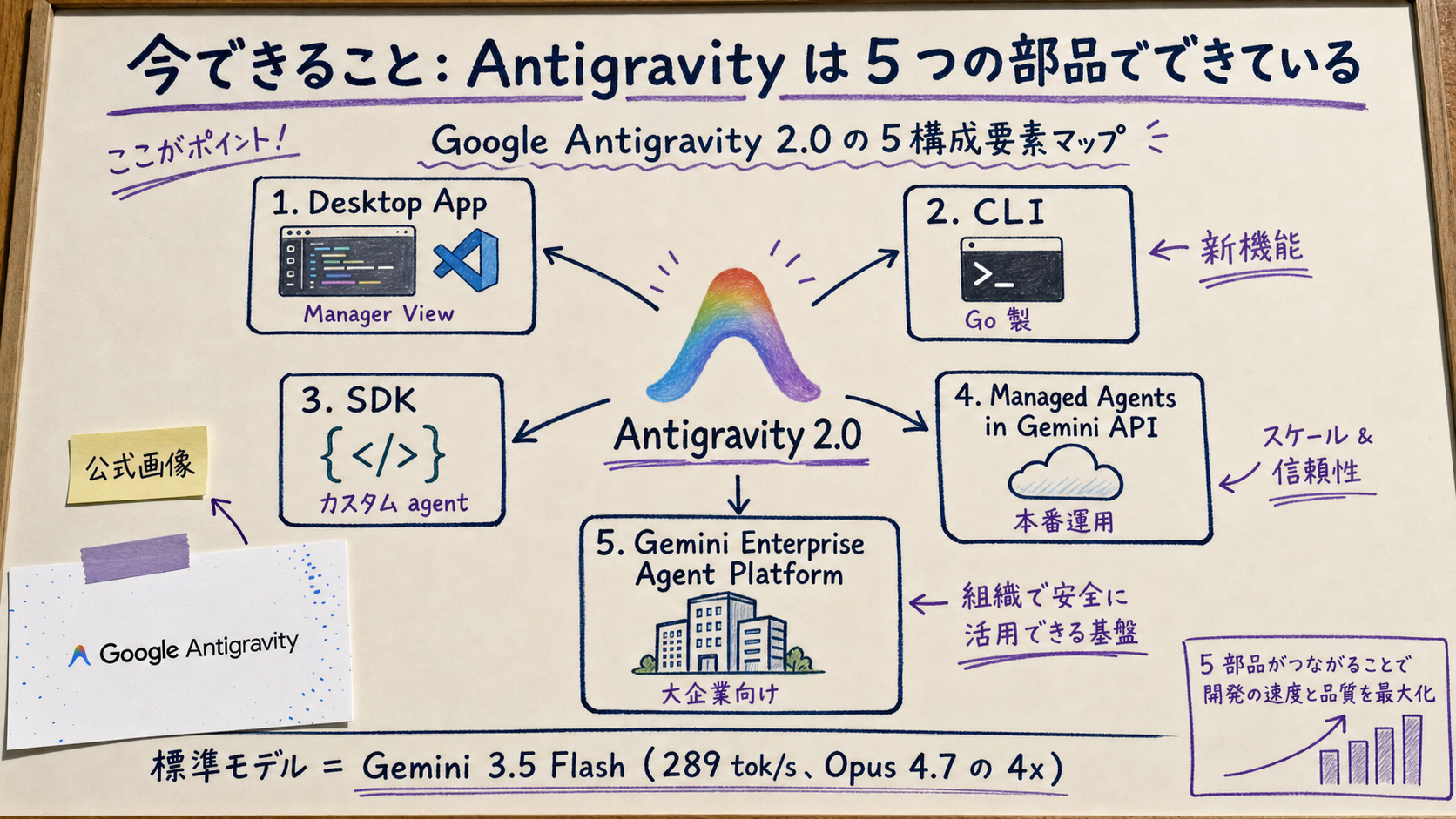
[Official] The Desktop App is a VS Code fork, in the same lineage as Cursor and Windsurf. Its biggest distinction is the separate "Manager View" that lets you run multiple agents in parallel and watch their progress in one place. Per Google Codelabs: "You orchestrate multiple AI agents running in parallel, spin up dynamic sub-agents for split workflows, and schedule tasks to run in the background while you sleep."
The Antigravity CLI gives you terminal access to Antigravity's capabilities. It's rewritten in Go, making it faster and lighter than the previous CLI. Good for embedding into CI/CD pipelines, Git hooks, and other automation scripts.
With the Antigravity SDK you can build your own agentsand plug them into Antigravity's orchestration. Think: "a SQL-generation agent that understands our DB schema" or "a documentation agent that pulls specs from our internal wiki." These specialized agents can then run in parallel with the built-in ones.
For agents you want to run in production, Managed Agents in the Gemini APIhosts them on Google's cloud. For larger organizations, the Gemini Enterprise Agent Platform brings the SLA, audit logging, and security posture you need for enterprise rollouts.
"Which one should I use, then?" is the question most people care about. All four are either a VS Code fork or VS Code extension, so they look superficially similar. The real differences come down to "how close to the AI you sit" and "what unit of work runs in parallel."
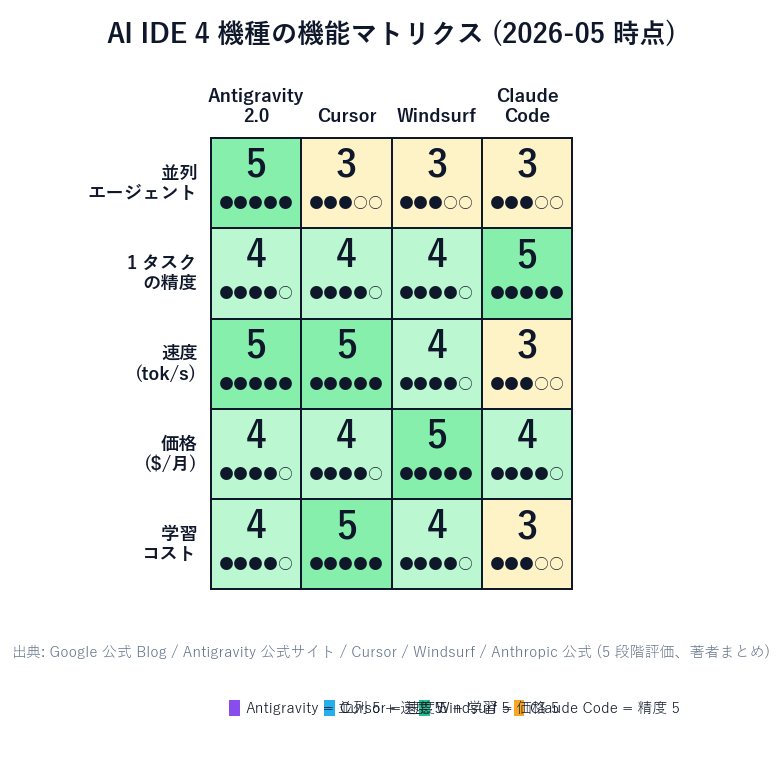
| 項目 | Google Antigravity 2.0 | Cursor |
|---|---|---|
| Top strength | Parallel agent management | AI pair programming, fast completion |
| Base | VS Code fork + Manager View | VS Code fork + Composer |
| Default model | Gemini 3.5 Flash (~289 tok/s) | GPT-5.5 / Claude Sonnet 4.6 |
| Personal pricing | Free tier + $20 AI Pro | $20/mo Cursor Pro |
| CLI / SDK | Standalone Go CLI + SDK | Mostly in-IDE |
| Best for | People delegating multiple tasks at once | People who iterate fast on single files |
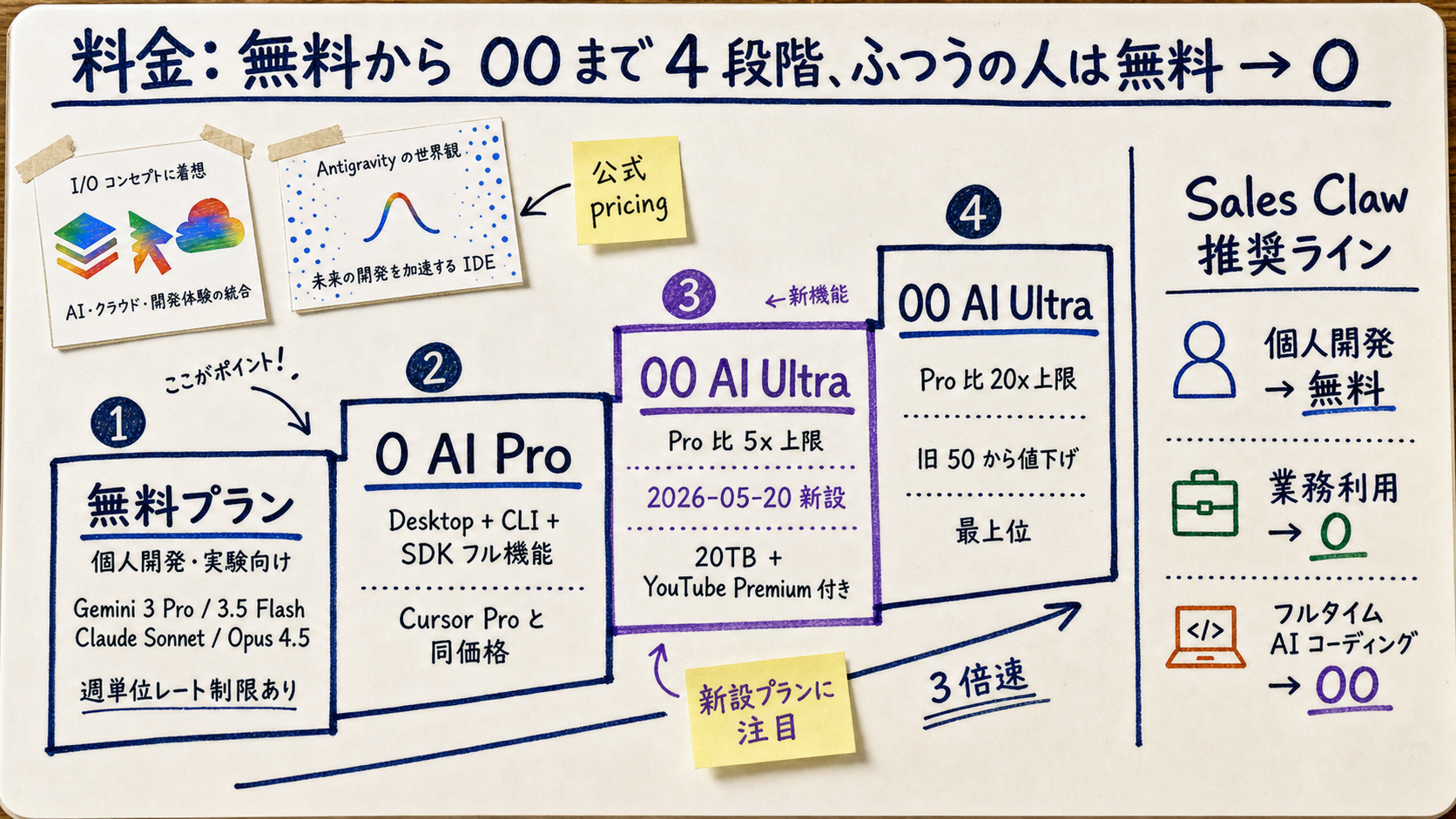
[Official] Per the Antigravity site, the free tier gives access to Gemini 3 Pro / 3.5 Flash / Claude Sonnet / Claude Opus 4.5 / gpt-oss-120b. Tab completions are unlimited; agent-driven actions areunlimited, with weekly rate limits. That's enough for "a weekend project or two each week."
$20/month Google AI Pro gives you the full Desktop / CLI / SDK. That's the same price as Cursor Pro, so jumping ship from Cursor is cost-neutral.
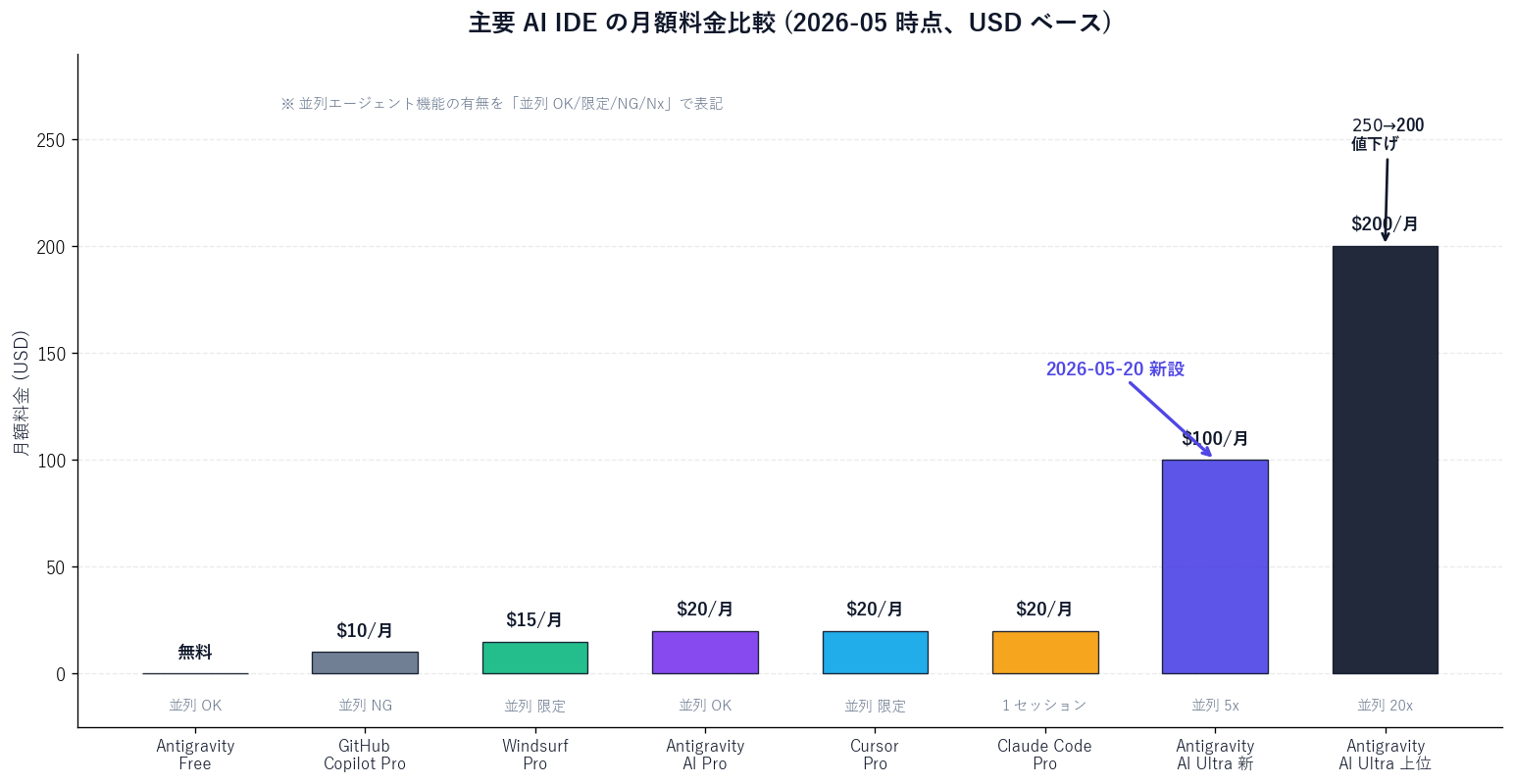
$100 AI Ultra (new on 2026-05-20) gives 5x the Pro usage limits inside Antigravity. $200 AI Ultra (down from $250) gives 20x the Pro limits. Both come bundled with 20TB of cloud storage, YouTube Premium, and similar perks. For Sales Claw-style solo OSS work, $20 is enough. If you're full-time on AI-driven coding, $100 is the realistic baseline.
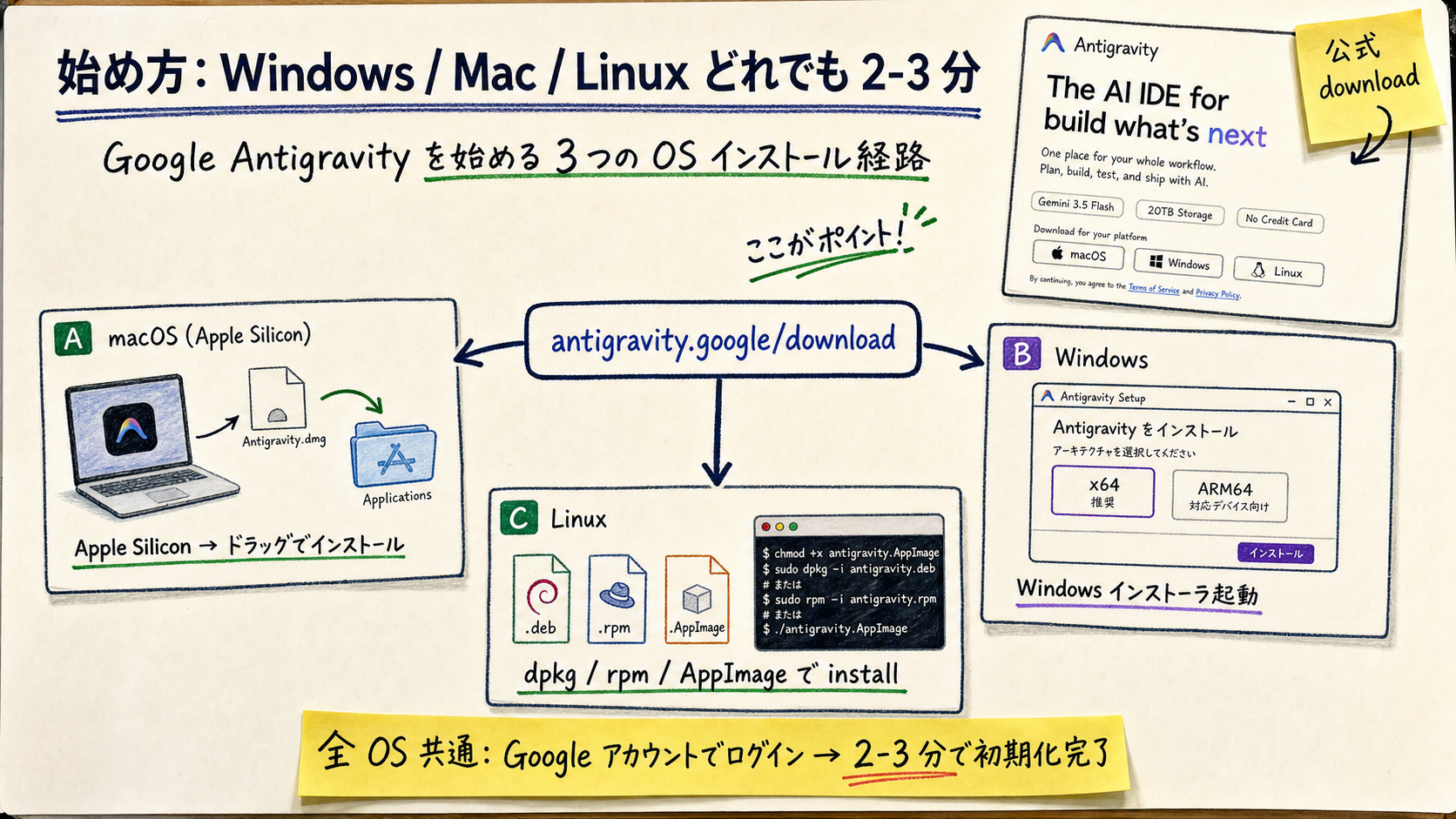
sudo dpkg -i antigravity_*.deb)[Official] Antigravity is built around running autonomous AI agents in parallel inside the editor, which means its default autonomy levelis higher than traditional one-task-one-agent AI IDEs. That's great when it works, but it does make accidents like "I left Agent mode on while I stepped away and now files I didn't expect are different"more likely.
Google showed off an Antigravity + Gemini 3.5 Flash demo at I/O 2026 that built a functional OS in 12 hours using 93 parallel sub-agents, 15,000+ model requests, 2.6 billion tokens, and under $1,000 in API credits. The numbers are impressive, but before trying to replicate that yourself, three caveats:
preferences.yaml variants in parallelSales Claw is open-source software designed to reduce mis-send and compliance-violation risk through policy-controlled autonomous operation, pre-send automated checks, sales-banned-content detection, CAPTCHA-stop behavior, send-rate limiting, audit logging, and automated kill-switch conditions. The mental map for an AI IDE like Antigravity and Sales Claw working together:
Antigravity 2.0 marks a meaningful pivot in AI IDEs: from "one AI pair-programming partner" to "managing a small team of AI agents." Rather than displacing Cursor, Windsurf, or Claude Code, it adds "parallel agent management" as a new and viable way to use these tools. That's the May 2026 status quo.
For ordinary users, the practical question is "what part of my workflow do I want AI to handle?" Iterating on a single file? Cursor. Huge monorepo? Windsurf. Terminal-driven, want deep reasoning? Claude Code. Want to throw multiple jobs at AI in parallel? Antigravity. Same category, different design philosophies, different sweet spots.
Next steps: the lowest-risk way to feel out Antigravity is to install the free tier from antigravity.google/download. If you're going to bring this into production, do a one- or two-week internal evaluation and write your guidelines first. If you also want to automate the outbound side, you can start with a free download of Sales Claw. For the companion announcement (Gemini Omni) and the broader AI Ultra reshuffle, see our Gemini Omni general-reader guide.
Note: This is the English version. The Japanese original is available at /blog/2026-05-23-google-antigravity-2-ai-ide-general-readers-guide.
本記事は X 公式アカウントと公式ドキュメントを一次情報として参照しています。
この記事の著者
中澤 圭志
Sales Claw maintainer
Designs and develops Sales Claw. Writes from the field on B2B sales automation and applied AI.