AIニュース
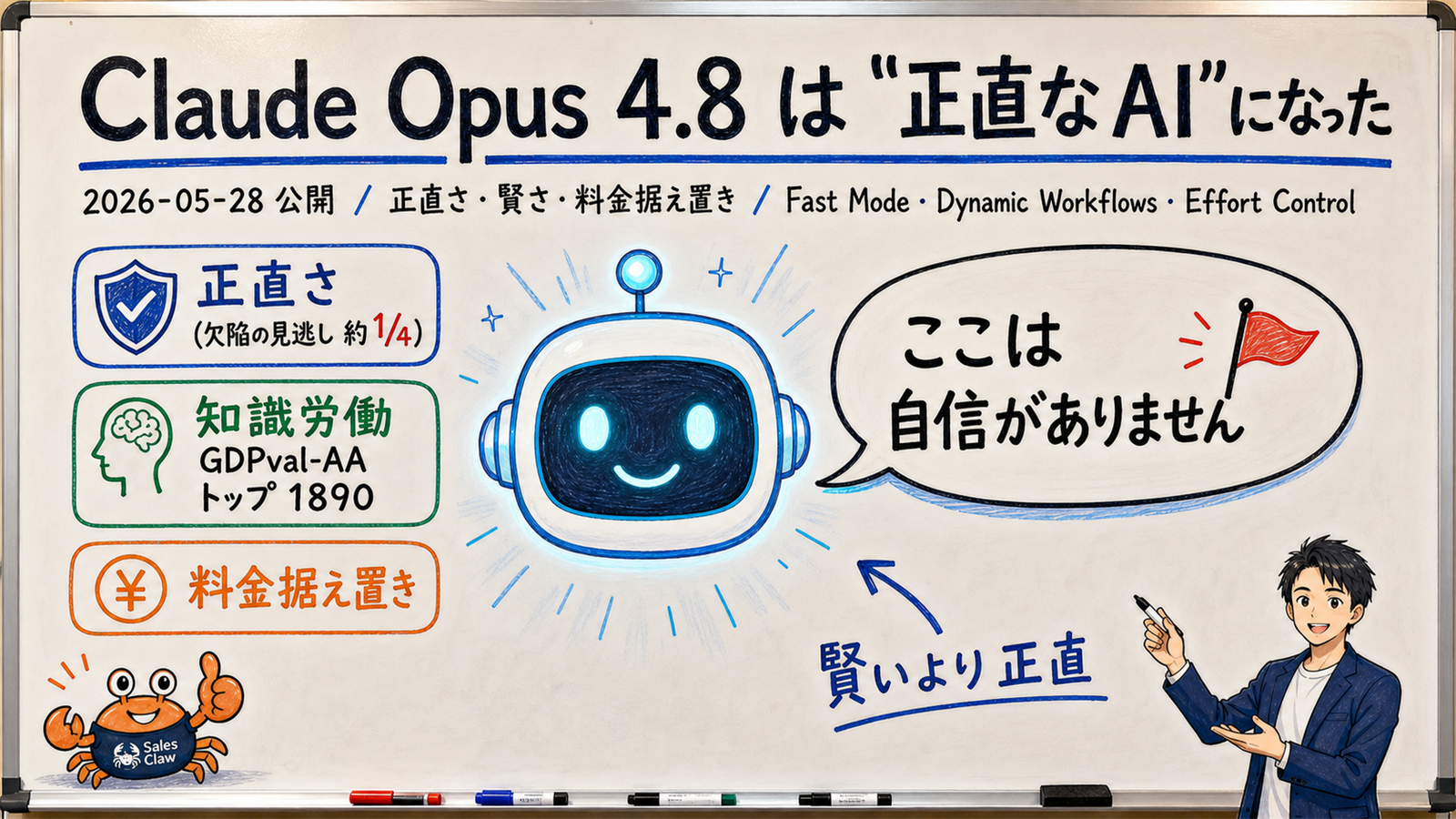
Claude Opus 4.8 Became an "Honest AI" — Benchmarks, New Features, and Cost, Explained for Non-Experts
15 分
On 2026-05-14, OpenAI rolled out Codex on ChatGPT mobile (iOS / iPad / Android) as a preview. Pair your phone with a Mac running Codex by scanning a QR code, then approve commands, switch models, and start new prompts from your phone. Available on every ChatGPT plan including Free and Go. Windows pairing is still 'coming soon.' Here's the full picture for non-technical readers — and how it changes the 'I have to be at my desk' rule for AI engineering work.

中澤 圭志
@keishi_nakazawaSales Claw maintainer

Key Facts
Released
2026-05-14 preview / iOS + iPad + Android
Plan availability
All ChatGPT plans including Free and Go (preview)
Pairing
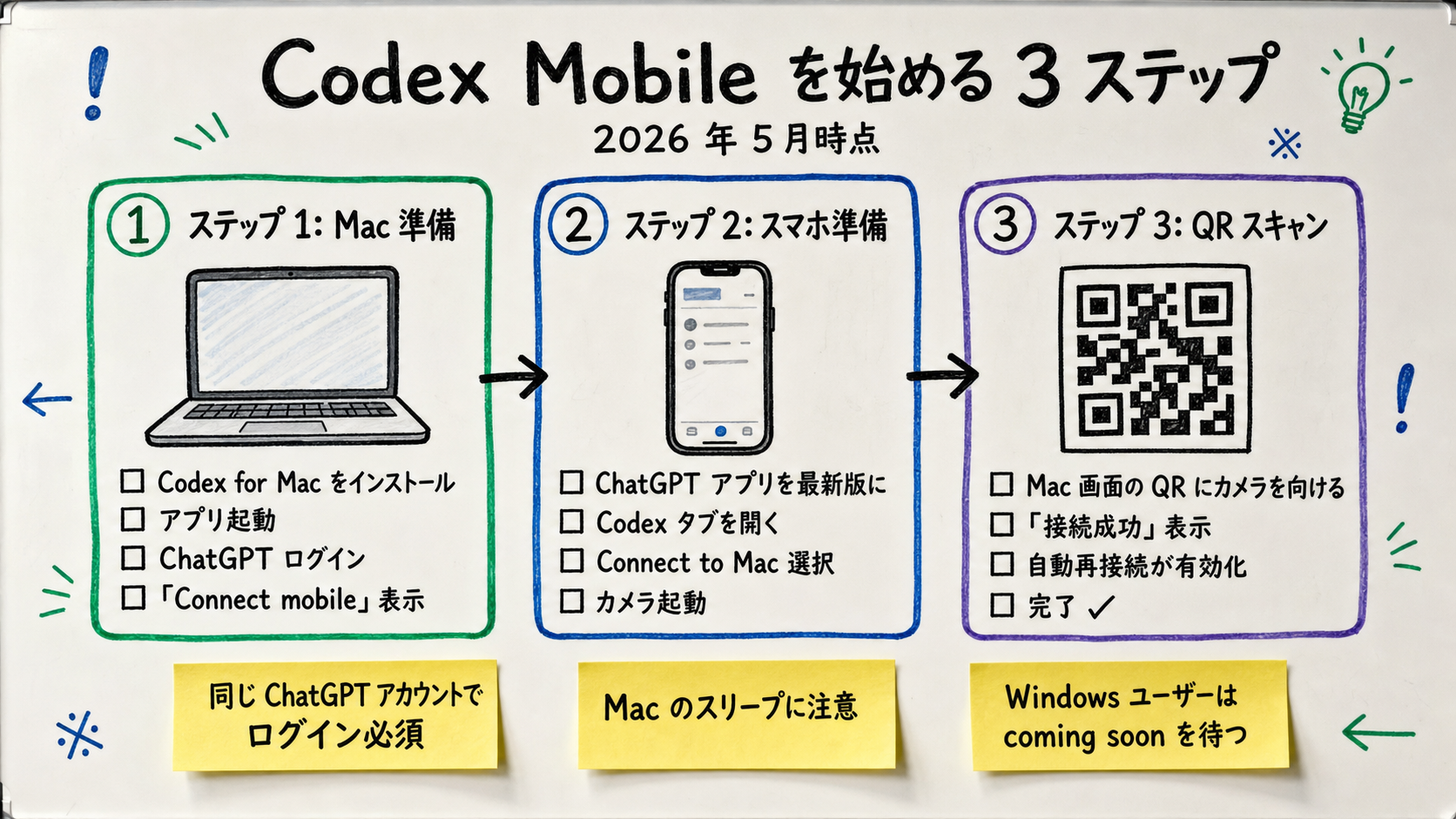
Scan a QR code shown by Codex for Mac with the ChatGPT mobile app
Host OS
macOS only / Windows pairing still coming soon (no date)
"Codex on a phone? Does the AI actually run on the phone? Do I need a Mac? Does the Free plan really get it?" This article walks through the Codex-on-mobile feature OpenAI rolled out as a preview on 2026-05-14, using the OpenAI Codex Changelog, Codex Docs, and the official blog post as primary sources. It's for people who are not technical AI users but want to understand what they're looking at before adopting it. Note that Anthropic already shipped Remote Control for Claude Code in February 2026 — Codex on mobile is OpenAI's response.
Primary sources: OpenAI Codex Changelog (developers.openai.com/codex/changelog), OpenAI's official blog post "Introducing upgrades to Codex," the Codex Docs, and the ChatGPT Release Notes. For desktop Codex features and Claude Code comparisons, see our Codex CLI vs Claude Code benchmark. For the Codex Chrome Extension's per-site approval model, see our Codex Chrome Extension write-up. For the broader browser-plus-AI picture, see our ChatGPT Atlas explainer for non-technical users. For the underlying environment-handover protocol, see our MCP complete guide.
Codex is OpenAI's AI coding agent. A coding agent is "an AI that reads, writes, and runs code when you ask it to." Until this release you ran it on a Mac or Linux box via Codex for Mac or the Codex CLI. The 2026-05-14 mobile update didn't put the AI on your phone — it added a remote-control surface inside the ChatGPT mobile app so you can drive a Mac Codex instance from your phone.
The shift, in plain terms: Codex used to be "an assistant you can only command when you're at your Mac." Now it's "an assistant running on your Mac that you can also talk to from the bus stop." The AI itself runs on the Mac; your phone gets a live view plus the ability to approve, switch model, and send new prompts.
The key phrase is "Codex runs from the connected host" — execution happens on the Mac, not the phone. That's a deliberate design property, not just a limitation.
[Author opinion] This isn't a one-off feature drop; it's a competitive response. Anthropic shipped Claude Code Remote Control in February 2026, three months earlier. Mobile remote control extends an engineer's working time from "desk hours" to "any waking moment," and both vendors moved quickly to plant a flag here.
The other factor is GPT-5.5 stabilizing. Codex's backing model moved 5.2 → 5.3 → 5.5 over a few months, and 5.5's latency profile makes remote round-trips feel acceptable.
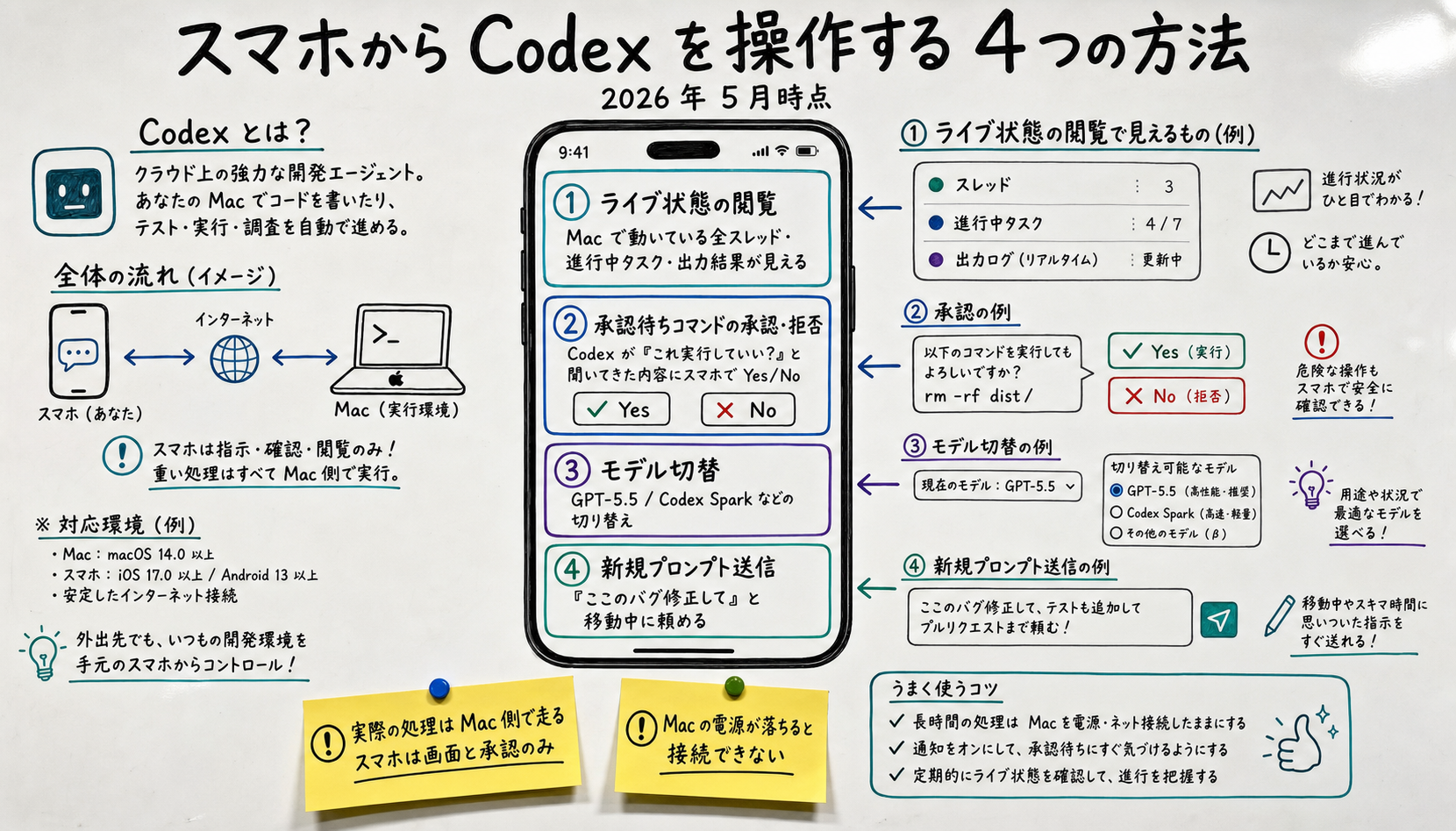
From the OpenAI Codex changelog:
The four operations in practice:
| Mobile operation | What it does | Example use |
|---|---|---|
| View live state | See every thread, current task, and recent output running on the Mac | On the train: "how far did the overnight build get?" |
| Approve / reject | Tap Yes/No on Codex's "may I run this command?" prompts | Clear a backlog of approval requests while out |
| Switch model | Change between GPT-5.5, Codex Spark, etc. from the phone | "From here I want deeper reasoning" → switch |
| Send new prompt | Send a new instruction ("fix this bug") from the phone's input | Saw a bug report on the commute — send a fix request |
What you can't do from the phone: edit files directly, manually run git push, get a full IDE, or do large-scale code reviews comfortably. Codex on mobile is optimized for "in-motion status check and approval" — real work still happens at the Mac.
[Official announcement] Per the changelog, "Codex runs from the connected host" — the QR code is purely about mapping which Mac your phone talks to. Both ends must be logged into the same ChatGPT account, so you can't accidentally pair with someone else's Mac.
After pairing, the phone and Mac exchange messages via OpenAI's servers, not directly. That means you don't have to be on the same Wi-Fi — 4G/5G works fine as long as the Mac is online and Codex is running.
Windows pairing is "coming soon" as of 2026-05-17 with no committed date. See the Windows section below for what to do in the meantime.
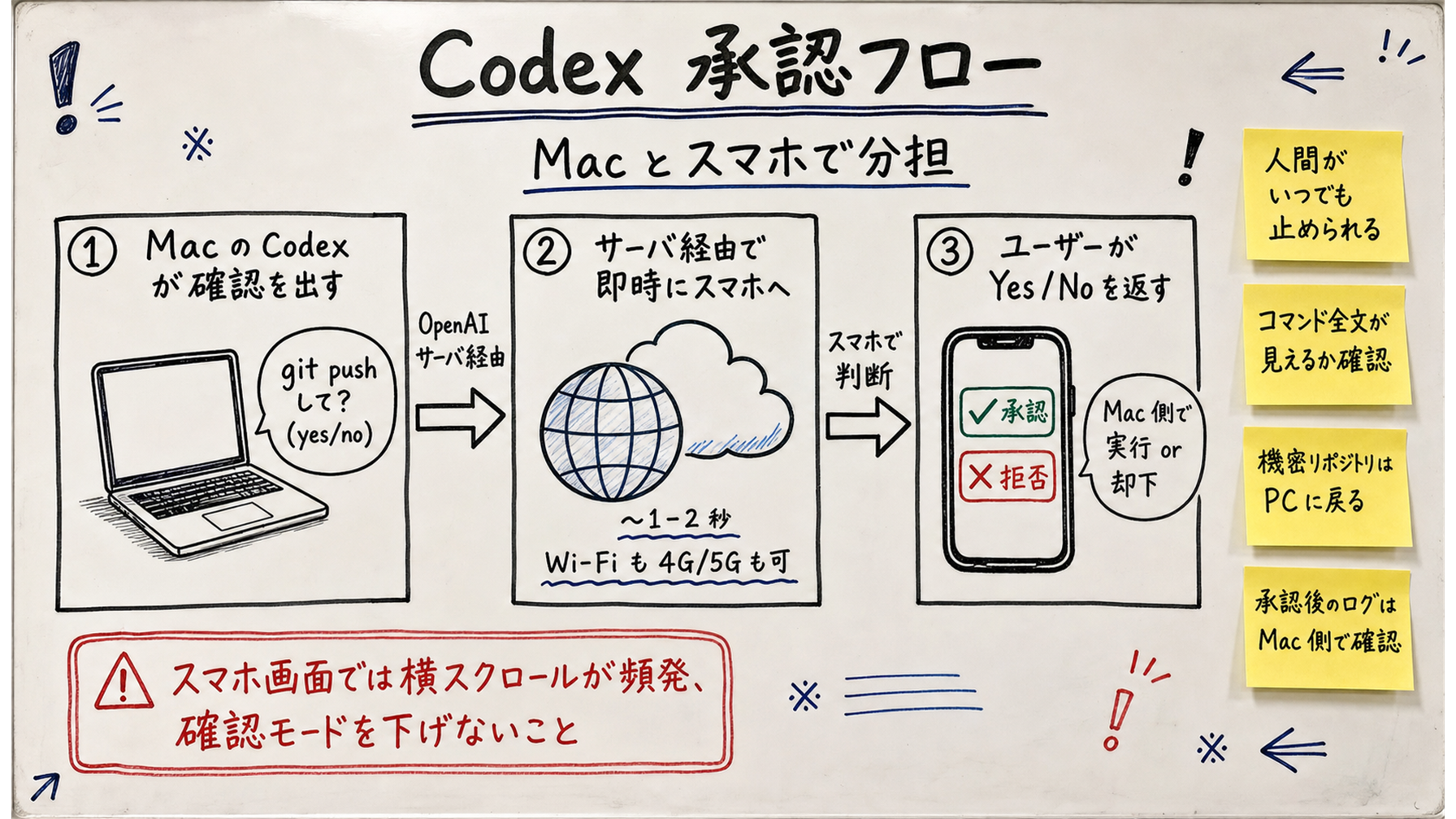
Open the Codex tab in the ChatGPT mobile app and you get every thread running on the Mac. Tap a thread to see its current task, recent output, and any pending approvals — basically "the view you'd have sitting next to the Mac," but on a phone screen.
Codex asks for explicit per-command approval before doing anything that touches the host — file writes, shell commands, git pushes. When one of those fires while you're away, the phone notifies you and you tap Yes or No; the answer goes back to the Mac and either runs or doesn't.
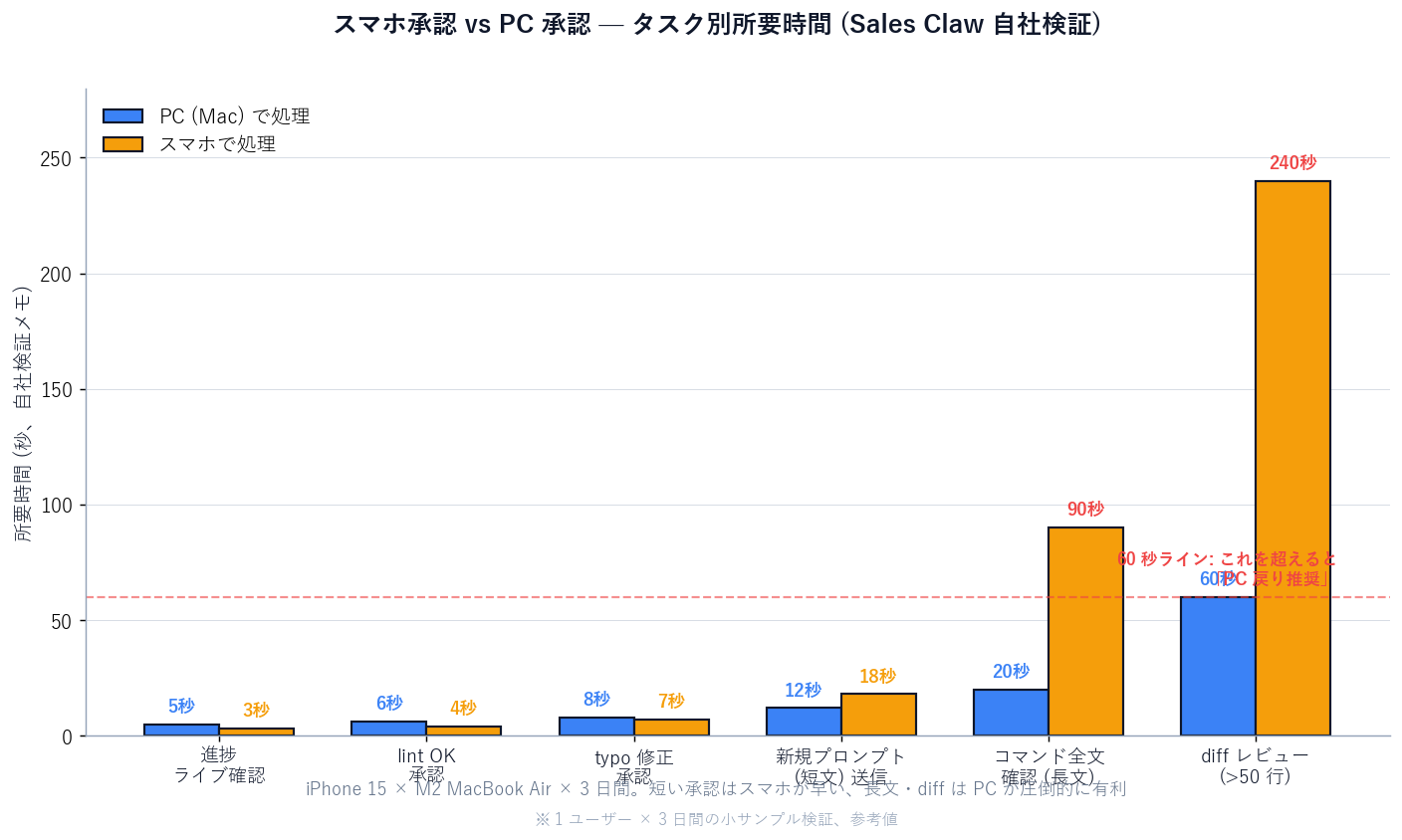
The approval model already existed on desktop Codex; Codex on mobile just lets you make those calls when you're not at the Mac. [Author opinion] We've argued this point repeatedly in Sales Claw's design: the real boundary for handing approval authority to an AI is "can you read the full command on the screen you're using?" If a phone screen can't show the whole command without horizontal scrolling, wait until you're back at the Mac.
Model selection is mirrored phone ↔ Mac. Switch from GPT-5.5 to Codex Spark from either end and both reflect the change.
You can send follow-ups in existing threads and start brand-new threads from the phone. "Fix this bug," "write a test for X" — type it on the commute and the work has already started by the time you're at the desk. Codex opens the repo on the Mac side, so when you sit down the diff might already be ready.
| 項目 | OK from the phone | Avoid from the phone |
|---|---|---|
| Overnight build progress check | View live state — perfect fit | —— |
| Light approval backlog | Lint passed / typo fixed → OK | —— |
| New prompt off a bug report | "Reproduce this error and propose a fix" → OK | —— |
| Approving a push to production | —— | High blast radius — review the diff at the Mac first |
| Large change in a sensitive repo | —— | Phone screen can't show full text — go to the Mac |
| Full code review | —— | Skim on the phone is fine; merge decision at the Mac |
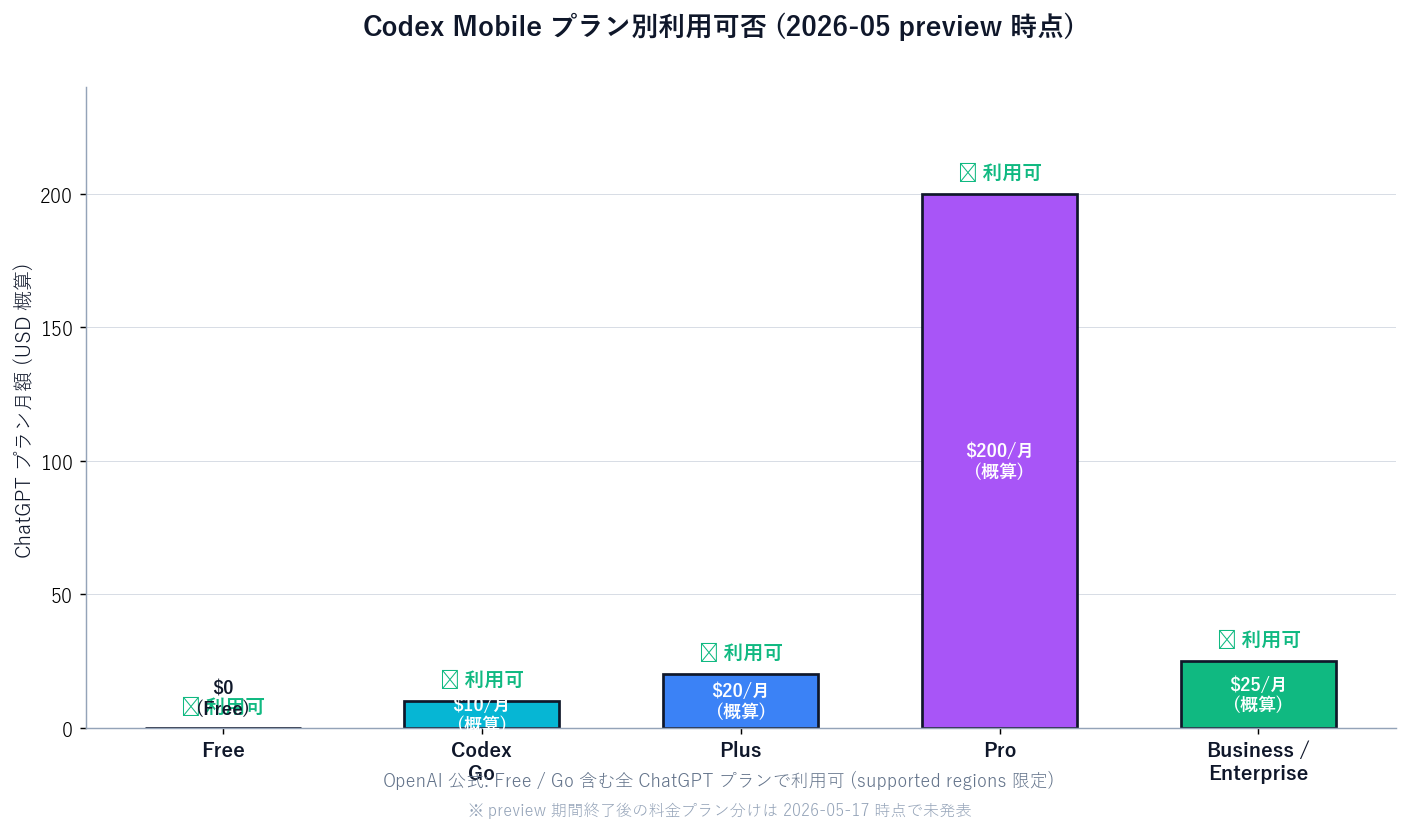
[Official announcement] Per the OpenAI Codex Changelog, "Codex in the ChatGPT mobile app is rolling out on iOS and Android across all plans, including Free and Go, in supported regions." Concretely:
| ChatGPT plan | Codex on mobile (preview) | Notes |
|---|---|---|
| Free | ✅ Yes | Works as long as Codex for Mac launches on your Mac |
| Codex Go | ✅ Yes | Lower-cost plan explicitly included |
| Plus | ✅ Yes | Standard individual plan |
| Pro | ✅ Yes | Higher-tier models like Codex Spark are switchable |
| Business / Enterprise | ✅ Yes | Access tokens enable non-interactive workflows |
[Unverified] OpenAI hasn't announced when preview ends or whether plan-tier feature splits will appear afterwards. Most ChatGPT previews land general availability in 2–6 months, so a late-2026 GA is a plausible guess; verify against the OpenAI Help Center post-release.
The control side (phone) and the host side (Mac) have different OS coverage:
| Role | Supported OS (as of 2026-05-17) | App required |
|---|---|---|
| Control (phone) | iOS / iPad / Android | ChatGPT mobile app (latest) |
| Host | macOS (Windows coming soon) | Codex for Mac (CLI 0.130.0+) |
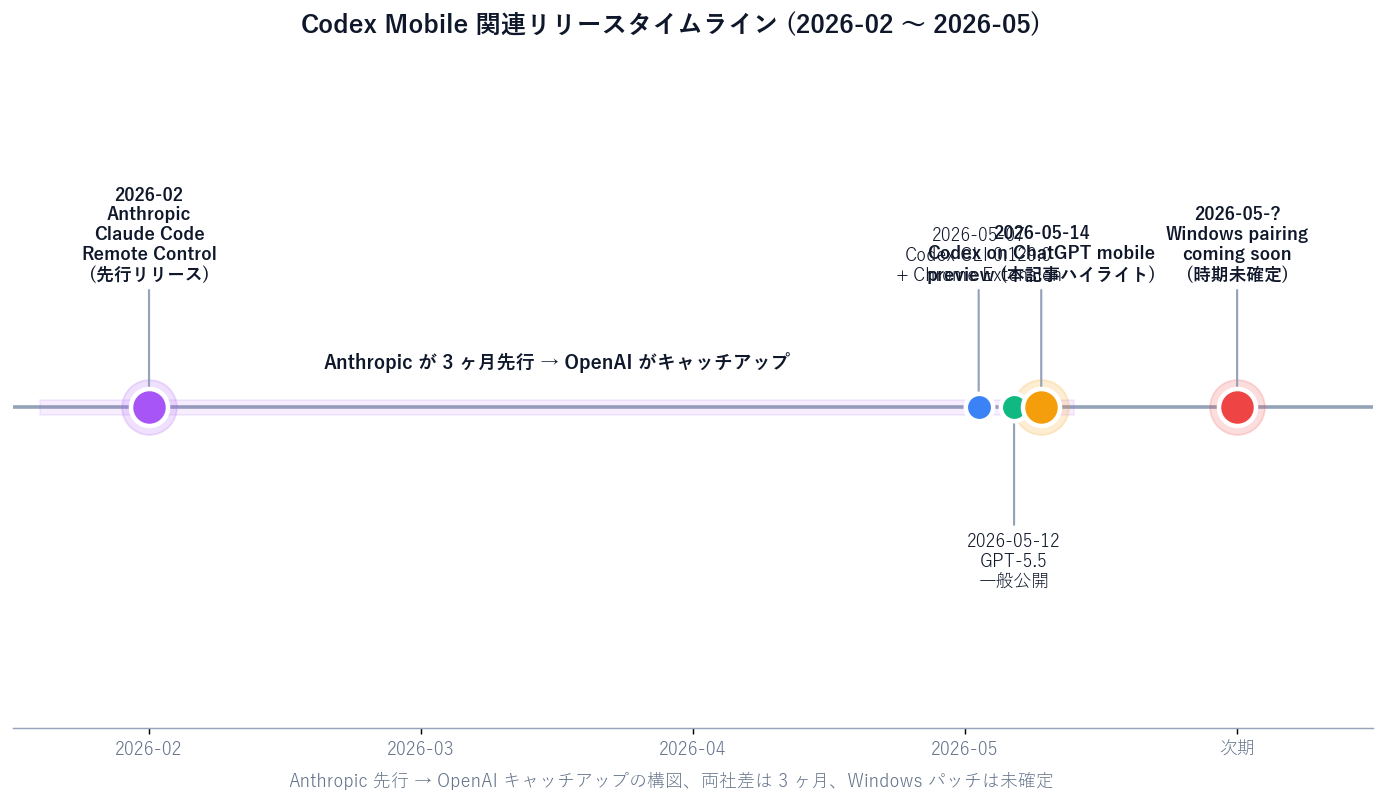
As of 2026-05-17, [Official announcement] Windows pairing is "coming soon" with no committed date. If you want to try Codex on mobile right now and you're Windows-only, your options are:
[Author opinion] If you're planning enterprise adoption, the realistic move is "one person on one Mac, evaluating now, drafting the internal guidelines." Waiting for Windows before touching it leaves you with no policy when the rollout lands and individuals start using their personal phones uncontrolled.
Phones get lost or stolen far more often than PCs. Codex on mobile keeps code and credentials on the Mac, so a stolen phone doesn't leak code directly — but a phone with the ChatGPT app left logged in lets the attacker remote-control your Mac's Codex. Mitigations: turn on screen lock + biometric auth, enable any per-app lock the ChatGPT app supports, and learn the "disconnect this device" flow on the Mac side so you can revoke quickly.
Full command text often doesn't fit on a phone screen without horizontal scrolling, which makes "approve without reading" structurally more likely than on a PC. We've repeated this in Sales Claw's design discussions: the quality of approvals is what makes or breaks AI-assisted workflows.
System sleep on the Mac stops Codex for Mac too, so the phone connection drops. Configure Mac power options so display sleep is on but system sleep is off, or accept that "I tried to approve but the Mac was asleep" is going to happen sometimes. For workflows where the Mac sits idle for hours, this becomes a design constraint.
Phone ↔ Mac messages go through OpenAI servers, which is exactly what makes' "same Wi-Fi not required" work — at the cost of trusting OpenAI's infrastructure. OpenAI says the traffic is encrypted; [Unverified] whether it's end-to-end (so even OpenAI can't see the content) isn't explicit in the May 2026 docs. For internal codebases, this is something to clear with InfoSec before broad rollout.
Engineers, SREs, and on-call rotations get the most direct change. Concrete examples:
For Sales Claw specifically: "Sales Claw runs overnight, errors page the operator, phone checks state, Codex on the Mac proposes a fix, phone approves, Mac applies" is now a viable loop. The old "the only person who can recover is the one at the Mac" constraint loosens, which is the genuine value.
For non-engineers (sales, marketing, executives), there's little direct use of Codex on mobile itself. What's worth tracking is "engineers' effective working time may expand" and "Anthropic and OpenAI are both serious about the mobile surface now" as industry signals.
For "use AI from the phone" outside of coding, keep using the right tool for the job:
| 項目 | Codex on mobile (phone × coding) | Other tools (phone × non-coding) |
|---|---|---|
| Target task | Code read/write/approve/fix | Research, summarization, customer responses, sales copy |
| Tool | Codex tab inside the ChatGPT mobile app | ChatGPT (non-Codex), Claude mobile, Perplexity, Sales Claw, etc. |
| Environment needed | Mac with Codex for Mac running + paired | Phone alone (backends on each vendor) |
| Use case | Engineer incident response, small fixes, progress checks | On-site research, customer reply drafts, email copy |
| Security boundary | Code and credentials stay on the Mac (phone is view + approval only) | Processing moves to the cloud (Sales Claw etc. local-execution stack is separate) |
Sales Claw is a locally executed OSS focused on delivering messages through corporate contact forms. Codex on mobile is about "remote-controlling Codex on your Mac from a phone" — different layer, different role.
Sales Claw is a policy-controlled autonomous system that reduces mis-send and policy-violation risk via pre-send automated checks, sales-NG detection, CAPTCHA-detected pause, send-rate limits, and audit-log retention. With Codex on mobile in the picture, a realistic combined flow looks like:

無料・MIT ライセンス。インストールせずにライブデモも試せます。
本記事は X 公式アカウントと公式ドキュメントを一次情報として参照しています。
この記事の著者
中澤 圭志
Sales Claw maintainer
Designs and develops Sales Claw. Writes from the field on B2B sales automation and applied AI.