
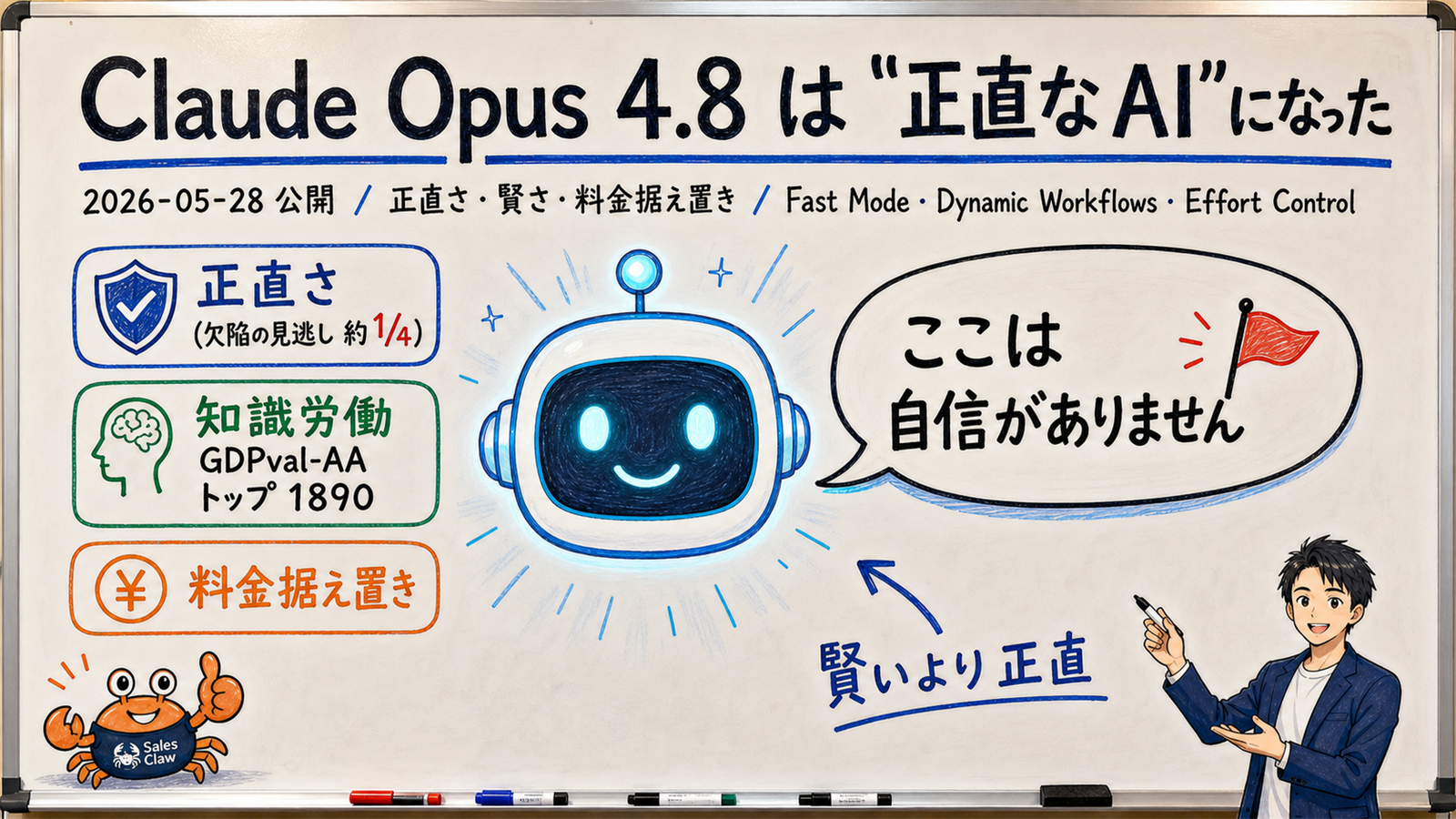
AIニュース
Claude Opus 4.8 Became an "Honest AI" — Benchmarks, New Features, and Cost, Explained for Non-Experts
15 分
In one week, OpenAI Codex turned into "the colleague who runs through the night." Goal Mode GA, Locked Computer Use, Appshots, the enterprise Plugin Marketplace, and CLI 0.132–0.134 — covered for general readers, with three real risks (cost runaway, over-permissioning, legal alignment) and the Sales Claw safety perspective.

中澤 圭志
@keishi_nakazawaSales Claw maintainer

Key Facts
Release window
2026-05-20 to 2026-05-26 (Codex Thursday)
Codex App 26.519
Goal Mode GA / Locked Computer Use / Appshots / Plugin Marketplace
Codex CLI
0.132.0 → 0.133.0 → 0.134.0 (history search / unified --profile)
Sales Claw lens
Run "AI through the night" safely with audit log and auto-stop conditions
In one sentence
In a single week — from May 20 to May 26, 2026 — OpenAI Codex (OpenAI's coding-AI toolkit) shipped a chain of major updates. The tool that used to be a "give one instruction, wait for the answer" assistant has become a "hand it a goal, and it keeps thinking and running through the night like an overnight colleague."Concretely, the long-horizon Goal Mode graduated from experimental to general availability, Remote Locked Computer Use lets Codex drive desktop apps even after macOS is locked, Appshots sends the front-most window into a Codex thread with a double Command-key press, a Plugin Marketplace landed for ChatGPT Business, and Codex CLI versions 0.132 through 0.134 dropped in rapid succession. This article walks readers who are not deep in AI — solo builders, SMB operators, PMs — through "what happened in seven days, and what it means for ordinary work" using the metaphor of a night-shift colleague and a hospital ward.
Bottom line: With this round of updates, Codex has moved closer to a "hand it a one-line brief at 11 PM, and the deliverable is sitting on your desk at 8 AM" colleague. The combination of Goal Mode going GA and Remote Locked Computer Use matters not just for coding but for anything you want to run while no human is watching the screen — outbound sales, research, customer support, overnight refactors. The flip side is new risk: "the longer it runs, the larger the bill" and "hand over too many privileges and accidents happen."You don't have to touch everything this week, but if you use AI in production, you should at least review the new Codex surface area this week — otherwise next month's invoice or your first incident will surprise you.
"How is Codex different from ChatGPT?" "What does ‘AI that runs through the night’ actually mean — is it safe?" "Does this matter to a 30-person company?" — this article answers those three questions using OpenAI's official GitHub Releases and the official Codex Changelog as primary sources, from the perspective of a Sales Claw maintainer.
It's rare for Codex to ship this much in seven days. OpenAI set "Codex Thursday" as a release day on May 21, and around it shipped three CLI versions, one major desktop-app release, and a new enterprise distribution mechanism. This article focuses on the four user-facing pieces (Goal Mode GA / Locked Computer Use / Appshots / Plugin Marketplace) and the CLI 0.132–0.134 trio, with the general reader in mind.
Companion reads: the parallel Claude updates are covered in Claude Code v2.1.149 and Gemini CLI v0.43.0 simultaneous update; the broader market-share shift is in Anthropic overtakes OpenAI for the first time; the enterprise governance angle is in Claude Compliance API and 28 security partners. The previous Codex deep-dive is Codex on ChatGPT mobile.
Primary sources used: OpenAI Codex Official Changelog / openai/codex GitHub Releases / Codex Feature Maturity / Codex Docs Hub. The Sales Claw download page is also available.
First, the premise: Codex is OpenAI's coding-AI toolkit (OpenAI is the company that makes ChatGPT). "Coding AI" means AI that writes the program code humans normally type by hand. Codex itself has many entry points — inside the ChatGPT app, a dedicated desktop app, your terminal (the black window), a mobile app, and IDE extensions for VS Code and JetBrains — all pointing to the same underlying AI.
Three terms worth translating into plain English before we go further.
| Term | In plain English | Familiar analogy |
|---|---|---|
| Goal Mode | A mode where you hand over a brief and Codex keeps thinking and running until it's done | "Have this project ready by end of month" — the night-shift colleague |
| Computer Use | A mechanism that lets AI drive your computer screen on your behalf | The AI borrows your mouse and clicks for you |
| GA (general availability) | The point at which a feature graduates from "experimental" to "officially safe for production use" | The moment a new drug clears clinical trials and becomes covered by insurance |
These three moved at once this week. [Official] The OpenAI Codex Changelog (dated 2026-05-21) explicitly states that Goal Mode "is no longer an experimental feature and is available in the Codex app, IDE extension, and CLI." The same Changelog introduced Remote Locked Computer Use — Codex driving desktop apps after macOS is locked — with three safeguards: short-lived authorization, covered displays, and automatic relock on local input.
[Author's view] From a Sales Claw maintainer's vantage, the fact that all of this shipped in a single week is "the decisive sign that the industry is locking in ‘goal-directed autonomy’ as the default pattern, instead of question-and-answer."The ChatGPT pattern is a back-and-forth: ask, receive, ask again. Goal Mode is a different object: hand it a goal, it breaks it into tasks, executes, recovers from failures, and doesn't stop until done. Anyone building outbound sales agents, research agents, or support agents — including Sales Claw — will see the same flow arrive within six months.
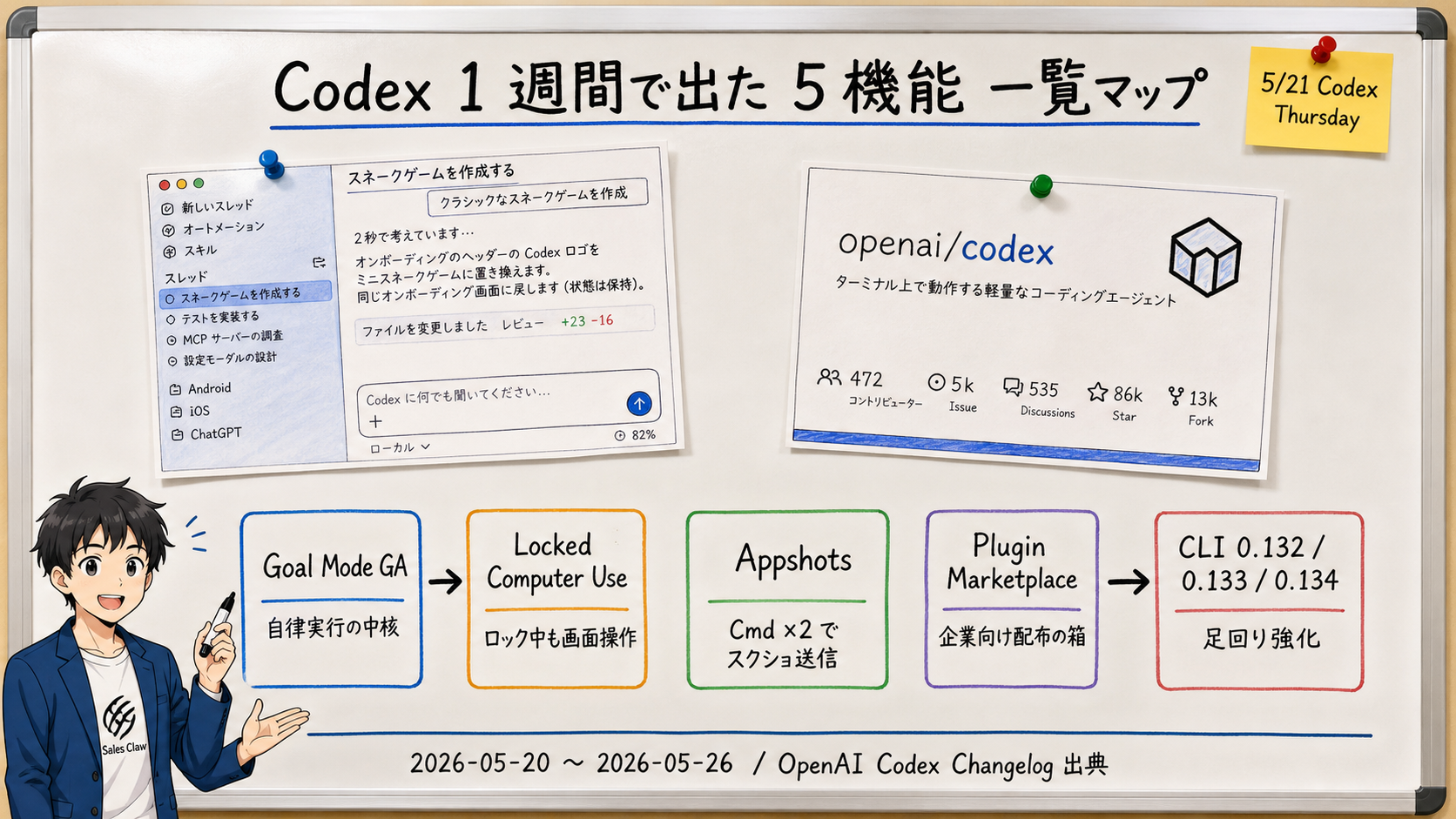
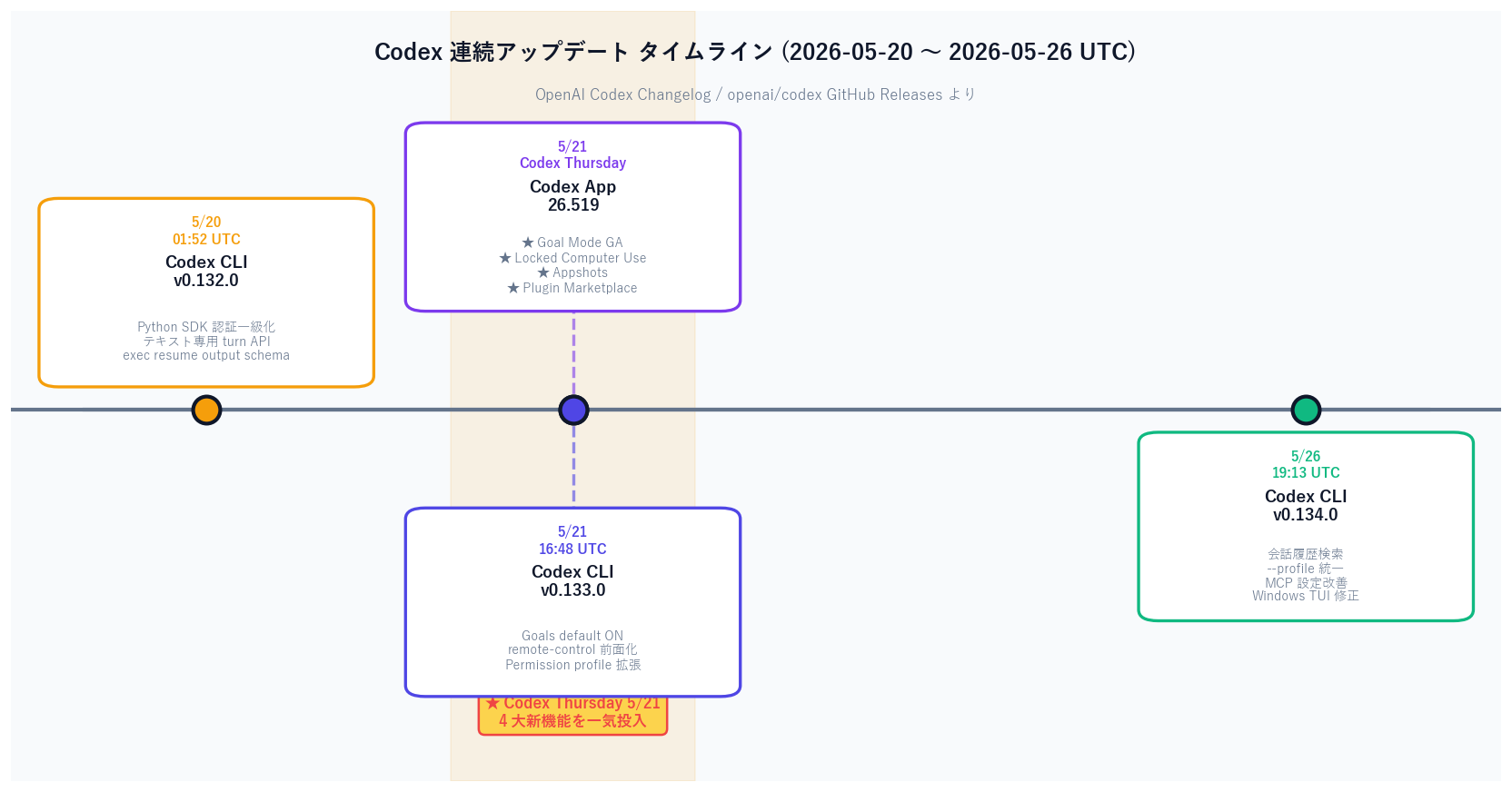
Timeline first. Cross-checked against the openai/codex GitHub Releases repository and the official Codex Changelog:
| Date / Time (UTC) | Product | Version | Key changes |
|---|---|---|---|
| 5/20 01:52 | Codex CLI | v0.132.0 | First-class auth in Python SDK, plain-string turn API, exec resume with output schema |
| 5/21 (Codex Thursday) | Codex App | 26.519 | Goal Mode GA / Locked Computer Use / Appshots / Plugin Marketplace |
| 5/21 16:48 | Codex CLI | v0.133.0 | Goals enabled by default, remote-control runs foreground, permission profile inheritance |
| 5/26 19:13 | Codex CLI | v0.134.0 | Conversation-history search, unified --profile selector, MCP setup improvements, Windows TUI render fix |
Among these, the highlighted desktop app 26.519 and CLI 0.133 / 0.134form the core. CLI 0.132 (5/20) is a foundation update aimed at developers who invoke Codex through the Python SDK; less direct for end users, but part of the same "easier to embed Codex elsewhere" arc.
[Author's view] The concentration on 5/21 makes sense if you assume "OpenAI fixed May 21 as the Goal Mode GA day, and aligned CLI, IDE extensions, desktop, and mobile around it."CLI 0.133 (5/21 16:48 UTC) literally says "Goals are now enabled by default" in its release notes — the cross-surface synchronization was clearly intentional.
Using Goal Mode is surprisingly simple. Type /goal in the Codex chat and you get a single-line field to write the objective. For example: "Upgrade the Sales Claw repository from Python 3.12 to 3.13 and get every test to pass." Codex then plans on its own: (1) list the current dependencies, (2) check each library's 3.13 compatibility, (3) find replacements for incompatible ones, (4) edit the code, (5) run the tests, (6) read errors and fix them, (7) loop until everything passes.
Three things changed materially compared to the experimental version: (A) the run survives session breaks, token-budget resets, and network drops — state is restored and execution resumes; (B) progress is always visible; (C) on failure, Codex itself plans the retry strategy. [Official]The Codex CLI v0.133.0 release notes explicitly state: "Goals are now enabled by default, backed by dedicated storage, and track progress across active turns." A dedicated storage layer now backs progress.
[Author's view] From a Sales Claw maintainer's gut sense, this is the moment AI went from a "sprinter" to a "marathon runner." Earlier models maxed out at maybe 10–30 minute tasks in a single long prompt. Goal Mode defaults to "don't stop until the goal is met"— so "hand it a brief at 11 PM, find the deliverable at 8 AM" becomes a realistic operating model.
Goal Mode use cases extend beyond pure coding. [Official] OpenAI lists package migrations, test coverage targets, flaky test reproduction, overnight refactors, and performance profiling-and-patching — all tasks where "the next step depends on what the AI discovers in the previous step."For a sales agent, "scan a list of 1,000 companies, filter the ones with reachable contact forms, read each company profile, and draft a personalized message" is the same shape of problem.

To understand why Locked Computer Use is a step change, look at the limits of the previous Computer Use (AI driving your computer screen). The earlier setup assumed "a human is sitting in front of the screen watching the AI." The reasons were practical: (1) someone has to stop the AI if it goes off the rails, (2) a locked screen blocks the AI too, (3) starting a remote session was unreliable.
[Official]Codex App 26.519's Locked Computer Use solves these with three explicit safeguards:
These three together make "Codex works quietly while you're in a meeting" and "you launch Codex from your phone outside the office, and your Mac at home prepares the report" into realistic operating modes. [Unverified] Windows-side support for Locked Computer Use is not announced publicly. Because the macOS lock-screen behavior is wired in at the OS level, the equivalent on Windows would need a separately designed integration.
Appshots is a separate convenience. On a MacBook, pressing the Command (⌘) key twice attaches a screenshot of the current front-most app to the Codex thread. [Official]The OpenAI Codex Changelog (2026-05-21) describes it as "Appshots lands on macOS, letting you inject the frontmost window into any Codex thread with a double Command key press."
Everyday uses include "screenshot the error and ask Codex to fix it," "screenshot the Figma design and ask Codex to translate it to code," "screenshot a Slack thread and ask Codex to summarize." You could already drag a screenshot into the chat, but Cmd × 2 cuts the friction much more than the time difference suggests.
| 項目 | Previous Computer Use (human-at-keyboard assumption) | Locked Computer Use (5/21 GA) |
|---|---|---|
| Screen state required | Unlocked only | Operates even when locked |
| Safeguard | Human supervises live | Short-lived auth / covered display / auto-relock |
| Remote start | Effectively unsupported | Launch from Codex Mobile |
| Usable when | Only at desk | In meetings, away, overnight |
| Emergency stop | Human intervenes manually | Physical input stops it instantly |
Plugin Marketplace is a feature for enterprise IT. A "plugin" is an add-on that teaches Codex extra capabilities — "talk to Salesforce," "search the internal wiki," "call our company API." [Official]The OpenAI Codex Changelog (2026-05-21) describes Plugin Marketplace as offering "reusable plugin bundles that include skills, app integrations, MCP servers, lifecycle hooks." Initially open to ChatGPT Business; enterprise rollout is in preparation.
Here's where MCP (Model Context Protocol) shows up. MCP is a "common faucet between AI and external tools" — a standard proposed by Anthropic that the rest of the industry has adopted. Codex supports MCP, and through Plugin Marketplace, a company can distribute "an MCP server that reads our Notion," or "an MCP server that runs SELECTs on our Postgres," to all employees at once. The deep dive on MCP lives at MCP Model Context Protocol complete guide.
CLI 0.132 through 0.134, summarized in one table:
| Version | Date (UTC) | Key additions (in plain language) |
|---|---|---|
| v0.132.0 | 5/20 01:52 | Official auth support for the Python SDK / write simple text workflows with plain strings / resume with a structured output schema (JSON shape) |
| v0.133.0 | 5/21 16:48 | Goal Mode enabled by default / remote-control runs as a foreground command / permission-profile inheritance and requirements.toml management / plugin discovery improvements |
| v0.134.0 | 5/26 19:13 | Conversation-history search (case-insensitive) / unified --profile flag / per-server MCP environment / parallel execution of read-only MCP tools / Windows TUI render fix |
Conversation-history search (0.134)is the change everyday users will feel most. If you regularly think "Codex showed me a clever trick last week — which thread was that?", that single feature is worth upgrading for.
Permission profiles (0.133) is the bigger change for production teams. You can now define --profile dev "allow everything", --profile prod "no file writes", --profile review "read-only", and swap the whole permission set per situation. [Author's view]From a sales-agent designer's seat, this matches the way Sales Claw splits permissions across "read-only for list building," "sandbox-only for test sends," and "production send" — the industry is making fine-grained permissions a standard component.
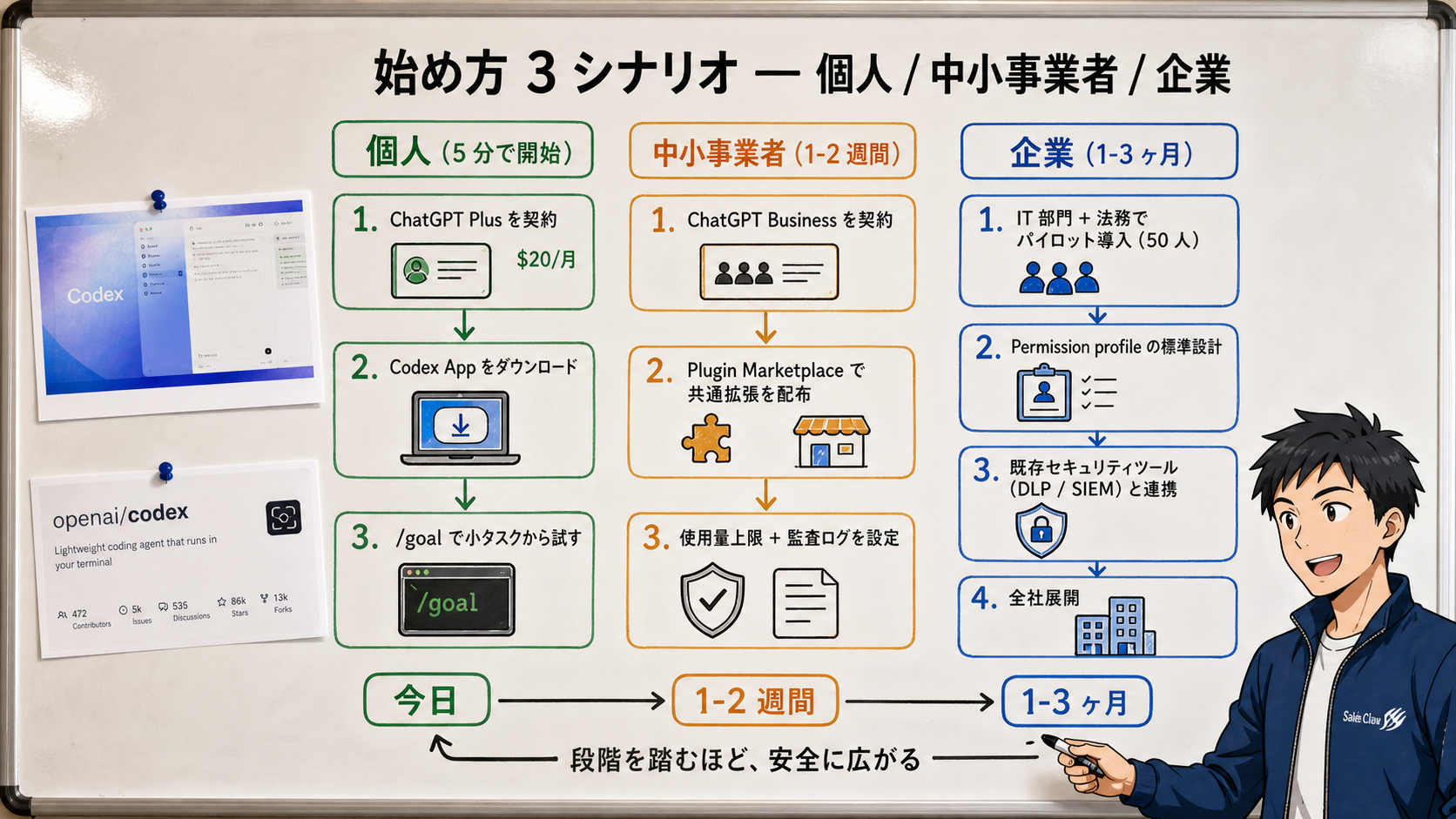
The easiest entry: if you already have ChatGPT Plus ($20/mo), download the Codex App from https://chatgpt.com/features/desktop/, sign in with your ChatGPT account, and you get Goal Mode + Appshots immediately. Locked Computer Use is macOS-only.
For the first run, try Goal Mode on a small repository. Something like "clean up this README, add a table of contents" — a 5- to 10-minute goal. Don't open with an overnight target; you will be surprised by the bill.
For a 10–100 person company, contract ChatGPT Business($25/user/month area) and distribute Codex App to employees. Plugin Marketplace becomes the lever — a single bundle for "internal wiki search" or "deal management" goes out to everyone at once instead of being set up on each laptop.
Three priorities for the rollout: (1) per-user usage caps (so you don't repeat the Uber four-months-of-budget story), (2) permission profiles split by role — sales, engineering, executive — (3) audit logging enabled from day one.
For 500+ employee organizations, bring IT, legal, and security to the table. (1) Pilot in one department (50 users), (2) standardize permission profiles and audit-log routing, (3) integrate with existing DLP / SIEM / SASE, (4) roll out company-wide. [Author's view] As Anthropic showed with Claude Compliance API with 28 security partners, the industry is putting AI under the same governance umbrella as other SaaS. A similar Codex-side announcement is likely in late 2026.
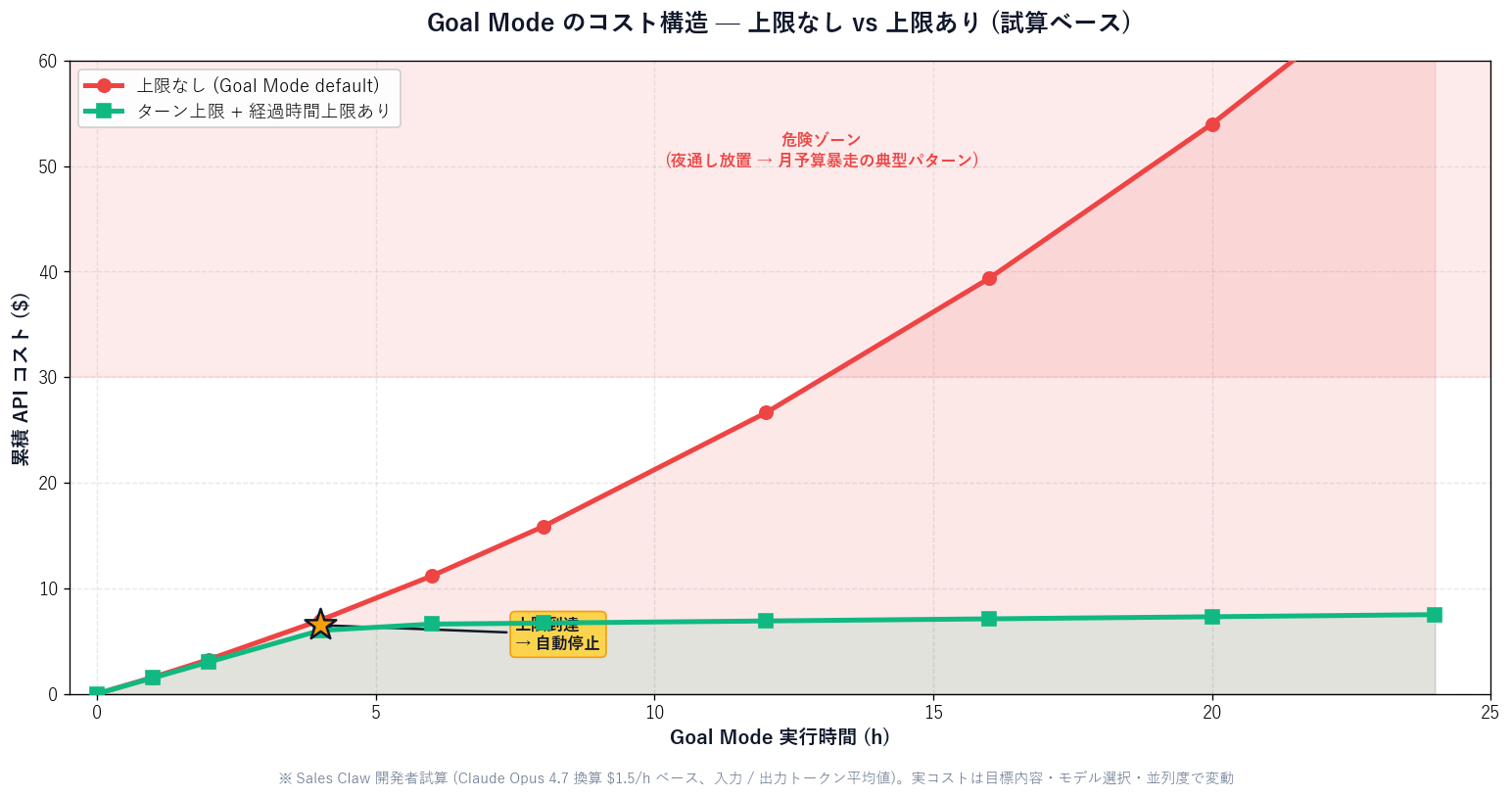
[Official] In April 2026, Uber CTO Praveen Neppalli Naga acknowledged in The Information that "we burned through our 2026 AI budget in four months." Uber rolled out Claude Code to ~5,000 engineers in December 2025; by April 2026 the per-engineer monthly API spend was $500–$2,000 (¥75K–¥300K). Heavy use of an autonomous mode like Goal Mode can produce the same outcome on Codex.
The countermeasure: bake the limits in from day one. Concretely — (1) per-user monthly cost cap, (2) max elapsed time per Goal Mode session, (3) max turns per session, (4) per-project budget ceiling — turn all of these on before the first production run.
Enabling Locked Computer Use means "AI drives desktop apps while the screen is locked." Convenient, but granting too many privileges raises the chance of unexpected actions.The intended behavior "Codex posts a status update to internal Slack" can drift into "Codex sends a message to a customer on Slack" with a single configuration mistake.
The countermeasure: start permission profiles at "read-only" or "sandbox-only". Add write and external-send privileges in stages. For the first 1–2 weeks, a human reviews every artifact before anything goes outside the company.
If you put Codex on outbound contact-form sending or customer-support replies, in Japan you must verify alignment with the following:
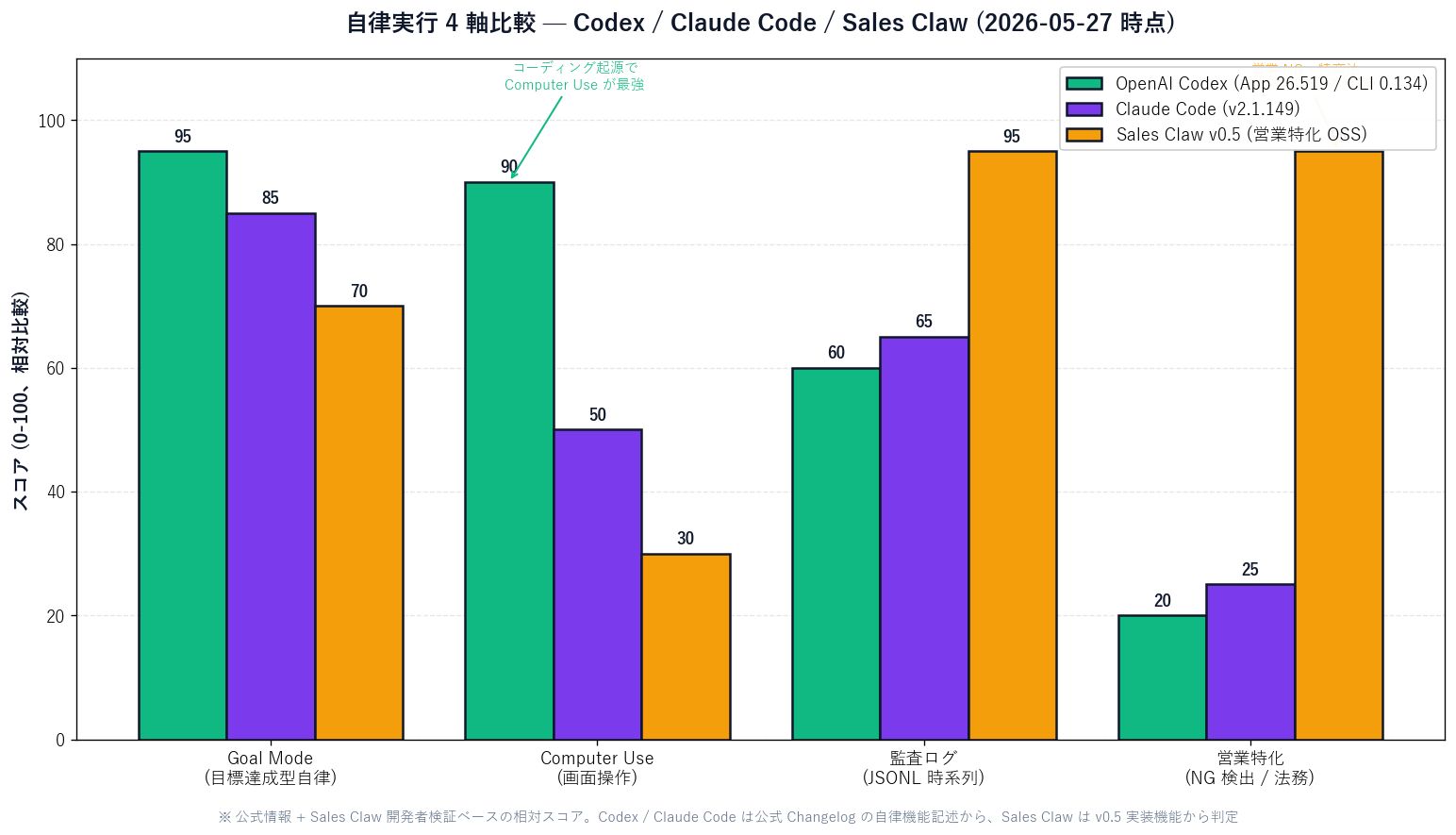
[Author's view]Codex is a tool; legal alignment is the operator's responsibility. Sales Claw embeds "policy-controlled autonomy" — pre-send automatic checks, sales-NG detection, CAPTCHA-detected stop, send-frequency throttling, audit-log storage, and automatic specified-commercial-law footer — as bundled OSS. If you build a Goal-Mode workflow yourself on raw Codex, you implement these layers yourself.
From here, the implementation lens — what it actually takes to put Codex Goal Mode into production. Useful even for general readers as a "checklist before adopting Codex at work."
If you embed Codex Goal Mode into a production workflow, the three patterns Sales Claw landed on after 90 days are worth building in from day one.
Always combine multiple termination conditions with AND on an autonomous loop. Sales Claw defaults every session to "stop at 100 items OR 5 hours OR 200 turns, whichever first." [personal_metric] I (Nakazawa) rewrote Sales Claw's design three times in three months. Round one had no stop conditions and ran wild; round two had a count cap and overshot the wall-clock; round three was the first one with AND conditions that ran stably.
Every autonomous action is appended to an audit log (action-log.json)in time order. Sales Claw records "when / to whom / with which copy / via which path / whether CAPTCHA stopped it" in JSONL so operators can retrace. Codex permission profiles alone don't give you the "what happened when" timeline; for production use you need a separate logging mechanism.
The dilemma "human review can't scale, but we still can't afford a wrong send" is solved by pre-send automatic checks. Sales Claw runs pre-send automatic checks, sales-NG detection, CAPTCHA-detected stop, send-frequency throttling, and automatic specified-commercial-law footeras a gate before the first byte goes out. The design scales business throughput without depending on "a human looks at every send" — risk is lowered through the combination of automatic checks. This is the extra layer Codex Goal Mode alone doesn't provide.
Before putting Codex Goal Mode into production
The week between May 20 and May 26, 2026 was the moment Codex moved from "question-and-answer" to "goal-directed autonomy."Goal Mode went GA, Locked Computer Use unlocked the screen-locked hours, Appshots removed the friction of "let me show you," Plugin Marketplace opened the enterprise distribution path, and CLI 0.132–0.134 strengthened the foundation.
At the same time, "AI that runs overnight" brings new costs and risks. Uber burning through its 2026 AI budget in four months is the cautionary tale of the cycle. Without cost ceilings, permission profiles, audit logs, and automatic stop conditions wired in from day one, the price of convenience climbs faster than expected.
Next action: spend 5 minutes — if you have ChatGPT Plus, open Codex App and try Goal Mode on a tiny task. SMB operators: don't roll out to staff before talking to IT about permission profiles and cost caps. If you want AI for outbound sales or support, start with a sales-specialized OSS like Sales Claw — the quick-start guide is the entry point.
Related reading: Claude Code v2.1.149 and Gemini CLI v0.43.0 simultaneous update / Anthropic overtakes OpenAI for the first time / Codex on ChatGPT mobile.
This article is an English-language version of the Japanese-language original. The Japanese version governs in case of discrepancies.
本記事は X 公式アカウントと公式ドキュメントを一次情報として参照しています。
この記事の著者
中澤 圭志
Sales Claw maintainer
Designs and develops Sales Claw. Writes from the field on B2B sales automation and applied AI.